

Sales Accelerator: Unlock Potential, Accelerate Success


AI Summary
CKP/CCKP tasks in Sales Accelerator help sellers push campaign products toward Campaign Key Product and Content Campaign Key Product status for Black Friday and year-end sales. Prioritize registering eligible CKP products and finishing Stage 1 tasks in Seller Center > Products > Sales Accelerator > Bestseller incubation. From Nov 1 to Dec 31, SKPP and Bestseller Incubation rewards are paused, but previously earned rewards stay valid. Final qualification and reward eligibility remain subject to platform selection and Seller Center rules.
CKP/CCKP Program
💡Black Friday and the year-end mega sale are coming — one of the most important times of the year to drive sales. To stay ahead during the campaign, the key is to identify high-potential products and focus your resources where they matter most.
Sales Accelerator has launched CKP/CCKP Tasks to help sellers: discover the products most likely to become bestsellers during the campaign, and follow guided growth tasks to concentrate efforts on campaign core products — setting you up for success throughout the mega sale.At the same time, from Nov 1 to Dec 31, rewards for SKPP and Bestseller Product Incubation tasks will be temporarily paused. Previously earned rewards will not be affected.
Identify Product Status
The campaign-exclusive product pool consists of three tiers: Campaign Key Product Eligible → Campaign Key Product (CKP) → Content Campaign Key Product (CCKP). These tiers are progressive (i.e., if a product qualifies as CCKP, it must also qualify as CKP and Campaign Key Product Eligible), and the product tag will display only the highest tier.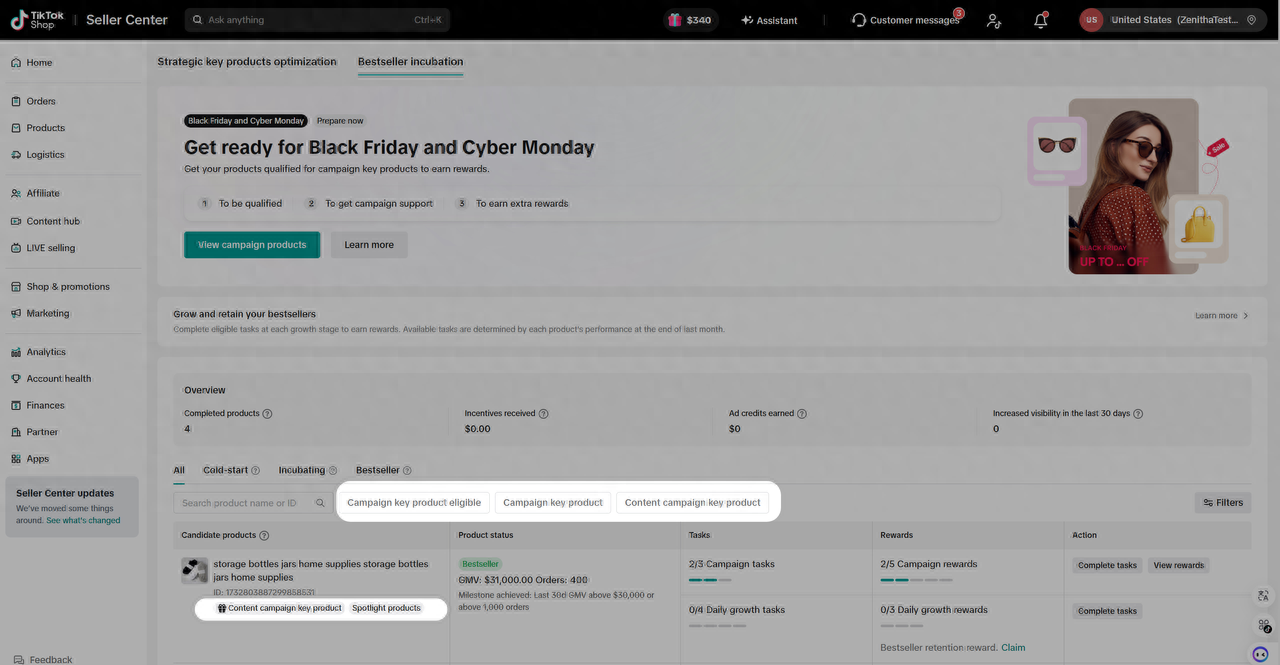
- For products in different statuses, sellers should complete the tasks for the current stage to help products move up to the next tier.
Current status | Target status | Value | |
| The product is in the campaign product list, but it is not yet Campaign Key Product Eligible | ➡️ | Campaign Key Product Eligible | Increases the product’s chances of entering CKP |
| The product is already a Campaign Key Product | ➡️ | Register for the campaign | Unlocks campaign support and benefits |
| The product is already a Campaign Key Product, but not yet a Content Campaign Key Product | ➡️ | Content Campaign Key Product | Increases the product’s chances to receive additional support across content channels |
Instructions
Enter:Products-Sales Accelerator-Bestseller incubationTask Type | Actions | Instructions | Page Screenshot |
| To be a campaign key product | Must be a strategic key product (This only applies to products with SKPP tasks.) | Check the progress of the tasks on the Campaign tasks list page. Hover to view the completion status of sub-tasks.Click "Complete tasks" to open the task details page and complete the tasks one by one. |  |
| Must be Fulfilled by TikTok (FBT) | |||
| Set up multi-product promotions | |||
| Increase product sales | |||
| To get campaign support | Register for campaign |  | |
| To be a content campaign key product | Set up commission for creators |  | |
| Restock product | |||
| Offer refundable or free samples | |||
Approve sample requests |
When a task stage shows Completed, it means the product has met the eligibility requirements for that stage.
Recommended Actions
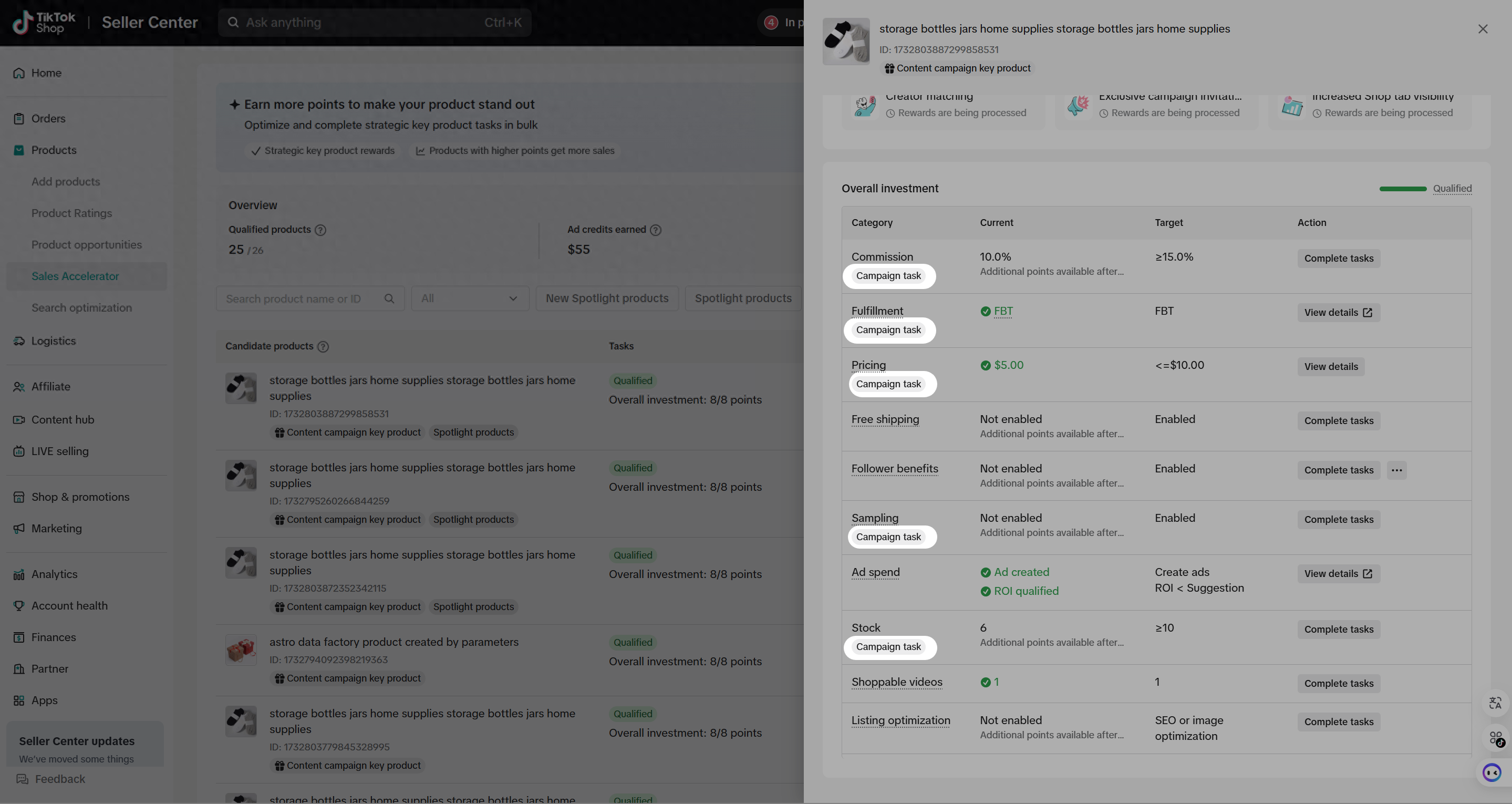
- The CKP product pool and SKPP product pool overlap and share some tasks. When working on SKPP tasks, sellers can filter for products in the campaign candidate pool and prioritize tasks labeled Campaign task.
 |  |
- Before the campaign officially begins, sellers are advised to prioritize the following:
- Register as many eligible CKP products for the campaign as possible to maximize access to campaign benefits and allow more time to build momentum.
- Complete the Stage 1 tasks to help more products in your shop enter the campaign candidate pool and unlock more growth opportunities.
 |  |
SKPP & Bestseller Incubation
Sales Accelerator helps you grow high-potential products through a two-stage plan: first, strengthen the product fundamentals in Strategic Key Products Optimization (SKPP tasks); then, use Bestseller Incubation to move products through cold start, incubation, bestseller growth, and retention.
In the updated Bestseller Incubation experience, each product is grouped by its current growth stage and matched with suggested actions and rewards. You can also use Seller Assistant for product diagnosis, so you can understand what may be holding a product back, take the right next step, and claim eligible rewards with more confidence.
The Two Stages of Your Growth Journey
Stage 1: Strategic Key Products Optimization (SKPP tasks)
This stage helps you identify promising products in your catalog and improve the fundamentals that make them ready to grow, such as price competitiveness, delivery, product content, and seller investment.
Stage 2: Bestseller Incubation
Once a product enters the next growth stage, Sales Accelerator helps you turn early traction into stronger sales momentum. You can find products by lifecycle tab, complete the tasks shown for each product, use Seller Assistant for product diagnosis, and claim rewards when the product meets the required conditions.
Why Join Sales Accelerator?
- 📈 Grow GMV: Sales Accelerator points you to the actions that help products move from readiness to stronger sales performance.
- 💎 Find the right products to focus on: The tool highlights products with growth potential and shows where each product sits in its lifecycle.
- 💰 Earn more rewards as products grow: Eligible products can unlock ad credits, TikTok Shop-funded discounts, and marketing support. A single product may receive up to $2,800 in incentives across eligible Bestseller Incubation rewards.
- 🤖 Act with more confidence: Seller Assistant provides product diagnosis and suggestions, helping you connect what you see in the data with the task actions you can take.
How to Access
Go to Seller Center > Products > Sales Accelerator

How It Works: Stage 1 (Strategic key products optimization)
In this stage, your goal is to improve the fundamentals of your high-potential products to get them "Shop Ready."
Step 1: List "Spotlight Products": Products That Are Pre-eligible for "Strategic Key Product Optimization" (SKPP)
Spotlight products are eligible to earn ad credits based on the GMV generated within the first 30 days of being listed. Click on "Explore opportunities" and discover your potential catalog.

Step 2: Review Your Opportunities 👀
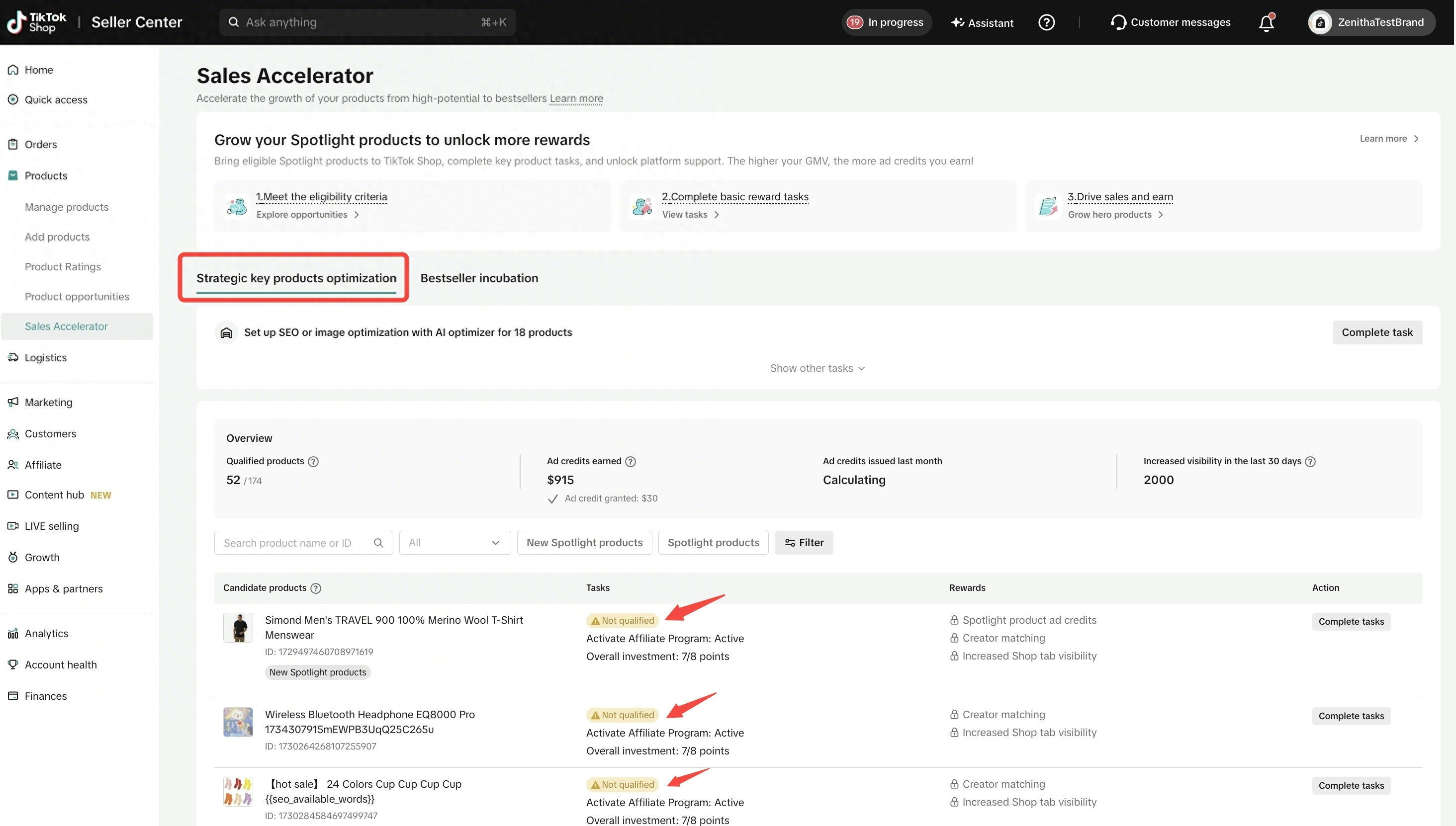
Enter the "Strategic Key Product Optimization" (SKPP) tab to see your dashboard. For each eligible product, you will see a status tag:
- 🟢 Qualified: Great work! You have met the standards. Check the "Rewards" section to see what you have unlocked.
- 🟠 Not Qualified: Action required. This product has high potential but is missing some of the key optimizations. Focus on the assigned tasks to unlock your rewards.
Step 3: Earn Points to Qualify ✅
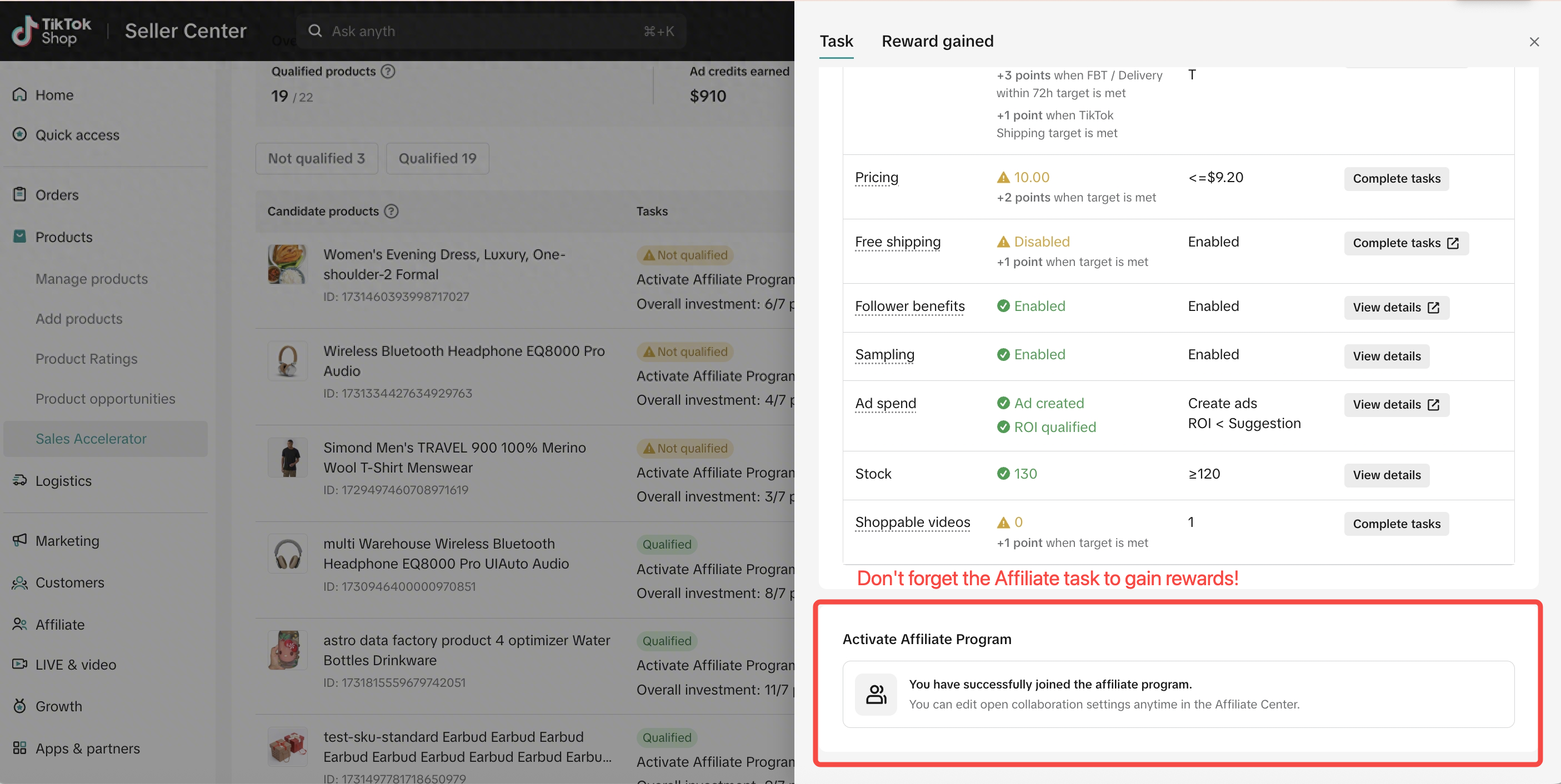
We use a simple point system to track your progress. You must earn 8+ points (out of 15) to unlock rewards:
- Price Competitiveness: 1-3 points
- Free Shipping: 1 point
- Follower Coupon: 1 point
- Fast Delivery:
- Fulfilled by TikTok (FBT) or Delivery <3 days: 3 points
- TikTok Shipping or Delivery <7 days: 1 point
- Commission Rate: 1 point
- Free/Refundable Sample: 1 point
- Ad Spending: 1 point
- Stock Availability: 1 point
- Shoppable videos: 1 point
- CRM: 1 point
- Listing optimization: 1 point
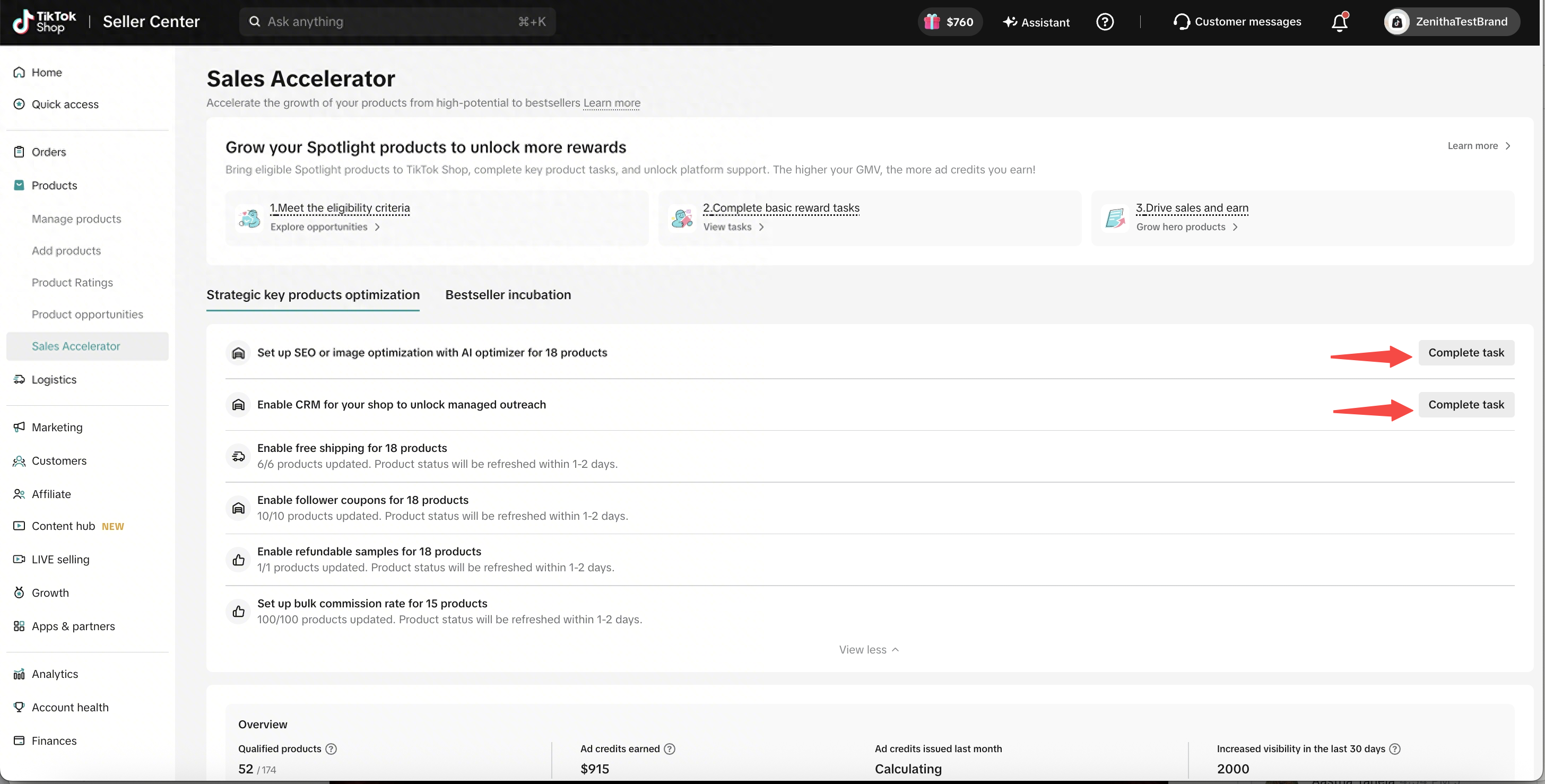
Enter the task drawer through the "Complete tasks" button.

Get into the task drawer
Check the task options - only 8 points needed out of 15 to unlock your reward::

💡 Pro Tip:
- You can also complete tasks in bulk

Step 4: Unlock Your Rewards 🏆
Once you qualify, you unlock a powerful benefits package designed to drive visibility and sales.
- Enter the reward drawer

- Check your rewards

💡 Pro Tip:
- Amplified reach: Increased visibility across TikTok Shop touchpoints to help more shoppers discover your product.
- Ad Credits: The more GMV you generated, the higher ad credits you will gain:
- Rewards follow a tier system based on each qualified item's GMV earned within the first 30 days after listing.
- $100 ≤ GMV < $1,000: $3 ad credit
- $1000 ≤ GMV < $2,000: $30 ad credit
- Every additional $1,000 in GMV: +$30
- Final ad credit amounts are governed by actual disbursement.
- Campaign access: Gain entry to eligible marketing campaigns, giving your product more chances to appear during key promotional moments.
- Creator matchmaking: We make it easier for creators to discover and promote your product:
- TikTok Shop Bonus on Commission: We fund a bonus commission to make your product more attractive to creators.
- Featured tag: Your product may receive a featured badge in the affiliate marketplace.
- Creator campaign feature: Your product may be featured in creator campaigns to increase promotional opportunities.
Free Sample Support: We cover the cost of samples during specific campaigns.
How It Works: Stage 2 (Bestseller Incubation)
Bestseller Incubation helps you continue growing products after they complete SKPP. Products are organized by lifecycle stage, and the available tasks may change based on each product’s latest performance and its status at the end of last month.
Step 1: Find the right product tab
Use the four tabs to understand where each product is in its growth journey:

- All: All products that currently have Bestseller Incubation opportunities.
- Cold-start: Products that have completed SKPP but have not yet reached cold-start success. Use Seller Assistant to review product diagnosis and the suggested next steps.
- Incubating: Products that have completed cold start and can work toward becoming bestsellers through growth tasks.
- Bestseller: Products that have reached bestseller status and need to maintain that status through retention tasks.
💡 Pro Tip: Your tab reflects the product’s current lifecycle stage, while some tasks are assigned based on the product’s status at the end of last month. If a product moves between stages during the month, check its task drawer for the most relevant action and reward status.
Step 2: Use Seller Assistant for product diagnosis
For Cold-start products, click Smart Growth to open Seller Assistant. Seller Assistant compares the product with similar products and highlights areas that may be limiting sales, such as shipping, title quality, pricing, or other product details.

Use the diagnosis as your action guide: improve the items Seller Assistant suggests, then return to Sales Accelerator to check whether the product has moved into the next lifecycle stage.

Step 3: Complete growth tasks for Incubating products
Incubating products can receive tasks that help them build engagement and sales momentum. Open the task drawer to see which tasks are available for each product.

- Self videos: Meet the monthly self-posted video target. Eligible products may receive a 5% TikTok Shop-funded discount, and other participating products may receive marketing support.
- Creator videos: Meet the monthly creator video target. Eligible products may receive a 10% TikTok Shop-funded discount, and other participating products may receive marketing support.
- Ads challenge: Join the challenge and meet the product’s ad-spend target within 7 days. Eligible products may receive up to $500 in ad credits, and other participating products may receive marketing support.
- New Bestseller milestone: Help an eligible product become a bestseller by month-end. Eligible products may receive $1,000 in ad credits.
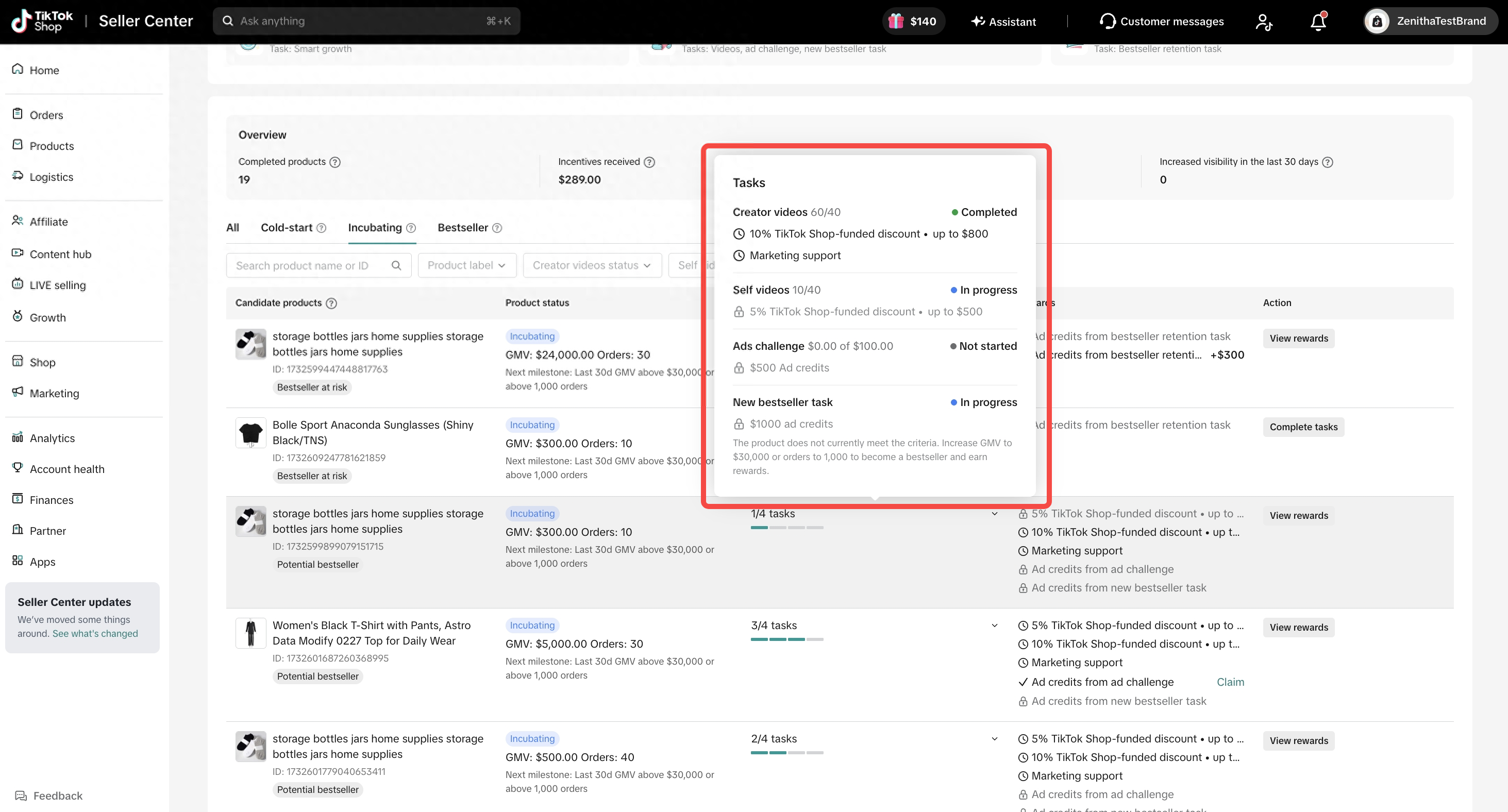
💡 Pro Tip: You can complete more than one eligible task for the same product. Check the reward drawer to see which rewards are locked, in progress, available to claim, or already granted.
Step 4: Maintain "Bestseller" status
Some bestseller products may receive a Bestseller retention task. To complete it, keep the product at bestseller level through the end of the month. Eligible products may receive $300 in ad credits.

If a product’s performance drops during the month, use Smart Growth where available to review its diagnosis and suggested actions. Your goal is to improve the product’s GMV and orders before the month-end assessment.


Step 5: Claim and track your rewards
Rewards are shown in the product’s reward drawer. Some rewards are based on monthly results and become claimable after month-end. If you earned a reward last month, you may still see a claim option at the beginning of the next month.
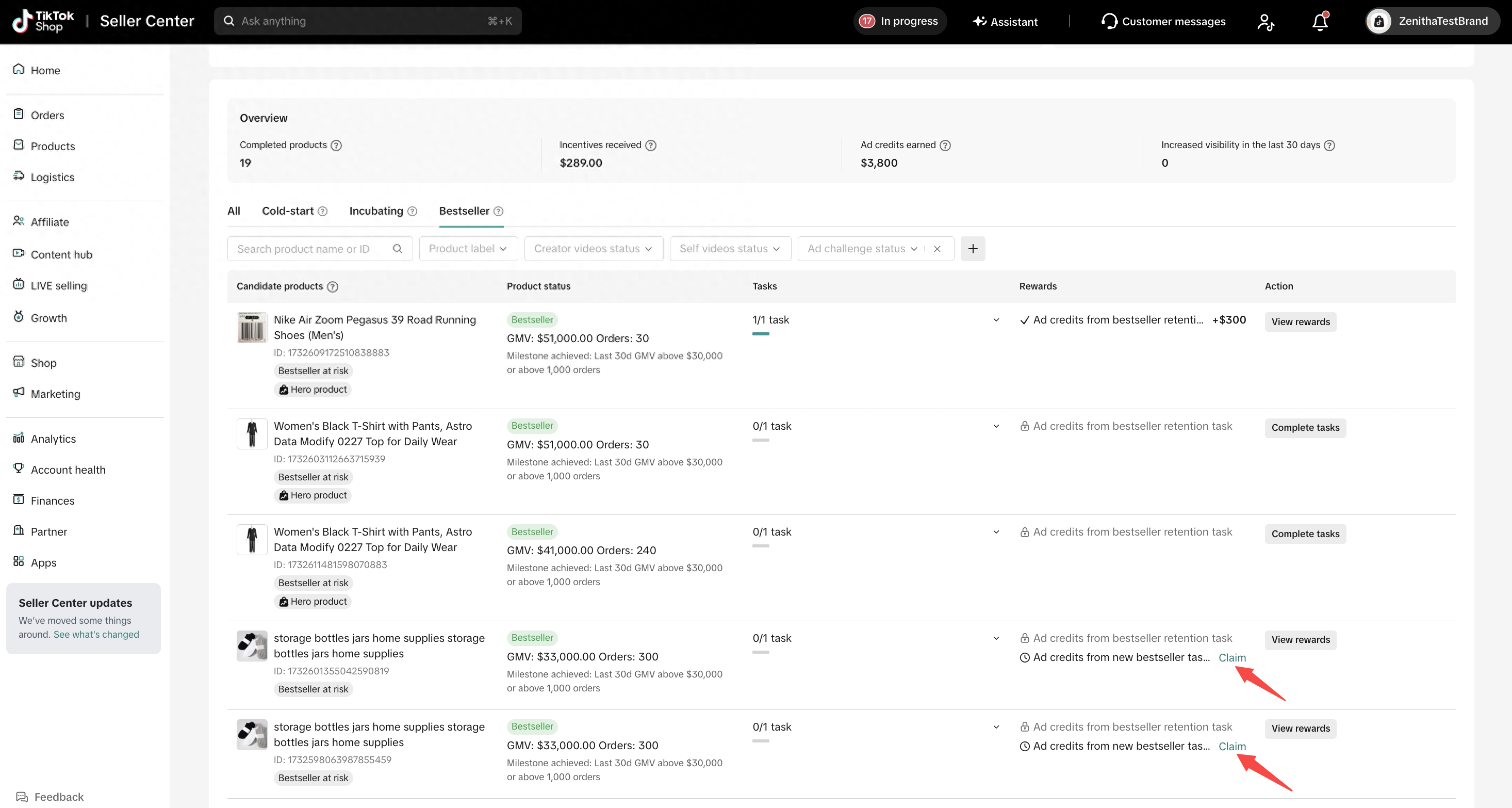
- Ad credits: Earned from eligible Ads challenge, New Bestseller milestone, and Bestseller retention tasks.
- TikTok Shop-funded discounts: Earned from eligible Self videos and Creator videos tasks.
- Marketing support: Helps increase product reach when available.
💡 Pro Tip: Bestseller Incubation uses offline performance data, so GMV and order updates may have a delay of about 2 days. If a product looks close to a threshold, keep improving it and check back later.
FAQs
Q: What is the difference between Strategic Key Products Optimization and Bestseller Incubation?
A: Strategic Key Products Optimization helps products become ready to grow by improving core fundamentals. Bestseller Incubation helps qualified products move through cold start, incubation, bestseller growth, and retention with stage-based tasks and rewards.
Q: What do the All, Cold-start, Incubating, and Bestseller tabs mean?
A: All shows products with Bestseller Incubation opportunities. Cold-start shows products that still need to reach cold-start success, Incubating shows products ready for growth tasks, and Bestseller shows products that have reached or need to maintain bestseller status.
Q: Why do I see tasks that do not exactly match the tab I am viewing?
A: A product’s tab is based on its current lifecycle stage, while some tasks are assigned based on its status at the end of last month. Always use the task drawer and reward drawer as the source of truth for what you can do and what you can claim.
Q: What should I do for a Cold-start product?
A: Start with Smart Growth. Seller Assistant will diagnose the product against similar products and suggest actions that can help it move toward cold-start success.
Q: What rewards can I earn in Bestseller Incubation?
A: Eligible products can earn TikTok Shop-funded discounts, ad credits, and marketing support. Depending on task eligibility and completion, a single product may receive up to $2,800 in incentives.
Q: When can I claim rewards?
A: Some rewards are granted after task completion, while month-end rewards are assessed after the month closes and may be claimable at the beginning of the next month. Check the reward drawer for the latest claim status.
Q: Why are my GMV or order numbers not updating immediately?
A: Bestseller Incubation uses offline data, so GMV and order numbers may be delayed by about 2 days. If your product recently improved, check again later and continue working on the suggested actions.
Q: Is there a cost to join?
A: No. Sales Accelerator is a free growth support system from TikTok Shop. You invest effort into the right product actions, and TikTok Shop supports eligible growth with rewards and marketing support.
Note: Final eligibility, reward amounts, and availability are subject to the rules shown in Seller Center.