

[NEW] Guide to VoC (Voice of Customer)


AI Summary
VoC is a diagnostic tool that now centers on Negative Feedback Rate instead of product levels or a VoC Index. It helps sellers identify top complaint themes, trace them to specific orders, and prioritize fixes through Seller Center > Account health > Voice of Customer. Use it to improve listings, quality, packaging, and returns handling; it does not make penalty decisions or support appeals, and you must not use it to contact, pressure, or suppress reviewers.
What is VoC?
Voice of Customer (VoC) is a seller-facing analytical tool that helps you find, understand, and act on the negative feedback your products receive. It brings negative feedback together in one place, groups it into commonly-observed feedback themes, and lets you trace each piece of feedback down to the specific problem orders — so you can turn feedback into targeted product improvements.What's new in VoC
- No more product level and VoC Index. Products are no longer rated by performance level (e.g. Good / Fair / Poor), and the VoC Index has been removed. Instead, VoC surfaces each product's Negative Feedback Rate.
- Clearer feedback grouping. Negative feedback is grouped into a defined set of feedback themes. Each theme uses a consistent label so sellers can compare feedback across products.
- Comprehensive feedback channels: VoC aggregates negative feedback from multiple sources — including negative product reviews and quality-related returns — and always shows you which channel each item came from.
- Traceable to order. Every feedback theme can be drilled down to the associated orders, so you can verify, follow up, and improve with confidence.
Common Feedback Themes
The table below summarizes common feedback themes, what they generally cover, customer feedback examples, and what sellers may want to check first. These themes reflect how consumer feedback is commonly grouped. They are not TikTok determinations that any product is defective, unsafe, non-compliant, or in breach of any standard.Feedback theme | What it means | Customer feedback examples | What to consider checking |
Safety, health, or restricted-use risk | Consumer feedback in this theme raises concerns about safety, health, intended users, restrictions, key parameters, or core-use results, or suggests that important information may be missing, unclear, unsupported, or inaccurate. | “rash,” “irritated skin,” “stings,” “made me sick,” “too hot,” “shock,” “cut me.” | Warnings, ingredients, certifications, age or user restrictions, safety instructions, temperature or electrical limits, and risk disclosures. |
Function, technical performance, or core-use failure | Consumer feedback in this theme suggests the product may not have achieved the main function, effect, technical performance, or use case described on the Product Detail Page. | “Doesn’t work,” “no effect,” “not strong enough,” “too dim,” “battery doesn’t last,” “doesn’t connect.” | Functional claims, performance statements, compatibility, power or battery information, testing records, and quality-control checks. |
Promotion mismatch, information gap, or item not as described | Consumer feedback in this theme suggests the product received or used by the customer differs from the listing, images, SKU page, content composition, color, configuration, version, quantity, or other stated attributes. | “Not as pictured,” “color is different,” “only received one,” “missing parts,” “need extra purchase,” “no size info.” | Main images, videos, SKU names, variant images, bundle quantity, accessories, restrictions, specifications, and measurement basis. |
Size, specification, or fit issue | Consumer feedback in this theme suggests sizing, fit, model compatibility, dimensions, capacity, selection guidance, or ergonomic structure may be missing, conflicting, or unclear. | “Runs small,” “not true to size,” “too tight,” “too short,” “not enough coverage,” “does not stay on.” | Size charts, measurement method, fit guidance, model compatibility, units, product dimensions, and body-contact design details. |
Structure, workmanship, durability, or appearance quality | Consumer feedback in this theme suggests the product’s structure, assembly, connection, seal, waterproofing, support, moving parts, exterior workmanship, or durability may not have met the consumer's expectations. | “Leaks,” “cracked,” “ripped,” “fell off,” “won’t lock,” “collapsed,” “print peeled off,” “faded.” | Assembly instructions, component fit, seals, waterproofing, load-bearing claims, attachment parts, material finish, and durability testing. |
Material, formula, ingredient, or source authenticity | Consumer feedback in this theme suggests the promoted material, ingredient, source, craftsmanship, formula, effect, or odor condition may not match the product received. | “Fake,” “not real,” “not human hair,” “synthetic,” “cheap,” “thin,” “dried out,” “won’t spray.” | Material labels, ingredient lists, supplier certificates, formula records, batch consistency, test reports, and claim substantiation. |
Packaging, accessories, shortage, or delivery integrity | Consumer feedback in this theme suggests the delivered product may have damaged packaging, leakage, missing core parts, missing instructions, incomplete set contents, or lower quantity than shown. | “Missing screws,” “can’t assemble,” “missing items,” “not a set,” “package damaged,” “leaked,” “arrived broken.” | Package contents, manuals, accessories, quantity shown in images, SKU quantity, shipping protection, and fulfillment handoff checks. |
Subjective experience feedback | Feedback in this theme mainly reflects personal preference or subjective perception, such as taste, smell, look, comfort | “Tastes bad,” “smells bad,” “not comfortable,” “looks used,” “I don’t like the texture.” | Repeated patterns, product description clarity, and expectation-setting language |
How to Diagnose your products via VoC?
Where to find VoC:You can access VoC in Seller Center > Account health > Voice of CustomerWhen you receive a relevant notice, you can also access VoC through the link provided in the notice to further review product-related negative feedback and associated orders.
Overview Page
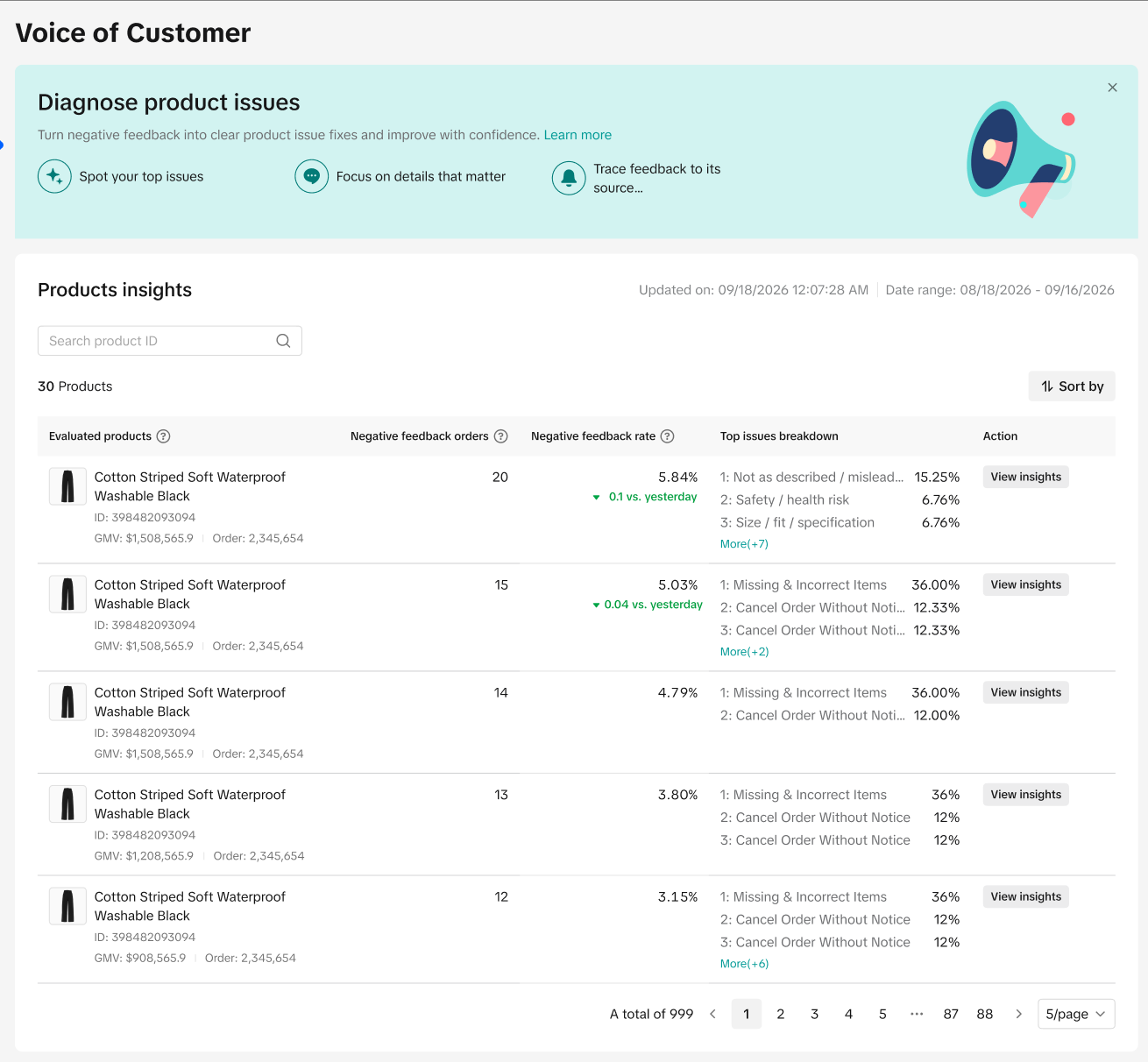
The Overview page gives you a clear view of product-level negative feedback signals, so you can quickly identify which products need attention and decide where to focus first. It shows the products that received negative feedback in the last 30 days.Start with Product insights
Before reviewing the product insights, first check the time fields at the top right of the page:- Updated on: The most recent data refresh time
- Data range: The order time range that the product insights on this page are based on
Review the product list
- Evaluated products: products that have received negative feedback (a negative text review or a quality-related return) during the data period, with enough volume for the metrics on this page to be shown. Products with insufficient feedback or orders won't appear in the list.
- Negative feedback orders: delivered orders that got a negative text review or quality-related returns during the evaluated time period (each order is counted once).
- Negative Feedback Rate: the share of delivered orders that received negative feedback during the period. A higher rate reflects a higher proportion of orders with negative feedback for that product.
Review top issues breakdown
The Top issues breakdown section shows the leading feedback themes affecting each product, ranked by their share of the product's total negative feedback. The top categories are shown by default, click View more to expand the full list.Themes are ranked from highest to lowest share, so you can quickly see which themes account for the largest portion of the product's negative feedback and prioritize your next actions.
Product insights Page
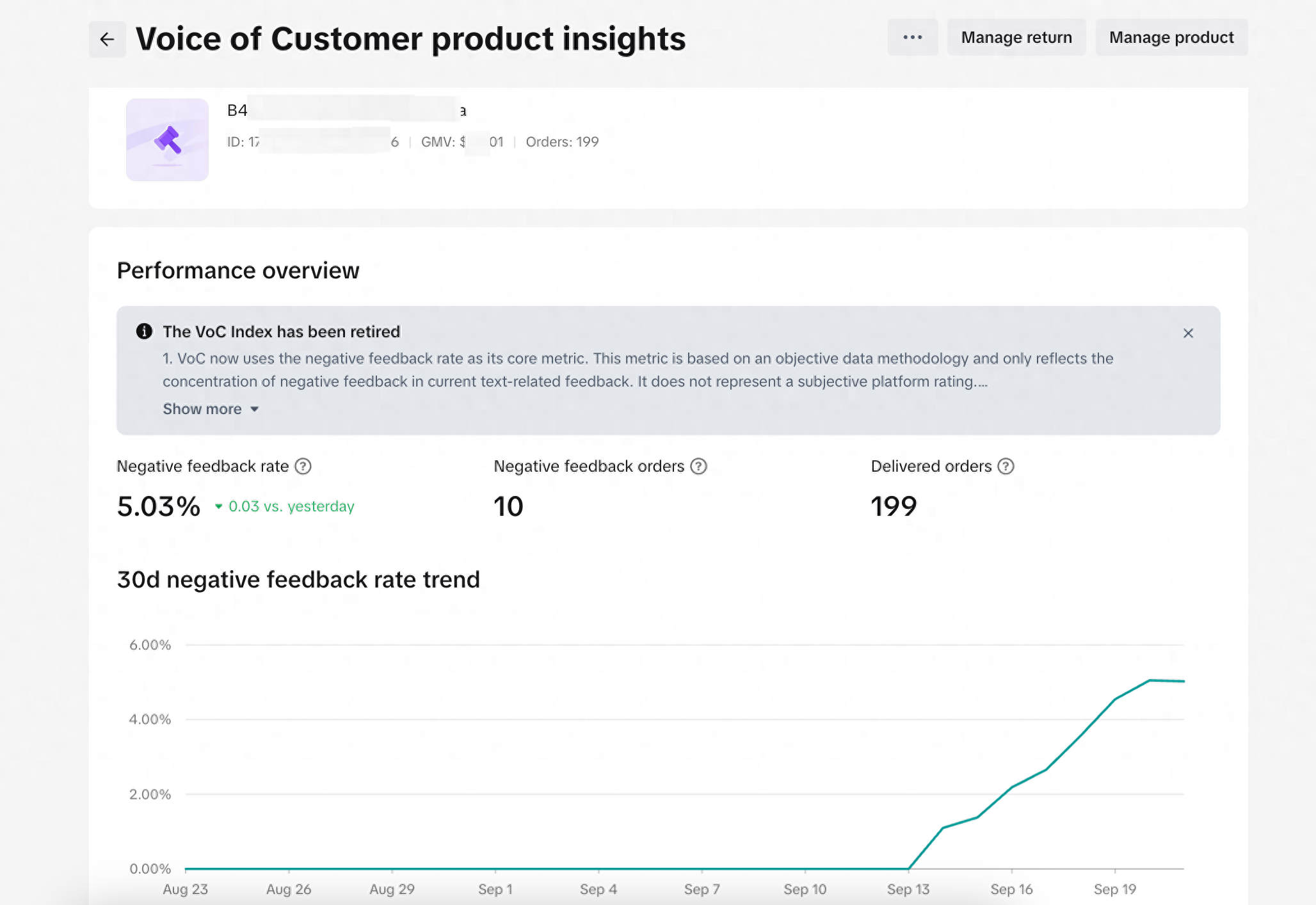
The Product Insights page provides a deeper look at a single product. Use it to review how the product is performing, the themes that account for its negative feedback, and the specific orders associated with each theme. You can open this page by clicking a product name in the Overview list or clicking 'View insights' beside each product in the Overview page.Review the Performance
Identify the key issues
The Issue details section breaks down negative feedback into themes, ranked by their share of the product's total negative feedback orders.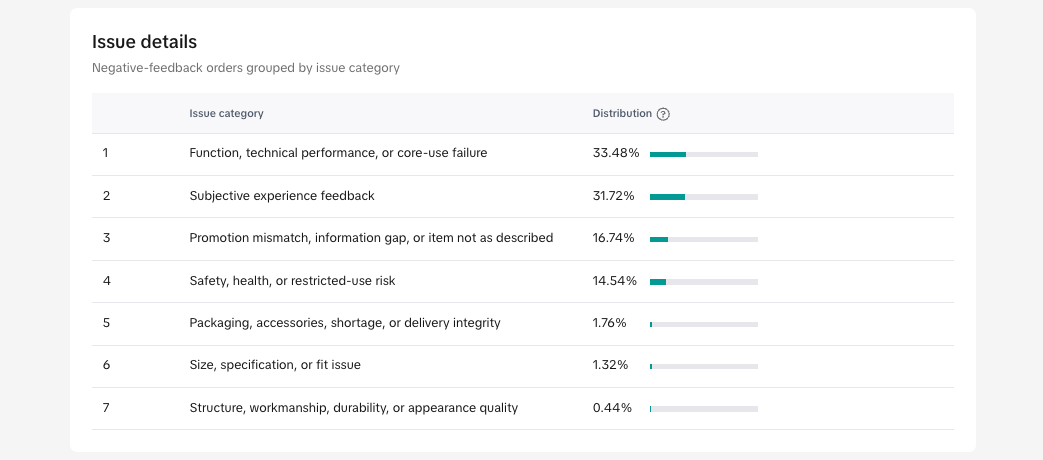 Use this view to decide which themes account for the most feedback and where to focus your review.
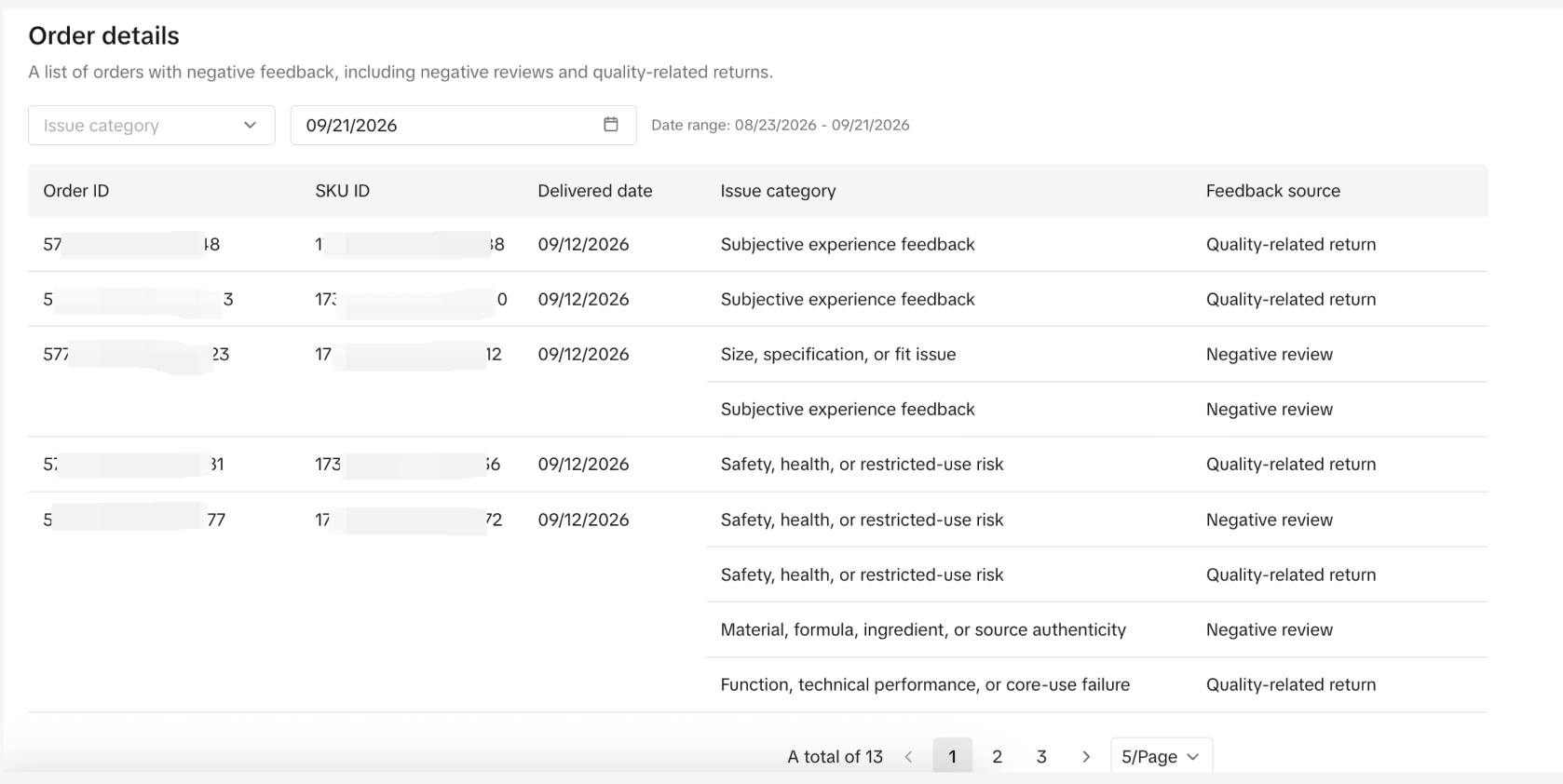
Trace the associated orders
- The feedback theme it was grouped into
- The feedback channel it came from — a negative review or a quality-related return
- The order-level details you need to verify and follow up
Use the Quick actions on the page
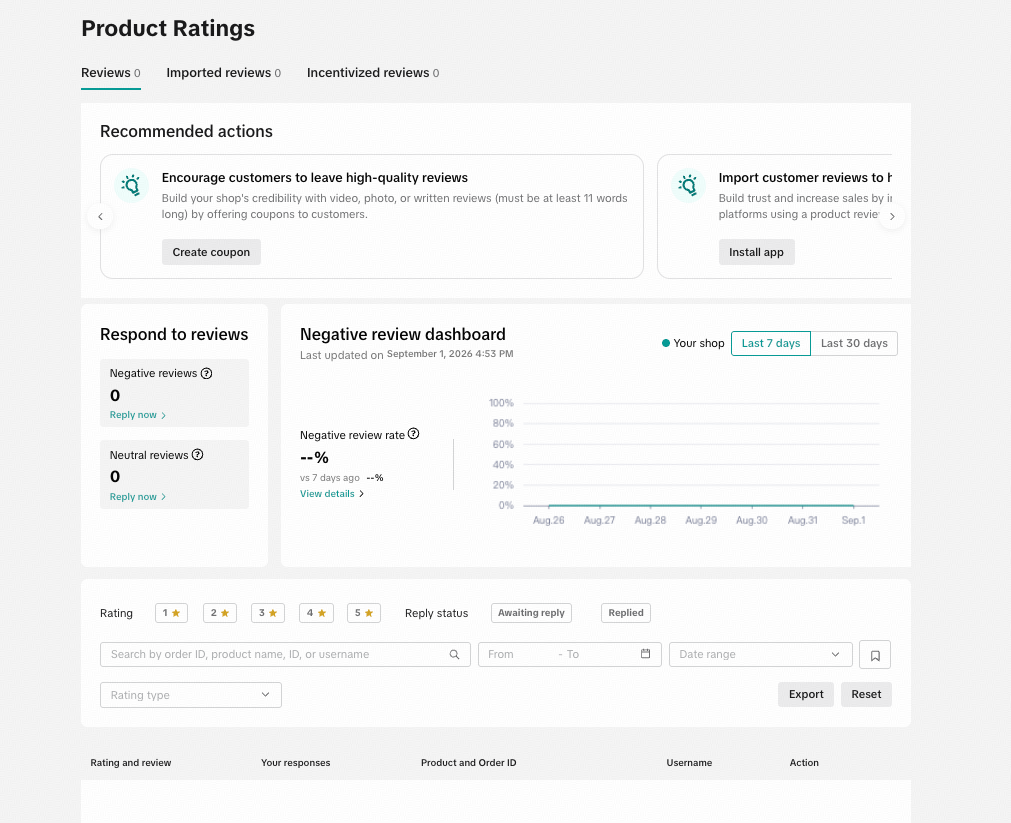
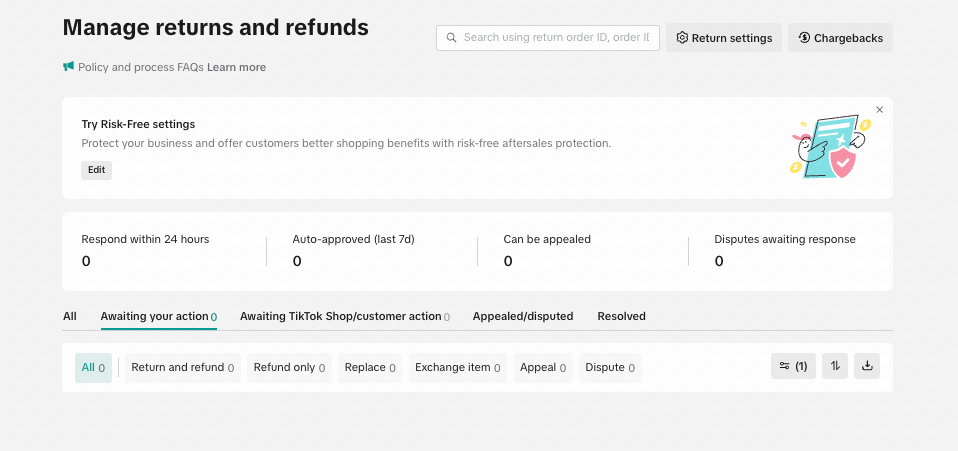
Once you have the order info and feedback channel from Order details, in order to read the feedback content and follow up, use the shortcut buttons at the top right of the Product Insights page, match the channel shown in Order details to the right button.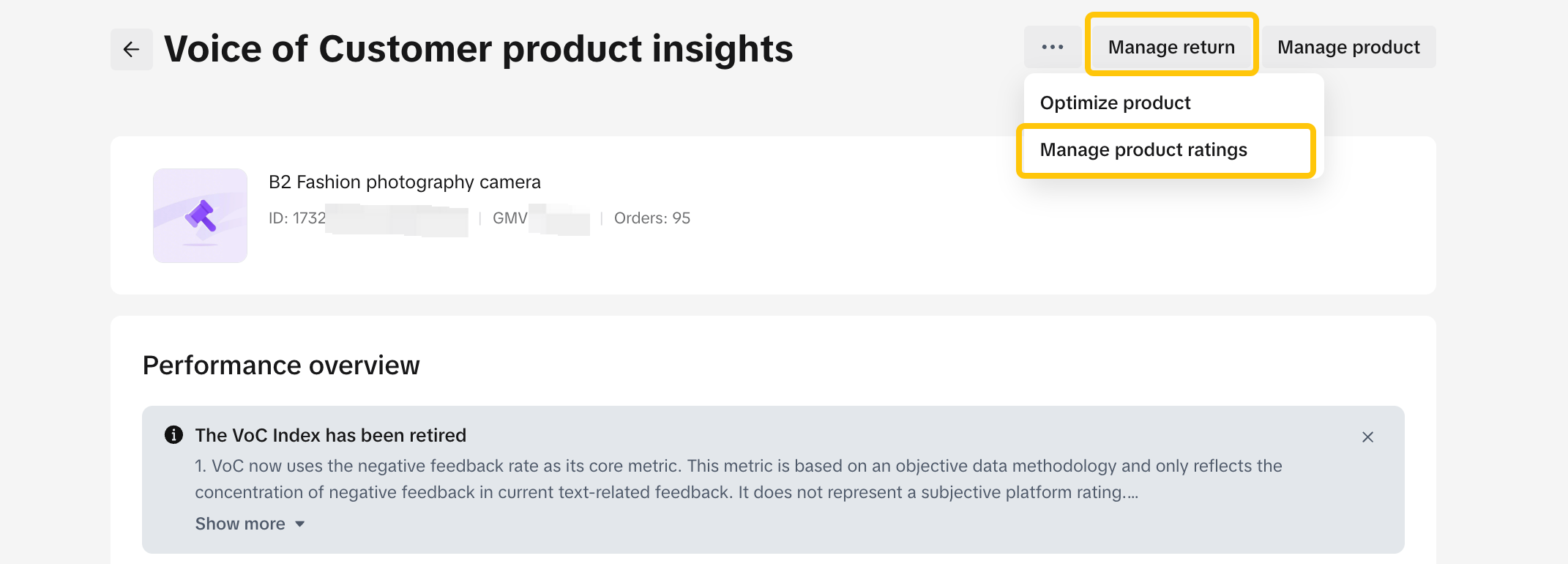
|
|
Take action with best practices
 The Best practices section includes a General correction actions guide. It helps sellers understand common feedback themes, reduce avoidable negative feedback, and prepare clearer improvement materials informed by the feedback themes. Click Learn more on the card to view the full guide.
Note: VoC is a diagnostic tool designed to help you improve your listings, quality, and returns handling. When using VoC:
- Use the feedback to improve product listings, quality, packaging, and post-purchase support.
- Do not use VoC or any related channel to identify, contact, retaliate against, incentivize, or attempt to suppress reviewers.
- VoC does not replace any of your obligations under applicable federal and state consumer-protection, product-safety, labeling, and intellectual property laws.
FAQ
Q: Where can I access VoC?- Log in to Seller Center homepage
- In the left-hand navigation bar, go to Account health
- Click Voice of Customer to enter the Overview page
Q: How can I appeal if I disagree with a VoC diagnosis?VoC is a diagnostic tool only and it does not have its own appeal channel. If you believe a specific review, return record, or penalty record is inaccurate, please use the existing review-reporting or returns-dispute channels, or visit the violation center for penalty record and follow the applicable correction/appeal process.
Q: Why are some of my products not listed in the VoC page?A product will only be displayed on the VoC page when it has received negative text feedback from negative reviews or product returns, and when the number of related negative-feedback orders reach sufficient sample size.
You may also be interested in

[New] Introduction to Shop Performance Score New Version (US…
Quick Navigation: Where should you start? Protection Strategy for BFCM → How will SPS metric scores…

[New] SPS: Introduction to Logistics and Fulfillment Score
Quick Navigation: Where should you start? How is each metric calculated? → Dispatch Time / Transit T…

[New] SPS: Introduction to Product Quality Score
Quick Navigation: Where should you start? Product Quality Score calculation steps → How is product q…

How to Appeal Your Shop Performance Score (SPS) Metrics
Overview The Shop Performance Score (SPS) Appeal feature allows sellers to directly submit appeals f…