

ACE Powered Insights
11/26/2025
Summary
What new features are being introduced in the TikTok Shop Seller Center to help sellers grow their business?
- In November 2025, TikTok Shop Seller Center upgrades with ACE-powered diagnostics modules in Growth Center, Analytics, and Home, offering personalized, data-driven insights and actionable recommendations based on Assortment, Content, and Empowerment performance.
- These modules provide tailored growth opportunities, structured performance diagnosis, industry benchmarks, trend tracking, and success stories to inspire sellers and help them identify and act on key growth areas immediately.
How do the new Shop Analytics features help sellers understand and improve their store performance?
- Shop Analytics breaks down performance into ACE dimensions with detailed insights, showing strengths, gaps, and benchmarks against peers to set realistic goals and prioritize improvements.
- Sellers can track trends of specific metrics, identify negative indicators that bottleneck growth, and focus on high-impact factors with direct action buttons to complete tasks that optimize results.
What guidance is provided for sellers to prioritize and act on the ACE indicators effectively?
- Sellers should focus first on the top three ACE factors per category, especially those marked as "Needs Attention," completing corresponding tasks to remove growth bottlenecks.
- Regular monitoring of trendlines and benchmark gaps is recommended, with weekly reviews during normal periods and daily checks during major promotions to proactively address issues.
What benefits will the upcoming Home dashboard provide to TikTok Shop sellers?
- The Home dashboard will offer a curated spotlight of critical business insights and actionable recommendations to guide sellers’ daily operations.
- It will also deliver focused updates and key educational content to keep sellers informed and empowered to make effective decisions.
In November 2025, we are upgrading TikTok Shop Seller Center to provide sellers with data-driven insights and personalized, actionable recommendations based on the ACE framework to help grow your business.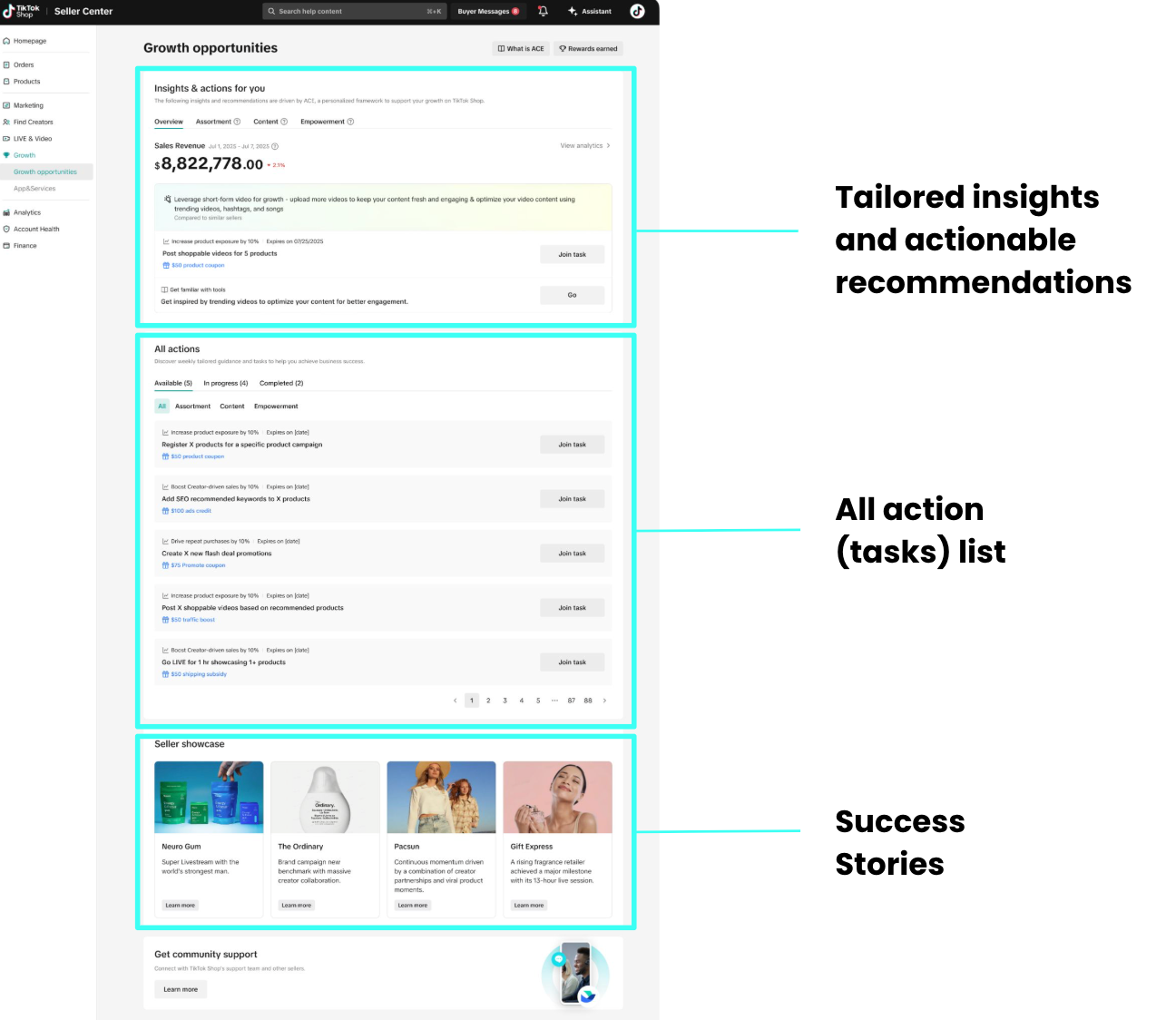 Tailored insights for every seller: Personalized growth recommendations based on store data and benchmarks within the same category and tier, to help merchants identify growth opportunities.Actionable steps for immediate impact: Beyond insights, we offer clear, practical task recommendations that merchants can act on right away to drive measurable improvements.Success stories to inspire innovation: By showcasing real examples of merchant success, we help inspire new strategies and ideas to fuel growth across stores.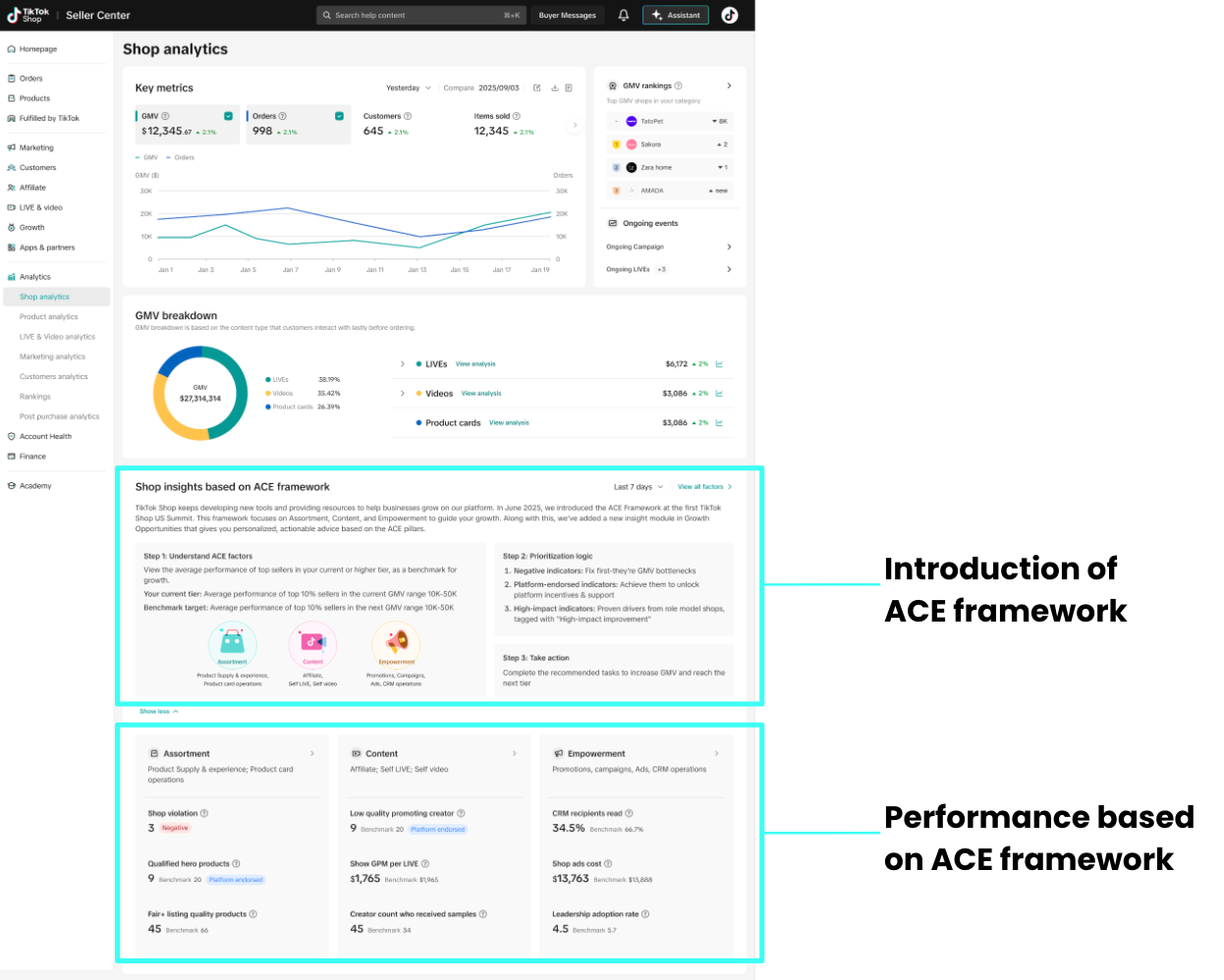


This content is only supported in a Feishu Docs
Check the trend of a specific indicatorClick "view trend" >> Show trendline window >> Check trendline of your shop and benchmark
This content is only supported in a Feishu Docs
Take action according to the suggestions providedClick the action button (Add products in this case) >> Open action page >> Complete the task
This content is only supported in a Feishu Docs
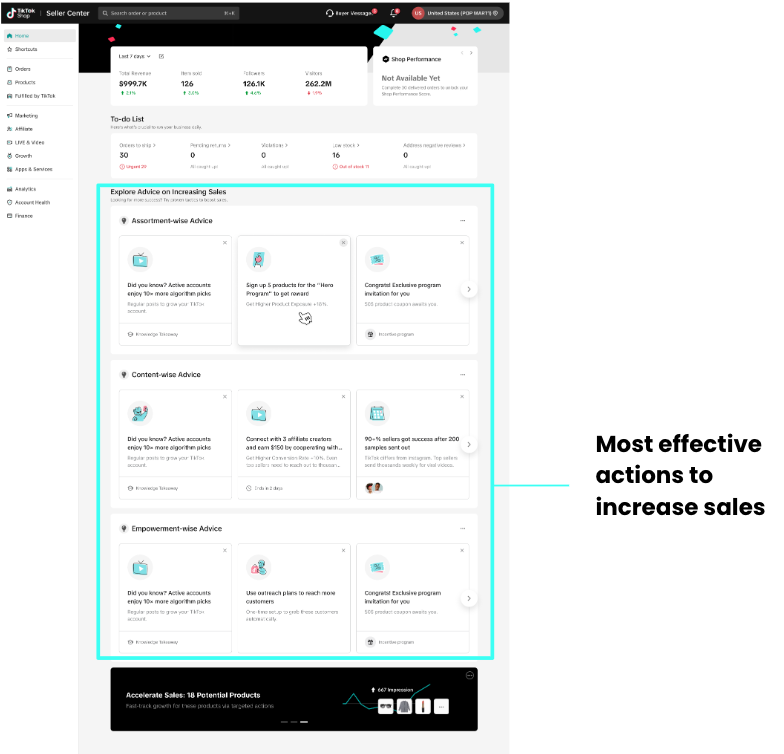 Your dashboard: Your spotlight curated and effective business insights with actionable recommendations will get you moving in the right direction. Focused updates: Get the info you need in the most critical areas of operations while accessing key educational content. Learn more about the ACE Framework here.
New Diagnostics Modules in Growth Center, Home, and Analytics: We have three new ACE-Powered areas that provide you with a curated list of recommended actions based on your Shops analysis of Assortment, Content, and Empowerment performance. Find out more about them below.
The diagnostics tool will have multiple entry points on the Growth Center, Seller Analytics, and the main Seller Center Homepage to maximize visibility and create a cohesive experience. They are all powered by ACE with individual features on each page. Find out more about them below. Growth Opportunities (Now Available) View Now- Shop Analytics (Now Available) View Now
Structured & comprehensive performance diagnosis: Breaks down overall shop performance into ACE dimensions and granular factors, giving merchants a clear view of strengths and gaps.
Benchmark-driven, data-informed evaluation: Provides industry comparisons to help merchants understand their relative standing and set realistic improvement targets.Actionable insights that drive impact: Automatically highlights opportunities and guides targeted actions across assortment, content, and empowerment.Shop Analytics details: |  |
Introduction
- Full Visibility of ACE Indicator Performance
All ACE factors are now displayed in the Analytics module. Merchants can click any factor to view detailed insights on its performance, helping you quickly understand how your store is performing in that dimension.
- Industry Benchmarks to Set Achievable Goals
Benchmarks are provided for comparable metrics to help you understand where your shop stands relative to peers and set realistic targets. Note: Some yes/no indicators are not comparable across shops, so benchmarks are not provided for these metrics.
- Trend Tracking & Actionable Guidance
Clicking on a specific metric opens its recent trendline, allowing you to monitor short-term changes. For actionable metrics, a Call-to-Action button is available to take you directly to the relevant task page, so you can act immediately to optimize results.
- Understand the types of indicators and their business impact
- Negative Indicators → Fix these first — they represent GMV bottlenecks that limit your growth.
- Platform-Endorsed Indicators → Meeting these unlocks platform incentives and additional support.
- High-Impact Indicators → Proven success drivers identified from top-performing shops, labeled as "High-Impact Indicators."
Key scenarios
Check performance of all indicators by categoryClick the small arrow next to the category name >> Open the indicator page >> Check the detailed performance of each indicator >> Switch category >> Filter indicators needs attentionsThis content is only supported in a Feishu Docs
Check the trend of a specific indicatorClick "view trend" >> Show trendline window >> Check trendline of your shop and benchmark
This content is only supported in a Feishu Docs
Take action according to the suggestions providedClick the action button (Add products in this case) >> Open action page >> Complete the task
This content is only supported in a Feishu Docs
How to interpret the performance of these indicators and take corresponding actions:
- Focus on the top three ACE factors in each category first. These factors carry the highest weight within their category, so check whether any of them are marked as "Needs Attention". If so, complete the corresponding action or task first.
- Monitor the trendlines and benchmark gaps of these key factors, even if none are marked as "Needs Attention". If an indicator trends downward, pay close attention to its associated actions and consider taking preventive measures proactively.
- Review all indicators at least weekly during normal periods, and daily during major promotions. Begin by filtering for “Needs Attention” indicators and complete all associated actions.
- Home (Available Soon)