

Negative Account Balance Requirements

This document outlines negative account balance requirements on TikTok Shop. Negative account balances are also subject to our Seller Enforcement Policy and Seller Terms of Service. Sellers must comply with this document, the Seller Enforcement Policy, and the Seller Terms of Service when operating a shop and managing account balances on TikTok Shop.Key Points:
- Always ensure your account balance is above zero! Optimize your shop operations to ensure an overall positive cash flow to achieve this.
- You can add a payment method to automatically resolve any negative balances that may arise. Please note that we currently only accept credit cards as a payment method.
Negative Account Balance
A negative account balance occurs when your account balance falls below zero. This means that your platform expenses, such as refunds and referral fees, exceed your platform revenue.Requirements for Account Balances
You must maintain an account balance above zero at all times.Payment Methods
In accordance with our Seller Terms of Service, you may be required to provide a valid payment method to meet our platform operating requirements. We may use this payment method at any time to settle any outstanding balances or platform expenses, such as referral fees. We reserve the right to charge the payment method you provide in accordance with our Terms of Service. We may check the validity of your payment method from time to time.Types Of Payment Methods
We currently only accept credit cards with valid billing addresses located in the United States.Enforcement Actions and Appeals
We regularly review your shop’s compliance with this document, our Seller Enforcement Policy, and our Seller Terms of Service. If any violations are identified, TikTok Shop may take enforcement action at our sole discretion.Negative balance enforcement is applied by tier. If your negative balance remains unresolved and meets the next threshold, your account may progress to the next enforcement level.Negative balances may result in the following enforcement actions:
| Negative Balance Amount | Enforcement Actions |
| Negative Balance ≥ $100 for more than 5 days | You will receive a warning ticket, informing you that your account has a negative balance, and reminding you to add funds to your account.❗️Warning Tickets do not come with enforcement actions. You will not be able to appeal this ticket. |
| Negative Balance ≥ $250 for more than 10 days | You will receive a violation ticket, with the following enforcement actions:
|
| Negative Balance ≥ $500 for more than 30 days | You will receive a violation ticket, with the following enforcement actions:
|
| Fund Deduction | We may deduct funds from your account to resolve a negative balance after your account is deactivated. |
| Withholding Balance | We may withhold your balance, as described in our Seller Enforcement Policy, if:
|
| Deferred Settlement | We may place your account under Deferred Settlement, as described in our Dynamic Settlement and Reserve Policy, if we suspect your negative balance is linked to fraudulent, deceptive, illegal, or harmful activities. |
How To Add Your Payment Method
We currently only accept credit cards with a valid billing address in the US as a payment method. To learn how to add your payment method or check charges applied, please see How to Pay Off Negative Balances.
Frequently Asked Questions (FAQs)
How do I know I have a negative balance?
- Go to Finances > Overview. If you have a negative balance, it will be displayed at the top of the page.
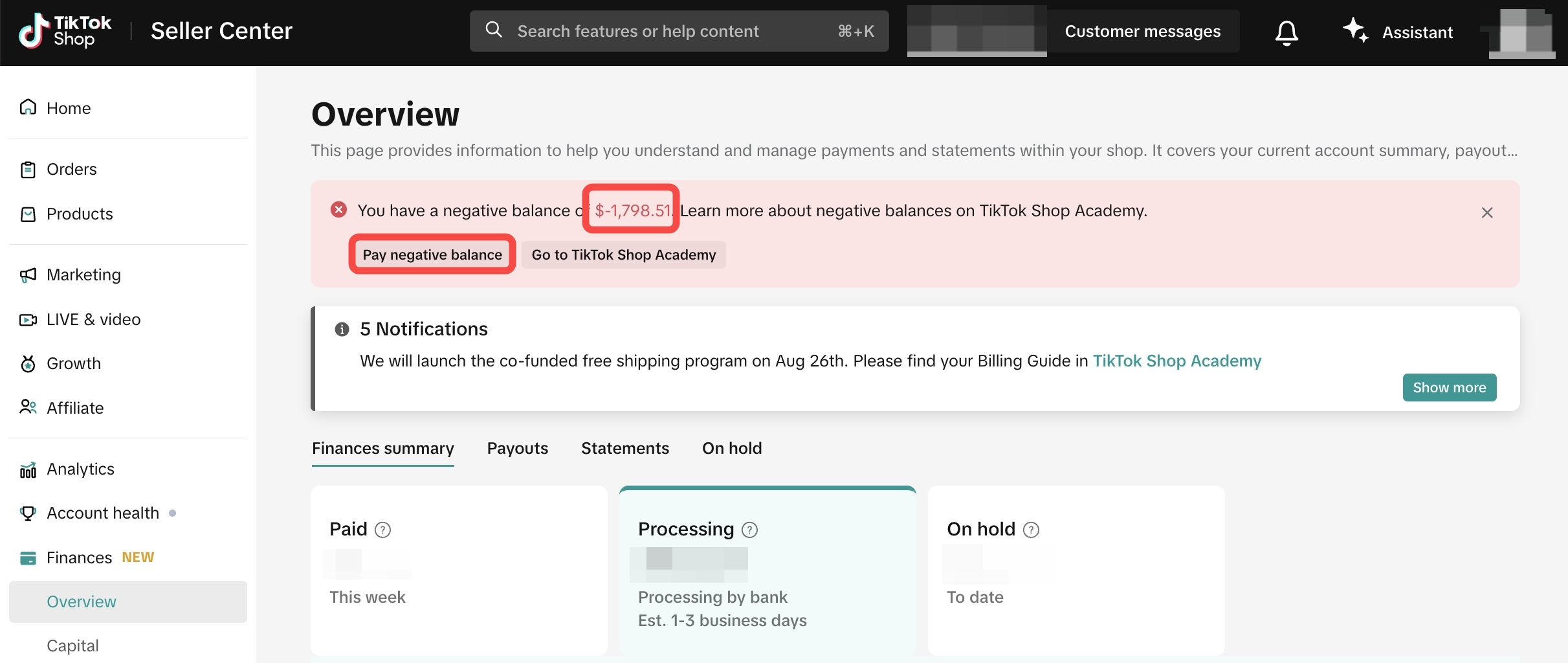
How can I avoid a negative balance?
- Set accurate prices: Make sure your product prices account for the cost of making or purchasing them. Setting prices too low just to attract more customers may result in your shop operating at a loss and incurring a negative balance.
- Set accurate estimated package weight and dimensions: Ensure you set accurate estimates for the weight and dimensions of packages, as this affects the calculation of the shipping fee. If there is a difference between the weight and dimensions you entered and the actual weight and dimensions, you may be required to pay the difference in fees.
- Keep track of your inventory and fulfill orders promptly: Make sure your inventory is up-to-date. If you oversell a product or are late in fulfilling an order, you may need to issue refunds.
I've added my credit card as a payment method. How do I use it to resolve my negative balance?
- You don't need to do anything once you've added a credit card. We will automatically charge your credit card the amount required to resolve your negative balance. All you need to do is ensure your credit card remains valid at all times and your credit line can cover the amount of negative balance. Once we've charged your credit card, we'll remove any enforcement actions taken and restore any privileges withdrawn, unless there are other reasons to keep them.