AI Homepage: Reinventing the TikTok Shop Seller Experience
What is the AI Homepage?
The AI Homepage isn’t just a new dashboard, it’s a game-changing, AI-powered command center built exclusively for TikTok Shop sellers. Designed to replace the traditional “module-based” homepage, it combines real-time shop data, TikTok Shop’s marketplace expertise, and personalized growth strategies into one seamless experience. Powered by intelligent Agents, it transforms how you operate your shop—from reducing tedious manual tasks to uncovering hidden growth opportunities—so you can focus on what matters most: growing your business.
Whether you’re a new seller just starting out, an established seller scaling your operations, or anywhere in between, the AI Homepage adapts to your unique needs. AI mode analyzes your data to surface opportunities and guide faster decisions.
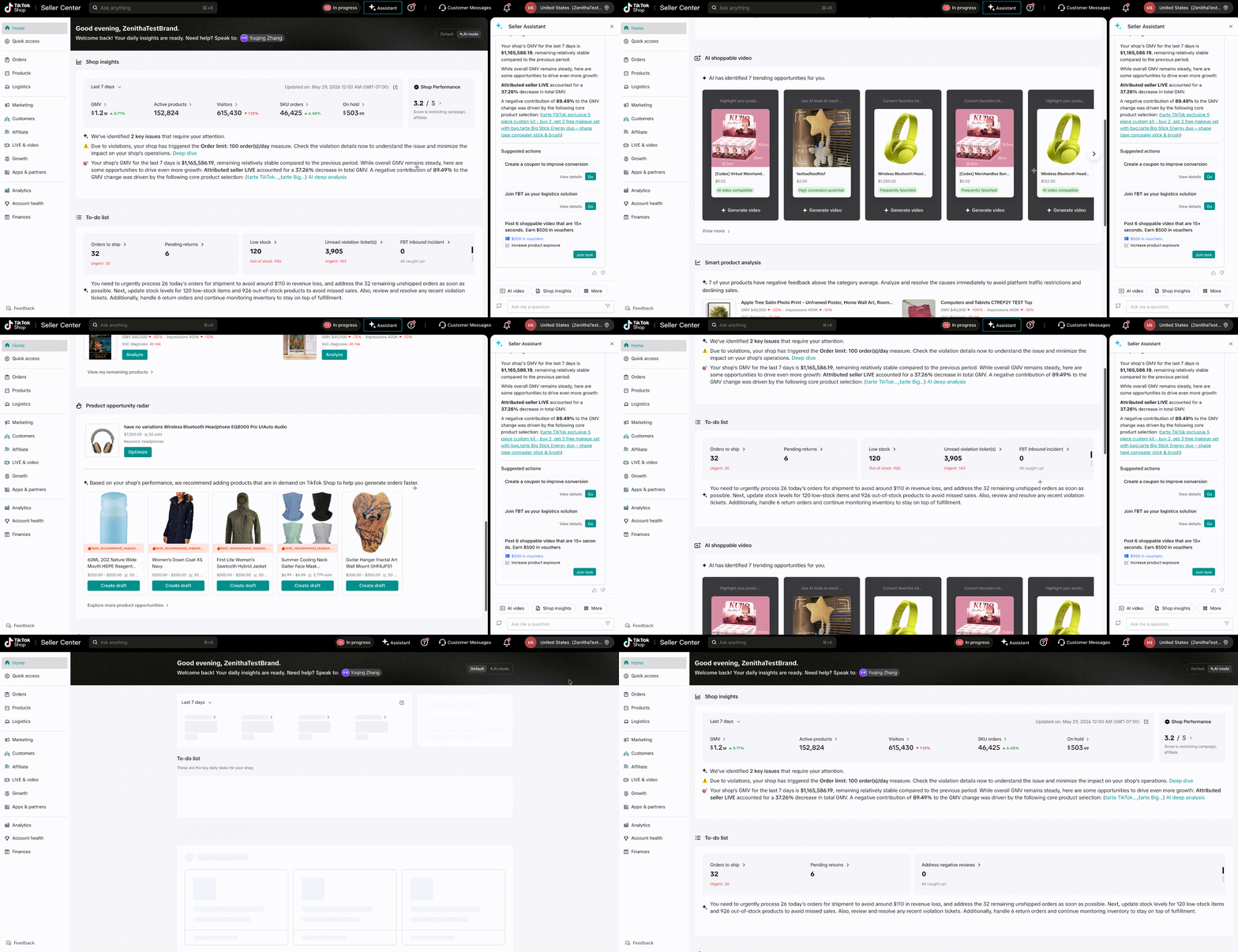
Reinventing the TikTok Shop Seller Experience
In today’s fast-paced e-commerce landscape, speed and simplicity aren’t just nice-to-haves — they’re essential. Every hour you spend manually checking metrics, hunting for information, or navigating complex workflows is an hour you could spend growing your business, engaging with customers, or refining your products.
That’s why we built the AI Homepage: to put the power of AI directly in your hands, turning the Seller Center from a “tool collection” into a personalized growth partner. It’s not just about making tasks easier — it’s about helping you make smarter decisions, seize opportunities faster, and scale your business with confidence.
The AI Homepage is more than a feature — it’s a new way to sell on TikTok Shop. And this is just the beginning. We’ll continue to add more AI capabilities, expand access to more categories, and refine the experience based on your feedback.
Note: This feature is only available for part of US L2L sellers during the Beta phase (starting from 4/9).
Benefits
- 🚀 Frictionless Onboarding: New sellers get a guided, step-by-step path to their first sale—no more guessing how to navigate the platform. What used to take hours of research now takes minutes with personalized task guidance.
- 📈 Effortless Scaling: For established sellers, the AI Homepage acts as your personal business advisor. It analyzes your shop’s performance, flags bottlenecks, and suggests actionable optimizations, so you can focus on strategy and creativity while AI handles the complexity.
- ⏱️ Time-Saving Efficiency: No more jumping between tabs or manually checking metrics. All your critical shop tasks—from daily health checks to order follow-ups—are consolidated in one place, cutting down on admin time.
- 🎯 Targeted Growth Opportunities: AI proactively uncovers marketplace trends, high-performing SEO keywords, and hot-selling product opportunities tailored to your category, so you can stay ahead of the competition.
How It Works
The AI Homepage is built into your existing TikTok Shop Seller Center (PC only for MVP version) — no extra tools or downloads needed. Here’s how to start using it today:
- Log in to your TikTok Shop Seller Center. You’ll automatically see the AI homepage if you’re included in the beta.
- Familiarize yourself with the core interface:
- Top Bar: Displays your shop name and direct access to your Account Manager (if applicable).
- Right Sidebar: Seller Assistant (expanded by default, collapsible) — your go-to for detailed explanations, step-by-step guidance, and one-click task execution.
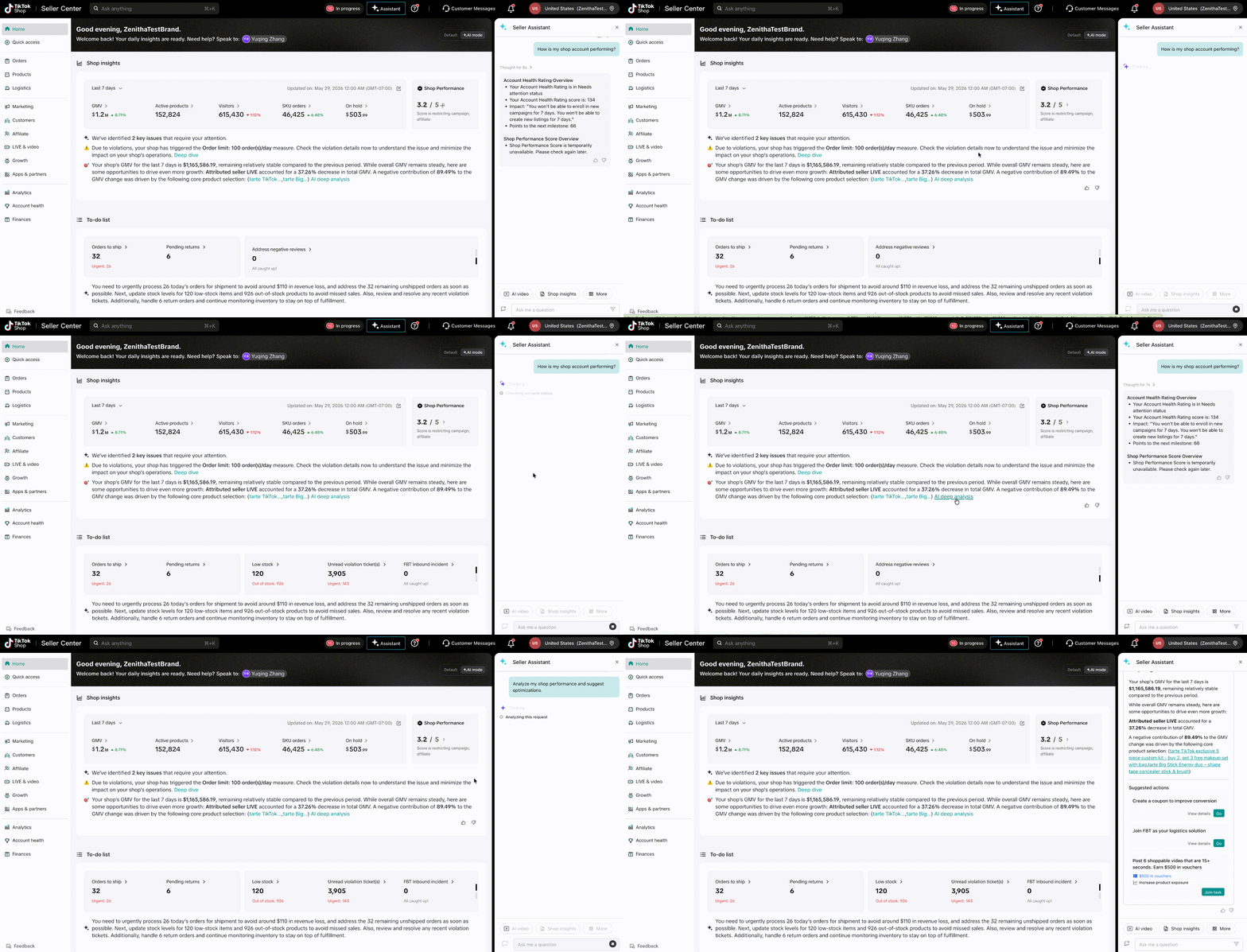
- Main Dashboard: 5 intelligent Agent cards, dynamically sorted based on your shop type (new seller, active seller, etc.) — core Agents are always visible for quick access.
- Feedback Feature: Hover over any Agent card to see “Thumbs Up”/“Thumbs Down” buttons. Your feedback helps us refine the AI to better serve your needs.
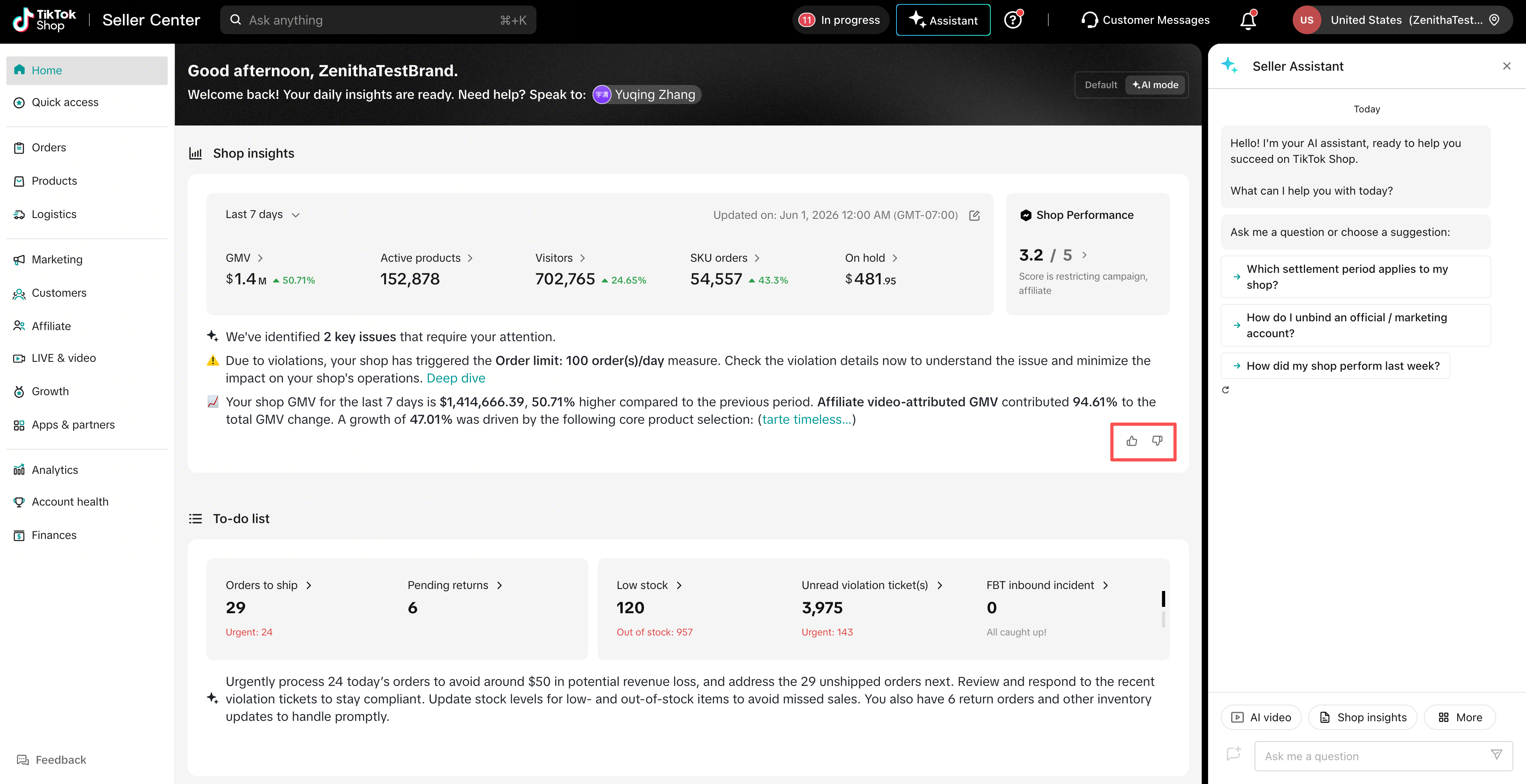
Your Personal AI Business Assistants: Agents to Transform Your Operations
Each Agent is designed to solve a specific pain point for sellers. Here’s how you can use them to make better business decisions and save time:
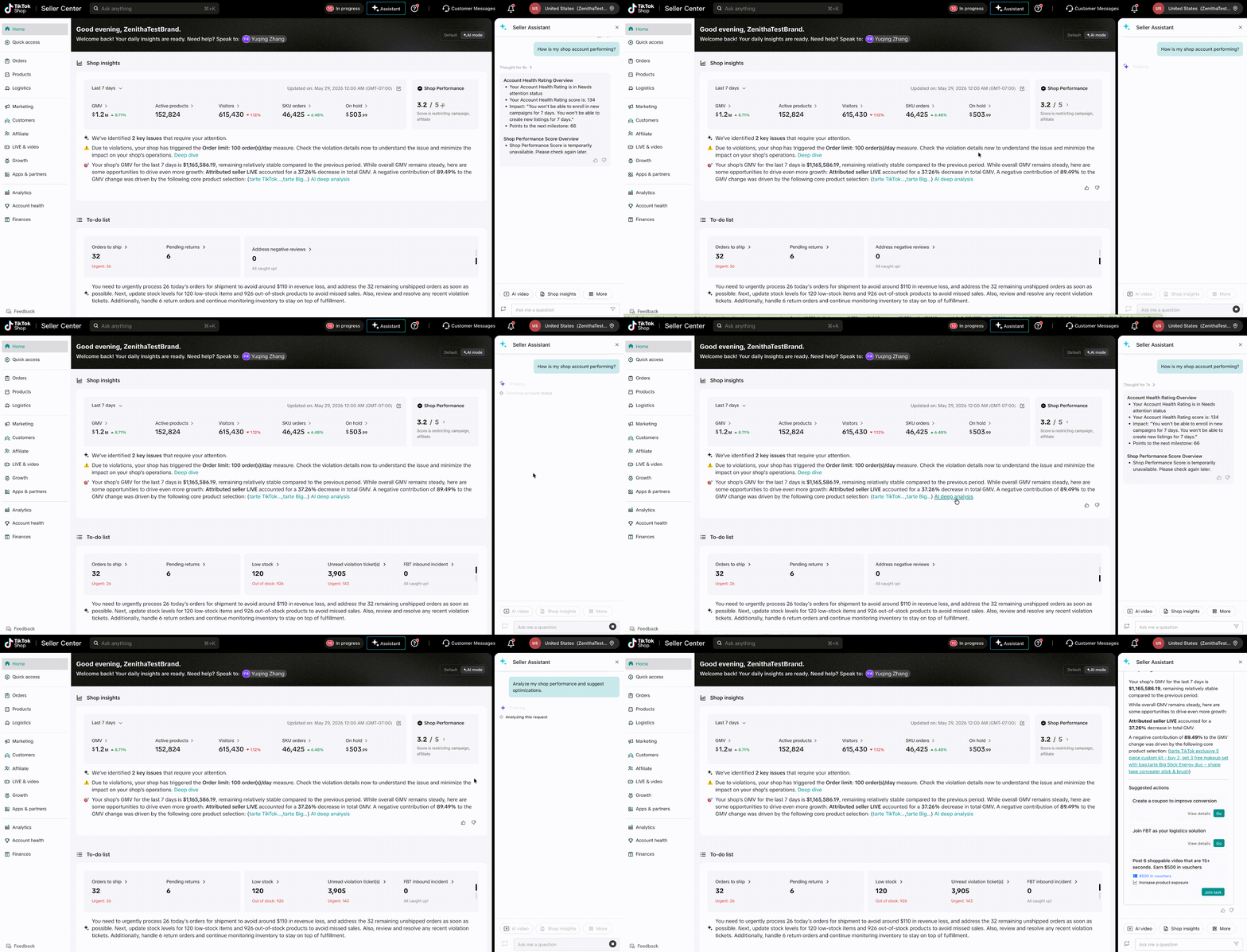
1. Shop Insight Agent (Daily Shop Check-In)
Think of this as your daily shop “health check” — the first thing you should look at when logging in. It gives you a bird’s-eye view of your shop’s performance and safety, so you never miss a critical issue.
- What it does: Automatically checks your shop’s key metrics and health scores (AHR/SPS), summarizes core performance (GMV, traffic fluctuations), and flags negative alerts (e.g., policy violations, low inventory).
- How to use it:
- Review the dashboard for a quick snapshot of your shop’s status.
- Click the card on any metric or alert to get detailed analysis, root-cause explanations, and step-by-step fixes (e.g., appeal a violation directly in the sidebar).
- Try asking the Seller Assistant: “How is my shop account performing?”
2. To-Do List Agent (Streamline Daily Tasks)
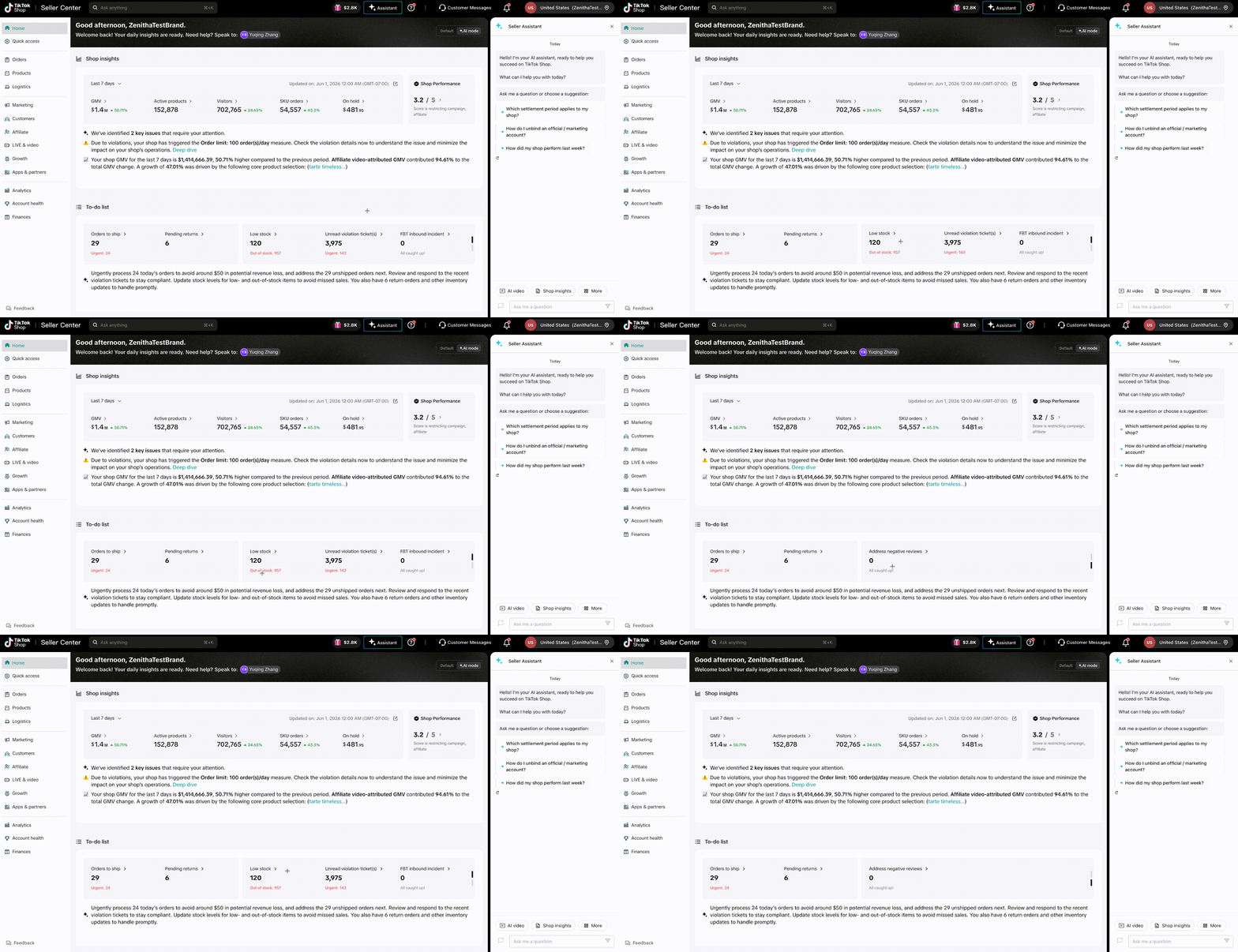
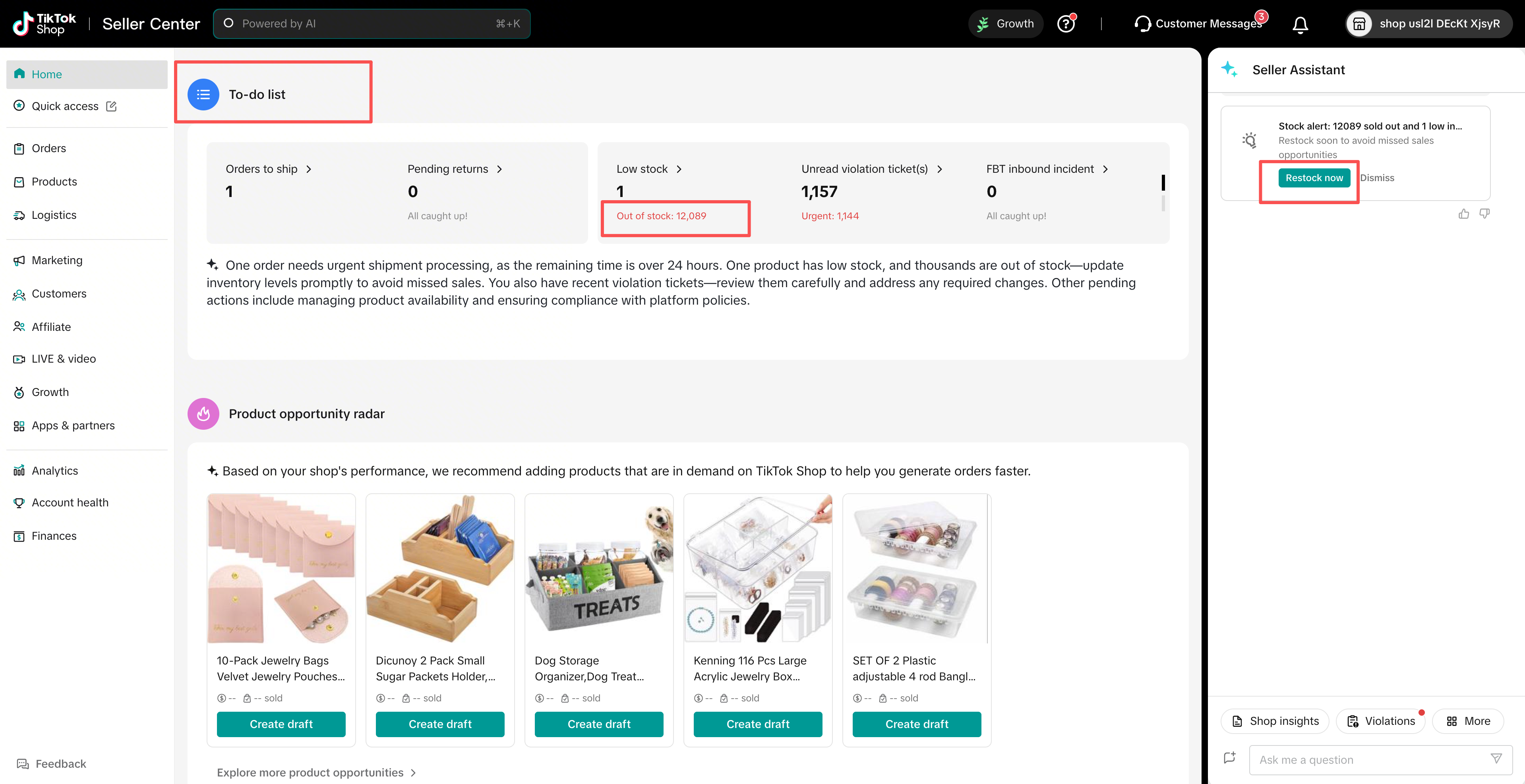
No more scattered tasks or missed deadlines. This Agent organizes all your critical daily operations into a prioritized list, so you can focus on what’s urgent and important.
- What it does: Compiles “fixed” tasks (e.g., order fulfillment, return processing) and “floating” tasks (e.g., inventory restocks, negative review responses), with urgent tasks (DDL within 24 hours) highlighted at the top. It also summarizes the risks of missing tasks (e.g., financial loss, shop penalty).
- How to use it:
- Click on any task to complete it: Simple tasks (e.g., restock inventory, reply to a review) can be done directly in the sidebar; complex tasks (e.g., tax setup) will redirect you to the relevant Seller Center page.
- Check the AI summary for a quick overview of urgent tasks and their impact.
- Try asking the Seller Assistant: “What urgent tasks do I have today?”
3. New Seller Coach Agent (Guide to Your First Sale)
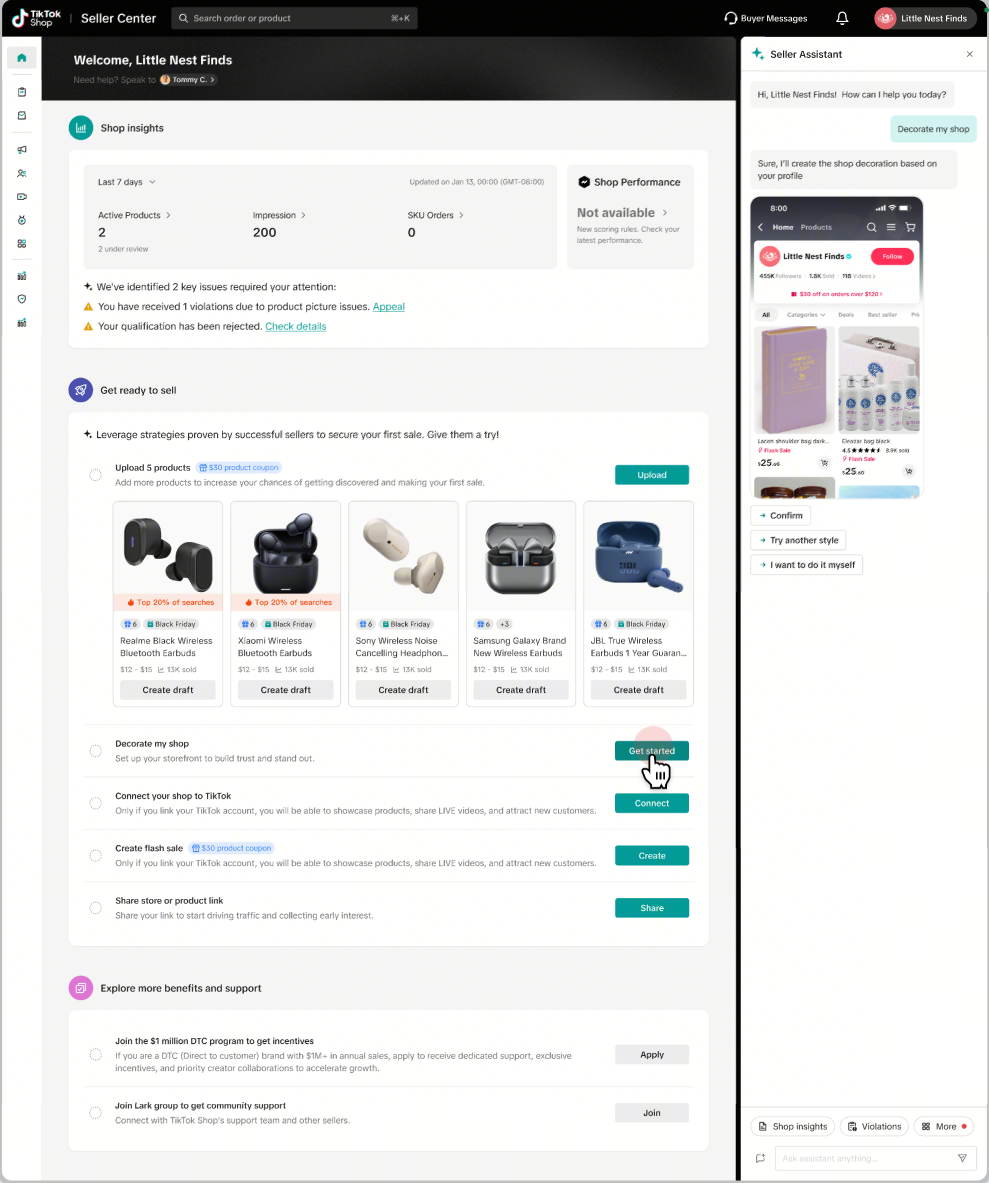
Perfect for new sellers (no prior sales, or within 60 days of onboarding) — this Agent takes the guesswork out of launching your shop and helps you hit your first sale fast.
- What it does: Delivers personalized onboarding tasks tailored to your shop type (e.g., “List 5 products,” “Set up a flash sale,” “Optimize your shop profile”). It tracks your progress and provides clear, step-by-step guidance for each task.
- How to use it:
- Follow the task list to complete onboarding — click each task for detailed instructions and direct links to the relevant tools.
- Once you make your first sale, complete all tasks, or reach 60 days of onboarding, the Agent will automatically disappear, and you’ll switch to the standard AI Homepage.
- Try asking the Seller Assistant: “Decorate my shop”
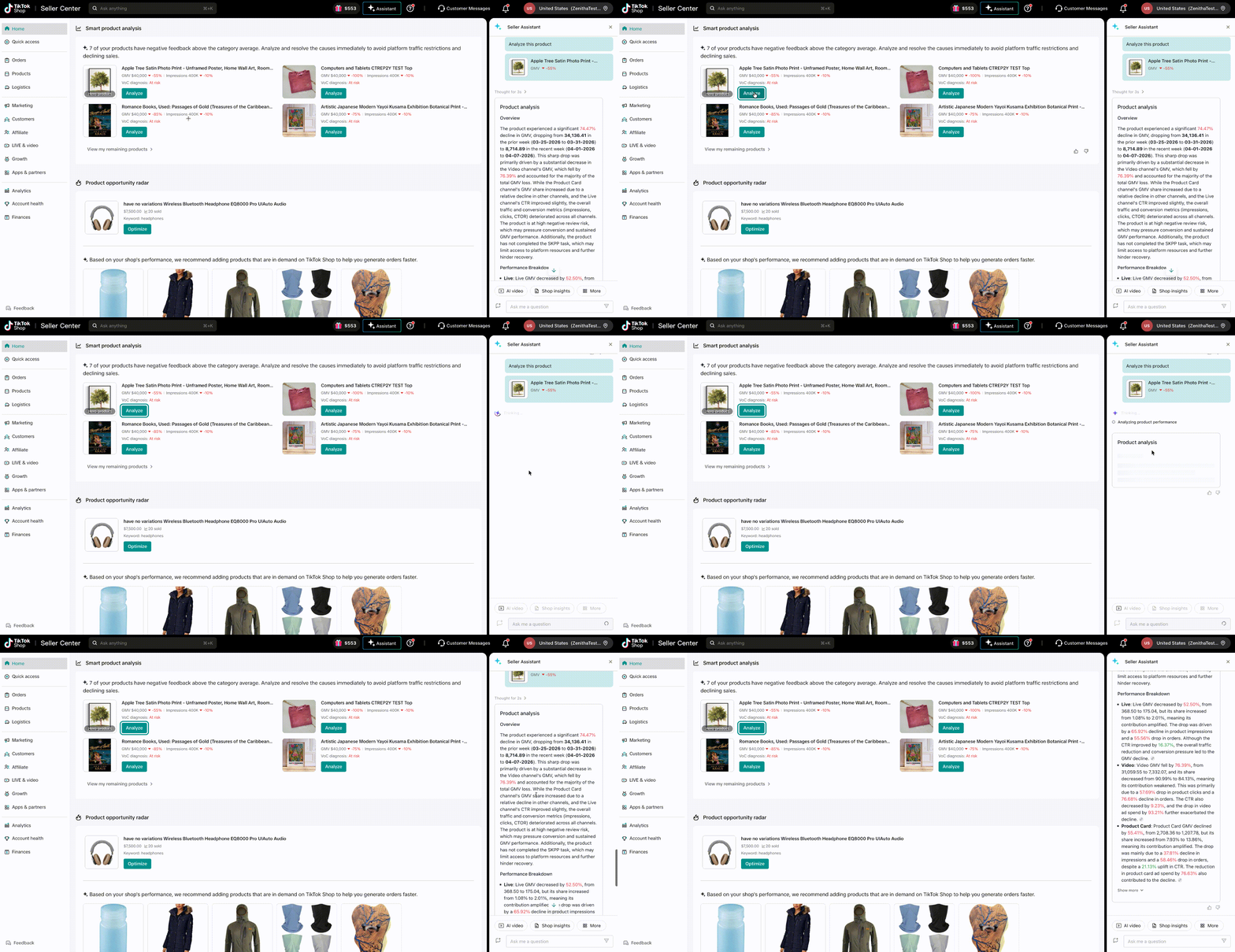
4. Smart Product Analysis Agent (Analyze Your Product Performance)
Stop guessing why your products aren’t selling — this Agent identifies traffic and conversion bottlenecks, explains the root cause, and gives you actionable fixes to boost sales.
- What it does: Real-time scans your active products (prioritizing bestsellers and new listings) to flag issues like “declining sales,” “low traffic,” or “poor conversion.” It provides data-backed explanations and optimization suggestions.
- How to use it:
- Review the product summary to see which items need attention.
- Click “Optimize” to get tailored recommendations (e.g., adjust pricing, improve product descriptions) — some optimizations (like one-click price adjustments) can be done directly in the sidebar.
- Try asking the Seller Assistant: “Analyze this product”
5. Product Opportunity Radar Agent (Uncover Growth Opportunities)
Stay ahead of the competition with AI-powered insights into marketplace trends, high-performing SEO keywords, and hot-selling product opportunities — all tailored to your category.
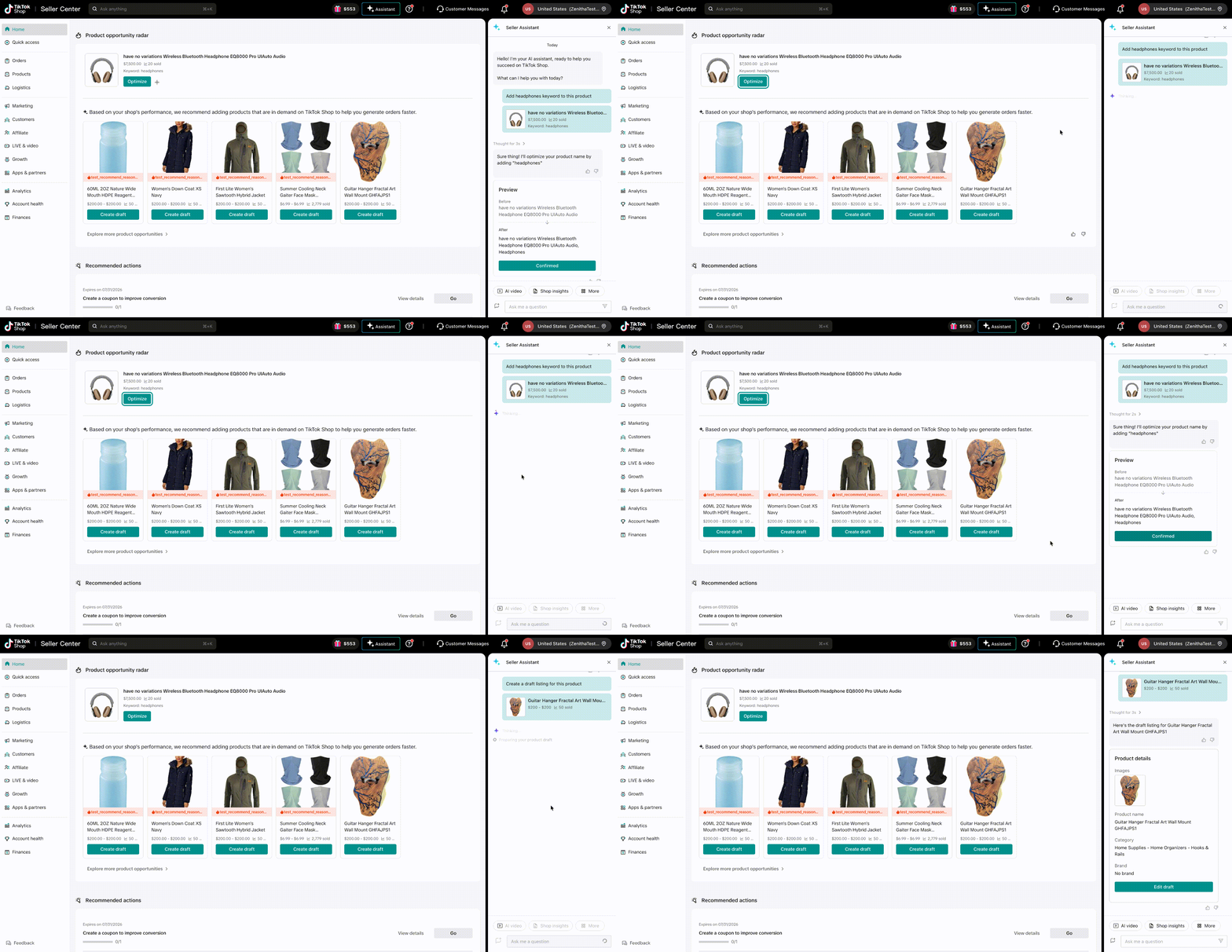
- What it does: Scans TikTok Shop’s 7-day real-time data to surface SEO keyword opportunities (to boost product visibility) and trending “opportunity products” (items with high demand in your category). It provides clear reasons why each opportunity is a fit for your shop.
- How to use it:
- Use SEO opportunities: Click “Apply” next to a keyword to get AI-optimized product details — confirm, and your product will be updated instantly.
- Capture opportunity products: Click “Create Draft” to generate a pre-filled product listing draft — edit as needed, then publish directly to your shop.
- Try asking the Seller Assistant: “Create a draft listing for this product”
FAQs
- Q: Why don’t I see all 5 Agents?A: Agent visibility depends on your shop type. For example, new sellers won’t see the To-Do List Agent (until they start fulfilling orders), and sellers with no active products won’t see the Smart Product Analysis Agent. The system dynamically adjusts based on your shop’s activity.
- Q: Can I reorder the Agent cards on the dashboard?
A: The MVP version does not support manual reordering. Agents are automatically sorted based on your shop’s needs, behavior, and Agent performance. You can help refine the sorting by giving “Thumbs Up”/“Thumbs Down” feedback on each Agent.
- Q: Which US sellers have access to the AI Homepage?
A: The MVP beta version is currently available to US-based sellers in different categories — including new sellers and active sellers. We’ll expand to more categories soon!
- Q: Is the AI Homepage available on the Seller Center app?
A: Currently, the AI Homepage is only available on the PC version of Seller Center. We’re working to bring it to the app in future updates.