

On-Time Delivery Rate Requirements
03/10/2026

This document outlines the On-Time Delivery Rate (OTDR) requirements on TikTok Shop. OTDR compliance is also subject to our Fulfillment Policy. Sellers must comply with both this document and the Fulfillment Policy when fulfilling orders on TikTok Shop.Key Points:
- On-Time Delivery Rate calculates how often you meet the expected delivery SLA for your orders.
- Sellers are expected to maintain an On-Time Delivery Rate at or above an 80% in order to meet the customer delivery expectations and avoid violations.
- Shops with an On-Time Delivery Rate below 80% will incur enforcements.
- Deliver-by SLA are in business days only. Weekends and federal holidays do not count toward your designated SLA.
On-Time Delivery Rate
On-Time Delivery Rate (OTDR) is a shop-level metric that measures the timeliness of order deliveries within a set frame of time. It represents the percentage of orders delivered by their designated "deliver-by date" from the total orders expected to be delivered within the set timeframe.Per our Fulfillment Policy, all shops must maintain an OTDR greater than or equal to 80%. If a shop's OTDR falls below 80%, it will subject to enforcement actions.
How On-Time Delivery Rate Impacts Your Shop
SFCR is one of the core four metrics used to evaluate a shop's fulfillment performance and shop health. The four core performance metrics, based on TikTok Shop's Fulfillment Policy, are:- Valid Tracking Rate (VTR)
- Late Dispatch Rate (LDR)
- On-Time Delivery Rate (OTDR)
- Seller-Fault Cancellation Rate (SFCR)
The higher your OTDR is, the more it can help to improve your shop's SPS.
OTDR enforcements can be appealed (see Appeals below). If not appealed, the violation will remain on your account record for 90 days. After 90 days, the violation will be removed.
Exceptions for On-Time Delivery Rate
Fulfilled by TikTok (FBT) and Express Shipping orders are exempt from OTDR calculations.To learn more about the On-Time Delivery Rate policy, refer to our Fulfillment Policy.
How On-Time Delivery Rate Is Calculated

A shop's OTDR reflects order delivery efficiency on a weekly basis (Monday through Sunday). A healthy OTDR will be at or above an 80%.
Shops with an OTDR below 80% will incur enforcements. Please refer to How OTDR Impacts Your Shop above for more information on expectations and enforcements.
Deliver-By SLA and Deliver-By Date
The deliver-by SLA is measured from order creation time to delivery. It is the designated timeframe that a seller has to get an order packed, shipped, and delivered.The deliver-by date is the deadline for a package to be marked "Delivered" to meet OTDR expectations. For each order, the "deliver-by" date is calculated from the business day after the customer places the order.
For an order to be considered delivered on time, the Logistics Service Provider (LSP) or carrier must mark it as "Delivered" on or before the "deliver-by" date. Seller Center will then display the status to "Delivered."
Order Types and Deliver-By SLA
The deliver-by SLA varies depending on the order type. The table below outlines the deliver-by SLA for different order types.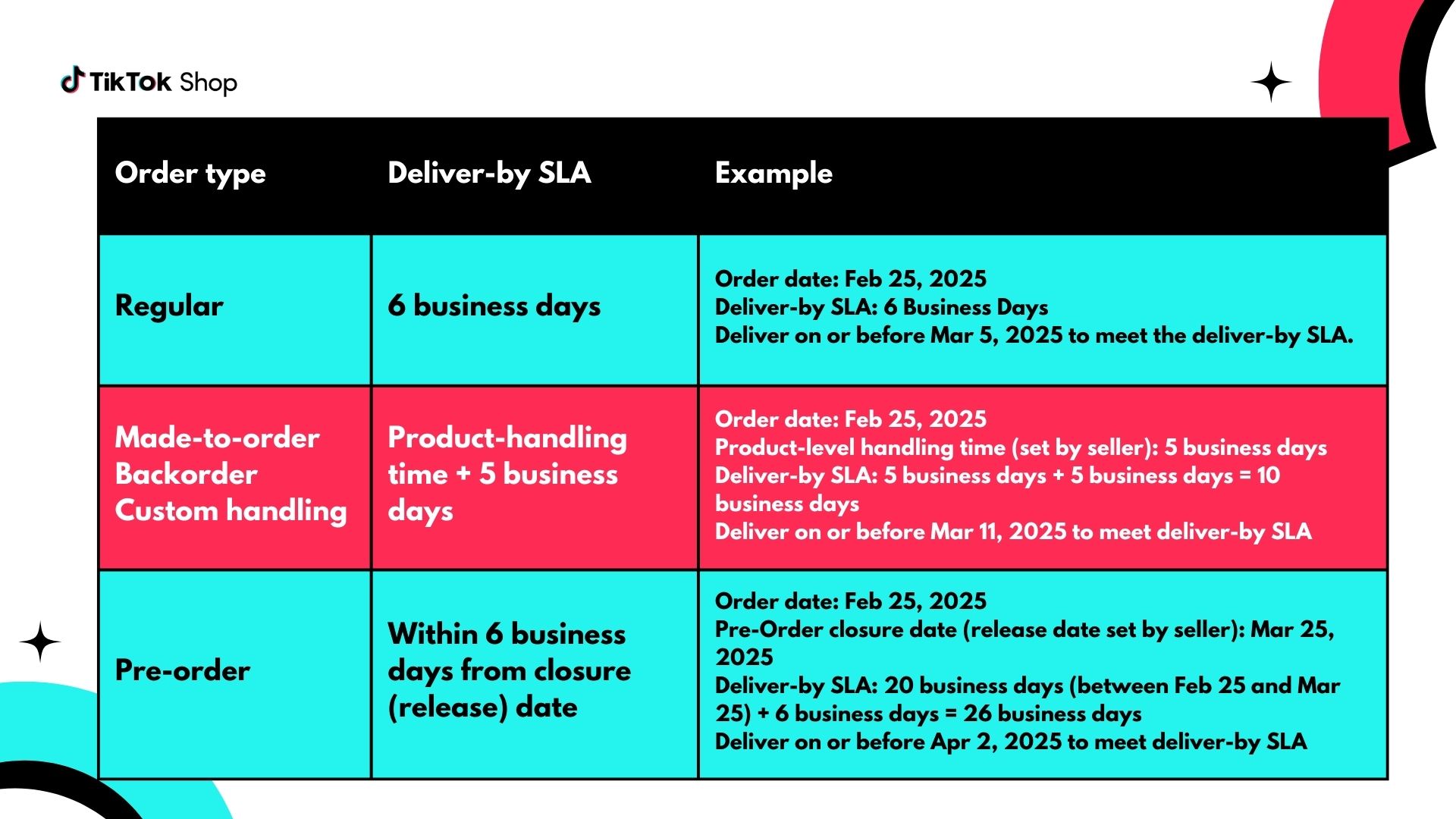
If you have additional questions about product handling, you can refer to the Estimated Delivery Time (EDT) Seller Configuration Process guide.
On-Time Delivery Rate Appeals
Enforcements or violations for OTDR can be appealed twice.- A seller must appeal within 30 days of the violation.
- A second appeal must be filed within 15 days if the first appeal fails.
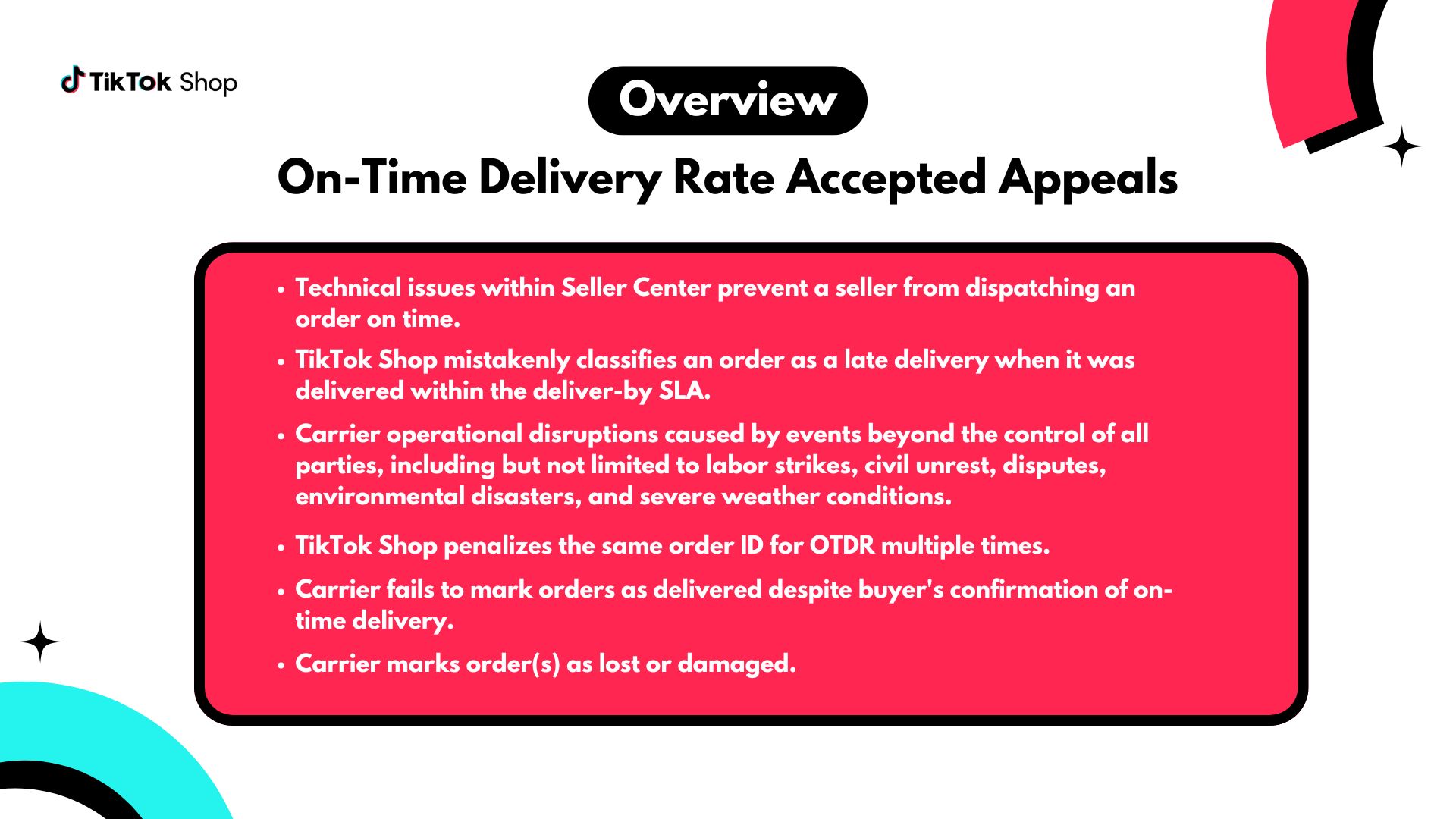 To appeal, sellers must provide valid evidence and documentation from their Logistic Service Providers (LSPs) to support their appeal claims.
 If an appeal is approved, any penalties will be removed from the shop's record and OTDR data will be corrected accordingly.
How to See Your On-Time Delivery Rate
You can view your OTDR in two different places in Seller Center:- Shop Performance Score page: shows you a 30-day OTDR
- Fulfillment Performance page: shows you a 7-day OTDR
Shop Performance Score (SPS)

- In Seller Center, click on Account health
- Click Shop Performance Score
- Scroll down to Improve these metrics to elevate your score and then click the Analyze performance in the Fulfillment & logistics section for the Metric diagnosis tool.
Fulfillment Performance Page
To see your Fulfillment Performance page in Seller Center, follow these steps:- Click on Orders
- Click on the Fulfillment Performance tab

How to See Deliver-By Dates for Orders
To see the deliver-by dates for each order, go to the Manage Orders page and click on the Shipped tab. The deliver-by dates for each order is in the Shipping Method column.

You can also look at the Order Details page for a specific order. The deliver-by date will be listed below the Warehouse name.

How to See Orders That Missed Their Deliver-By Date
Orders that miss their deliver-by date will be grouped under the Logistics Issue tab in Seller Center.
- Go to Seller Center
- Click on Manager Orders from the main menu
- Scroll down to the list of all orders

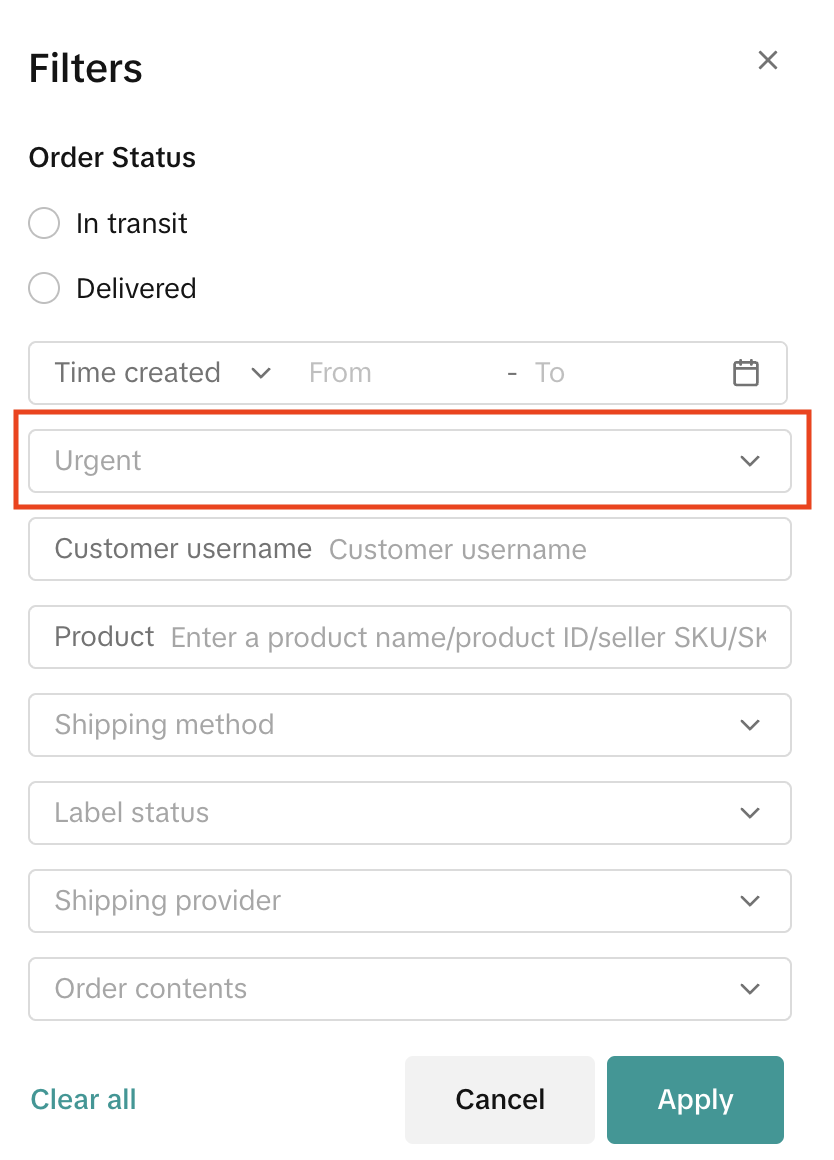
- Click on the Filter button and click on the Urgent dropdown
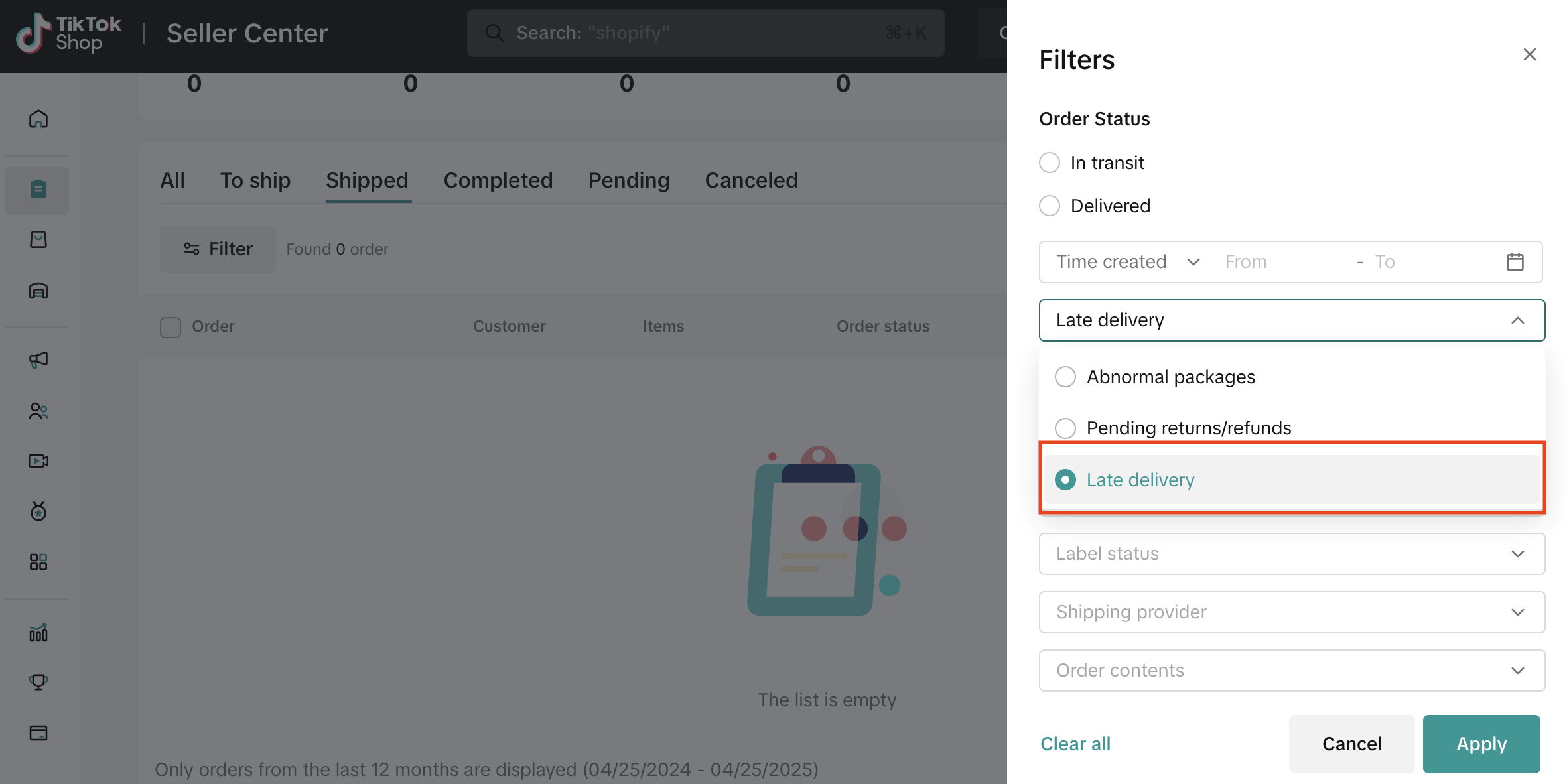
- Select Late Delivery and then Apply
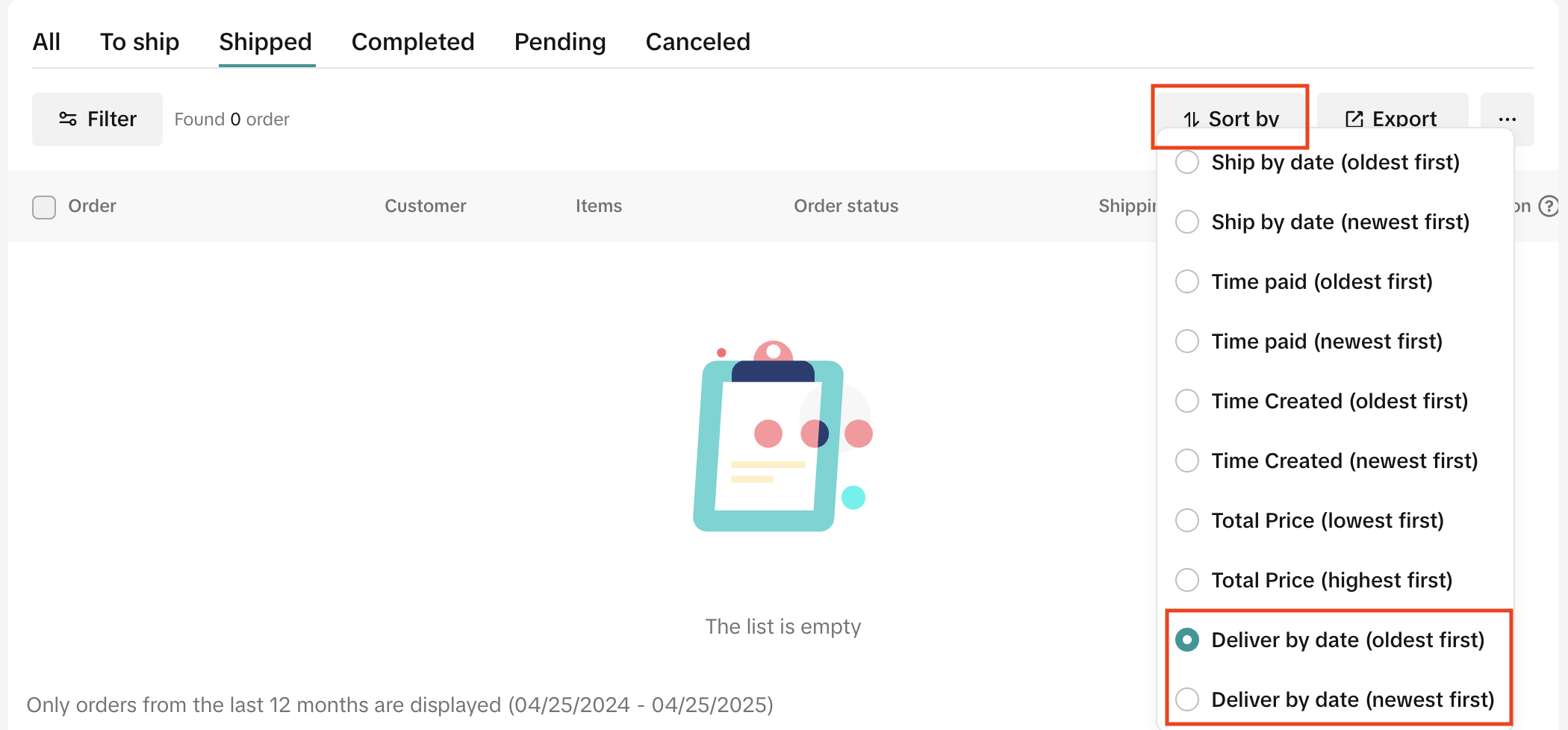
- Click on the Sort By button and select either Deliver-By date (oldest first) or Deliver-By date (newest first)
Best Practices for Maintaining a High On-Time Delivery Rate
- Choose a reliable logistics provider
- Use a TikTok Shop-supported logistics provider or select one of TikTok Shop logistics services. (See Frequently Asked Questions section for more information).
- For more information on seller shipping, refer to the Seller Shipping: Overview and Services article.
- Use accurate product categories
- Categorize products correctly during listing.
- Items listed as made-to-order, pre-order, backorder, or custom handling have a longer deliver-by SLA due to product-specific processing/handling times.
- Stay up-to-date on your order statuses
- Monitor their delivery status of dispatched orders consistently and follow up with the carriers as needed.
- Check out our Best Practices for Order Fulfillment to learn more fulfillment tips.
- Monitor your OTDR performance
- Check your Fulfillment Performance page or your Shop Performance Score page to see detailed OTDR information.
- Jump directly to your Seller Center pages by clicking on one of the following links:
- Keep an eye on your inventory
- Regularly monitor your listing inventory. Listed items should have an accurate inventory count and the appropriate stock levels for orders to be readily available for shipping.
- Don't inflate inventory counts beyond actual stock levels. Doing this can result in unmanageable order volumes, which lead to customer complaints and potential penalties.
- Check out the Order Handling Capacity feature
- Activate Order Handling Capacity and its associated deadline extension to receive extra days in the deliver-by SLA for orders exceeding their stated daily capacity.
- Consider the Fulfilled by TikTok (FBT) program
- Consider enrolling in Fulfilled by TikTok — as FBT orders are not subject to OTDR evaluation.
Frequently Asked Questions (FAQ)
Where can sellers see their OTDR data?
Check out the How to see your OTDR section for detailed instructions on where to find see your shop's OTDR.
I see that the minimum expectation is 80%, why does my Seller Performance Score display a benchmark of 90%?
Your seller performance score includes the benchmark of 90% for OTDR, which is the industry standard. Your store will not receive enforcements if you stay above 80%. However, we always want to help you provide the best customer experience possible and aiming for 90% OTDR is a good place start.
Where can a seller track their deliver-by dates?
Check out the How to see deliver-by dates for orders section in this article for detailed instructions on how to see delivery-by dates for individual orders.
Do business days include weekends and federal holidays?
No. Weekends (Saturday and Sunday) and federal holidays (as listed in the US Office of Personnel Management) are not considered business days.
When does the deliver-by SLA start counting days?
The deliver-by date is calculated starting from the next business day after the order is placed. Therefore, the deliver-by SLA countdown begins on the business day following the order placement date.
Does OTDR affect a shop's Account Health Rating (AHR) or Shop Performance Score (SPS)?
Yes. A shop's OTDR is included in Shop Performance Scores (SPS) calculations. This means that the higher your OTDR is, the more it can help to improve your shop's SPS.
What if my carrier's deliver-by SLA differs from TikTok Shop's?
TikTok Shop continually monitors the delivery SLAs of logistics providers to ensure that our deliver-by SLAs are aligned with industry standards.
You can also refer to our list of approved logistic providers listed in the Seller Shipping: Overview and Services guide to see if a different carrier would be a better fit.
You can also refer to our list of approved logistic providers listed in the Seller Shipping: Overview and Services guide to see if a different carrier would be a better fit.
What's the difference between OTDR and Late Dispatch Rate (LDR)?
Late Dispatch Rate (LDR) measures how efficiently sellers dispatch their orders, while On-Time Delivery Rate (OTDR) assesses whether orders are delivered within the expected timeframe.
For LDR, sellers can meet dispatch timeliness requirements by confirming orders and providing valid tracking numbers. The OTDR ensures sellers manage their order volume effectively and collaborate with their chosen carriers to deliver orders within expected timeframes.
For LDR, sellers can meet dispatch timeliness requirements by confirming orders and providing valid tracking numbers. The OTDR ensures sellers manage their order volume effectively and collaborate with their chosen carriers to deliver orders within expected timeframes.
What type of shipping services are accepted by TikTok Shop?
TikTok Shop shipping options include:
- Fulfilled by TikTok (FBT): FBT takes care of warehousing, packing, and shipping.
- TikTok Shipping: TikTok Shop offers Standard and Express Shipping services, with carriers like USPS, UPS, and FedEx, for negotiated carrier rates. Shipping labels will be printed directly from Seller Center.
- Seller Shipping: You select your own carrier and supply the shipping logistics to Seller Center.
Which logistics partners (shipping services) are supported by TikTok Shop?
For the most up-to-date list of all the logistics partners (shipping services) supported by TikTok Shop, refer to the Seller Shipping: Overview and Services article.
What happens if an order is lost or damaged by a logistics carrier (shipping service)?
Unfortunately, TikTok cannot assist with resolving any logistics issues for orders shipped outside of TikTok Shipping. Please contact your chosen carrier directly to resolve any issues. Check out our Recommendations to prevent lost or damaged packages for guidance on best practices.
To learn more about accepted appeals for OTDR enforcements, please refer to the Appeals section.
To learn more about accepted appeals for OTDR enforcements, please refer to the Appeals section.
What should I do if I can't dispatch a product due to unexpected events, such as weather disruptions?
During widespread disruptions, the standard Service Level Agreements (SLA) in our Fulfillment Policy may be temporarily extended. TikTok Shop is unable to notify sellers in all instances, especially when extensions are localized to specific regions. You can check SLA extensions for your orders by following these steps:
Step 1: See the latest SLA for your order(s):
You may be asked to include documentation that includes but is not limited to:
You may also submit an appeal for violations, related to impacted orders, through the Shop Performance Score page.
🔎 Refer to our guide on How to Appeal Your Shop Performance Score (SPS) for detailed steps.
Orders that have not been impacted must follow the standard Fulfillment SLA in our Fulfillment Policy.
Step 1: See the latest SLA for your order(s):
- Go to the Manage Orders page in Seller Center.
- Click on the To Ship tab. The dispatch deadline for each order is in the Shipping Method column.

- Alternatively, select an Order ID to view the Order Details. The dispatch SLA, auto-cancellation SLA, and deliver-by SLA should be visible.

You may be asked to include documentation that includes but is not limited to:
- your carrier or logistics service provider's delay notice (with the name, warehouse address, and impact period)
- proof of an attempted pick-up and/or drop-off,
- the impacted order IDs with an enforcement action
You may also submit an appeal for violations, related to impacted orders, through the Shop Performance Score page.
🔎 Refer to our guide on How to Appeal Your Shop Performance Score (SPS) for detailed steps.
Orders that have not been impacted must follow the standard Fulfillment SLA in our Fulfillment Policy.