

How To Remove Invalid Or Incorrect Customer Reviews
02/26/2026
Key Points:
- TikTok Shop does not tolerate customer reviews that are designed to mislead or manipulate other platform users.
- Report any invalid or incorrect customer reviews via the Product Ratings page in Seller Center.
What Constitutes An Invalid Or Incorrect Customer Review?
- Multiple malicious reviews
- Reviews from a single customer who made repeat purchases and left a negative review each time
- A single customer who posts 1-2 star reviews on multiple shops and none of their reviews has any content
- Coercive reviews - Review that a customer offers to remove in exchange for free products, samples, refunds, or other services
- Competitor reviews - Review left by a competing seller to attack your shop or product
- Traffic diversion reviews - Review that encourages potential customers to buy the product on other platforms instead of your shop
- Erroneous reviews - Reviews that are objectively wrong
For example, a review of a product you don't even sell, or a review that shows the customer misunderstood the product's purpose or how it was meant to be used.
- Invalid reviews - Reviews that are spam or irrelevant to the product the customer bought
How To Report An Invalid Or Incorrect Customer Review?
IMPORTANT: This feature is currently only available for select sellers. If you are unable to report customer reviews using the feature described below, you can do so by submitting a ticket via the Help Center.Step 1: Head over to the Product Ratings page in Seller Center.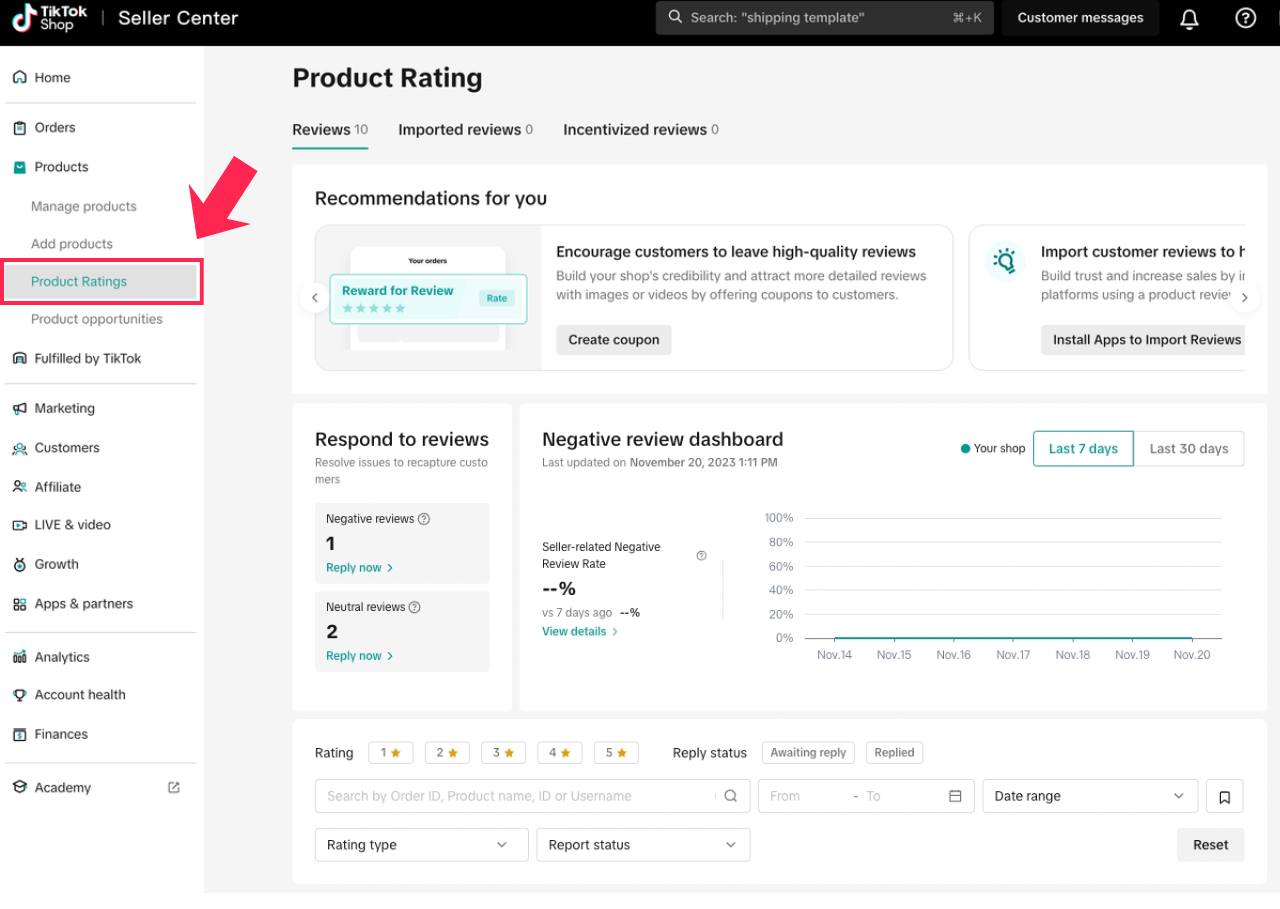

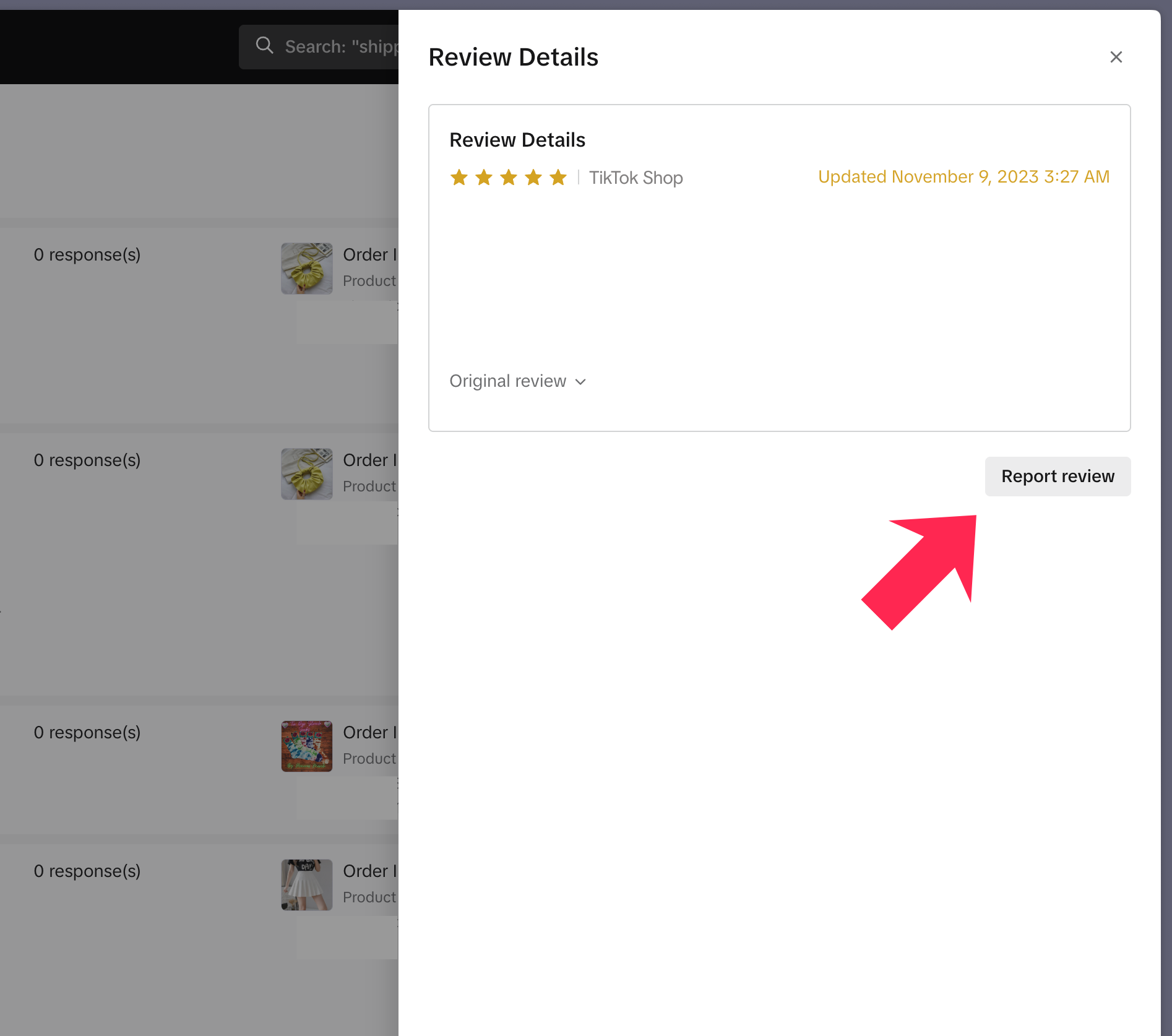
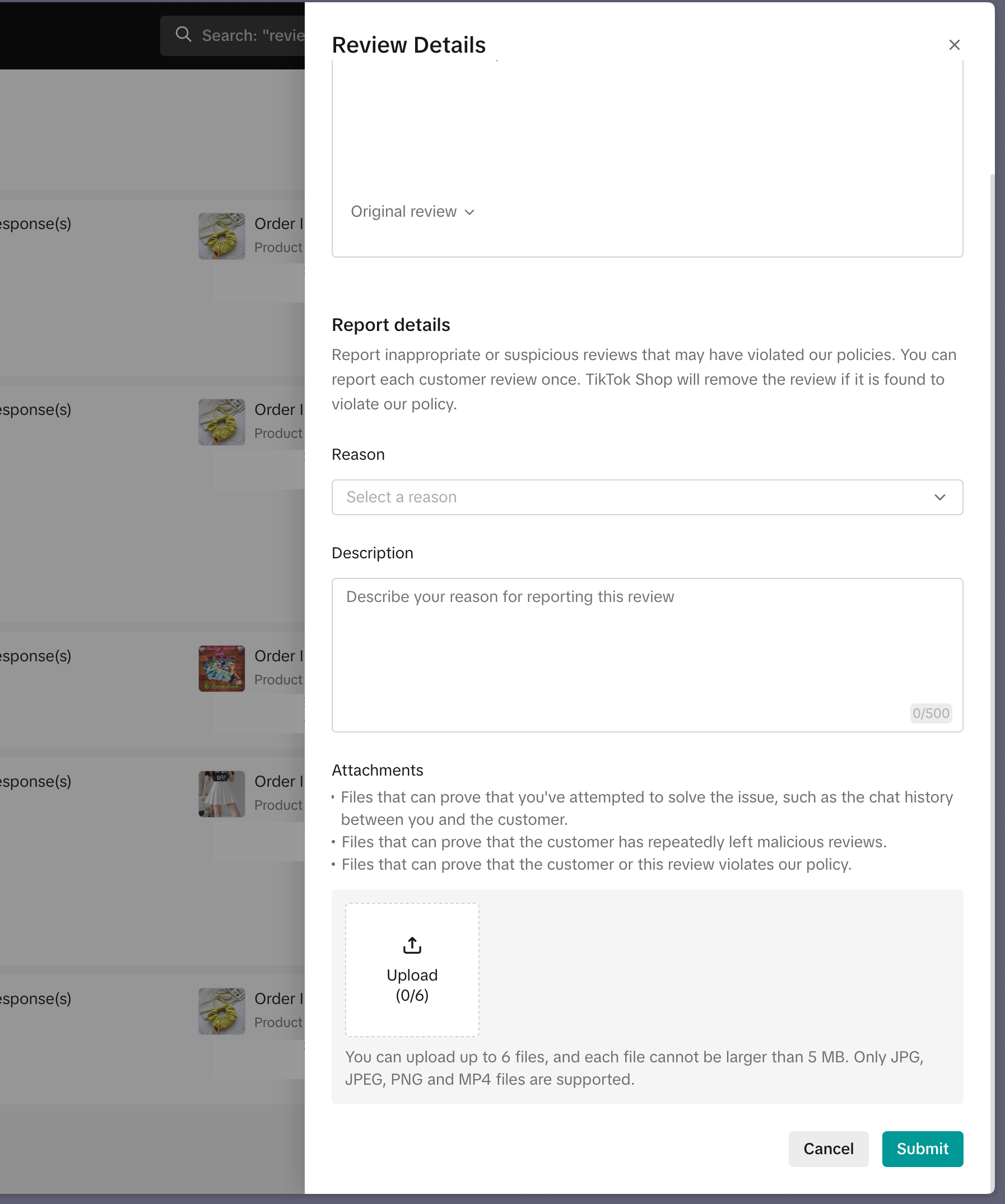
❗Submitting a report does not guarantee the review will be removed. It only ensures that your report will be reviewed. We will then decide, at our discretion, whether to approve your report.
Best Practices When Reporting Customer Reviews
The supporting information you need to submit depends on the type of review in question.What To Submit When Reporting Multiple Malicious Reviews
Customers who post multiple malicious reviews typically exhibit bad intent. When reporting these reviews, upload the following evidence:- Screenshots of your chat with the customer to prove their bad intent. These should show that they never replied to your messages or refused to engage with you in good faith. OR
- Screenshots of the relevant product listing to prove the customer's review has no relevance to the product.
An example would be a customer leaving a negative review that the protein powder you sell did not help with their weight loss. Upload a screenshot of the product listing to prove you emphasized that the protein powder is only a supplement, and does not replace the necessity for a healthy, balanced diet and regular exercise.
What To Submit When Reporting Competitor Reviews
The key evidence is proof that the review was posted or engineered by a competing seller. When reporting these reviews, upload the following evidence:- Evidence proving that the customer who posted the review is connected to a competing seller. OR
An example would be a screenshot of the order details showing that the customer's delivery address is the same as a competing seller's warehouse or business address.
- Screenshots of review bombing on similar products sold by other sellers in your category. OR
- Screenshots of your Manage Orders page in Seller Center showing that a large number of orders were made for the same product within a very short period, and all orders received negative reviews.
Frequently Asked Questions (FAQ)
Is there a time limit for reporting reviews?
- Yes, you must report a review within 30 days of it being posted.
How many times can I report a review?
- You can only report a review once.
Is there a limit on the number of reviews I can report?
- We want to protect our sellers from malicious or abusive customers, so there is no limit on the number of reviews they can report. That said, if we suspect that a seller is misusing this tool, the seller will be blocked from submitting reports.
You may also be interested in

Help Center Chat Assistant
Why use Help Center Chat Assistant? The Chat Assistant is designed to make managing your TikTok Shop…

TikTok for Shopify: Enable Third Party Cookies
In this resource, we'll cover essential steps to ensure your browser settings are optimized for smoo…

TikTok for Shopify: How to Disconnect TikTok Shop
Overview This guide provides step-by-step instructions for sellers on how to disconnect their TikTok…

TikTok for Shopify - Switching from TikTok Shipping to Selle…
TikTok Shipping All new and existing TikTok Sellers that onboard onto the TikTok for Shopify App,…
TikTok for Shopify: Frequently Asked Questions (FAQs)
About Set-Up and Log-In Q: I'm having issues connecting my Shopify store with TikTok Shop. I keep ge…