

How to use Customer Messages
12/11/2025
Summary
What messaging tools does TikTok Shop provide to sellers for managing buyer communication throughout the shopping journey?
- TikTok Shop offers a comprehensive Customer Messages feature with an inbox, filters, chat window, buyer details panel, and message tools to handle pre-purchase questions, order issues, and post-sale support, enhancing personalized customer service.
How can sellers access and manage customer messages within TikTok Shop Seller Center?
- Sellers can access messages via three paths: the Customer Messages button on the homepage, the Manage Returns page (for orders within 60 days or ongoing disputes), and the Manage Orders page (same conditions apply), enabling timely buyer engagement.
What automation and AI features are available to help sellers maintain high response rates and improve customer satisfaction?
- Sellers can enable a chatbot to cover weekends and maintain 24-hour response rates, and AI Reply Recommendations provide real-time suggested responses to speed up replies and ensure consistent, high-quality communication.
What customer insights and performance metrics does TikTok Shop provide to help sellers prioritize and improve their messaging?
- The platform offers detailed buyer insights (e.g., repeat contact, sentiment, order history) and performance metrics like 24h response rate and satisfaction rate, helping sellers prioritize urgent chats and monitor service quality effectively.
What best practices and message management features should sellers follow to optimize their customer communication on TikTok Shop?
- Sellers should reply within 24 hours, close resolved chats, use tags and filters to prioritize, transfer chats responsibly, and monitor due/overdue chats to avoid timeouts; inactive chats auto-close after 7 days to keep inbox manageable.
Feature Overview
TikTok Shop offers a suite of messaging tools that allow sellers to communicate with buyers across every stage of the shopping journey, from pre-purchase questions to post-sale support. These tools empower customer service teams to deliver timely, helpful, and personalized support, building stronger relationships and encouraging repeat business.
How to Access This Feature
There are three ways to access Customer Messages from Seller Center:- Top Navigation: On the Seller Center homepage, click Customer messages located in the top-right corner.

- Manage Returns Page: Go to Orders on the left-hand navigation bar, click Manage returns, then click the chat icon. You can start a conversation if:
- The order was created within the last 60 days
- There is an ongoing return/dispute

- Manage Orders Page: Go to Orders on the left-hand navigation bar, click Manage orders, click into the order, and then click the chat icon. You can start a conversation if:
- The order was created within the last 60 days
- There is an ongoing return/dispute


How it Works
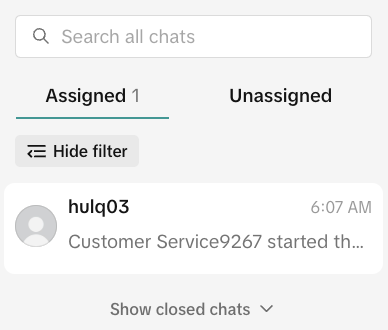
The Customer Messages interface includes the following sections:- Inbox Panel (Assigned / Unassigned)
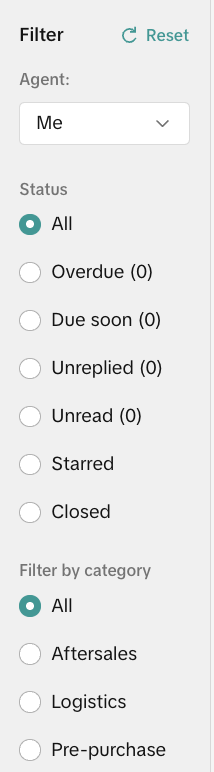
- Filters (Status, Category, Agent)
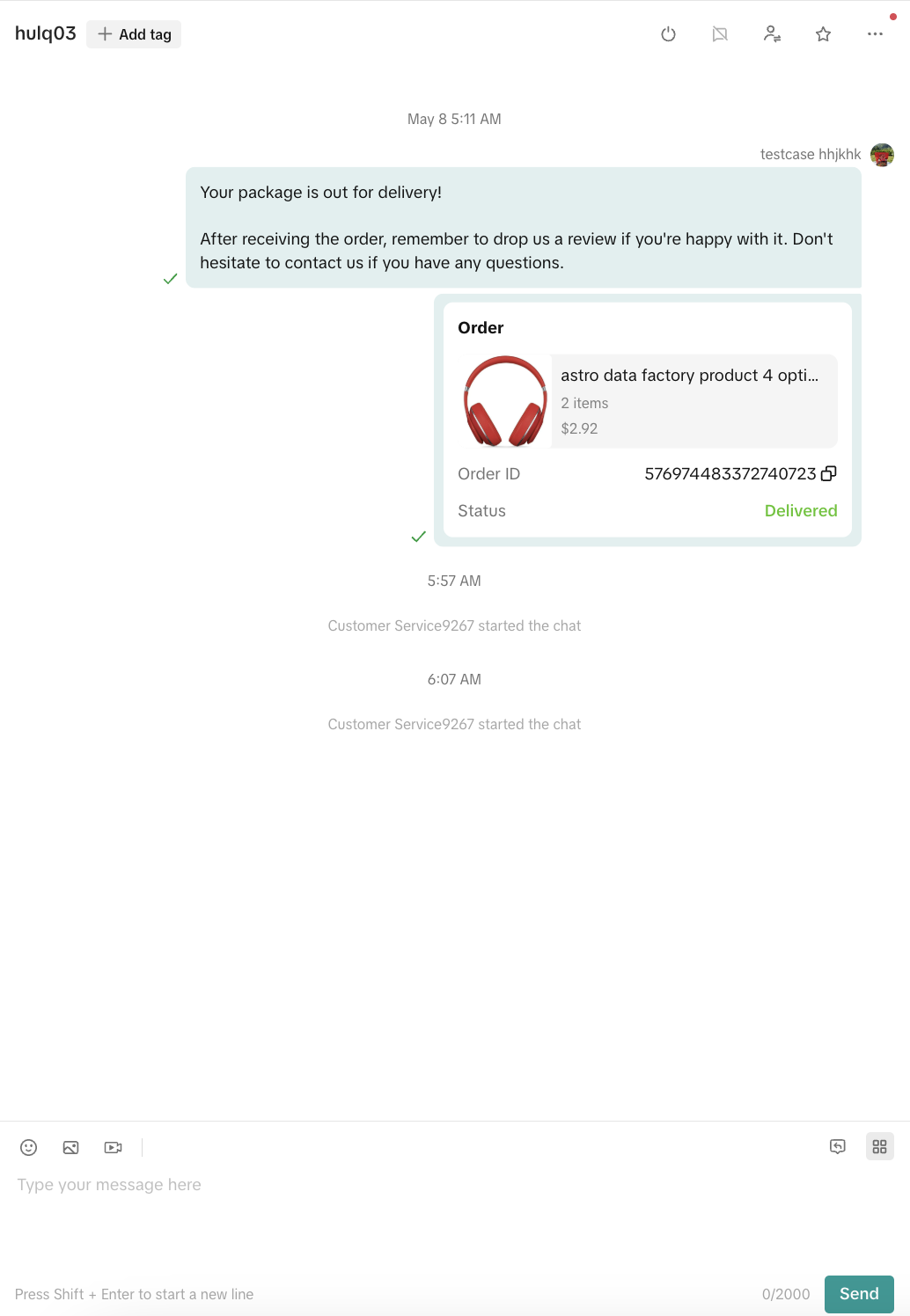
- Chat Window
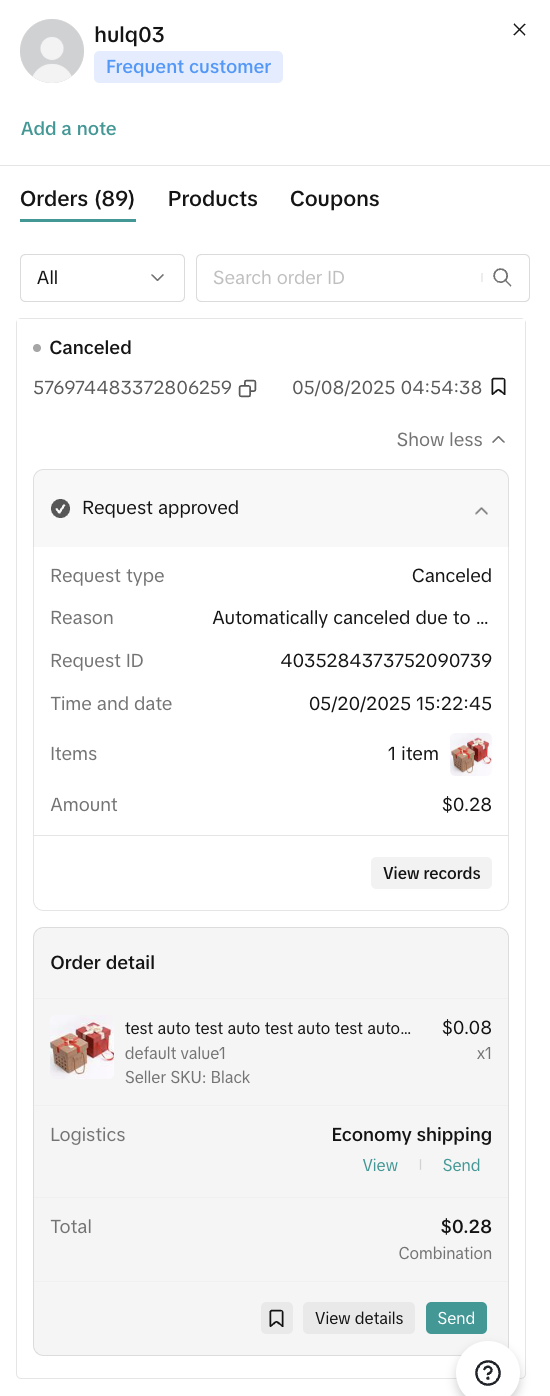
- Buyer Details Panel
- Message Tools and Actions

📥 Inbox Panel
The inbox is split into two main sections:
|  |
🗂️ Filters
✅ Status FiltersFilter chats by their urgency or progress:
🏷️ Category FiltersSystem-generated tags help you identify buyer intent
|  |
💬 Chat Window
This is where conversations between customer service agents and buyers take place. ⚙️ Chat Features:
🔨 Message Tools:
|  |
👤 Buyer Details Panel
This section offers key information to support personalized conversations.🛍️ Includes:
⏭️ Quick Actions:
|  |
🧰 Message Tools and Actions
⚙️ Agent Settings
Click on your avatar (top-left) to:- Toggle "Accept auto-assign chats" (when active, new chats will automatically be assigned)
- Edit your avatar and nickname (Note: avatar changes are subject to platform review)
🏖️ Need to take a weekend off? Just turn on our Chatbot!
Keep your 24hr response rate safe over the weekend by turning on all 3 chat activities and let the chatbot handle customer questions for you. You can reply until Monday 12 PM while still maintaining your customer satisfaction score (CSAT). Here are the steps:
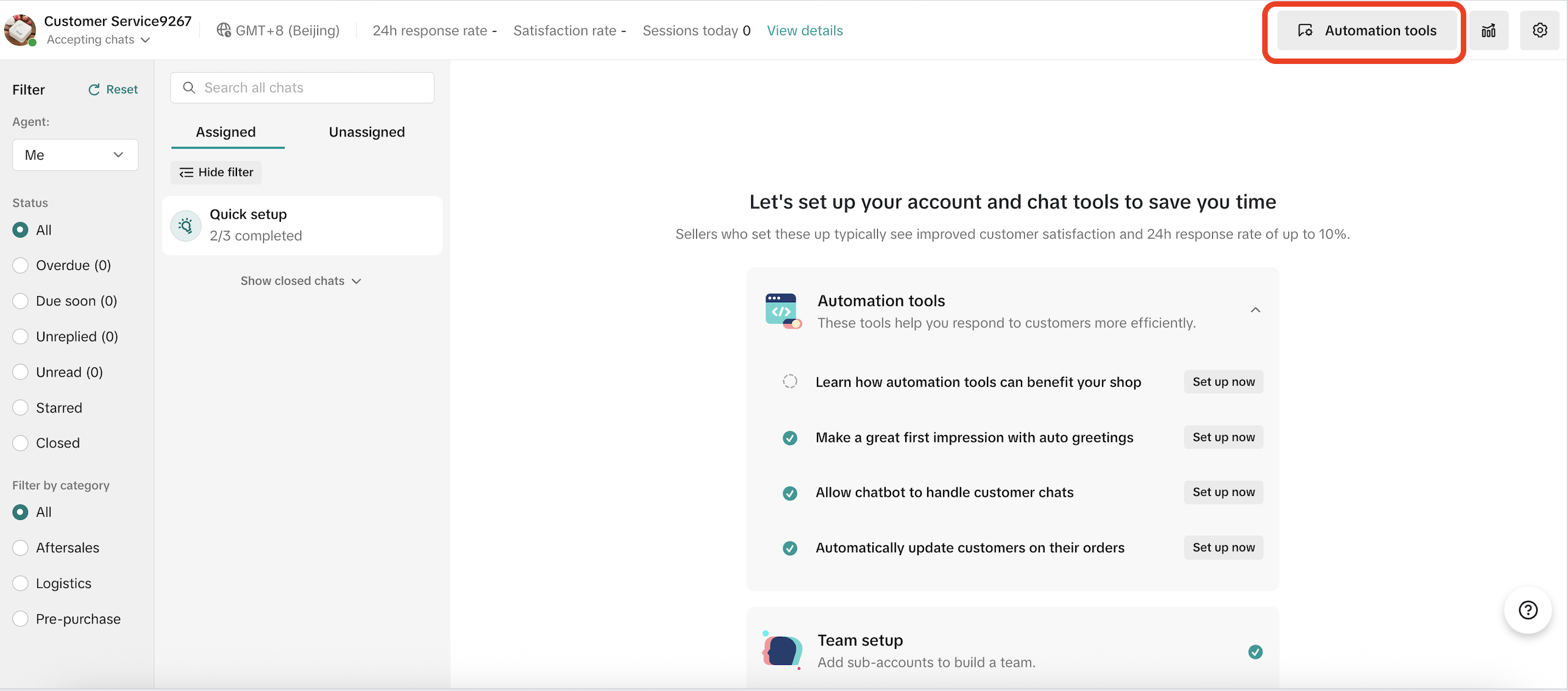
Step 1. Go to Seller Center > Customer Messages > Automation Tools
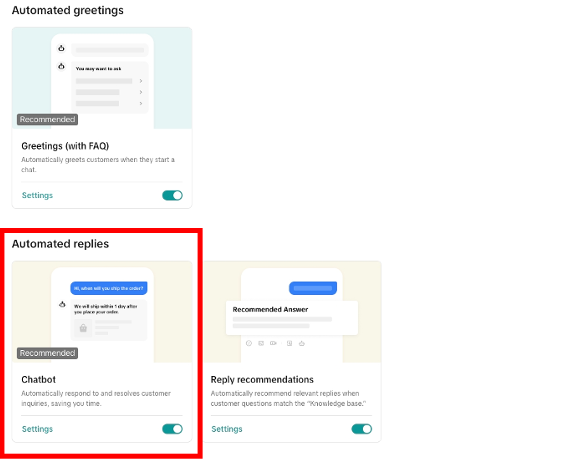
 Step 2: Toggle on Chatbot feature and Click Settings
 Step 3: Click All 3 activities to ensure you are eligible for 24-Hour response rate and enjoy your weekend!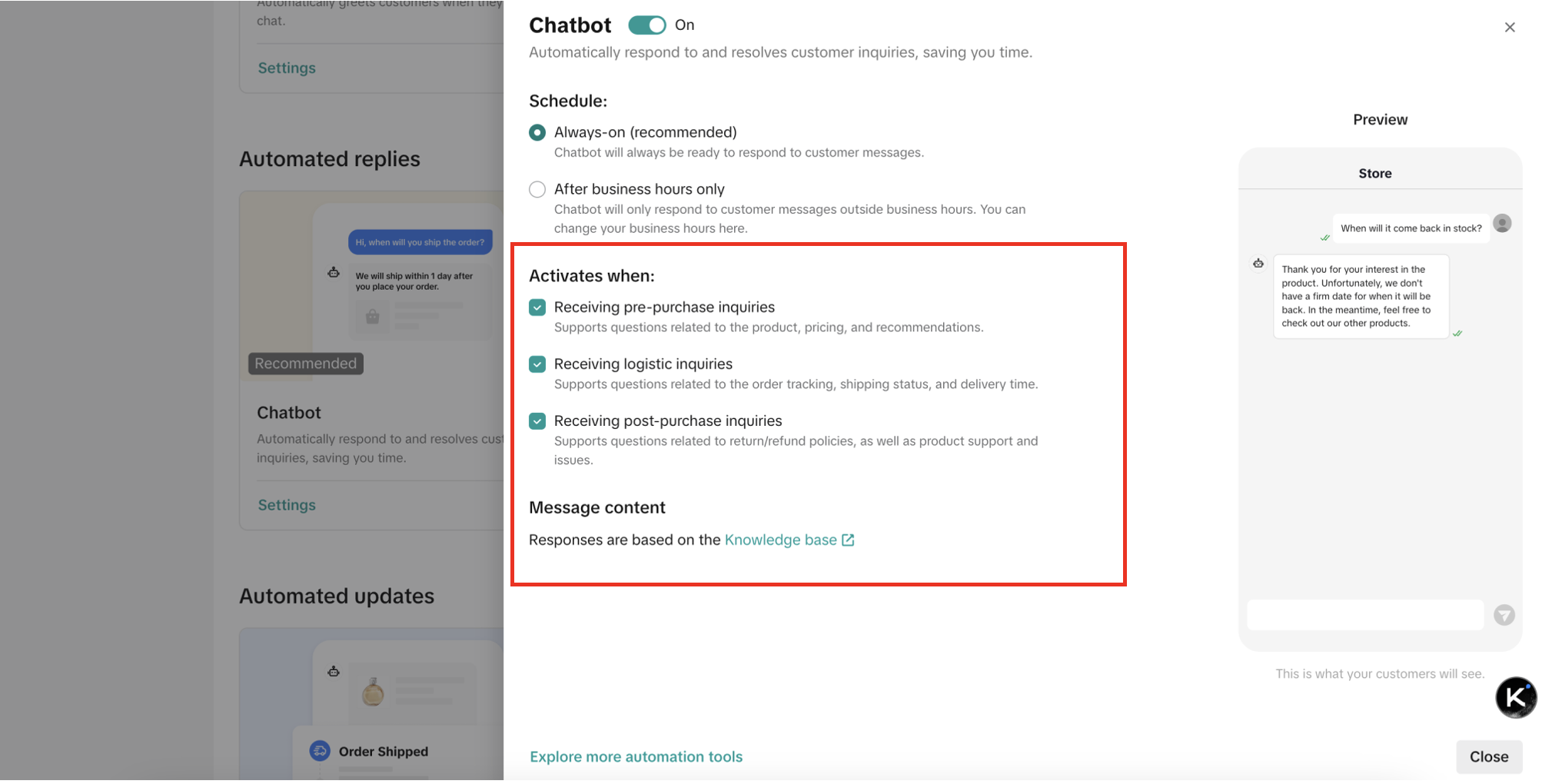
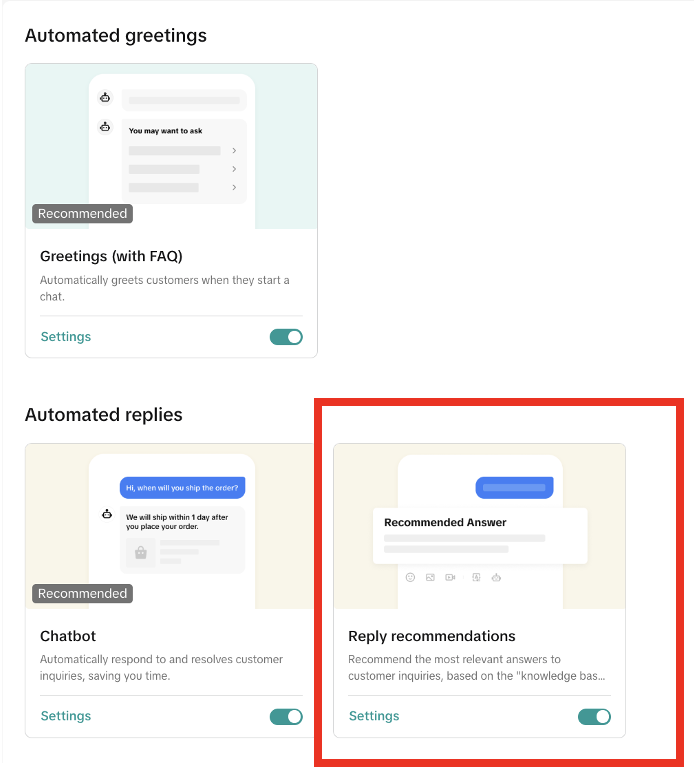
🤖 AI Reply Recommendations
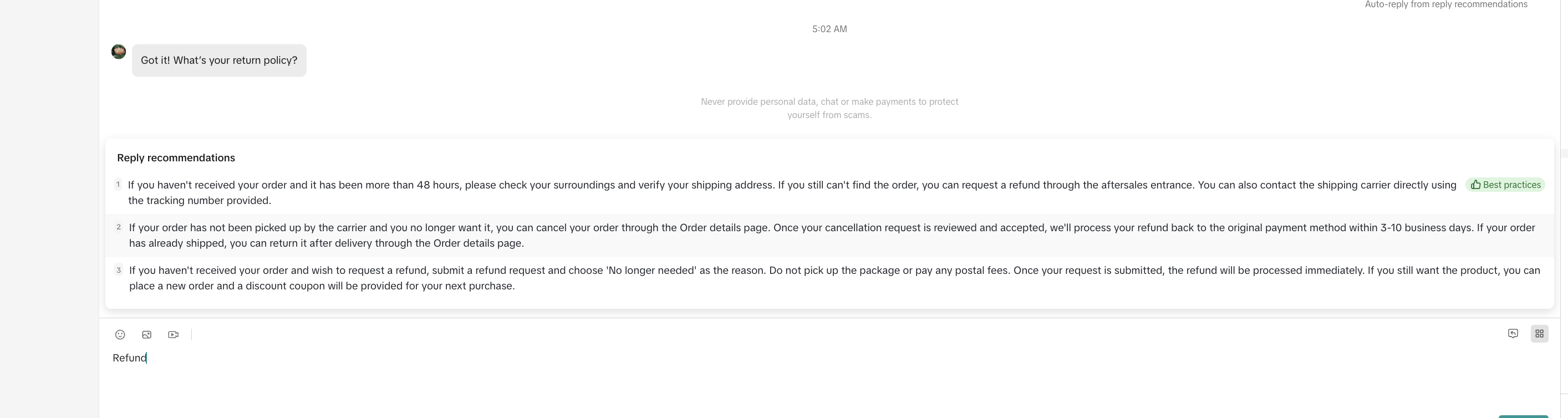
During a chat, the system provides real-time reply suggestions based on the customer’s message.These automated suggestions help agents:
- Respond faster with clear, high-quality answers
- Maintain consistency across conversations
- Improve overall customer satisfaction
📊 Customer Insights
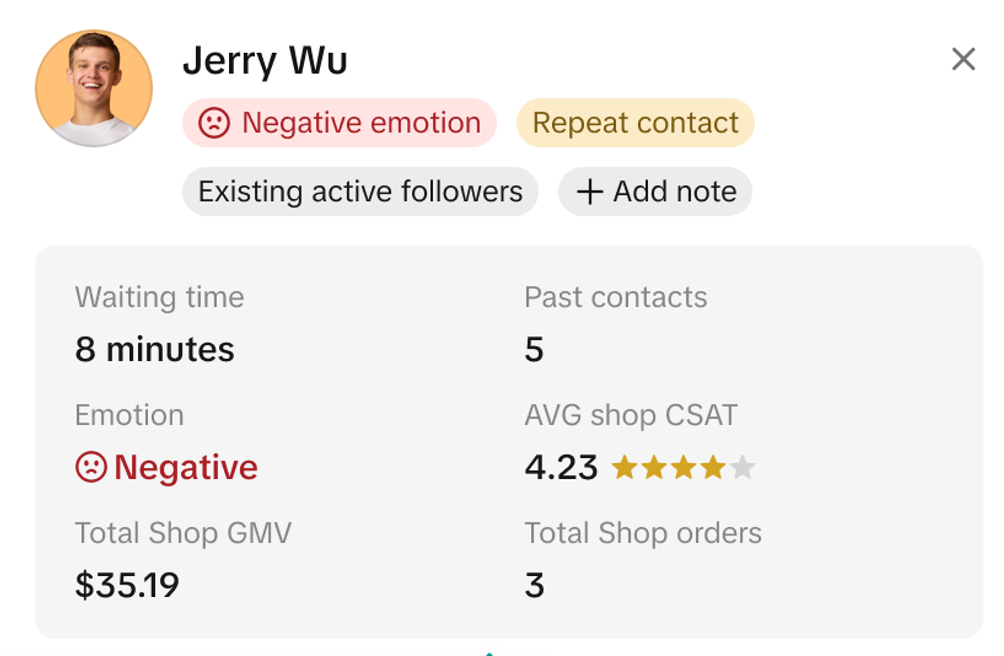 The workbench displays valuable context about each customer to support personalized responses. Key insights include:
- Repeat Contact: Has more than 1 chat for the same order
- Sentiment: System review of customer messages to show if tone is Positive, Neutral, or Negative
- Frequent Customer: Placed more than 1 order in the last 90 days
- Repeating Customer: Has purchased from your shop again within the last 90 days
- Recent Customer: Made their first purchase within the last 90 days
- New Follower: Started following your shop in the past 30 days
- Existing Follower: Follows your shop and engaged through LIVE, short videos, or product cards in the past 30 days
- Potential Customer: Favorited your items or added your items into their carts in the last 30 days but haven't completed their purchase
- Potential LIVE Customer: Interacted with your LIVE or shown intent to order from it
- Lapsed Customer: Purchased in the last year but not in the past 30 days
- Waiting Time: Time since your last reply
- Past Chats: Number of conversations in the last 30 days (excluding small talk)
- Average CSAT: Average customer satisfaction rating from past chats in the last 30 days
- Total Orders: Total number of orders placed in your shop
- Total GMV: Total gross merchandise value generated by the customer to your shop
⭐ High Priority Folder
This folder organizes chats that require special attention. Examples include:- Frequent shoppers or high-value orders
- Customers showing negative sentiment
- Chats flagged as urgent by the system or manually by agents
📊 Performance Metrics
Displayed at the top of the page for quick visibility:- 24h Response Rate: % of buyer chats replied to within 24 hours
- Satisfaction Rate: % of sessions rated "Satisfied" or "Very Satisfied"
- Sessions Today: Number of conversations assigned to the agent today
📥 Automated Updates
 To keep customers informed at key points in the order journey, automated messages are sent when the following events occur:
- Order confirmation (coming soon to all sellers)
- Logistics issue (coming soon to all sellers)
- Order signed (coming soon to all sellers)
- Order cancellation
- Order out for delivery
- Order shipped
- Order delayed
🌟 Best Practices
To maintain high service quality and strong buyer relationships:- Always reply within 24 hours to maintain performance standards
- End chats after resolution to keep your queue manageable
- Use tags and filters to prioritize high-impact messages
- Transfer chats responsibly to avoid leaving buyers unattended
- Monitor "Due Soon" and "Overdue" to prevent timeouts
You may also be interested in

How to Enable Customer Service Chat Assistant
Why use chat assistant? During off-work hours of human customer service agents (such as at night, h…

How to Maximize Customer Messages
Are you overwhelmed with hundreds of chats you get every day? Do you feel you don't know how all of…
How to Navigate Customer Service Workbench
Use the workbench to improve the efficiency Communicating with customers is a necessary condition fo…

How to Use Saved Replies
Save frequently used replies to respond to messages faster The admin can configure commonly used rep…
March 2024 Monthly Product Innovation
Every month, we introduce new products and features designed to simplify store management, boost sal…

Your Guide To The 24-Hour Response Rate Metric
Prompt responses = happy customers = more sales! The 24-Hour Response Rate aims to help you build tr…
Zendesk for TikTok Shop
Zendesk for TikTok Shop overview Zendesk is the all-in-one customer service solution for your growin…