

How to Enable Customer Service Chat Assistant
10/02/2025
Summary
What are the main benefits of using the TikTok Shop chat assistant for sellers?
- It provides automatic replies during off-hours and high-volume periods, reducing human agent workload and response times.
- Quick, accurate responses increase customer satisfaction, boost conversion rates, and encourage repeat purchases, enhancing overall shop performance.
What are the two types of chat assistant tools available and when should sellers use each?
- Reply recommendations assist human agents by suggesting or auto-sending answers during busy hours, ideal for live events or campaigns with many inquiries.
- Chatbot operates when no human agents are online or all are busy, handling customer queries during off-hours like nights and holidays.
What prerequisites must sellers fulfill to effectively use the chat assistant?
- Maintain an accurate, detailed FAQ database tailored to their shop’s common questions and customer service experience.
- The chat assistant relies on this database to identify customer intent and provide relevant automated replies.
How can sellers enable and configure reply recommendations and what are the key features?
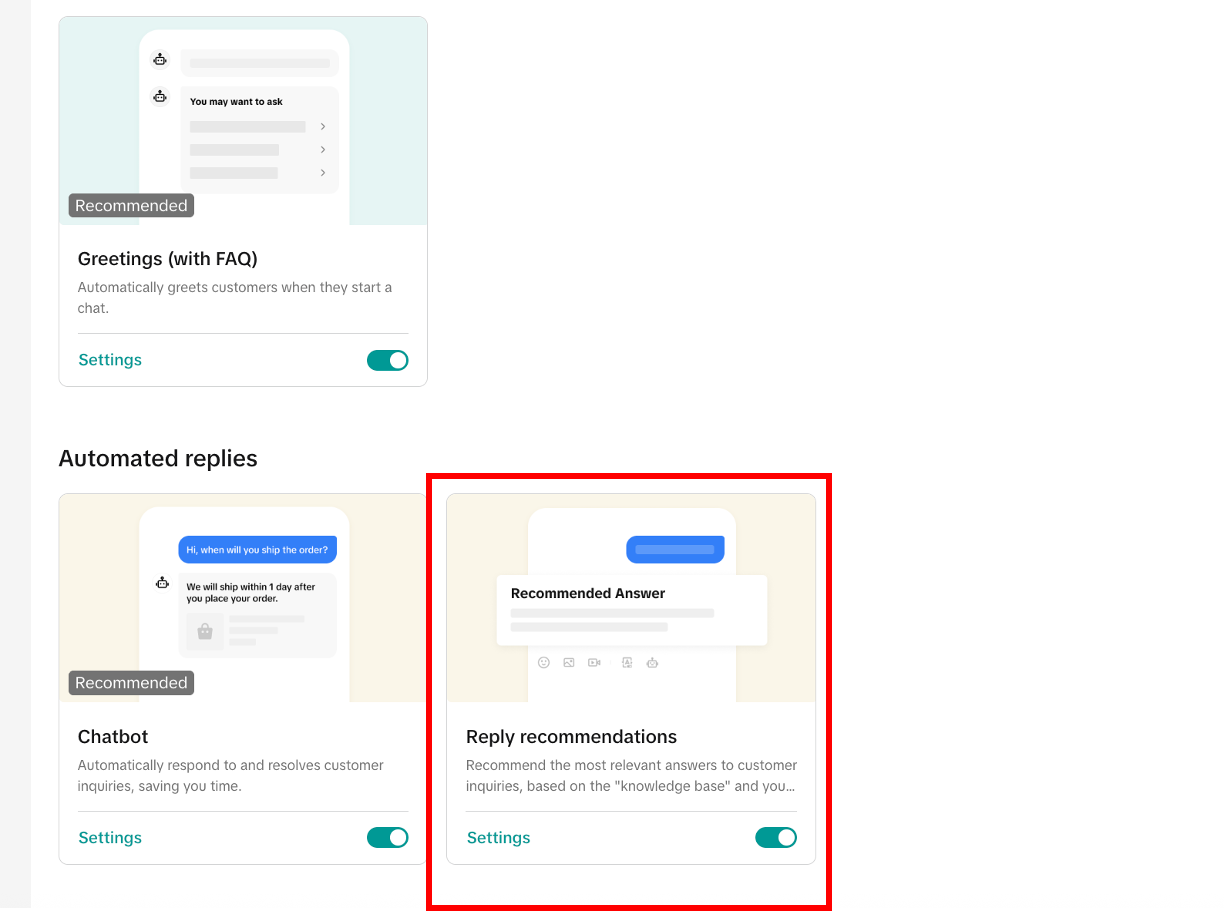
- Main or sub-account admins enable it via Automation Tools; agents can choose auto-send or manual send of recommended replies.
- Auto-send replies reduce agent workload by automatically responding to multiple chats; agents can modify replies before sending if needed.
How does the chatbot function and what configuration options do sellers have?
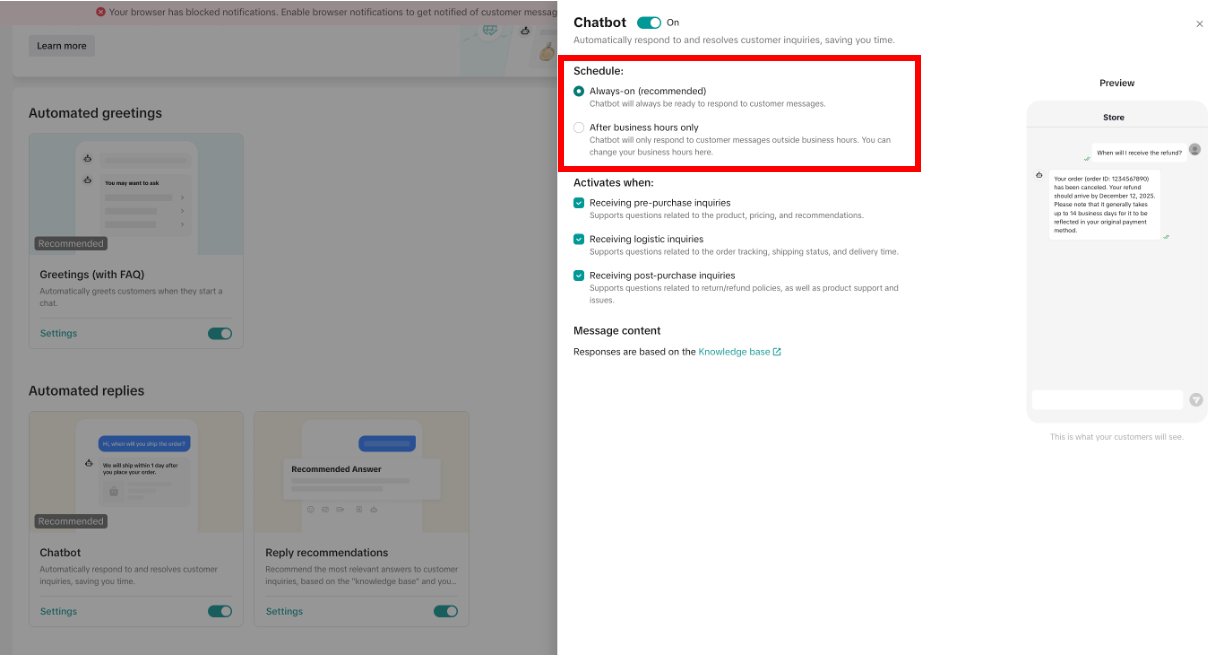
- Enabled via Automation Tools, it can run 24/7 (Always-on) or only during off-hours, automatically replying based on FAQ matches when agents are offline or busy.
- When unable to answer, it sends a polite fallback message and escalates chats to human agents, ensuring no inquiry is ignored.
Why use chat assistant?
- During off-work hours of human customer service agents (such as at night, holidays, etc.), the chat assistant can automatically reply to customers.
- During the working hours of human customer service agents, when there are too many enquiries and it is difficult for agents to respond quickly, the chat assistant can automatically reply to some enquiries, which reduces the pressure of human agents.
- On one hand, quick responses to customer enquiries can resolve any doubts, thereby increasing their willingness to buy and this increases conversion rate and GMV. On the other hand, it can improve customers' satisfaction with shop service. Customers who are satisfied with customer service may have a high probability of purchasing products in the shop again.

What is chat assistant?
Type 1: Reply recommendations
- Sellers have the option to enable/disable it. When a human customer service agent is online, it can recommend an answer to the human agent or automatically send the recommended answer to the customers directly.
- Applicable scenarios: It can be used for the scenario that the human agent is online, but the number of enquiries is large, and the human response is slow. For example, during LIVE and major campaigns, it can help human agent reply to high-frequency questions and reduce the waiting time of customers.
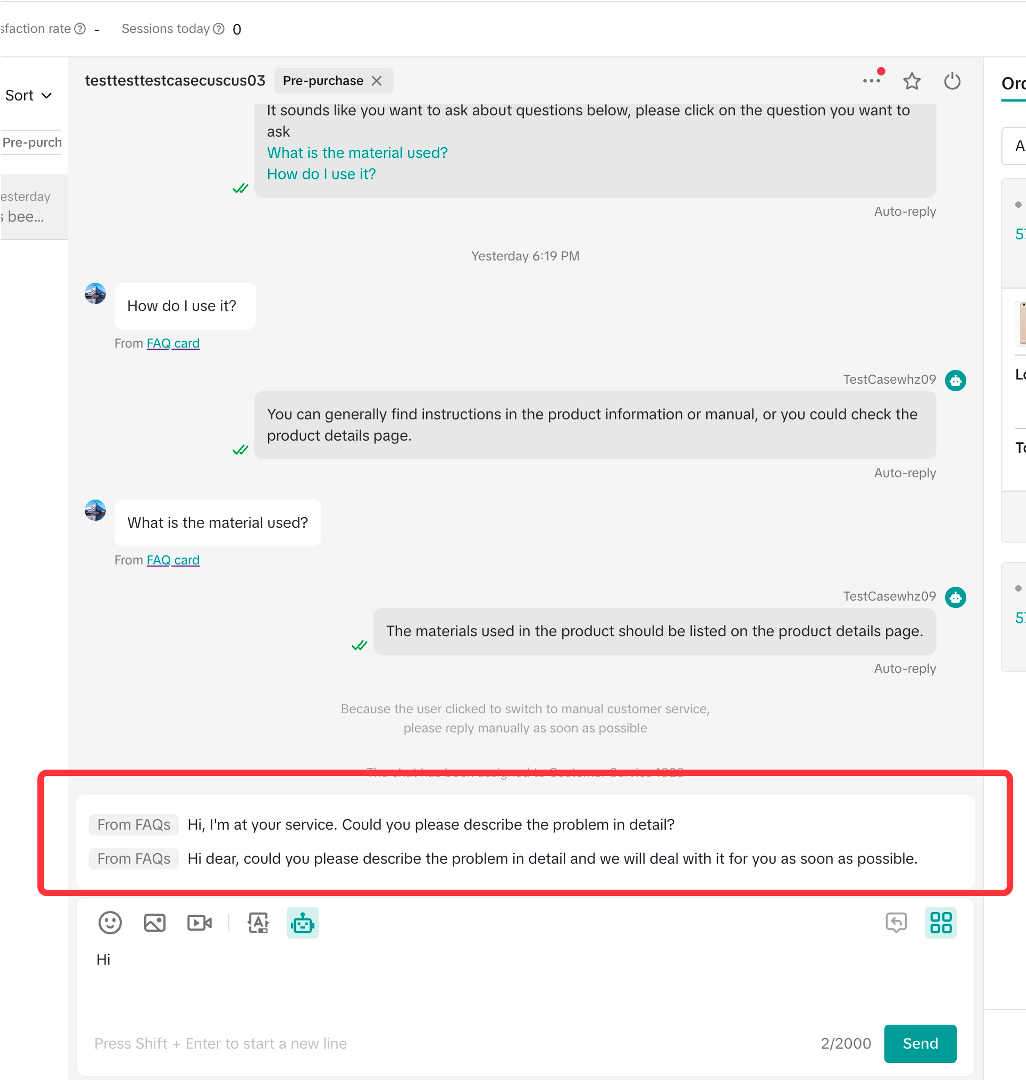
From FAQ: Recommend based on FAQ settings
TikTok policy: Recommend based on help center articles
Saved reply: Recommend based on agent's personally former saved replies
Type 2: Chat bot
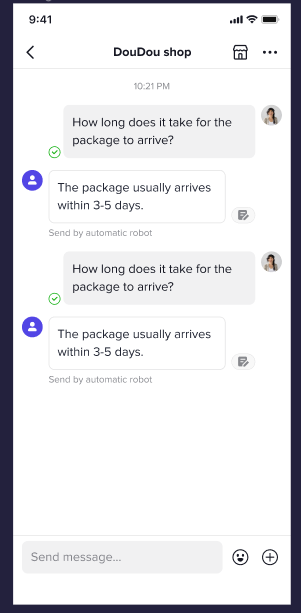
- Sellers choose to enable it or not. When the human agent is not online, or when all human agent receptions are saturated and customers are queuing, the chat bot can help reply to customer messages.
- Applicable scenarios: It can be used to handle customer enquiries during off-work hours of human agents, such as nights, weekends, holidays, etc.
Prerequisites for using chat assistant
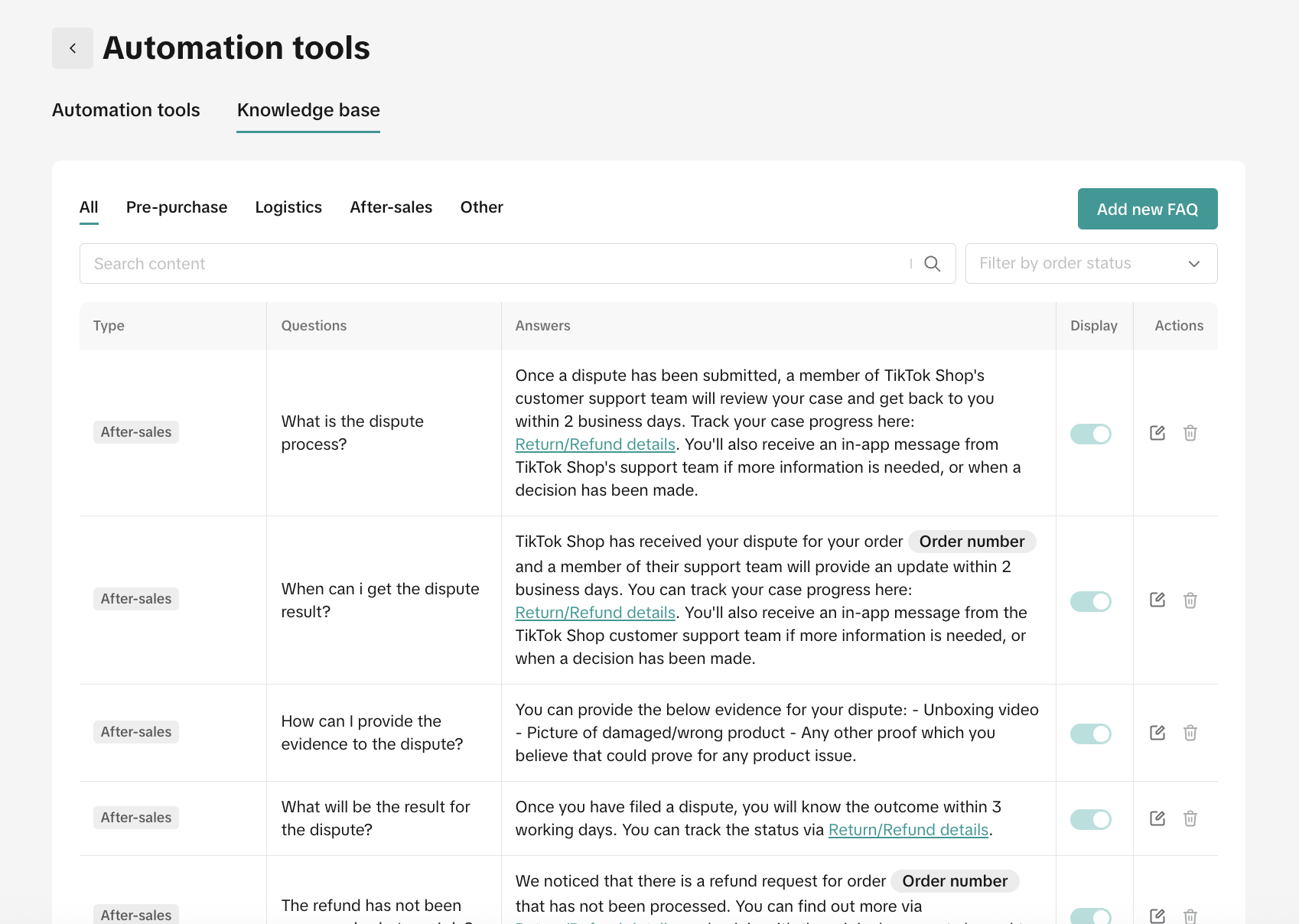
- Question: Is the shipping free?
- Answer: The shipping cost is shown on the product details page.
How to set recommended answer?
3.1 How to enable it
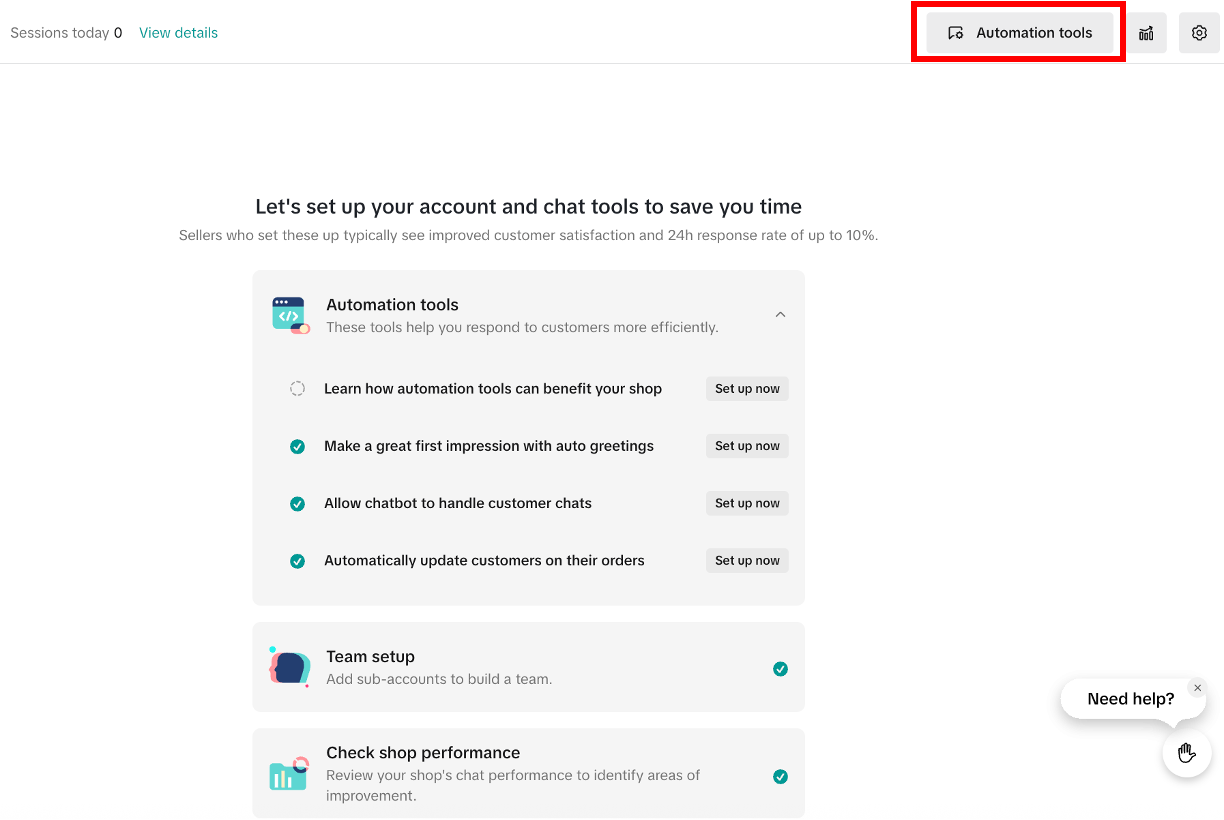
3.2 Effect achieved
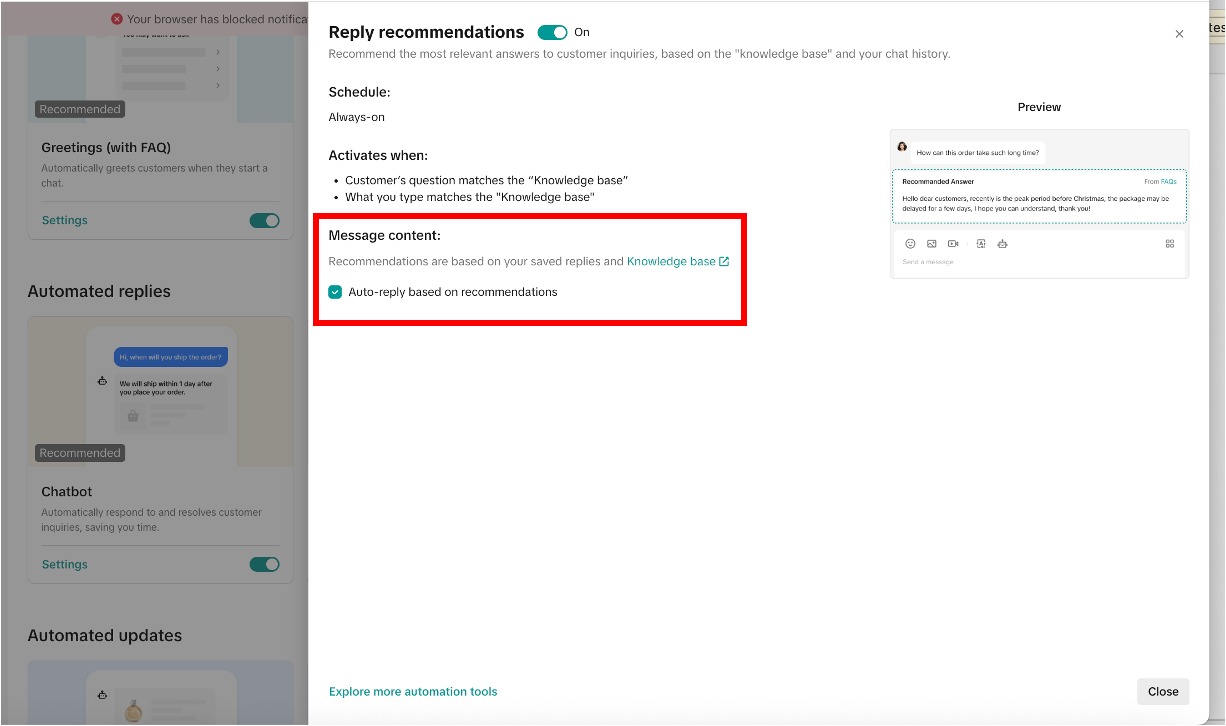 If you turn on [Reply recommendations] but do not select [Auto-reply based on recommendations], when the human agent is online, and when he is replying to a chat, the chat assistant will prompt the recommended reply to the agent based on (1) the content of the message sent by the customer or (2) the keyword entered by the human agent. If there is a suitable answer, the human agent can directly click the "Send" button to send the answer to customers with one click. If the recommended reply needs to be modified a little, you can click the reply, and the reply will be automatically moved to the input box, then the human agent can modify it before sending it.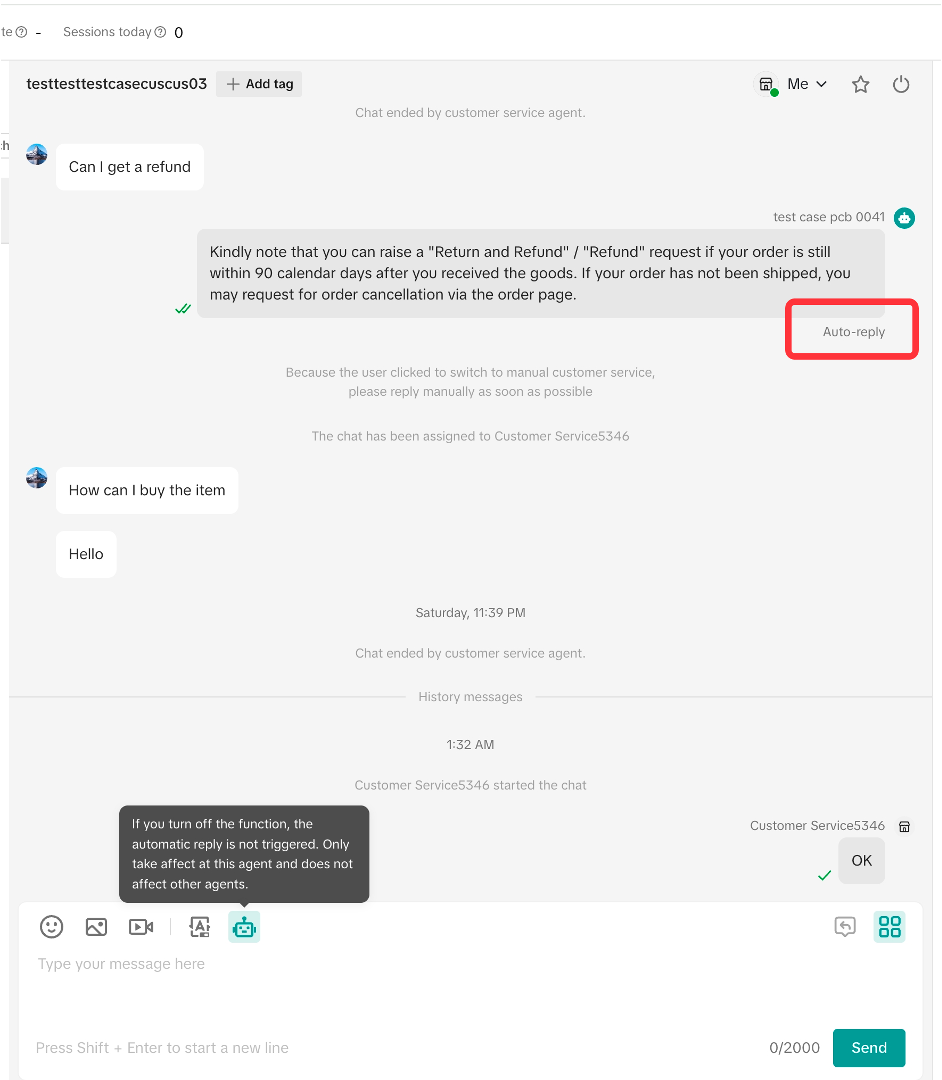
- When the human agent switches to this chat window, the chat assistant will stop sending automatically.
- For the chat with reply recommendations sending automatically, if the customer does not continue to ask after receiving the automatic reply, the chat will be displayed in the [Unread] list, and the unread red dot prompt will be displayed, but it will not be displayed in the [Unreplied] list, there are no unreplied label prompts. If the customer continues to ask questions, the chat assistant will continue to send replies continuously until it cannot answer.
- Human agent can see "Automatically sending" displayed under those messages sent by recommended answer. "Automatically sending" is not displayed on the customer 's side, so customers don't feel that this is an auto reply.
- When encountering questions that cannot be processed by the reply recommendation, this chat will be displayed in the [Unreplied] list, and there will be an unreplied label prompt. A related system message will appear on the chat page to remind the human agent to reply as soon as possible.
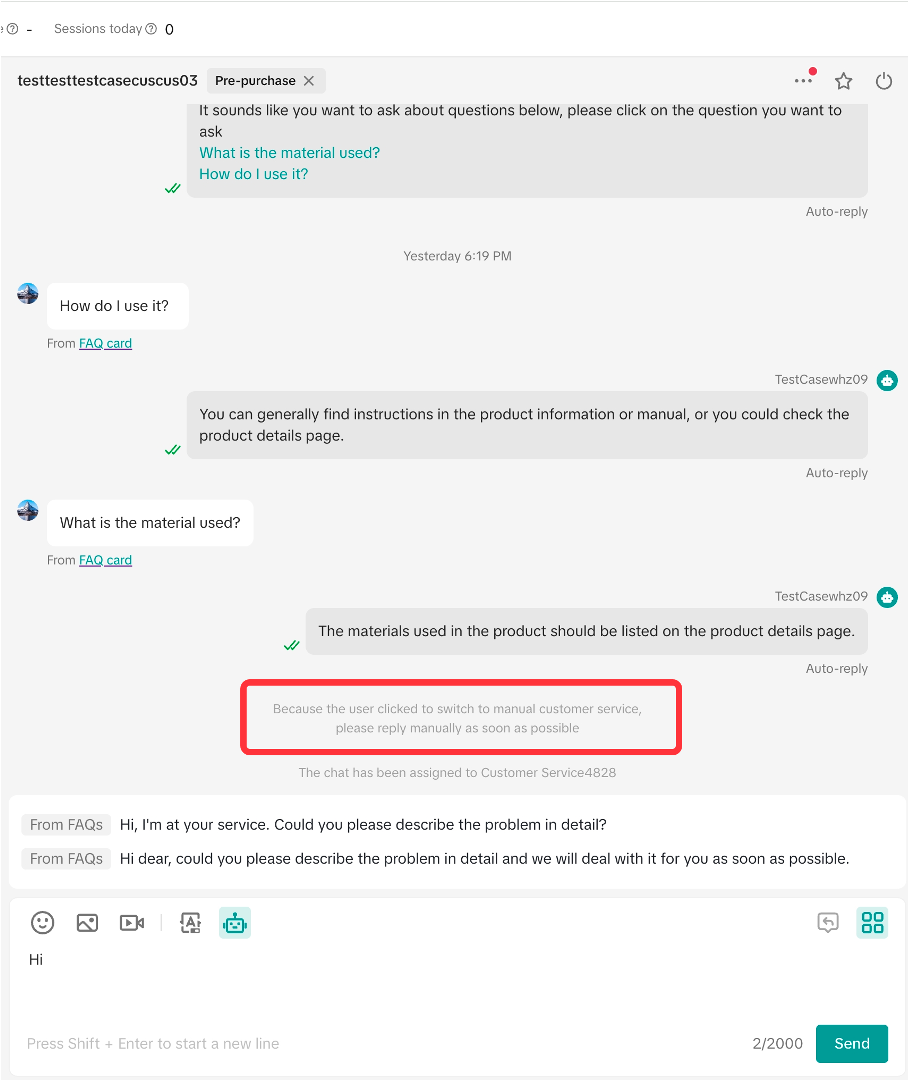
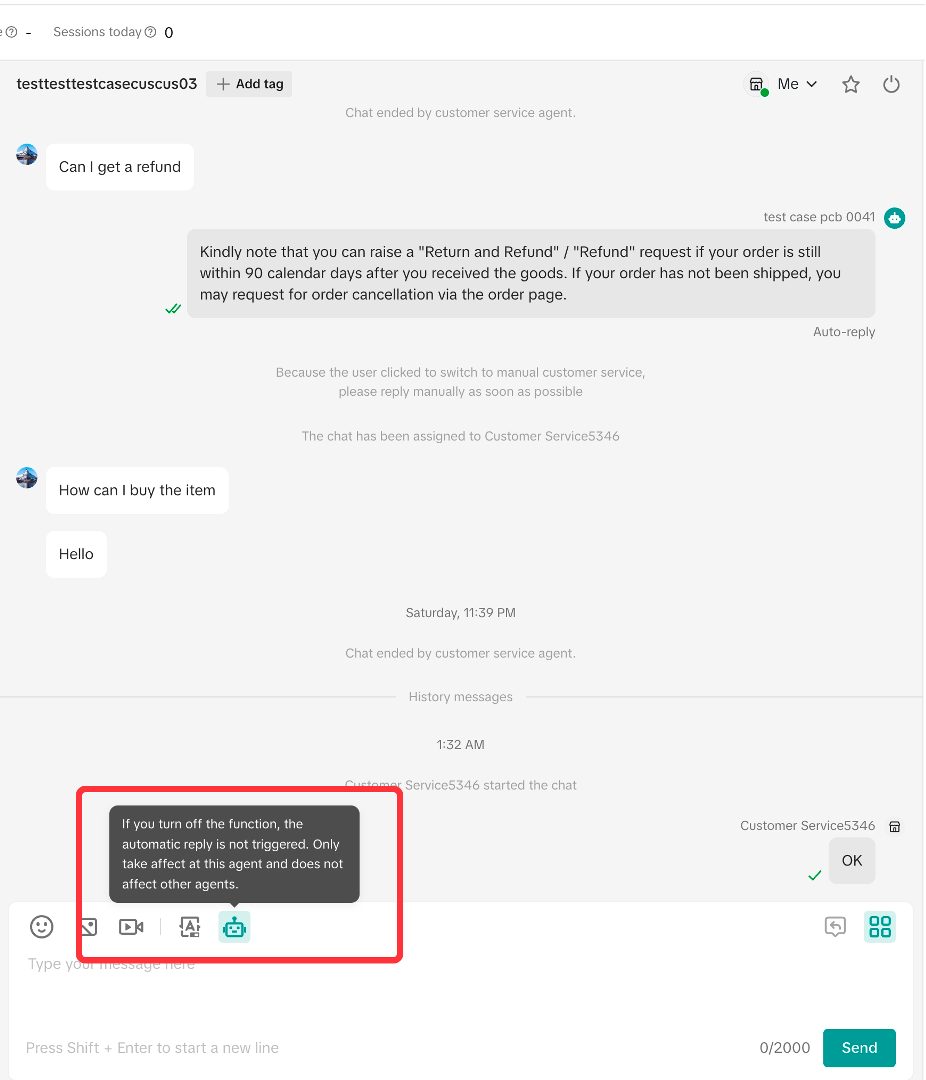
3.3 Human agents can set up to allow automatic sending by themselves
How to set chat bot?
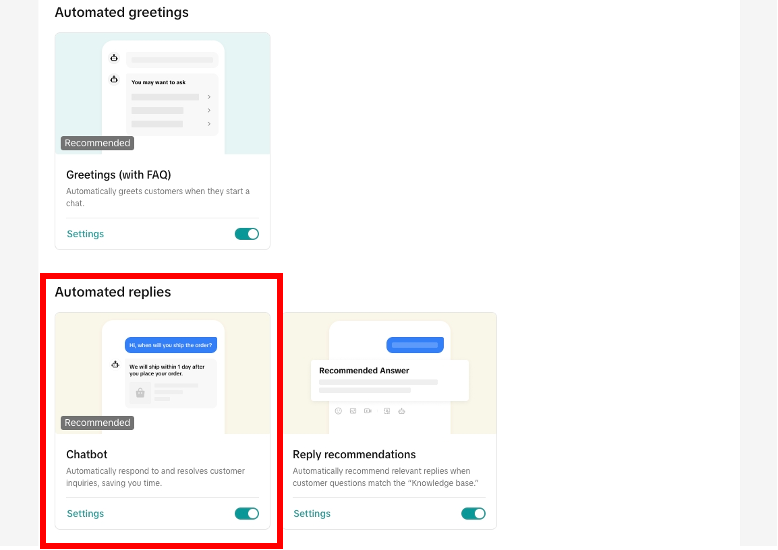
When the FAQ database is configured, you can start enabling chat bot.4.1 How to enable it
4.2 Effect achieved
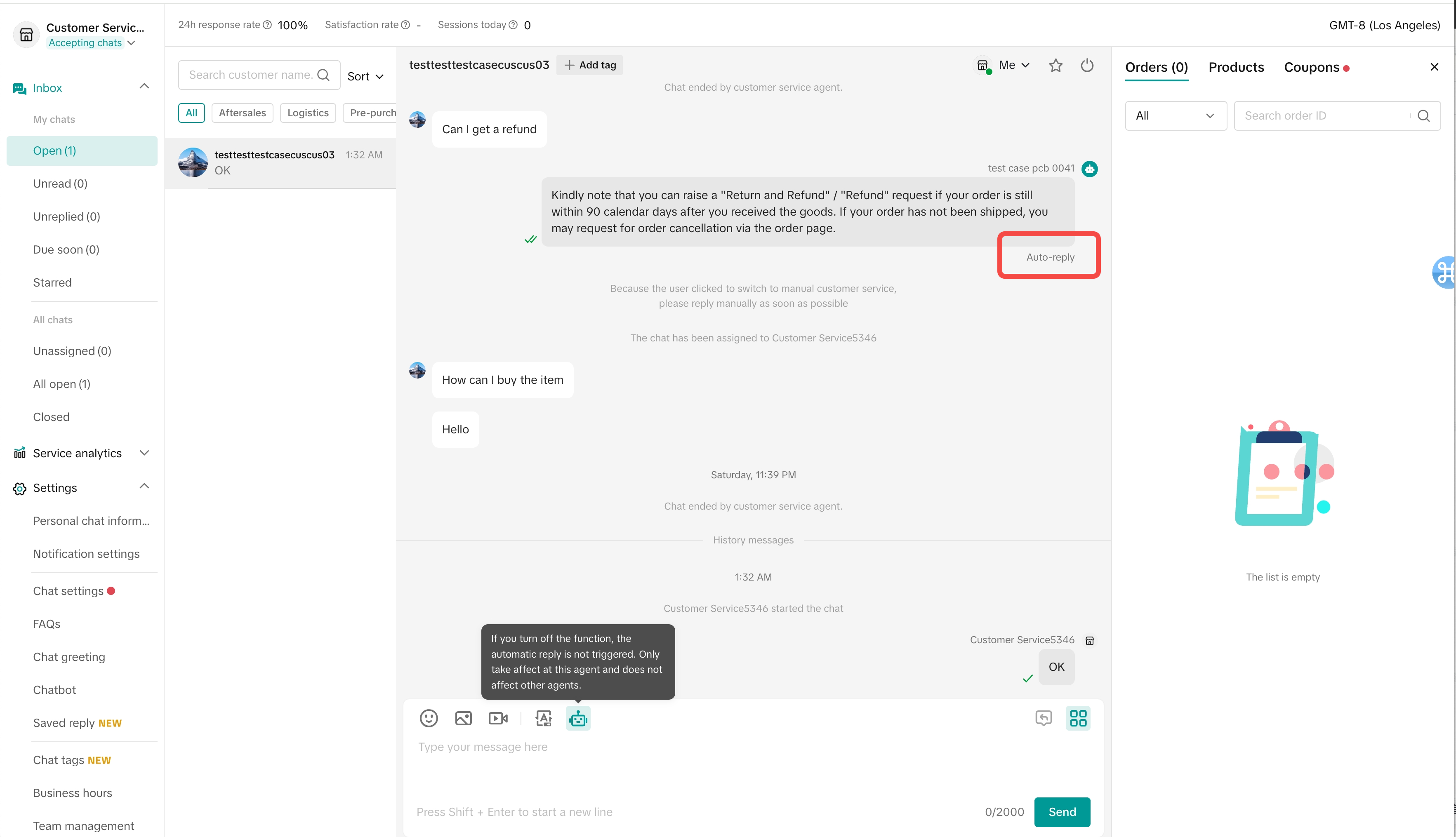
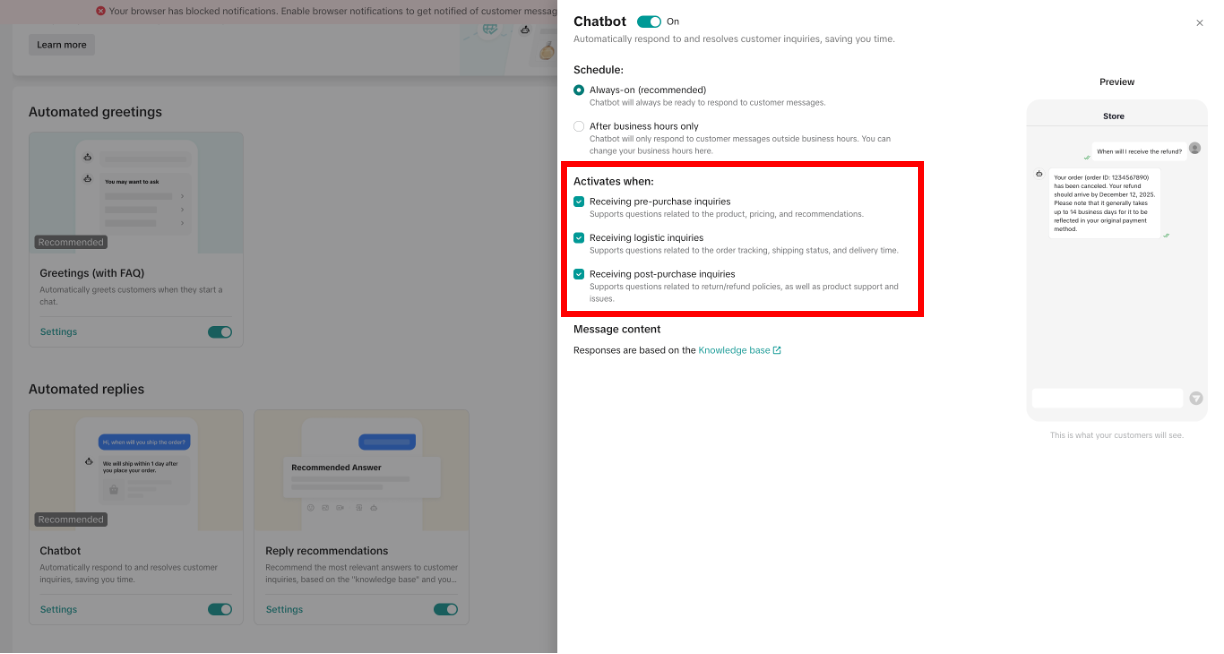
- When the human agent goes online, the chats answered by the chatbot will still be allocated to the human agent. If the customer does not continue to ask after receiving the auto reply, this chat will be displayed in the [Unread] list, and the unread red dot prompt will be displayed, but it will not be displayed in the [Unreplied] list, and there will be no unreplied label prompt. If the customer continues to ask questions, the bot will continue to send the corresponding content until it can't answer.
- For the message sent by the chatbot automatically, the human agent can see "Chatbot" displayed under this message. Customers can see "Auto-reply" displayed under this message
- When encountering questions that cannot be processed by the chat bot, the bot will send a brief reply: "Sorry that the human agent is not online at the moment, he will reply to you as soon as he is online." If the customer continues to inquire, an automatic off-work reply set by the seller (if any) will be sent. This chat will appear in the unreplied list with an unreplied label.
FAQs
- After the chat assistant is enabled, will it automatically reply to all chats?
- If there is a problem that the chat assistant cannot solve, the chat assistant will not automatically reply, and the response from a human agent is required.
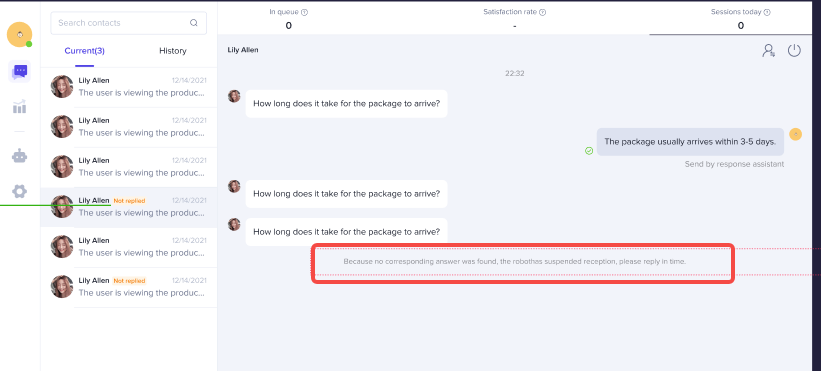
- If the same auto-reply content appears multiple times in the same chat, it means that the auto-reply may not answer the customer's question, so the chat assistant will stop replying to it, and the response from a human agent is required.
- When the chat assistant stops replying, a related system message will appear to remind the human agent.
You may also be interested in

How to use Customer Messages
Feature Overview TikTok Shop offers a suite of messaging tools that allow sellers to communicate wit…

How to Maximize Customer Messages
Are you overwhelmed with hundreds of chats you get every day? Do you feel you don't know how all of…
How to Navigate Customer Service Workbench
Use the workbench to improve the efficiency Communicating with customers is a necessary condition fo…

How to Use Saved Replies
Save frequently used replies to respond to messages faster The admin can configure commonly used rep…
March 2024 Monthly Product Innovation
Every month, we introduce new products and features designed to simplify store management, boost sal…

Your Guide To The 24-Hour Response Rate Metric
Prompt responses = happy customers = more sales! The 24-Hour Response Rate aims to help you build tr…
Zendesk for TikTok Shop
Zendesk for TikTok Shop overview Zendesk is the all-in-one customer service solution for your growin…