

How to set up sample auto-approval automations
Summary
What is the purpose and main benefit of setting custom creator rules for TikTok Shop sample approvals?
- Custom creator rules automate free sample approvals, ensuring samples go to creators who fit your strategy, maximizing marketing spend, and speeding up collaborations by skipping manual reviews for trusted creators.
How do sellers set up and manage the auto-approval feature for sample requests?
- Sellers enable auto-approval on the Sample request page under Automations, define creator criteria (e.g., 30-day GMV, posting rate), and set shop quotas (1-100) and price limits to control sample volume and cost risk.
What happens when a creator applies for a sample under these auto-approval rules?
- The system checks if the creator meets the set criteria and if the shop quota allows; if yes, the request is auto-approved and tagged "Auto Approval," skipping manual review. Otherwise, it moves to manual review for seller evaluation.
What key tips help sellers optimize their use of the auto-approval automation?
- Set a generous shop quota to fast-track high-potential creators, use 30-day GMV to target proven performers, and apply price limits to protect budget from expensive product samples.
What are important considerations and FAQs sellers should know about this feature?
- Auto-approval applies only to Open and Target manual review collaborations, not to fully automated or refundable samples; hiding thresholds still block low-quality creators; sellers can update rules anytime and receive notifications when quotas run low or are met.
Product overview
Set custom creator rules to automate your free sample approvals and focus your time on high-potential opportunities.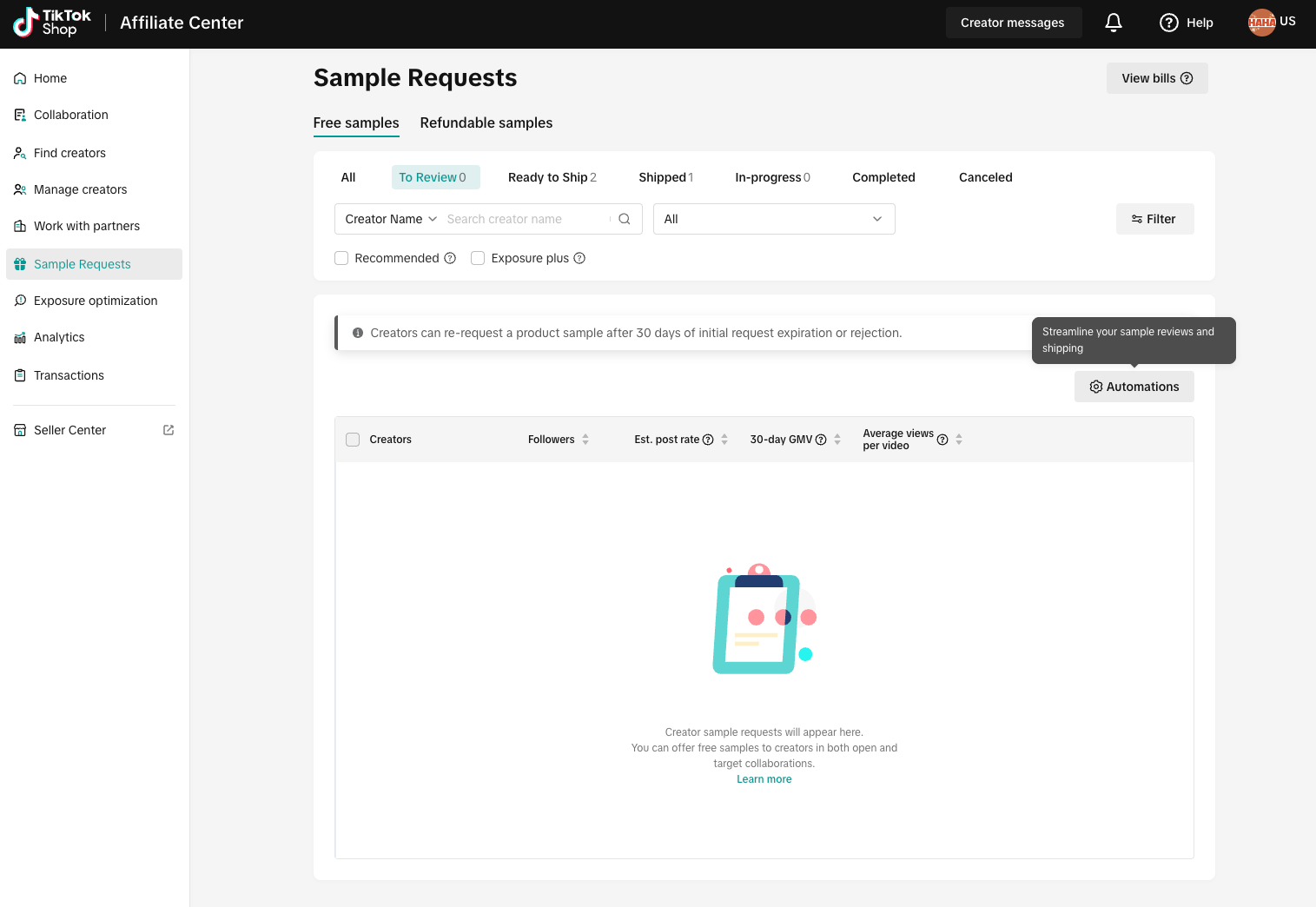 Adjust your sample automation in the Sample requests page | 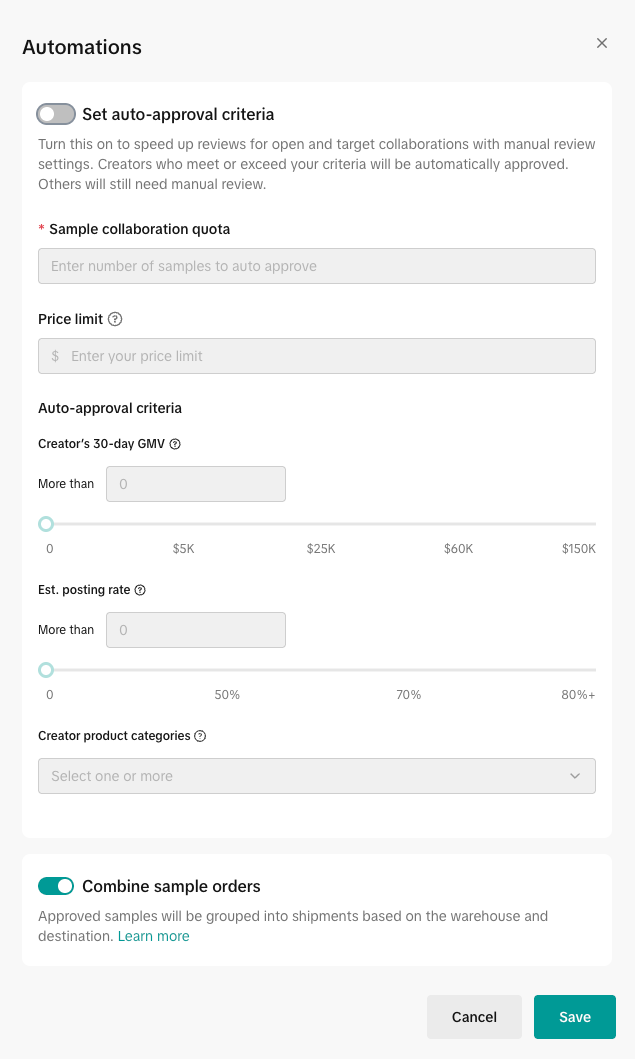 Toggle on the auto-approval settings |  Easily see your selections |  View their approval status on the sample requests page |
Benefits
- Take control of creator quality: set your rules to ensure your samples land in the hands of the creators who fit your strategy.
- Maximize your sample investments: easily manage your marketing spend by defining shop-level quotas and product price limits.
- Streamline and accelerate collabs: eliminate manual reviews for trusted creators, accelerating your collaborations and saving you valuable time.
How it works
- Turn on the feature: head to your Sample request page and go to Automations. Toggle the "auto-approval settings" on to get started. FYI, this works for both Open and Target collaborations.
- Define your creator criteria: this is where you set the rules for who gets automatically approved. you’ll define criteria like 30d gmv (the minimum sales performance you’re looking for) and estimated posting rate (how likely they are to post content).
- Behind the scenes: when a creator applies for a sample, the system checks their historical metrics against the thresholds you just set.
- Set your sample safety limits: you must set a shop quota (between 1 and 100) to cap the total number of samples that can be auto-approved using this method. You can also set price limits to reduce the risk associated with automatically approving expensive inventory.
- Behind the scenes: the system will only auto-approve requests as long as your shop quota has samples available. requests are processed in the order they are created.
- Creators start getting automatically approved: if a creator meets all the criteria you set and your shop quota has space, the request is instantly approved.
- Behind the scenes: the approved sample is assigned a new "Auto Approval" tag and instantly moved to the "ready to ship" status, skipping the manual review queue entirely.
- Manual review catches the rest: if a creator misses even one of your set criteria, or if your shop quota is already maxed out, the sample request automatically moves to the standard manual review section for your personal attention.
Tips
- Don't be shy with your shop quota: set a generous quota (remember, up to 100) to give high-potential creators a fast lane to collaboration, ensuring you capitalize on exciting partnership opportunities quickly.
- Target the right tier: use 30d gmv strategically to make sure you're consistently reaching creators who are proven performers in your category.
- Protect your budget with a price limit: if you sell a wide range of products, use the price limit setting to prevent the system from auto-approving samples for your highest-cost items. This helps you manage inventory risk efficiently.
- Power-up target collaboration: this feature applies to the manual review samples in target collaboration too! When you're inviting creators, the system surfaces an auto-approval tag for those who match your rules.
FAQs
- What types of samples are eligible for auto-approval automations? This feature works for Open collaboration (manual free samples) and Target collaboration (manual review samples). It does not apply to existing auto-optimized samples, refundable samples, or Target collaboration's fully automated approval cases.
- Do I need to set up my sample filters separately for Open and Target collabs? No. You set them up on the Sample requests page and it will apply to both formats.
- What if a sample request is already eligible for another type of automated approval, like target auto-approval? This feature is designed to focus on the applications you would normally review manually (Open collaboration and Target manual review). It will not interfere with or overwrite any existing Target collaboration automated approvals.
- I already set rules to hide my sample products from low-quality creators. How does that work with this new feature? Your hiding thresholds (which are often product-specific) still work first! If a product is hidden from a creator, they can't even apply. This only looks at requests that make it through the hiding threshold, and decides whether to auto-approve them instantly or send them to your manual review queue.
- How do creators know if they qualify for my rules? Creators who meet your criteria will see a "100% approval tag when they apply for your samples! This helps them understand your expectations, encourages them to engage, and results in more targeted requests coming your way.

- How can I tell if a sample was auto-approved with these new settings? You can find this info in the Approval Source column (Sample Request page > Ready to ship tab > Approval source column).
- What happens if a creator doesn't meet my custom rules? If a creator applies but doesn't meet the performance metrics you set, their request simply gets moved into your manual review section, giving you a chance to check it out personally.
- Are all the fields (GMV, posting rate, etc.) mandatory? Only the shop quota is mandatory. You need to set a limit between 1 and 100. All other creator characteristics (like T30D GMV, estimated posting rate, or creator category) are optional, letting you customize the rule set to your specific campaign needs.
- Will I be notified when my quota is reached? Yes, you'll see a notification on the Sample requests page when your shop quota is satisfied (or when it’s running low, such as when it hits 5 or fewer remaining), letting you know that new applications are being rerouted to manual review.
- Can I change my rules after I save them? You can update and save your settings any time you want to adapt to new campaigns or market trends.