

How to use SKU-level samples
Summary
What is the purpose and benefit of using SKU-level samples in TikTok Shop collaborations?
- SKU-level samples let sellers control which product variants creators receive, optimizing sample budgets by focusing on cost-effective, high-impact SKUs. This helps avoid sending costly or low-demand variants, maximizing marketing ROI.
How do sellers set up and manage SKU-level samples for Open and Target Collaborations?
- Sellers enable free or refundable samples in Open Collaborations, then select eligible SKUs for sampling. SKU-level rules set here automatically apply to Target Collaborations. Non-eligible or out-of-stock SKUs appear grayed out to creators.
What strategic considerations should sellers keep in mind when using SKU-level samples?
- Disable high-cost or low-demand SKUs to focus resources on variants that drive sales. Align SKU selections with marketing goals and regularly review performance to adjust sample offerings for optimal results.
What happens if a SKU is out of stock or disabled when a creator requests a sample?
- Such SKUs appear grayed out and are unavailable for creators to request, preventing fulfillment issues and ensuring creators only see currently available sample options.
Product Overview
SKU-level samples is a smart, direct way to control exactly which product variants you share with creators. Now you can be strategic about your samples, focusing your budget on the variants that drive real results.Benefits
- Optimize your sample budget: Direct creators toward your most cost-effective variants by selecting specific SKUs as samples.
- Control high-value inventory: Exclude premium variations and multi-packs from your sample offerings while still providing creators access to your core products.
- Customize your sample strategy: Take charge of which product variants are available for sampling – easily turn off specific SKUs that don't fit your creator marketing plans.
How it works
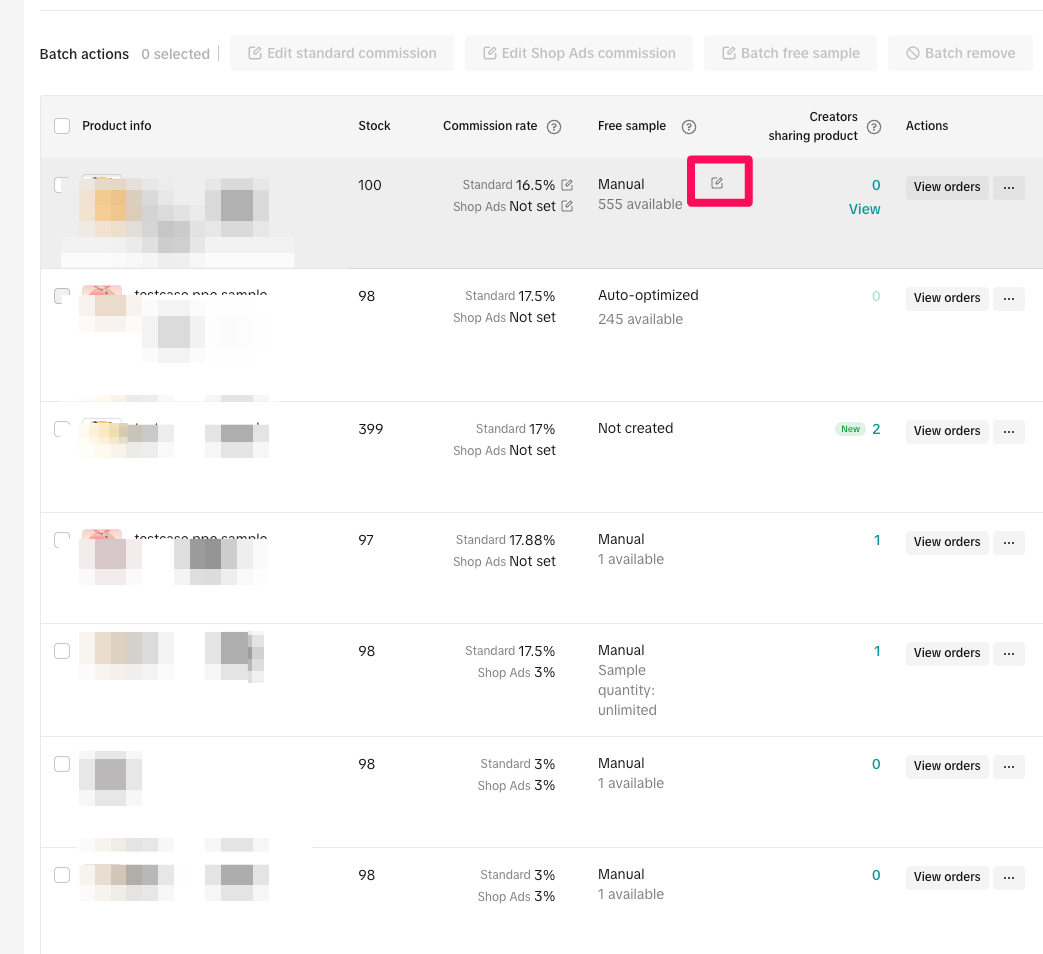
- Go to Open Collaborations. While the set up of SKU-level samples happens in Open Collaboration, SKU sample is a product level rule meaning that it will be applied to Open and Target Collaborations.
- If you haven't already, set up your free sample. Click the edit icon next to the desired product and enable the 'Offer free sample" toggle. You can also set up refundable samples at the same time. If your product is eligible, you can enable auto-optimized samples as well. - you can learn more about this option for automated sample workflows here.
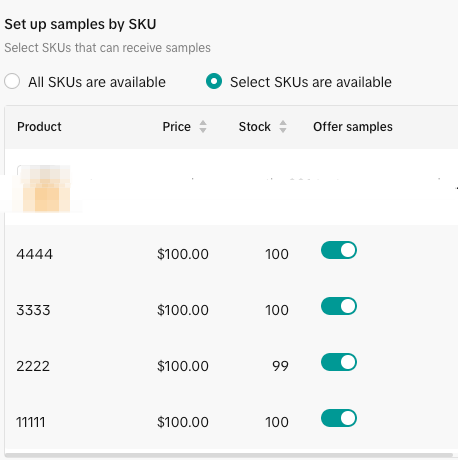
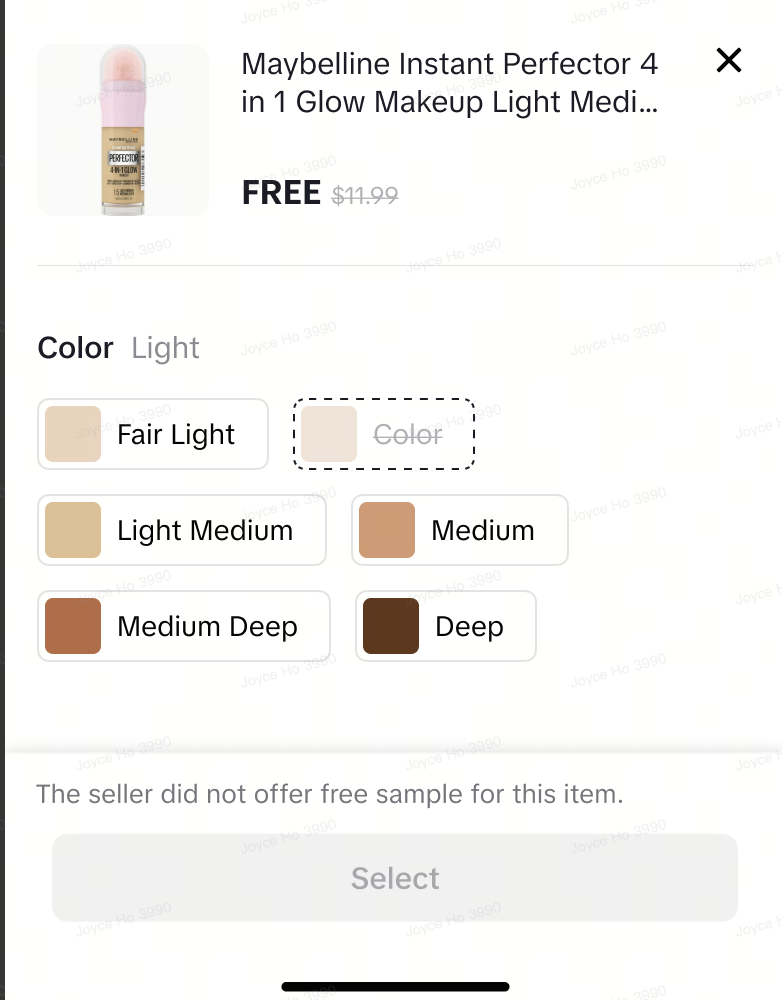
- For SKU-level samples, you can choose to make all SKUs eligible or restrict eligibility to specific SKUs. Non-eligible SKUs will appear grayed out when creators request samples. As a best practice, consider disabling SKUs with high costs or low demand (i.e., those that are not key sales drivers).
 |  |  |
Tips
- Be strategic with high-value items: Consider disabling SKUs with high costs or low demand. These might not be your key sales drivers for sampling, so focus your resources where they’ll make the biggest impact.
- Align with your marketing goals: Use SKU-level precision to align your sample offerings with your overall marketing and sales objectives.
- Review and adjust: Keep an eye on which SKUs are performing best as samples and adjust your settings as needed to optimize your strategy.
FAQs
Q: How do I configure SKU samples for Target collaboration?A: The rules you set for SKU-level samples in Open Collaboration will automatically apply to your Target Collaboration products. SKU sample is a product-level rule, meaning it's applied to Open and Target Collaborations.Q: What happens if a SKU is out of stock when a creator requests a sample?
A: If a SKU is not eligible or out of stock, it will appear grayed out to creators when they try to request a sample, so they'll know it's not available.
You may also be interested in
Open Collaboration One Click Solution
**This article is intended for the sellers that have been selected for the One Click Affiliate enrol…
How to use flat fee collaborations
Product overview Flat fee collaborations Secure top-tier creators with flat fees and drive sales wit…

8 Tips for Successful Seller & Creator Matchmaking
*Welcome to TikTok Shop Affiliate program *This playbook offers an end-to-end roadmap to empower US…
Affiliate Target Invite & IM Quotas
Overview The Affiliate Target Invite & IM quotas introduces a structured approach for optimizing sel…

How to use Affiliate Links
Product Overview Drive sales from beyond the TikTok app by empowering creators to share your product…

Refundable Samples Terms & Conditions for Sellers
Introduction The Refundable Sample program (“Program”) is offered by BD TikTok USA LLC (“TikTok”, “w…

Affiliate Partnerships Overview
*Introduction: What is Affiliate Partnerships Overview? Affiliate Partnerships are designed to help…

How to use Affiliate Center features in the app
Overview The TikTok Shop Seller Center App empowers sellers with the ability to manage their TikTok…

How to use refundable samples
Overview Refundable Samples is a TikTok Shop feature that allows you to connect with creators throug…