

Video Assistant
💡 Feature Overview
Think of Video Assistant as your AI-powered sidekick, designed to make creating shoppable video content easier and faster. Whether you’re a new seller or an experienced creator, this tool helps you write scripts, highlight products, summarize reviews, recommend hashtags, and craft engaging hooks to boost your content’s visibility and conversion.Hear about the power of Video Assistant from one of our top creators, @skintelligencia:

🧭 How to Access This Feature
There are three ways to access TikTok Shop's Video Assistant tool.Option 1: Through the Videos tab
- Open the TikTok app.
- Go to your Profile and tap the shopping bag icon in the middle of the screen.
- Select TikTok Shop to open the Creator Center.
- Tap the Videos tab at the bottom of the screen.
- Under the Create section, select Video assistant.
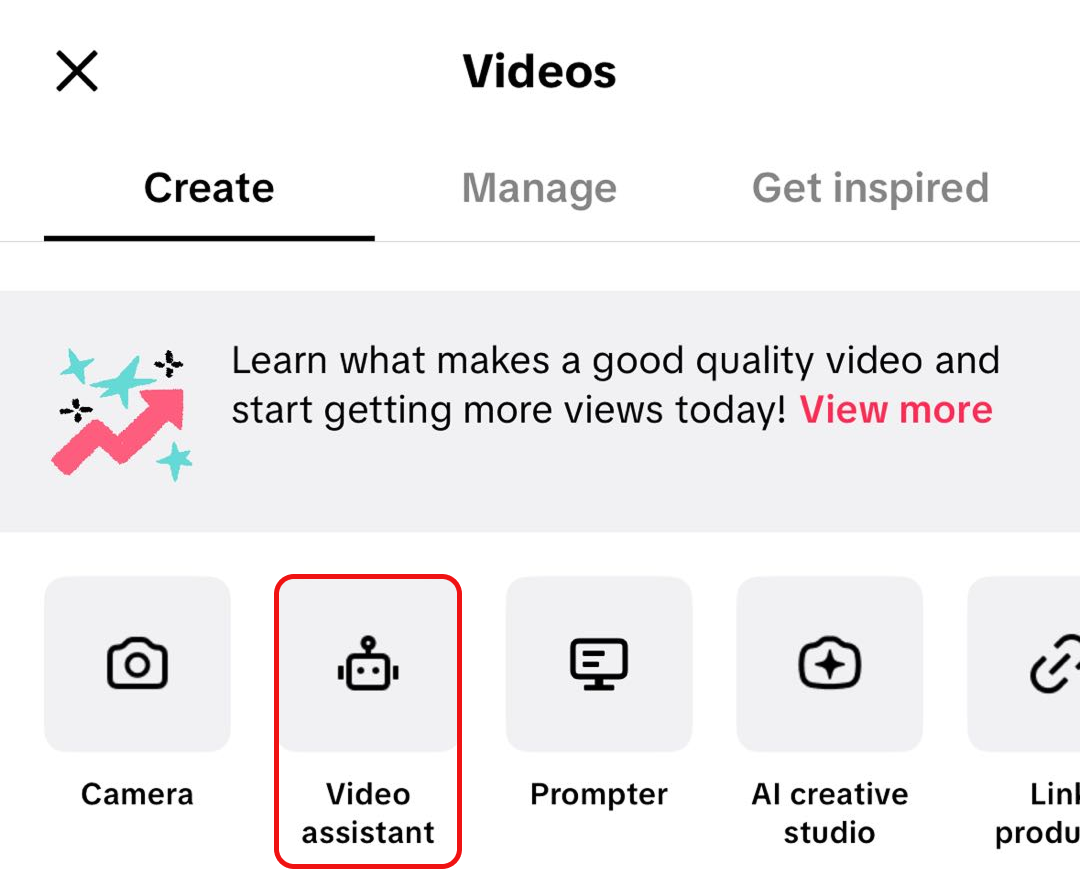
Option 2: Using the "Create now" shortcut
- Open the TikTok app.
- Go to your Profile and tap the shopping bag icon in the middle of the screen.
- Select TikTok Shop to open the Creator Center.
- Tap the Create now pill at the bottom of the screen.
- Toggle to Short video then select Video Assistant.
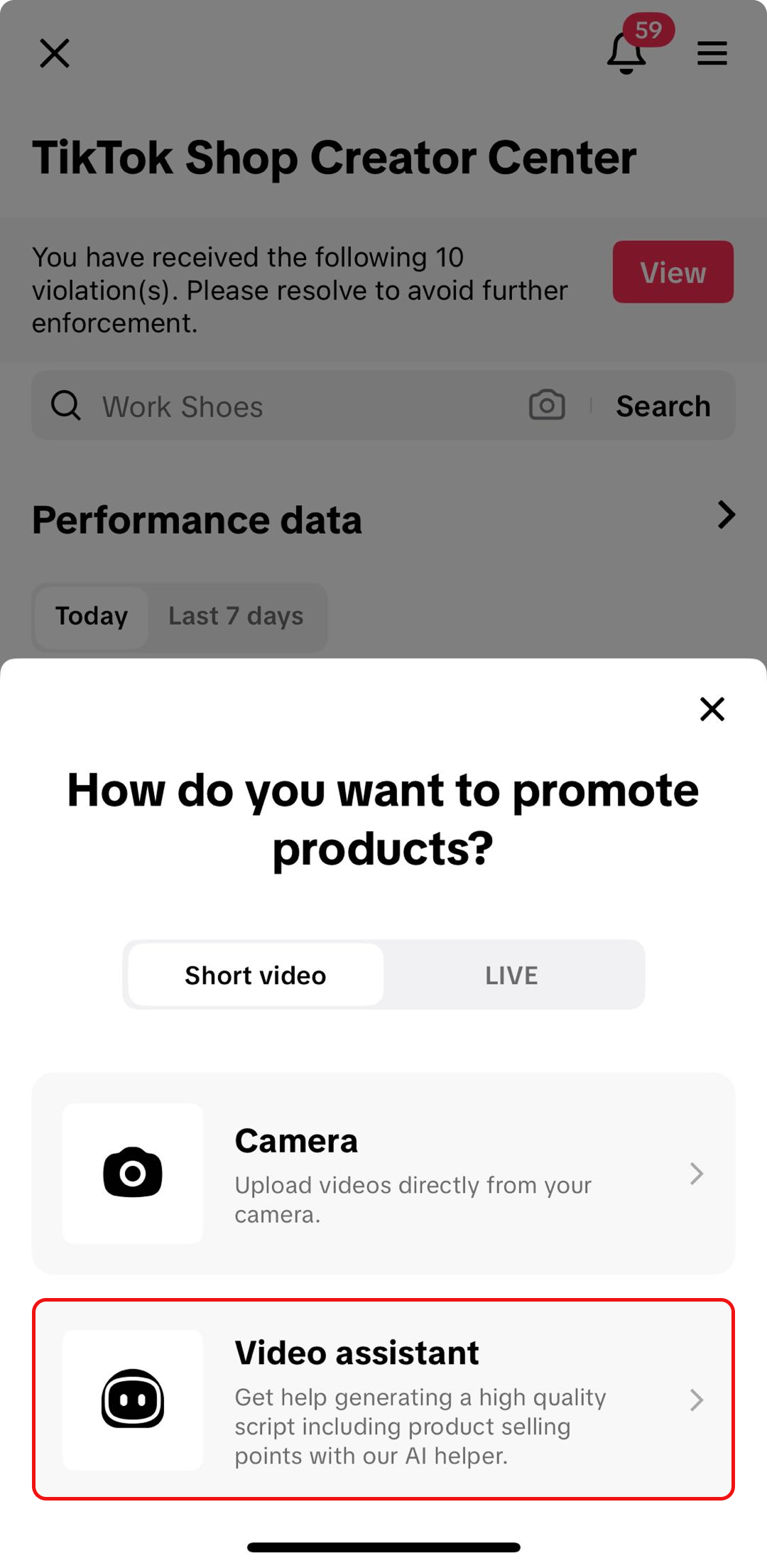
Option 3: Through the Product Display Page (PDP)
- Open the TikTok app.
- Go to your Profile and tap the shopping bag icon in the middle of the screen.
- Select TikTok Shop to enter Creator Center.
- Tap the Manage products icon in the middle of the page (under TikTok Shop toolkit).
- Choose a product, then swipe up on the small double arrows to expand and view Promotion info.
- Tap Create now.
- Toggle to Short video then select Video Assistant.
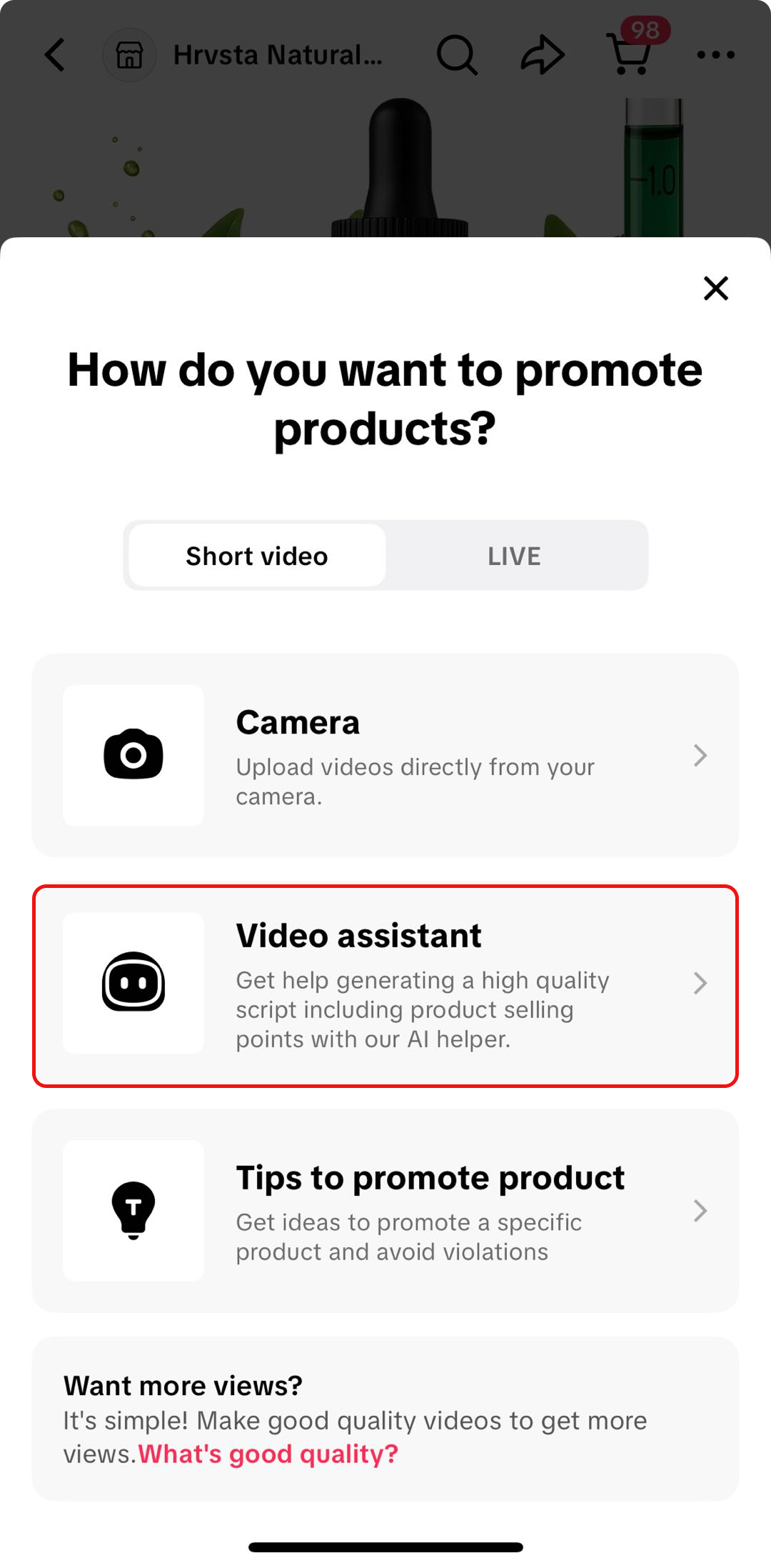

⚙️ How it Works
🏠 Video Assistant Homepage
When you open the Video Assistant, you’ll land on a simple and friendly homepage.Here, you’ll find five key features, each designed to tackle a different part of your video creation process:
| 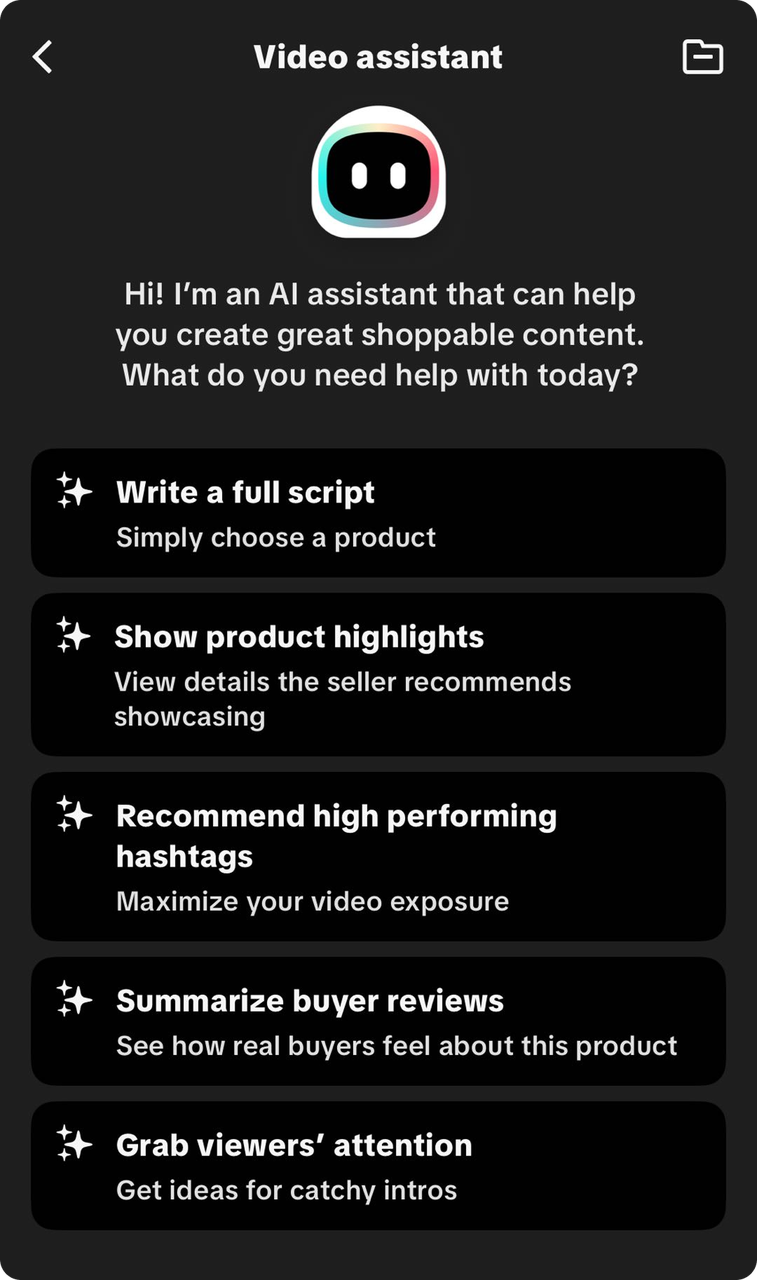 |

🌟 Key Features
🤖 Create videos with AI
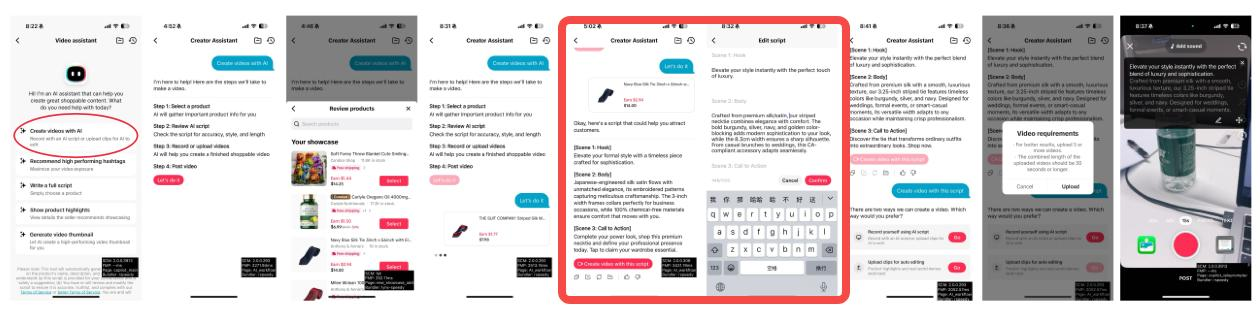
This is a step-by-step content creation tool that helps you turn any product into a ready-to-film shoppable video. It automatically writes a script for you, helps you refine or edit it, and then lets you record using a built-in teleprompter. Everything you need to go from product to polished video exists in one guided flow.⚙️ How it works:
- Select a product: browse or search for your products. Once you select one, the tool pulls in the essential details needed to generate a script.
- Get an AI-generated script: The tool instantly creates a structured script with a hook, body, and call-to-action. You can preview the script to make sure it fits your style and the product.
- Edit or refine the script: Edit your script manually, regenerate it, copy it, save it, or ask for another version. You can also rewrite sections by giving Video Assistant simple instructions like "make this shorter" or "stronger hook."
- Record with the teleprompter: When you tap Create video with this script, the app opens the recording page with your script displayed as a teleprompter. You can record directly with the script scrolling, upload existing clips to match the script, and re-record sections until you're happy with the video.
- Post your video: Once your recording is complete, you can finish edits and publish your shoppable video directly.
- Create scripts faster: Get ready-to-use scripts in seconds and edit them instantly through simple chat prompts.
- Improve video quality: Get stronger hooks, clearer messaging, and more engaging storytelling with AI support.
- Record more confidently: Use the built-in teleprompter to keep your delivery smooth and natural without memorizing lines.
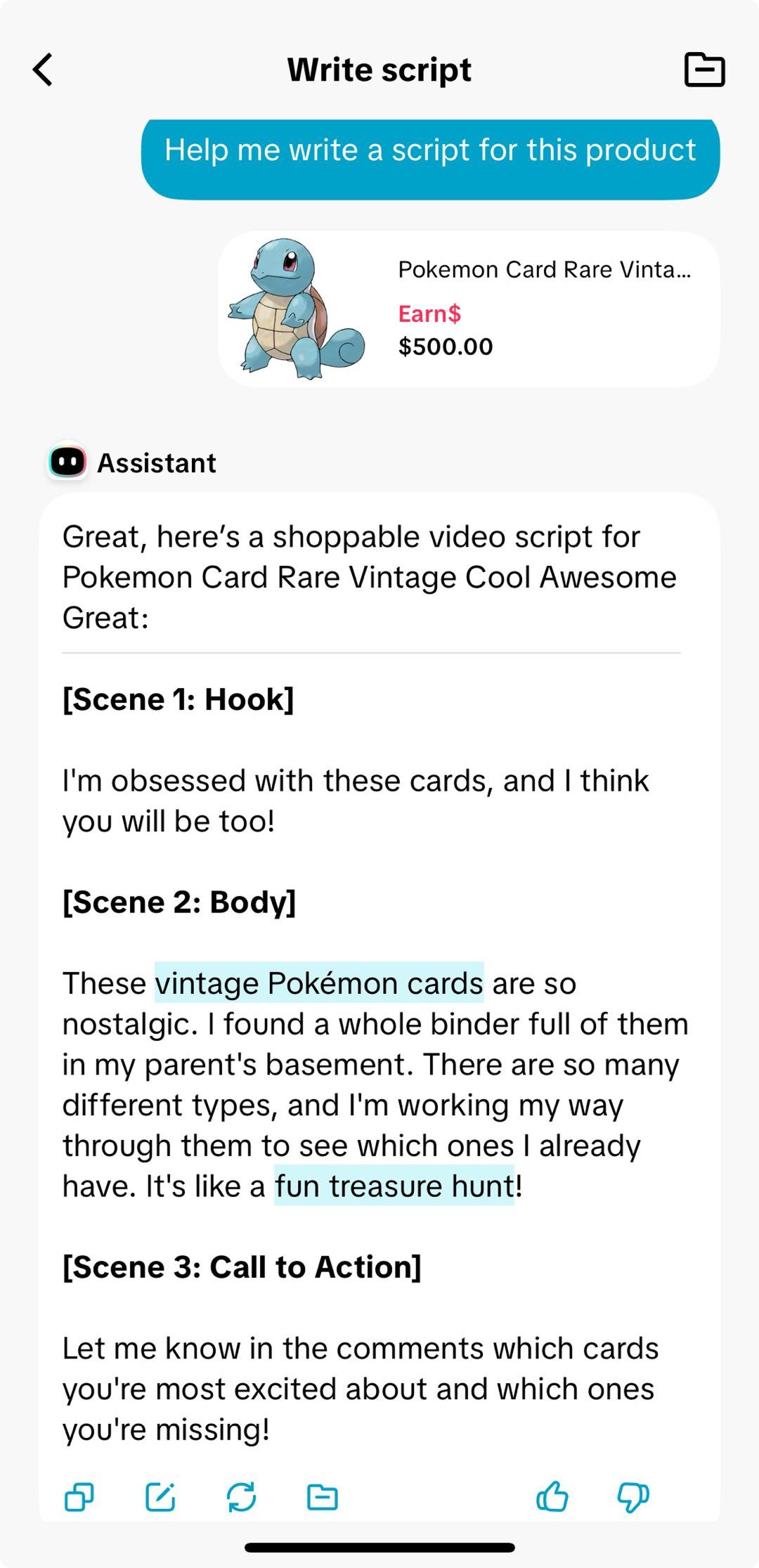
📝 Write a full script
Every great shoppable video starts with a great script, but coming up with the right content can be hard. With the Write a full script feature, all you need to do is pick a product, and in just a few seconds, AI creates a complete script that's ready for you to use. It pulls from:
|  |
📦 Show product highlights
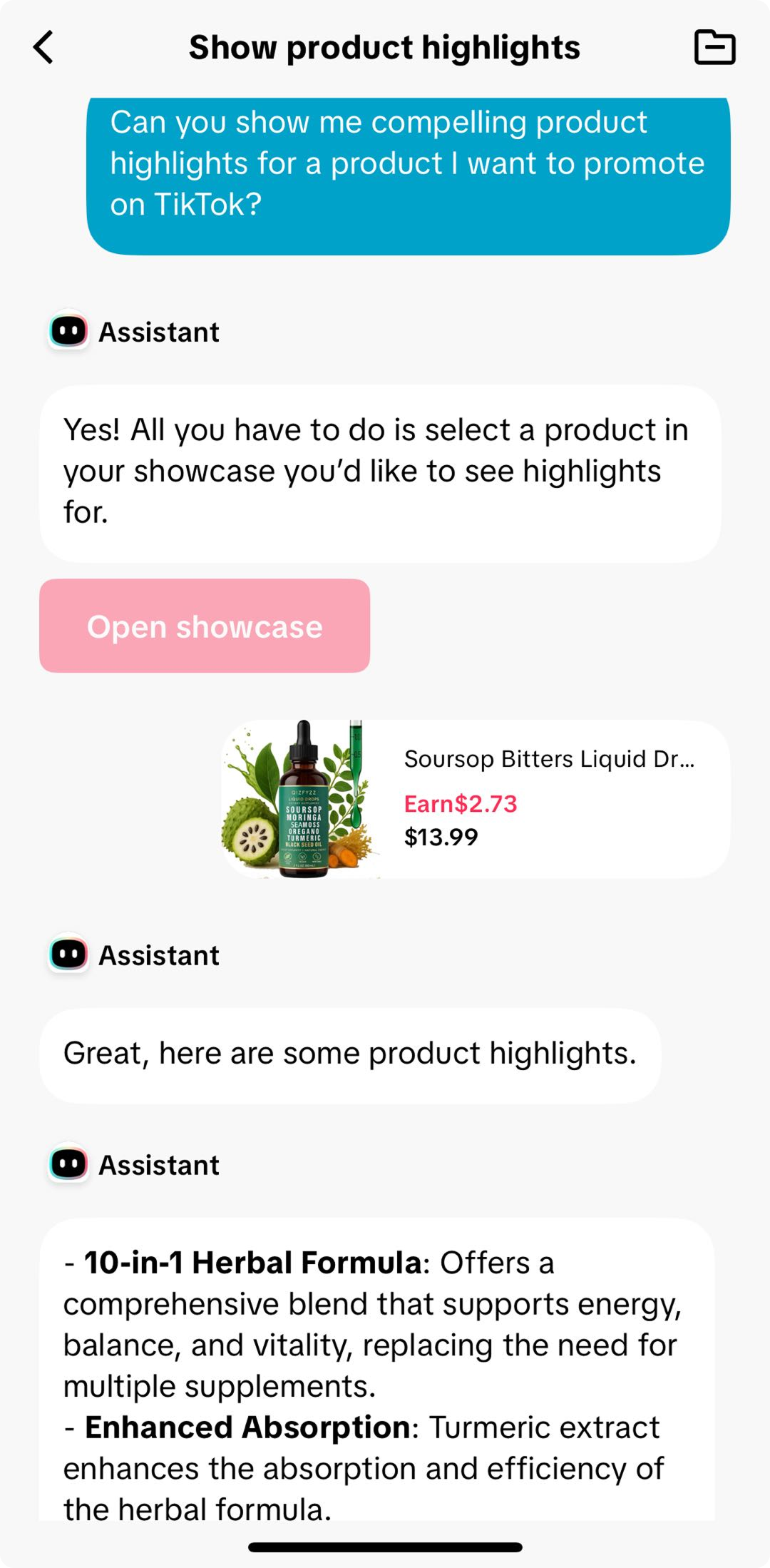
Your product has great features and this tool helps you show them off the right way. The Show product highlights feature automatically pulls out the most important details from your product listing, helping you spotlight what matters most to shoppers. In just a few seconds, AI identifies what sellers recommend showcasing, like unique materials, benefits, or standout features, and turns them into quick, scroll-stopping talking points.🌟 Why you’ll love it
|  |
#️⃣ Recommend high performing hashtags
Hashtags are one of the easiest ways to get your videos seen by more shoppers, but finding the right ones can take time. With the Recommend high performing hashtags feature, all you need to do is pick a product. In seconds, you'll get a list of relevant hashtags that will help you maximize your reach. 🌟 Why you'll love it
|  |
💬 Summarize buyer reviews
Real reviews sell products, and this feature makes it easy to turn them into authentic content. The Summarize buyer reviews feature scans your product’s customer feedback and condenses it into clear, engaging talking points. It highlights what real buyers love, what they mention most, and how the product performs in everyday use.🌟 Why you’ll love it
- Showcase real customer experiences to build trust
- Turn authentic feedback into content ideas and quotes
- Save time reading through hundreds of reviews yourself
👀 Grab shoppers' attention
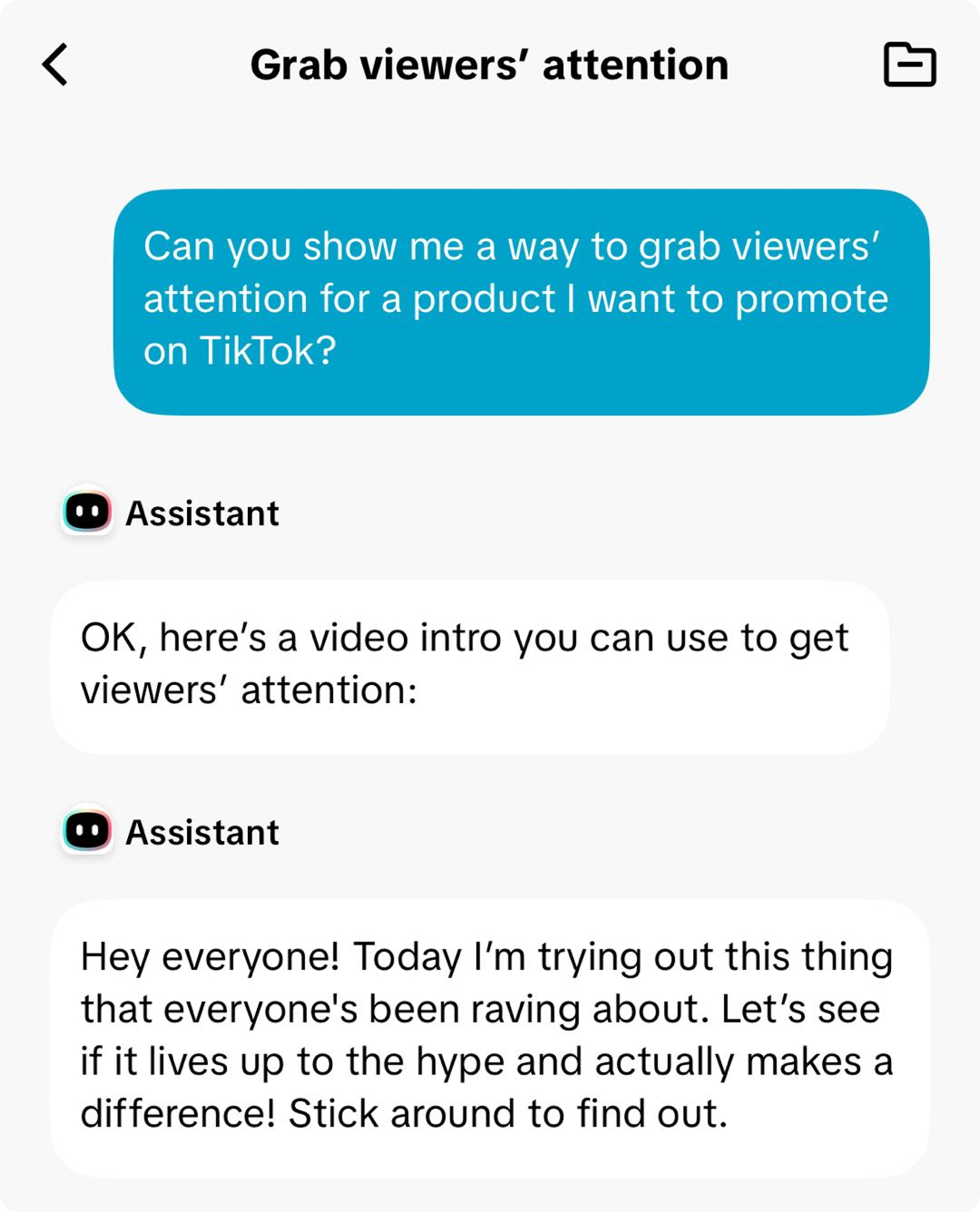
The first few seconds of your video matter most, and this feature helps you make them count. The Grab viewers’ attention feature generates catchy, scroll-stopping intros based on your product’s main benefits or pain points. Whether it’s a surprising statement, a question, or a bold claim, these AI-powered hooks help you stop the scroll and keep shoppers watching.🌟 Why you’ll love it
|  |

TL;DR (Because We Know You're Busy):
Video Assistant is your secret weapon for creating more effective shoppable videos, faster. It helps you understand your products, craft killer scripts, and save time, so you can focus on creating amazing content and boosting those sales! Seriously, give it a try – it's a game-changer!
You may also be interested in
- 1 lesson
Creating Shoppable Videos with Shopify's 1P App
Are you a Shopify seller looking to create scroll-stopping shoppable videos but don’t know where to…
2025 Shoppable Video Holiday Guide for Sellers 🎁 ✨
*👋 Introduction Black Friday Cyber Monday (BFCM) is the biggest seasonal sales weekend of the year,…
TikTok for Shopify: Shoppable Videos
Introduction: What is the SV Widget on the Shopify App? Compelling videos are at the heart of what d…

How to Schedule Shoppable Videos
💡 Feature Overview Scheduled Shoppable Videos lets sellers, like you create and prepare videos when…

How to Change Your Video's Sound
TikTok will notify you if any of your videos' sound is no longer available. The TikTok App offers di…

Seller Center AI Video Maker
*💡 Feature Overview Our AI tools for short video creation in Seller Center are being upgraded into…

"TikTok Shop for Sellers"
Introduction Shoppable Video is the most powerful way to sell on TikTok Shop. TikTok Shop for Seller…

Shoppable Photos
NOTE: This feature is currently in beta and available for select sellers. Functionality may evolve a…