

Guide to Seller-Fault Cancellation Rate (SFCR)
01/06/2026
Seller Fault Cancellation Rate (SFCR) represents the percentage of confirmed orders within a specific evaluation period that were canceled due to the seller's fault. It's used to evaluate the quality of a seller's fulfillment process. If a seller has a high rate of seller-fault cancellations, it indicates an issue with the efficacy and quality of a seller's fulfillment process.Key Points:
- Seller-Fault Cancellation Rate (SFCR) metric is used to evaluate the quality of a seller's fulfillment process and product shipping. A high rate of cancellations due to seller issues indicates fulfillment quality issues.
- Seller Requirement: Maintain an SFCR of less than or equal to 2.5%.
- You can check SFCR performance on your Fulfillment Performance page or on the Metric diagnostic tool page in Seller Center.
Per our Fulfillment Policy, all sellers are required to maintain an SFCR of less than or equal to 2.5%.
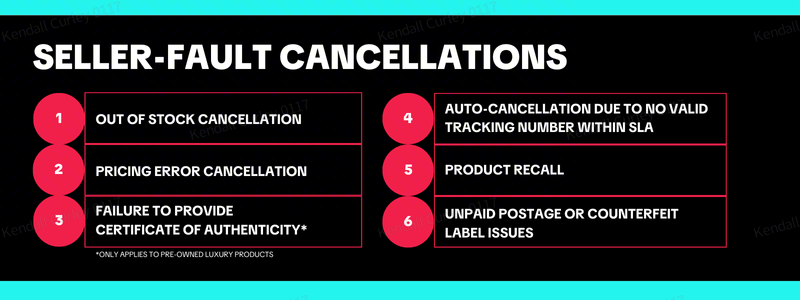
What's Considered a Seller-Fault Cancellation?
How Seller-Fault Cancellation Rate (SFCR) Impacts Your Shop
SFCR is one of the core four metrics used to evaluate a shop's fulfillment performance and shop health. The four core performance metrics, based on TikTok Shop's Fulfillment Policy, are:- Valid Tracking Rate (VTR)
- Late Dispatch Rate (LDR)
- On-Time Delivery Rate (OTDR)
- Seller-Fault Cancellation Rate (SFCR)
- Product Satisfaction
- Fulfillment and Logistics
- Customer Service
Seller-Fault Cancellation Rate (SFCR) Violations
When a shop's SFCR does not meet the policy expectations of equal to or less than 2.5%, enforcement actions will be imposed.Under the Seller Enforcement Policy, these violations can include, but are not limited to, Account Health Rating (AHR) point deductions, decreased visibility, extended settlement period, or order volume limits for your shop.
Additionally, the more SFCR violations a shop gets, the stricter the enforcement actions imposed will become.
Exception for SFCR
Fulfilled by TikTok (FBT) orders receive complete order protection. This means that although your FBT orders are counted in the total number of confirmed orders, FBT orders are excluded from the number of orders canceled due to seller's fault.How Seller-Fault Cancellation Rate (SFCR) Is Calculated

NOTE: TikTok Shop defines confirmed orders as orders with To Ship - Awaiting Shipment status. You can find these orders in the Manage Orders page. Use the To Ship - Awaiting Shipment filter to find them.
Example
Number of orders in the To Ship - Awaiting Shipment stage during the evaluation period = 200Out of the above, number of non-FBT orders canceled by the seller OR number of orders auto-canceled due to above mentioned issues = 10
- 10 / 200 = 0.05
- 0.05 x 100 = 5%
If you believe your SFCR is inaccurate, you can request an appeal.
Seller-Fault Cancellation Rate (SFCR) Appeals
Sellers bear responsibility for providing clear, verifiable, and original evidence. Claims relying solely on documents that cannot be independently verified are less likely to be accepted.A SFCR enforcement can be appealed based on the following rules:- Each SFCR enforcement can only be appealed twice.
- Initial appeal must be submitted within 30 days of the enforcement message. If the first appeal is unsuccessful, the second appeal must be submitted within 15 days of initial appeal rejection.
Accepted Appeal Scenarios
To appeal a SFCR violation, it must meet one of the acceptable appeal scenarios listed below.- Customer-requested cancellation: The order cancellation request was initiated by the customer. The customer either requested the cancellation by themselves or was unable to cancel it from their end.
- Address is marked undeliverable by the carrier: The order cancellation was required because the customer provided an undeliverable address.
- Order was dispatched prior to the auto-cancellation cut-off SLA: The order was auto-canceled due to the tracking status on the TikTok Shop not being updated before the auto-cancellation SLA cut-off.
- Warehouse Disruptions: The order cancellation was due to the US local fulfillment warehouse stopping service due to unexpected reasons, such as natural disasters or labor strikes, that caused the order tracking information to fail to be updated before the auto-cancellation SLA cut-off.
- Technical issue on the TikTok Shop platform: The order cancellation was the result of technical issues with Seller Center that prevented order tracking information from being updated. The technical issue must persist and remain unsolved until after the auto-cancellation SLA cut-off.
- Seller Enterprise Resource Planning (ERP) or Independent Software Vendor (ISV) technical issue: The order cancellation was due to an order sync issue caused by a system error with a seller's ERP or ISV that canceled orders from the seller's end.
- Test Orders: The order cancellation is part of a seller testing the transaction process on the platform for their shop. Orders placed for testing purposes must be canceled on the customer side, not the seller side. Appeals for seller cancellation will be rejected for more than 30 test orders.
Appeal Requirements
To successfully submit an appeal for technical issues scenarios, you will need to provide the following documentation.- Customer-requested cancellation. Must provide screenshots of the communication history with the customer that clearly shows:
- The order cancellation was requested by the customer.
- The order ID in the customer's request matches with the order ID canceled by the seller.
- Address is marked undeliverable by the carrier. Must provide both of the following:
- A screenshot from the logistics service provider's website states the order cannot be delivered to the customer's address.
- A screenshot of the order confirmation page that shows: customer's address, order ID(s), and date the order was placed.
- Order was dispatched prior to the auto-cancellation cut-off SLA. Must provide both of the following:
- A screenshot from Seller Center showing the order auto-cancellation SLA for each of the orders.
- A screenshot from the logistics service provider of the order's tracking nodes showing that the "Pick Up" timestamp is earlier than the auto-cancellation SLA for each of the orders.
- Warehouse Disruptions: A screenshot or document from the
overseasUS local fulfillment warehouse vendor confirming that the orders impacted were due to their fault. The screenshot or document must include all of the following:- US local fulfillment warehouse vendor's company name
- Impact period
- Impacted order count
- Impacted tracking IDs list
- US local fulfillment warehouse vendor's seal or signature
- Technical issue on the TikTok Shop platform: Provide one or both of the following:
- A screenshot of the system error along with the date the error occurred. Ensure the error date matches the timeline of the violation.
- A screenshot of the communication history with the TikTok platform product team confirming that the issue was caused by a system error.
- Seller Enterprise Resource Planning (ERP) or Independent Software Vendor (ISV) technical issue: Provide one or both of the following:
- A screenshot of the system error along with the date the error occurred. Ensure the error date matches the timeline of the violation.
- A screenshot or official document provided by the ERP or ISV vendor confirming the issue was caused by their system error. The screenshot or document must include the vendor's company name, seller's company name (or shop name), impact period, number of impacted orders, and the vendor's seal or signature.
- Test Orders:
- Screenshots of the orders placed from the customers' end. Each screenshot should show the order ID, order placement date, and customer name.
- Brief explanation of why the orders were canceled on the seller side instead of the customer side.
How to See Your Seller-Fault Cancellation Rate (SFCR)
You can view your SFCR in two different places in Seller Center:- Shop Performance Score page: shows you a 30-day SFCR
- Fulfillment Performance page: shows you a 7-day SFCR
Shop Performance Score (SPS)

- In Seller Center, click on Account health
- Click Shop Performance Score
- Scroll down to Improve these metrics to elevate your score and then click the Analyze performance in the Fulfillment & logistics section for the Metric diagnosis tool.
Fulfillment Performance Page
- Click on Orders
- Click on the Fulfillment Performance tab

Best Practices for Improving Your Seller-Fault Cancellation Rate (SFCR)
- Maintain accurate inventory levels, do not inflate inventory, and avoid cancellations caused by stock shortages or delayed shipments.
- Set the appropriate price and avoid cancellations due to pricing inaccuracies.
- Make sure to have accurate product listings that meet compliance requirements. Upload any necessary compliance documentation to the Qualification Center in a timely manner.
- Try out the Fulfilled by TikTok (FBT) program. Since TikTok Shop will handle the entire dispatch and delivery process, these orders are exempt from SFCR calculations.
- If eligible, try out our seller fulfillment tools!
- Backorder: Extend the handling time from 3-15 days for products that are temporarily out of stock but can be shipped with only a minor delay.
- Custom Handling Time tool: Extend the handling time from 2 business days to up to 7 business days, for in-stock products that require additional handling time to ship.
- Order Handling Capacity tool: Set an estimated maximum number of orders your shop can handle each day to extend the dispatch SLA and order delivery time. It also helps you to pace incoming orders to prevent additional order surges.
Frequently Asked Questions (FAQs)
What are auto-cancellation SLA timeframes?

What if I believe my SFCR is inaccurate?
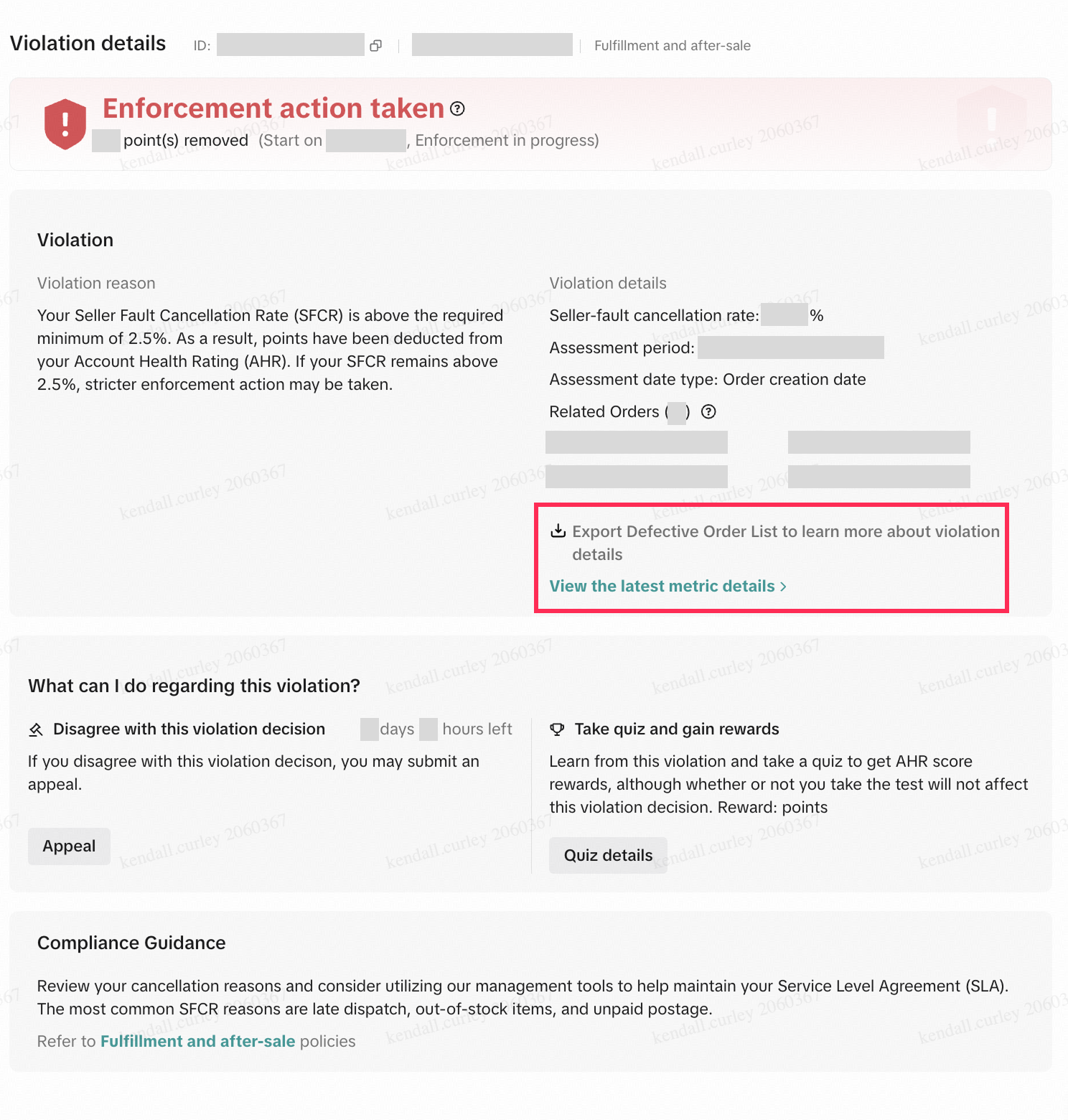
You will then need to prepare the required evidence (outlined above in the Appeal Requirements section) for each of the tracking numbers that were incorrectly flagged as canceled.
How can I improve my SFCR?
- Maintain accurate inventory levels, do not inflate inventory, and avoid cancellations caused by stock shortages or delayed shipments. Leverage these 3 tools to help you manage your inventory and fulfillment SLAs easily!
- Backorder: Extend the handling time from 3-15 days for products that are temporarily out of stock but can be shipped with only a minor delay.
- Custom Handling Time tool: Extend the handling time from 2 business days to up to 7 business days, for in-stock products that require additional handling time to ship.
- Order Handling Capacity tool: Set an estimated maximum number of orders your shop can handle each day to extend the dispatch SLA and order delivery time. It also helps you to pace incoming orders to prevent additional order surges.
- Set the appropriate price and avoid cancellations due to pricing inaccuracies.
- Make sure to have accurate product listings that meet compliance requirements. Upload any necessary compliance documentation to the Qualification Center in a timely manner.
- Try out the Fulfilled by TikTok (FBT) program. Since TikTok Shop will handle the entire dispatch and delivery process, these orders are exempt from SFCR calculations.
You may also be interested in
2025 BFCM TikTok Shop Readiness Guide
The holiday shopping rush is your single biggest opportunity to increase sales & grow your brand on…

How to Process "Shipped by Seller" Orders?
If you're using Seller shipping, our new tool makes the process of uploading your tracking number ea…

January 2026 Product Innovation
Logistics & Fulfillment New Logistics Module in Seller Center We’ve introduced a new Logistics modul…
September 2025 Product Innovation
Every month, we introduce new products and features designed to simplify store management, boost sal…

How Fulfilled by TikTok (FBT) Helps Sellers avoid Slow Dispa…
What is the slow-effectiveness governance strategy? The slow delivery governance strategy is a fulfi…
Splitting Orders into Separate Packages
Test accounts and orders for reference only. The actual interface may differ. Feature Overview The s…
How to combine multiple orders into a single package?
The demo screenshots are testing accounts for reference only. The actual interface may differ. Featu…

Order Handling Capacity Tool
Key Points: The Order Handling Capacity (OHC) tool enables sellers to set an estimated number of the…

TikTok Shipping & Collection by TikTok (CBT) Pickup Rules &…
Background Lack of Clear Responsibility in Warehouse–Carrier Handover: Unlike Seller Shipping, TikTo…

Fulfilled by TikTok (FBT) Inbound & Packaging Requirements f…
To ensure compliant management and safety of flammable liquids and battery-containing products, FBT…