

How to Use the Product Link Status Review Tool
11/21/2025
Summary
What is the purpose of the Product Link Status Review tool on TikTok Shop and how can creators access it?
- It helps creators track the approval status of product links in their shoppable videos, enabling timely resolution of issues to maximize monetization.
- Accessible via TikTok Shop Creator Center → "Video" tab → "Manage" tab, where product link statuses appear under each video title.
What are the different product link review statuses and what do they indicate?
- "No status" means product links are approved and posted successfully; "XX product links in review" means links are under review and unpublished; "XX product links need attention" indicates issues requiring creator action.
What common product link issues might creators encounter and how should they resolve them?
- Issues include expired invites (re-upload video with a new product), seller rejection (re-upload or contact seller), out-of-stock products (contact seller for restock), and content violations (upload compliant video with product link).
Can creators replace product links on already posted videos if issues arise?
- No, product links cannot be replaced on posted videos; creators must re-upload the video and link a product from their showcase to resolve issues.
Who can use the Product Link Status Review tool and how quickly are statuses updated?
- All creators eligible to create shoppable videos can access the tool.
- Status updates occur in real-time, but review durations may vary depending on the case.
Overview
Product Link Status Review is a tool that enables creators to track the status of their product links and quickly identify any issues. With clear visibility into whether a product link has been successfully approved and added to a shoppable video, creators can take timely action to resolve any abnormalities, ensuring they never miss out on valuable monetization opportunities.Accessing the Product Link Status Review Tool
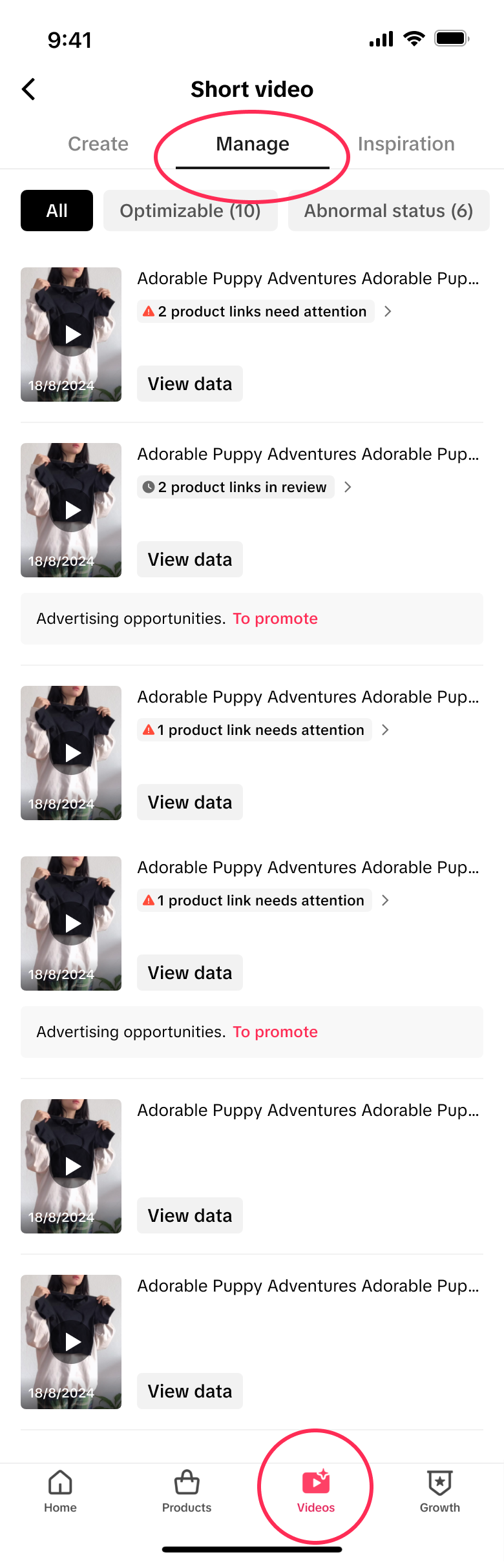
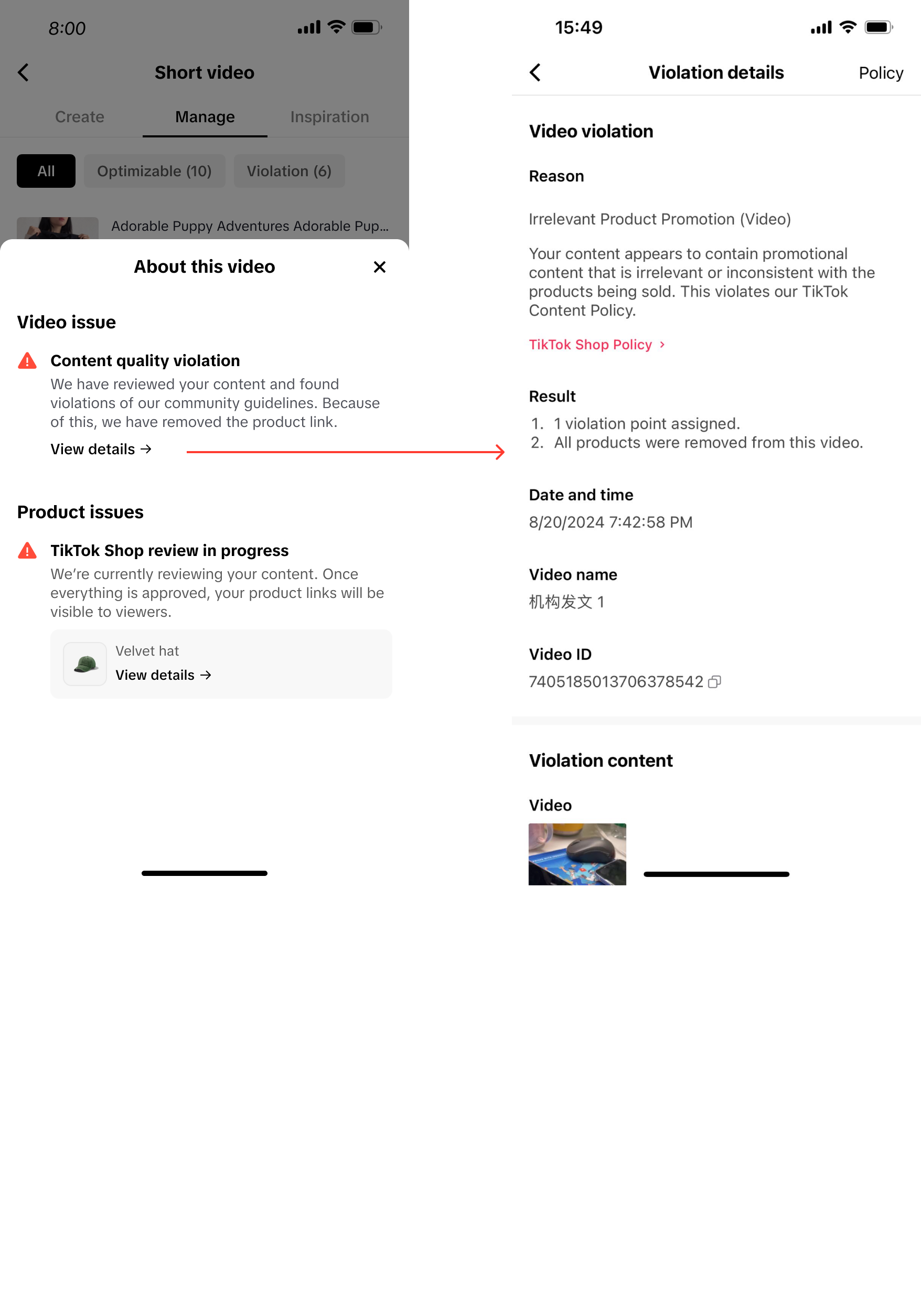
- Open the TikTok Shop Creator Center, navigate to the "Video" tab in the bottom menu, then select the "Manage" tab at the top. You'll find the product link review status and results displayed under the title of each short video in the video list.
How to Use the Product Link Status Review Tool?
Step One: Track Product Link Status
- Product link review status and results are displayed under the title of each short video in the video list under the "Manage" tab.
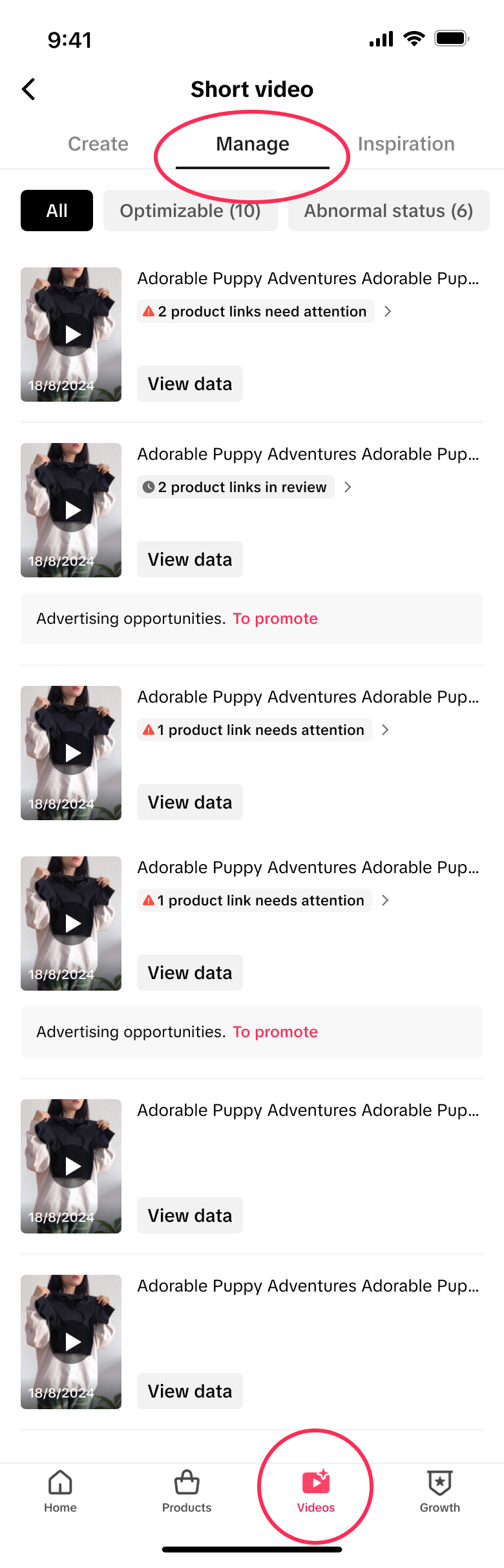
- Different review status:
- No status: the product links added to this video have been approved and posted successfully.
- "XX product links in review": the product links added to this video are currently under review and have not been published yet
- "XX product links need attention": XX product links added to this video have issues that need your attention. Click on the product link status to view more details.
Step Two: Check Product Issues
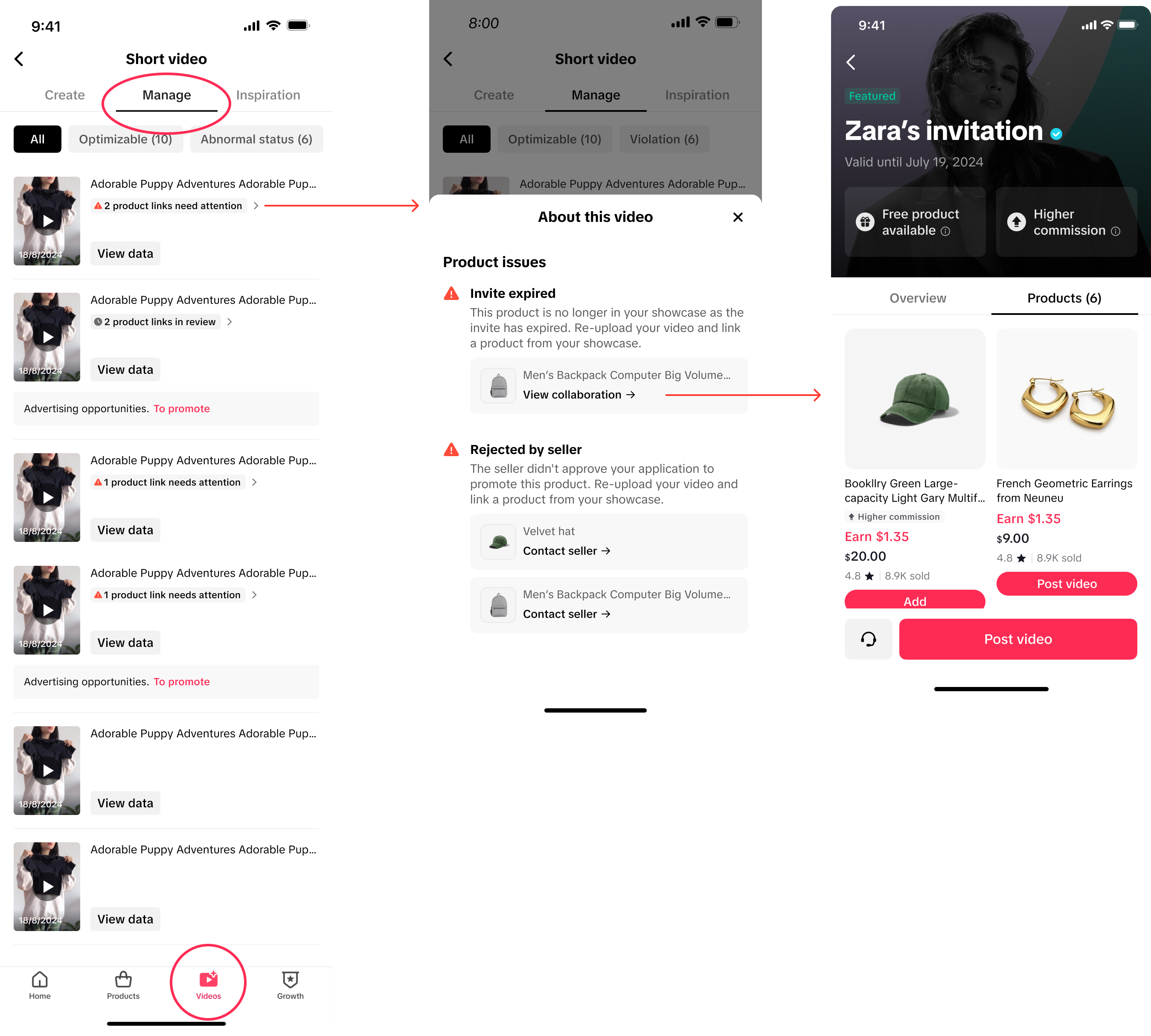
Below are common product issues that require your immediate attention:- Invite expired: the product is no longer in your showcase as the invite has expired. You need to re-upload a video and link a different product from your showcase.
- Rejected by seller: the seller didn't approve your application to promote this product. You need to re-upload a video and link a different product from your showcase. You can also find the seller's contact information if available and connect with the seller to find a solution.
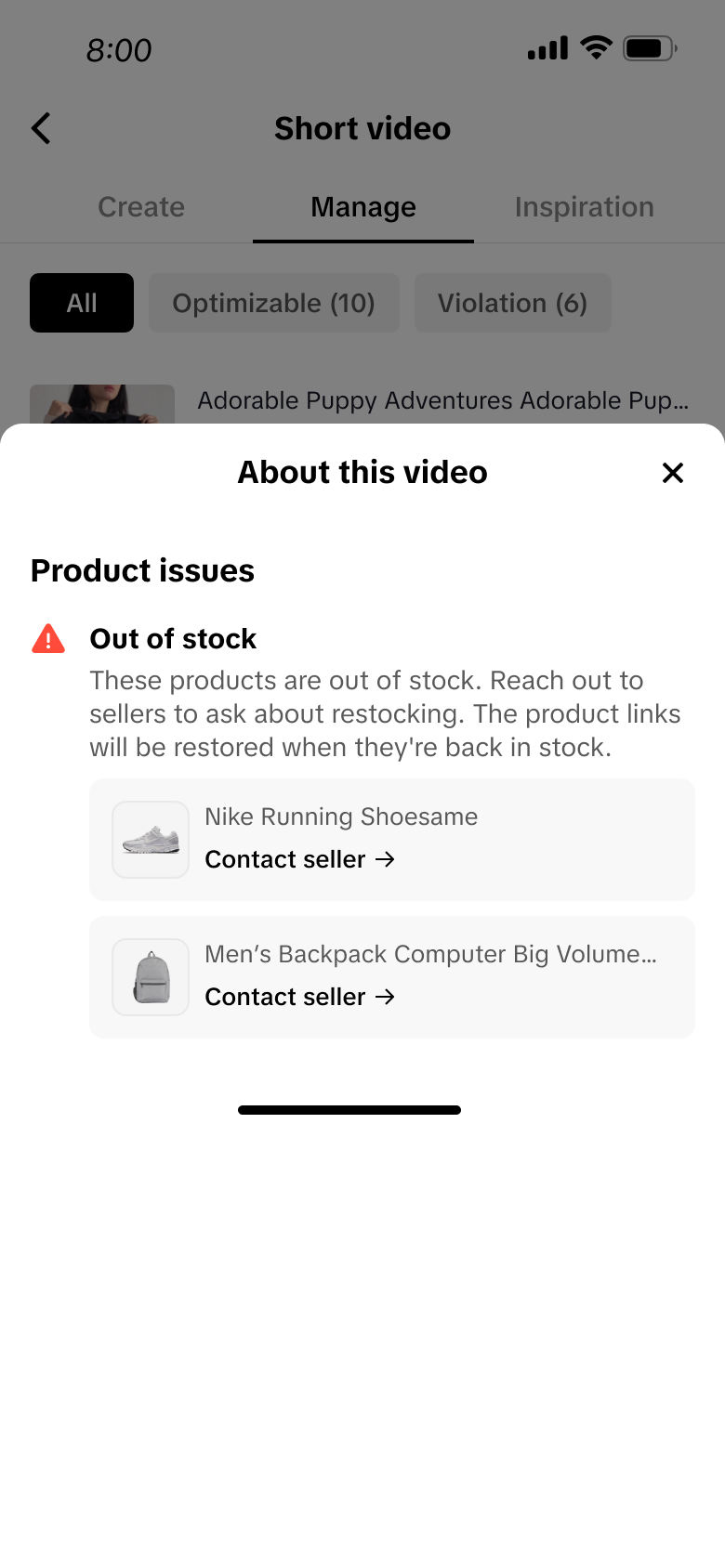
- Product out of stock: the products are out of stock. Reach out to sellers to ask about restocking. The product links will be restored when they're back in stock.
- Content quality violation: We have reviewed your content and found violations of our community guidelines. Because of this, we have removed the product link. To continue promoting this product, you need to upload a new video that complies with our guidelines and add the product link from your showcase.
FAQ
- Who can have access to the Product Link Status Review tool?
- The Product Link Status Review tool is available to all creators who can create shoppable videos.
- How long does the Product Link Status Review tool take to return a result?
- This status is updated in real-time, but the actual review time may vary from case to case.
- The product link added to my video has some issues. Can I replace the product link with a new one?
- No, you cannot replace product links for posted videos currently. You will need to re-upload the video and link a product from your showcase.

- No, you cannot replace product links for posted videos currently. You will need to re-upload the video and link a product from your showcase.
You may also be interested in

2025 Shoppable Video Holiday Guide for Creators 🎁 ✨
👋 Introduction Black Friday Cyber Monday (BFCM) is the biggest seasonal sales weekend of the year,…

Building + Nurturing a Loyal Community
Learn how to enhance your TikTok Shop experience by selecting products that align with your communit…

Understanding your customers
Discover how to build an effective content strategy for TikTok Shop by understanding your audience,…

Creating a Content Strategy
Learn to craft your content strategy for your TikTok Shop content, focusing on what to create, who i…

Content Pillars
Learn to define and express your unique brand identity on TikTok Shop by analyzing your most popular…
Introduction to Promoting Products on TikTok Shop
Learn to elevate your TikTok Shop as a creator with a blrend of authenticity and engagement, choosin…

How to Get Video Inspirations
Learn about top video script skills, hot music, and hashtags in trendy videos on the Video Inspirati…

Learn the 4 common mistakes for TikTok Shop video content qu…
Why is content quality important? 💡 Maintaining good content quality is important to boost your con…

Get insights from Valentine's inspirational videos to create…
Overview This article is aimed to introduce what great shoppable content looks like, why they perfor…
Keep it Engaging
Imagine your shoppable videos as inspiring journeys, not attention grabs. Ditch the shock tactics an…