

TikTok for SFCC: Product Catalog & Inventory Sync
Summary
What are the key steps involved in the initial product catalog synchronization during TikTok Shop onboarding?
- A product catalog feed is generated and dropped in a designated webdev location. TikTok Shop is alerted, picks up the file, uploads it, reviews the content, and publishes the products on the platform.
How does the ongoing product catalog synchronization process work after onboarding?
- Updates or changes trigger a delta product catalog feed dropped in the webdav location. TikTok Shop is alerted, uploads the file, reviews it, and publishes the updated or new products accordingly.
What is the process for inventory synchronization on TikTok Shop?
- An inventory feed with product info is dropped in the webdav location. TikTok Shop is alerted, uploads the feed, verifies data accuracy and completeness, and integrates inventory details into product listings.
What are the implications of these synchronization processes for sellers on TikTok Shop?
- Sellers must ensure timely and accurate feed generation and placement in designated locations to enable smooth product and inventory updates, ensuring their listings remain current and accurate on TikTok Shop.
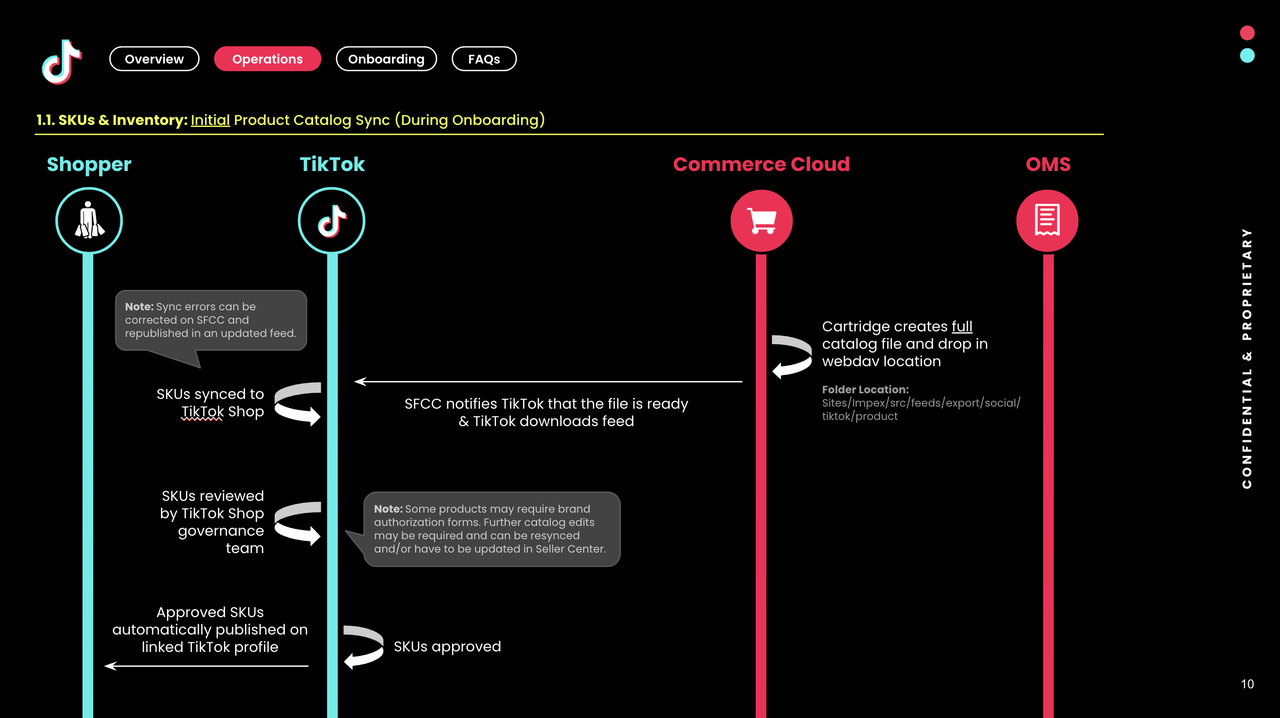
Initial Product Catalog Sync(During Onboarding):
- A product catalog feed is generated.
- The feed is dropped in the designated web development (webdev) location.
- TikTok Shop receives an alert indicating that a new file is ready for upload.
- The file is picked up from the webdev location and it is uploaded into TikTok Shop's system.
- The uploaded file undergoes a review by TikTok Shop.
- Once reviewed, the file is published on TikTok Shop.
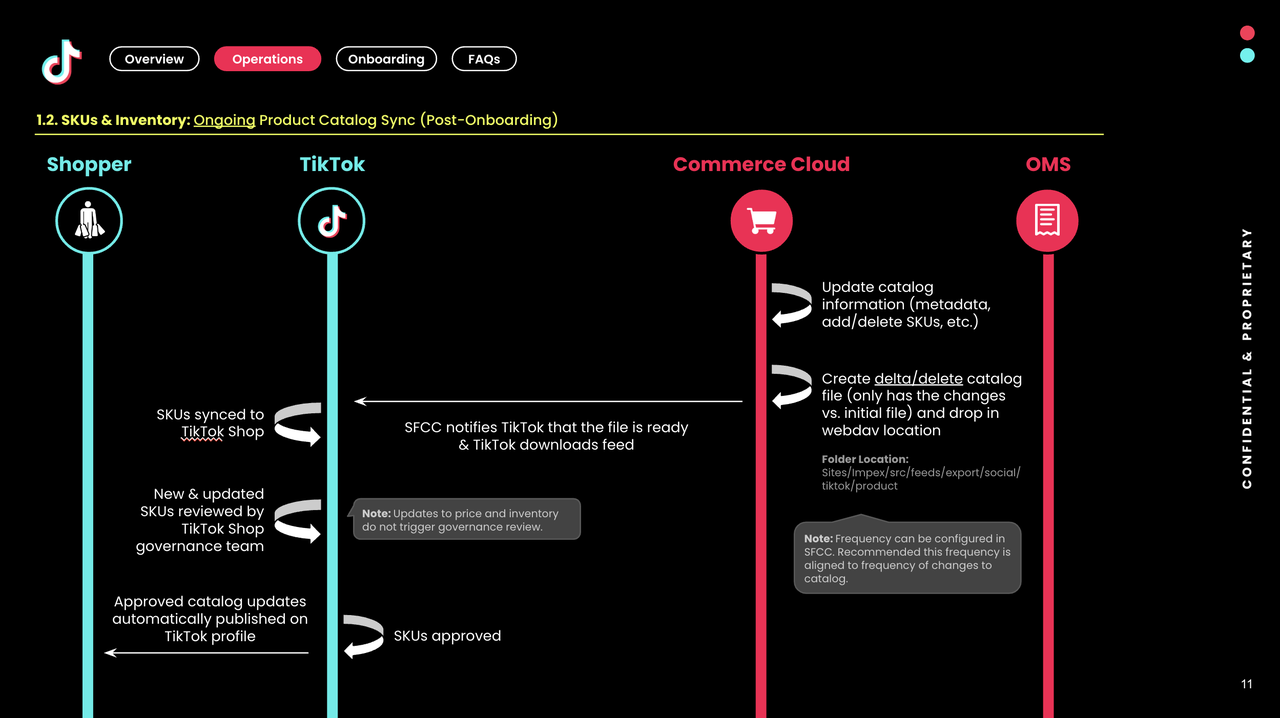
Ongoing Product Catalog Sync (Post Onboarding)
- When an update to an existing product or the addition/deletion of a new product occurs, a delta product catalog feed is generated
- The feed is dropped in the designated webdav location
- TikTok Shop receives an alert indicating that a new file is ready for upload.
- The file is picked up from the webdav location and it is uploaded into TikTok Shop's system.
- The uploaded file undergoes a review by TikTok Shop
- Once reviewed, the file is published on TikTok Shop.
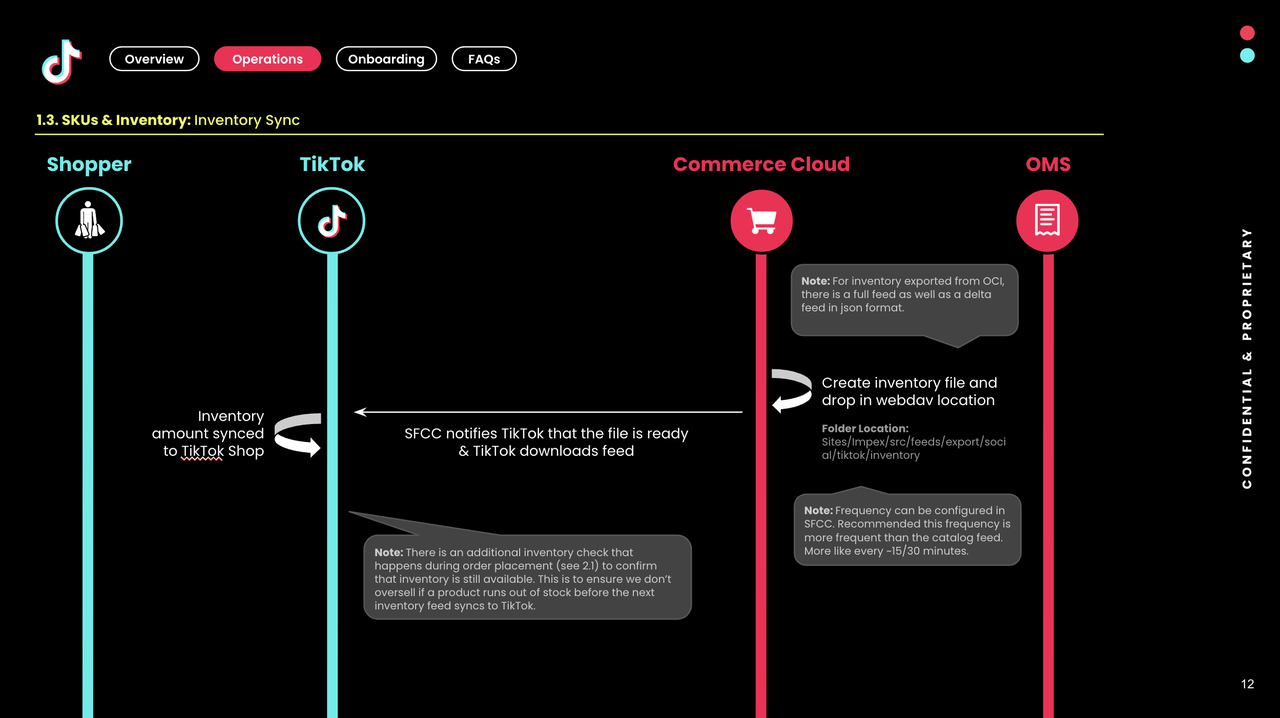
Inventory Sync
- An inventory feed is generated containing product information and is dropped in the designated webdav location
- TikTok Shop receives an alert indicating that a new file is ready for upload
- The file is picked up from the webdav location
- The inventory feed is uploaded into TikTok Shop's system
- The uploaded data is verified for accuracy and completeness
- The inventory information is integrated into TikTok Shop's product listings
You may also be interested in

How to Process "Shipped by Seller" Orders?
If you're using Seller shipping, our new tool makes the process of uploading your tracking number ea…

January 2026 Product Innovation
Logistics & Fulfillment New Logistics Module in Seller Center We’ve introduced a new Logistics modul…
September 2025 Product Innovation
Every month, we introduce new products and features designed to simplify store management, boost sal…

Logistics & Fulfillment: Shipping Options, Policies, and Bes…
🎬 Start here: Watch the Order Fulfillment Edu Video for a visual walkthrough before reading this ar…

Definition and Calculation of FBT Penetration Rate
Definition and Calculation of FBT Penetration Rate Definition and Calculation Formula of FBT Penetra…
Splitting Orders into Separate Packages
Test accounts and orders for reference only. The actual interface may differ. Feature Overview The s…

How to combine multiple orders into a single package?
The demo screenshots are testing accounts for reference only. The actual interface may differ. Featu…

FBT Inbound Request (IBR) Creation and Management Process
Inbound Request Rules and Timeliness Requirements Correct location and warehouse: Goods in the inbou…

FBT Goods Creation, Matching, and Management Process
How to Create Goods and Match Them with SKU For products containing hazardous chemicals, refer to th…

Order Handling Capacity Tool
Key Points: The Order Handling Capacity (OHC) tool enables sellers to set an estimated number of the…