

How to "Learn From Creators" on TikTok Shop
11/21/2025
Summary
What are the main benefits of using TikTok Shop's Learn from Creators tools for sellers and creators?
- Learn from Creators offers customized learning by modeling top-performing shoppable videos, providing key insights, best practices, and Dos & Don'ts to help creators confidently produce engaging content without worrying about algorithm penalties.
- It helps sellers incorporate proven skills and strategies into their videos, improving content quality and potentially boosting sales performance on TikTok Shop.
How can sellers and creators access and navigate the Learn from Creators tools within TikTok Shop?
- Access the tools via the Creator Center under the TikTok Shop toolkit by selecting "Learn from creators," where users can view educational videos, Dos & Don'ts tips, and filter top-performing videos by categories like Favorites, For You, Followers Loved, and Trending.
- The platform allows keyword searches and saving videos for future reference, enabling creators to efficiently find and study high-performing content relevant to their products and audience.
What specific functionalities and insights does the Learn from Creators tool provide to help improve video content?
- The tool highlights key creator skills with timestamps, shows video performance data (views, likes, comments, shares), and allows direct interaction with featured products by linking to product pages or adding items to showcases.
- Dos & Don'ts tips and short educational videos guide creators on best practices for shoppable content, helping avoid common pitfalls and optimize video effectiveness.
Are there any limitations or important considerations sellers should be aware of when using the Learn from Creators tools?
- Skills analysis is not available for videos that are not in English, which may limit insights for creators targeting non-English speaking markets or using multilingual content.
- All showcased videos are high sales performers with no violations, ensuring quality examples but possibly limiting exposure to diverse content styles or emerging trends.
Learn from creators overview
As a creator on TikTok Shop, we understand that trying to create quality shoppable videos can be overwhelming, which is why we encourage you to use the learn from creators tools. TikTok Shop's learn from creators tools offer a customized learning process so you can learn how to make engaging content by modeling other top-performing videos. The tools also provide key suggestions and Dos and Don'ts so you can be confident in the content you ceate, and less worried about the algorithm deboosting your video.Learn from creators offers the following benefits:
- Learn from top-performing videos
- View summarized key insights and skills so you can incorporate them into your own videos
- Learn best practices and recommendations when creating shoppable content

How to use learn from creators
Entrance
From the Creator Center, go to the TikTok Shop toolkit and select Learn from creators.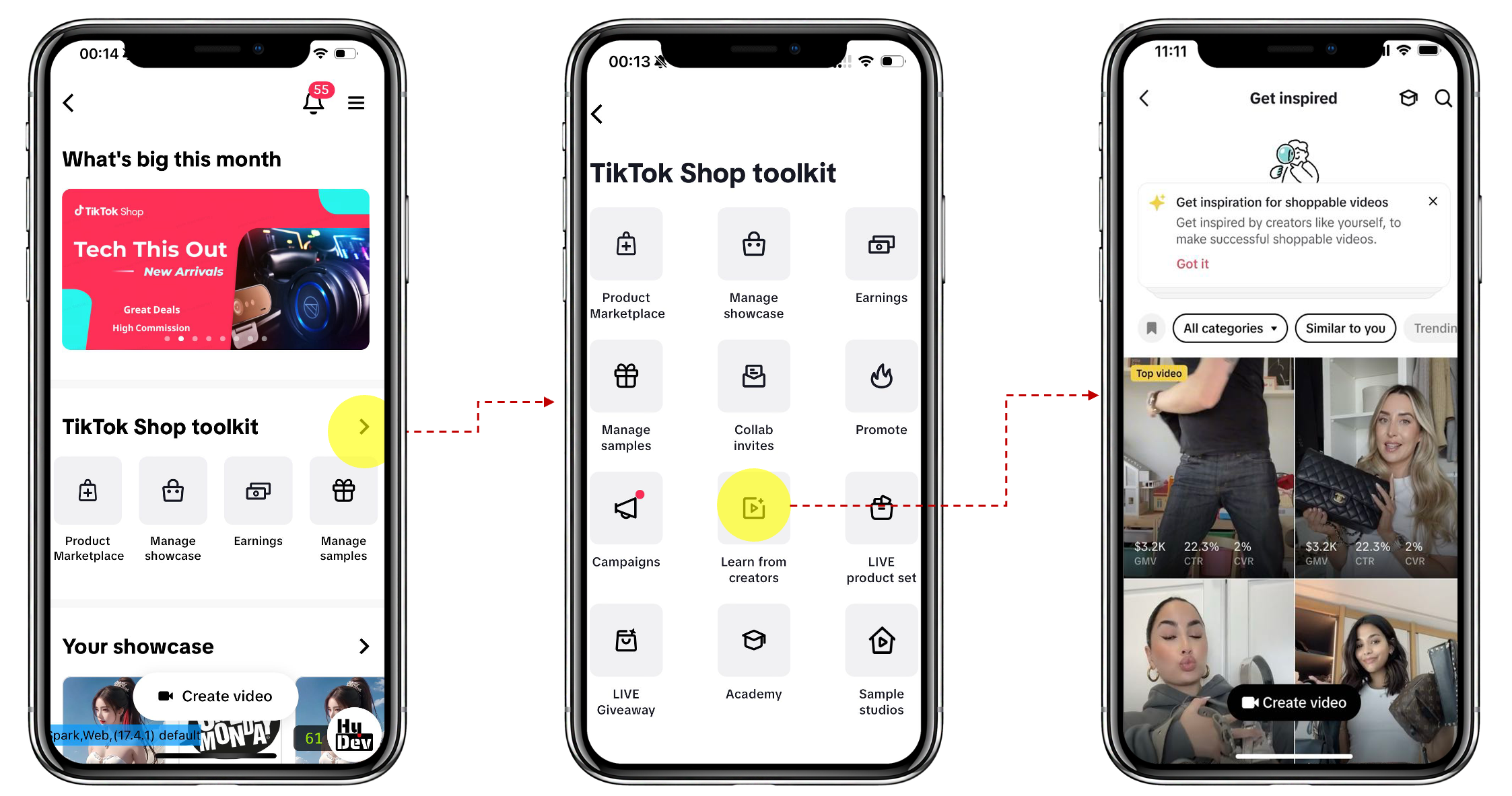

Functionalities
Dos & Don'ts tips for shoppable videos
Once you've selected learn from creators vita the TikTok Shop toolkit, you can access the short video tips by tapping the graduation cap icon in the top right corner. Additionally, you can also see the Dos & Don'ts in the top banner area. When you select learn more, you'll be redirected to a short education video.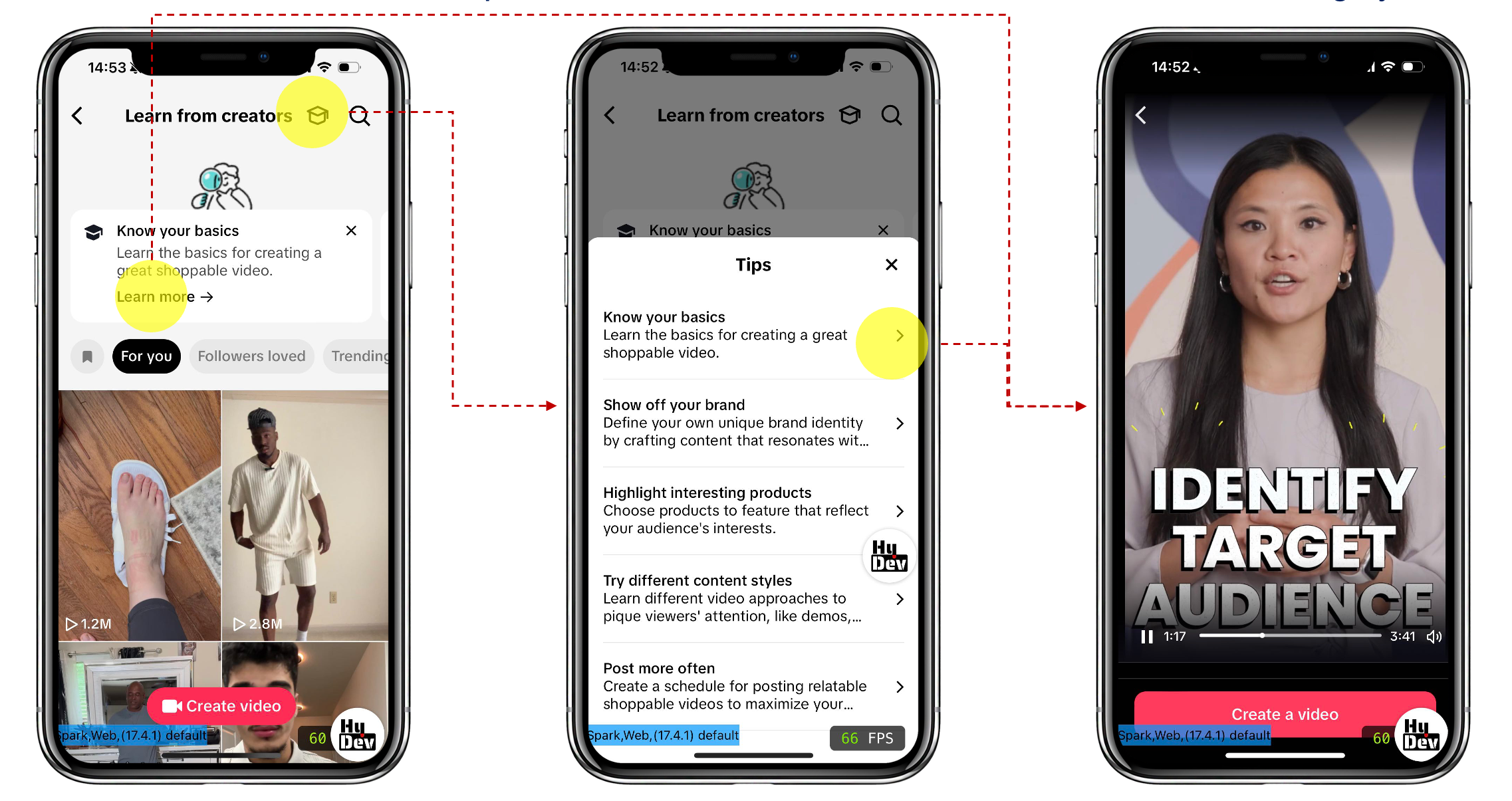

Filter and search top-performing videos
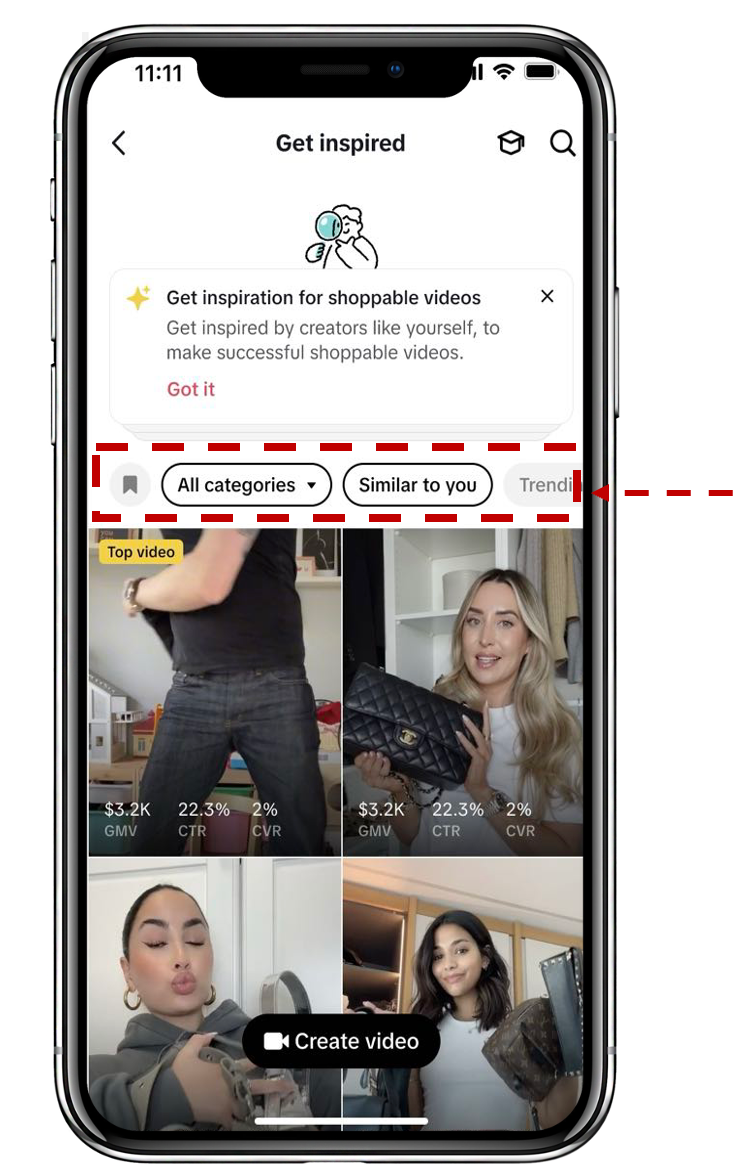
You can filter through the top-performing videos using the following categories:- Favorite (flag icon): Videos saved by creators
- For you: Recommended videos based on your product category
- Followers loved: Recommended videos based on your followers' ordered/viewed product category
- Trending in: Recommend the videos based on increased GMV/orders within your selected category
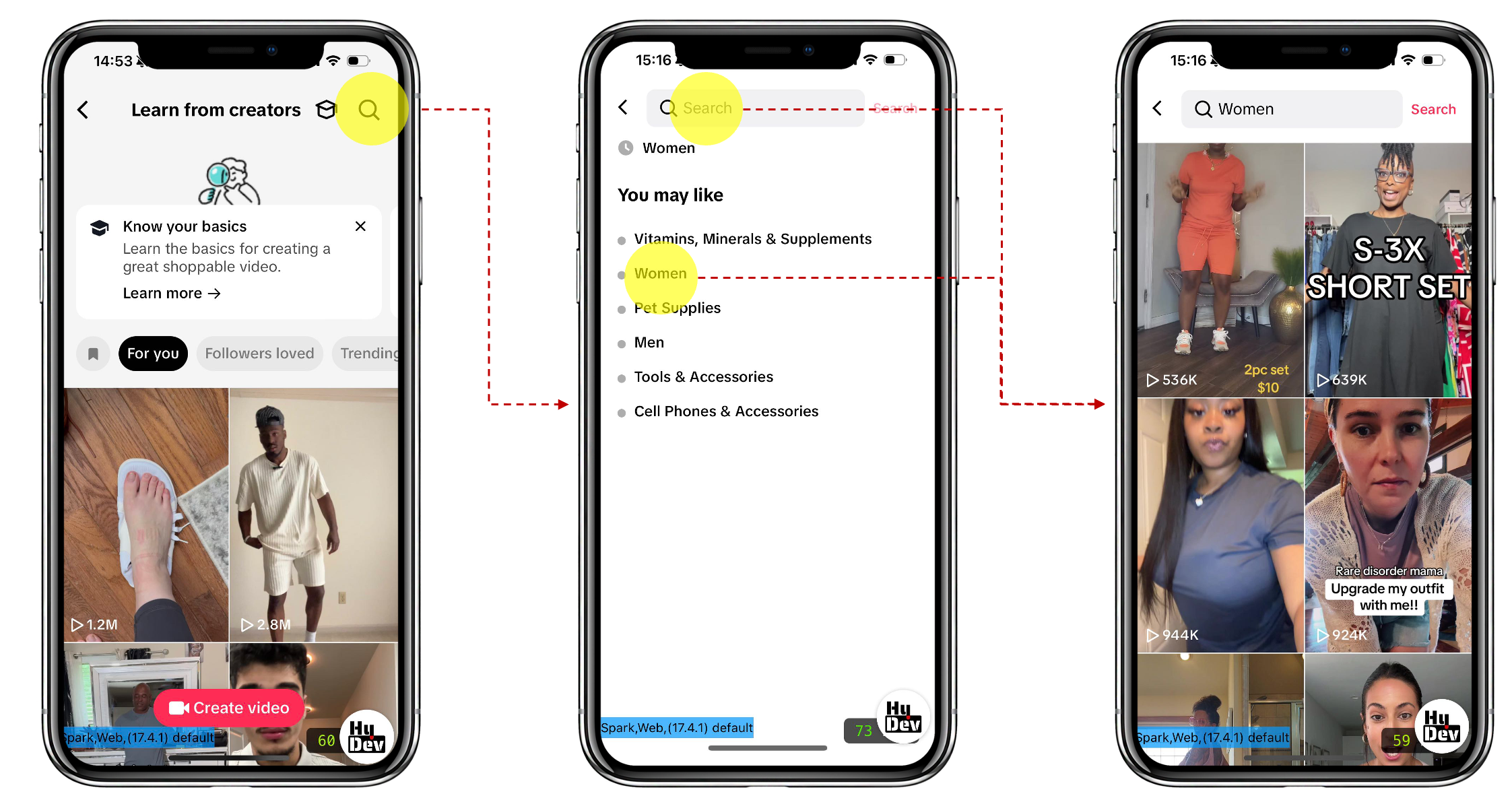
You can also use the search icon to find videos based on keywords.

Video insights
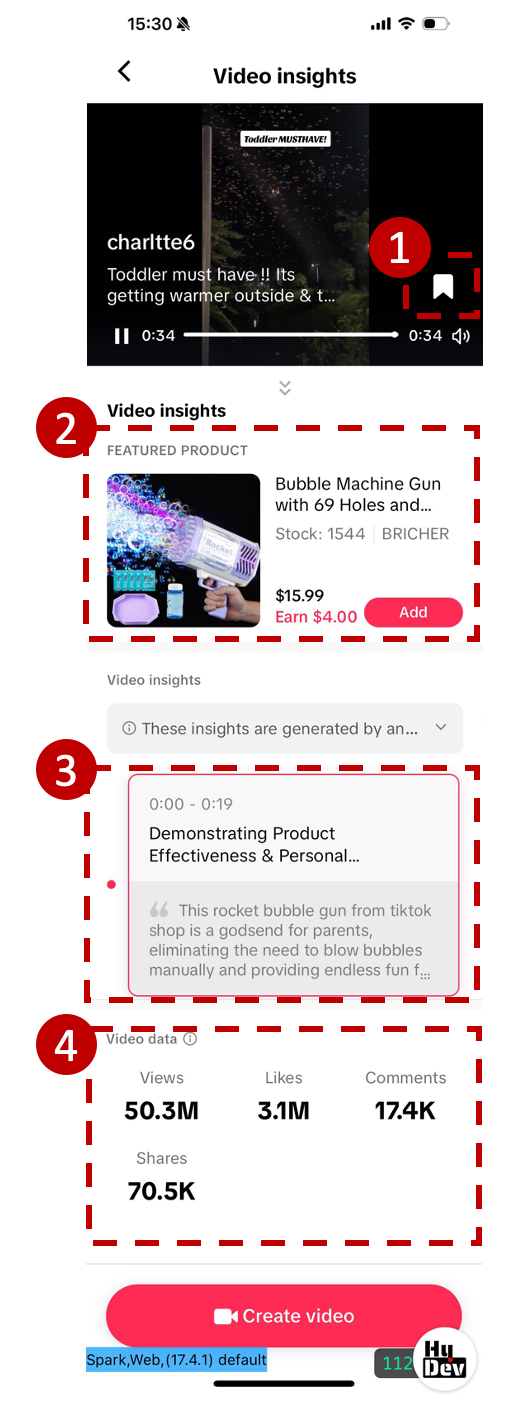
There are four components included in video insights:- Save: You can select the flag icon to save a video for future reference
- Featured product: If you're interested in a product, you can click on the thumbnail to go to the Product Detail Page for details, or directly add to showcase by clicking Add.
- Skills: We'll call out key skills used by the creator, along with a timestamp of when the skill is used.
- Video data: We'll provide data on views, likes, comments, and shares for your reference.

FAQs
| Questions | Answers |
| Videos that are not in English will not be able to generate skills analysis. |
You may also be interested in

2025 Shoppable Video Holiday Guide for Creators 🎁 ✨
👋 Introduction Black Friday Cyber Monday (BFCM) is the biggest seasonal sales weekend of the year,…
Building + Nurturing a Loyal Community
Learn how to enhance your TikTok Shop experience by selecting products that align with your communit…
Understanding your customers
Discover how to build an effective content strategy for TikTok Shop by understanding your audience,…
Creating a Content Strategy
Learn to craft your content strategy for your TikTok Shop content, focusing on what to create, who i…
Content Pillars
Learn to define and express your unique brand identity on TikTok Shop by analyzing your most popular…
Introduction to Promoting Products on TikTok Shop
Learn to elevate your TikTok Shop as a creator with a blrend of authenticity and engagement, choosin…

How to Get Video Inspirations
Learn about top video script skills, hot music, and hashtags in trendy videos on the Video Inspirati…
Learn the 4 common mistakes for TikTok Shop video content qu…
Why is content quality important? 💡 Maintaining good content quality is important to boost your con…

Get insights from Valentine's inspirational videos to create…
Overview This article is aimed to introduce what great shoppable content looks like, why they perfor…
Keep it Engaging
Imagine your shoppable videos as inspiring journeys, not attention grabs. Ditch the shock tactics an…