

Automated Order Combination
01/05/2026
Summary
What is the new TikTok Shop Livestream order auto-combination feature and how does it benefit sellers and shoppers?
- It automatically combines shopper orders across all channels within a set time if buyer, address, seller, and warehouse match, improving logistics efficiency and reducing multi-order shipping costs.
- Shoppers see reduced shipping fees on subsequent orders, encouraging repeat purchases and boosting sellers’ GMV.
What are the opt-in options available for sellers regarding the auto-combination feature and how can they manage their enrollment?
- Sellers can choose: (1) Auto-combine orders with free shipping from the 2nd order onward, or (2) Auto-combine orders charging a combined shipping fee for subsequent orders, or (3) No auto-combine (manual only).
- Enrollment varies by seller type; existing Livestream auto-combine users are auto-upgraded, others can opt-in via Seller Center or Manage Orders page, with options to change or unenroll anytime.
How does the auto-combination feature work across different seller types and order channels on TikTok Shop?
- TikTok Shipping, Seller Shipping, Fulfilled by TikTok, and Cross-Border sellers can opt-in; TikTok manages combination for FBT and Cross-Border sellers, while others can view, edit, and print combined orders.
- Orders from all channels (Shop Tab, Videos, Livestreams) placed within 3-6 hours of the first order qualify for combination and shipping fee benefits.
What are the key operational details sellers should know about managing combined orders and shipping labels?
- Sellers see auto-combine tags and recommended combines on Manage Orders; they can remove orders from combined packages before shipping and edit tracking numbers if needed.
- Shipping during a Livestream is allowed but recommended after completion to avoid extra fees, as shipping fees are calculated based on all orders during the Livestream.
What shopper notifications and incentives are associated with the auto-combination feature?
- Shoppers receive shipping fee discounts during checkout for incremental orders within the time window, boosting repeat buying.
- Notifications about free shipping benefits appear when shoppers join seller Livestreams that have opted into the feature.
Importantly, TikTok Shop will display reduced shipping fees to shoppers during checkout for subsequent purchases with the same seller (within a specific time horizon), thereby incentivizing incremental orders, repeat buying, and boosting GMV.
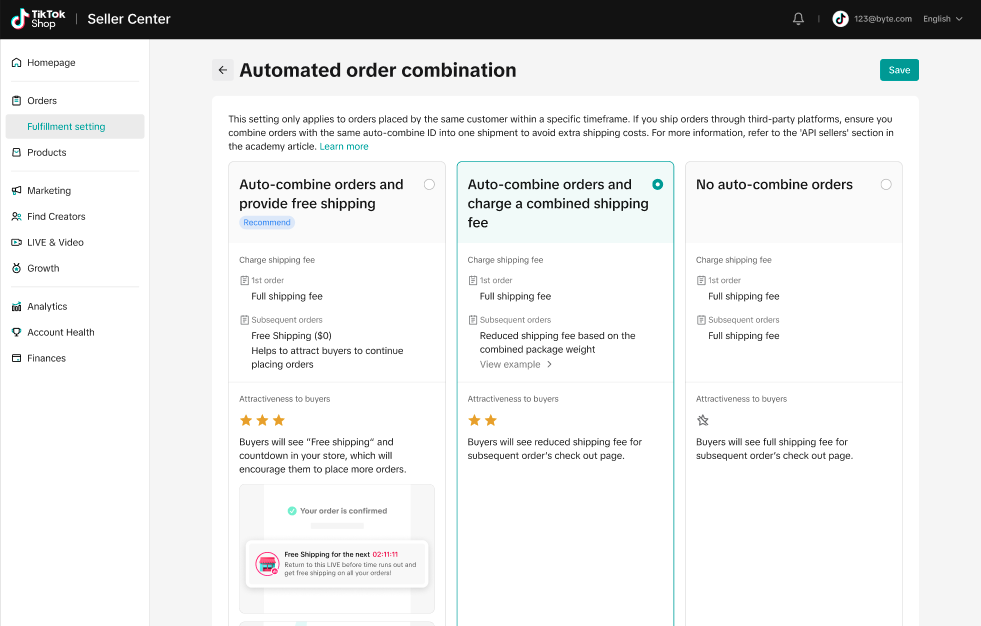
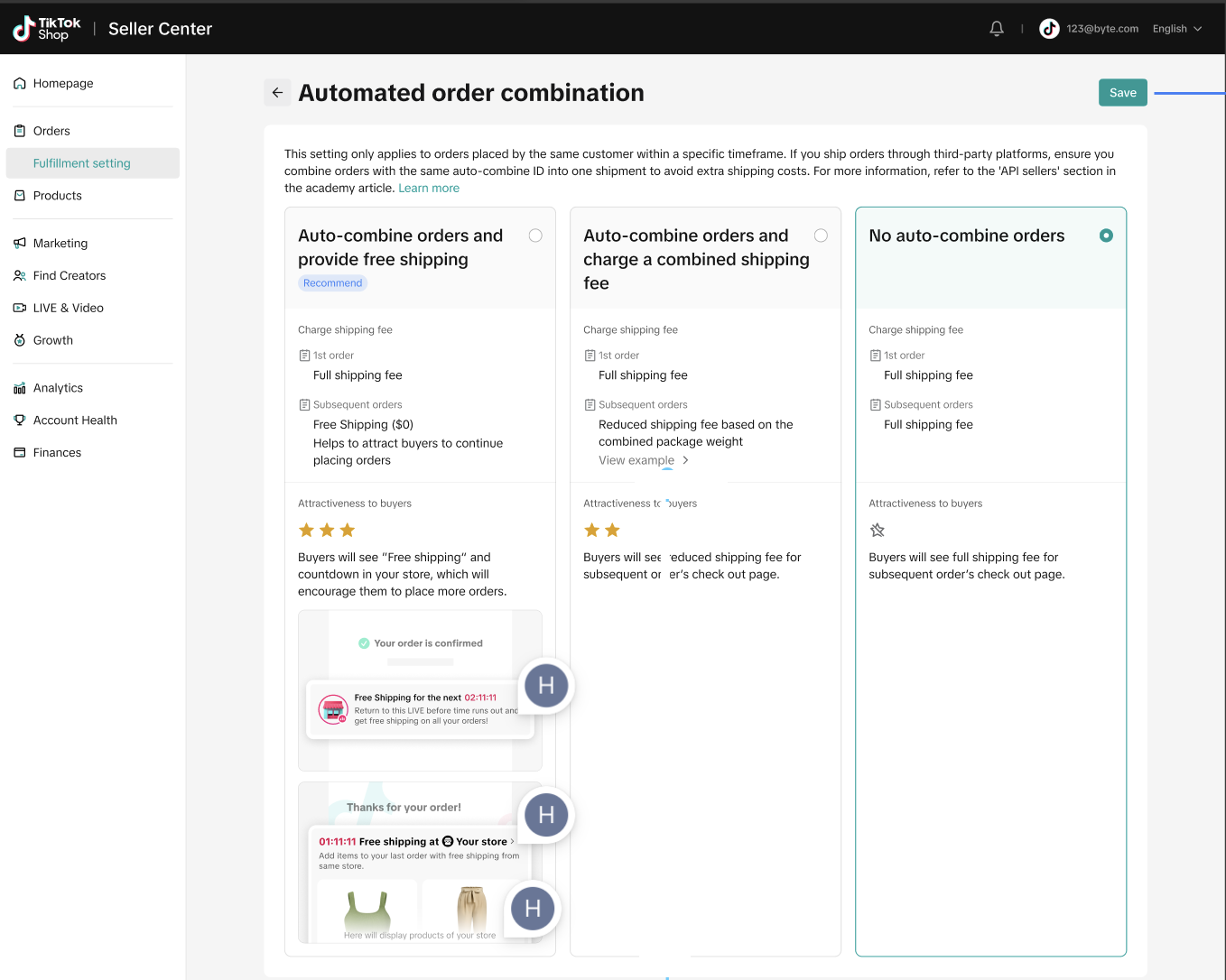
There will be 2 opt-in options for sellers:
- Auto-combine orders and provide free shipping - shopper orders across all order channels will auto-combine while providing free shipping to shoppers from the 2nd order onwards. Order confirmation will display a free shipping banner to encourage shoppers to place more orders.
- Auto-combine orders and charge a combined shipping fee - shopper orders across all order channels will auto-combine while only charging incremental shipping fees to shoppers from the 2nd order onwards.
- No Auto-combine - Sellers can only manually combine packages during the create shipping label process.
Seller Enrollment:
Seller enrollment for the feature is as follows:Sellers enrolled in Livestream Auto-combine feature:
Sellers already enrolled in Livestream auto-combine feature will be automatically upgraded to Automated order combination for all channels as their current selection
.Sellers opted-in to Livestream auto-combine and provide free shipping - Sellers will be automatically enrolled to Auto-combine orders and provide free shipping
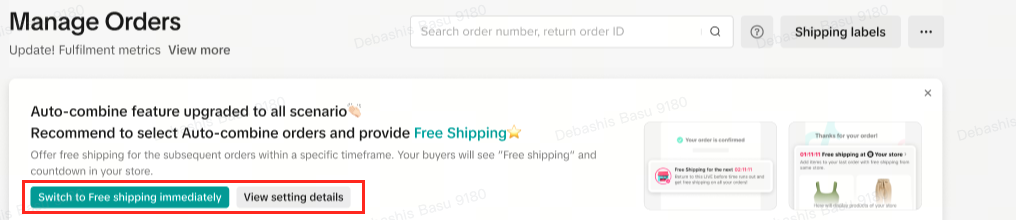
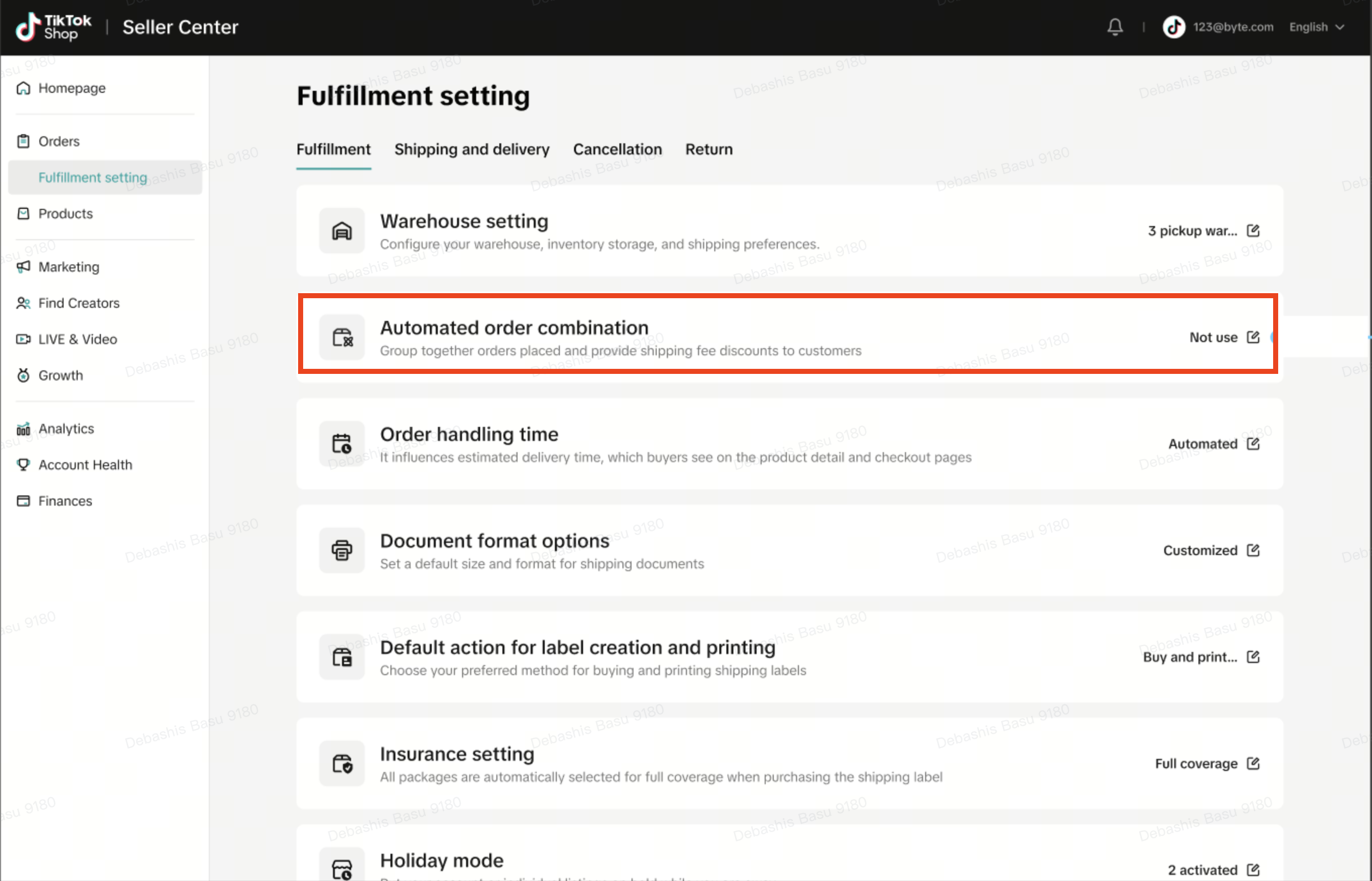
for all order channels. A banner will be displayed on the Manage Orders page.- Sellers are able to change opt-in options or unenroll by clicking: View Setting Details in the banner in Manage Orders, alternatively by navigating to Orders > Fulfillment > Automated Order Combination and selecting their preferred options.

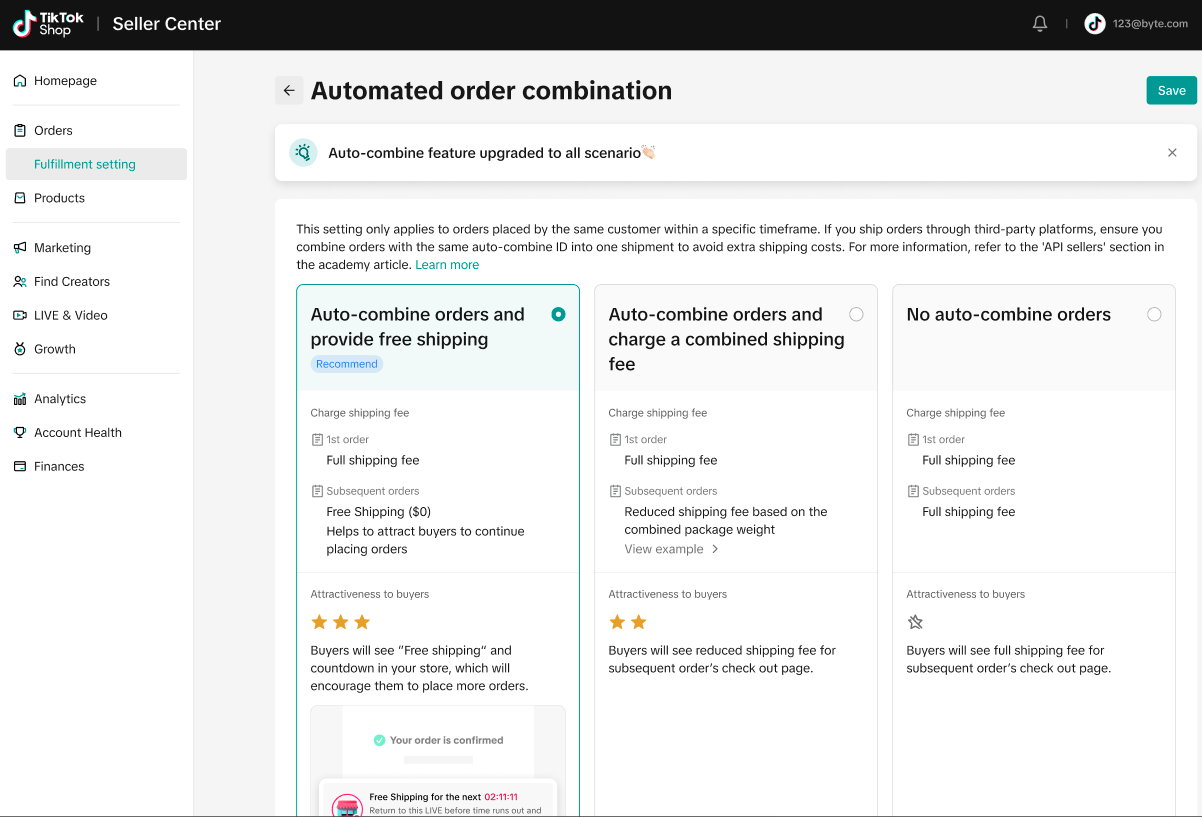
Sellers opted-in to Livestream auto-combine and charge combined shipping fees - Sellers will be automatically enrolled to Auto-combine orders and charge a combined shipping fee
for all order channels.- Sellers are able to change opt-in options or unenroll by clicking: View Setting Details in the banner in Manage Orders, alternatively by navigating to Orders > Fulfillment > Automated Order Combination and selecting their preferred options.
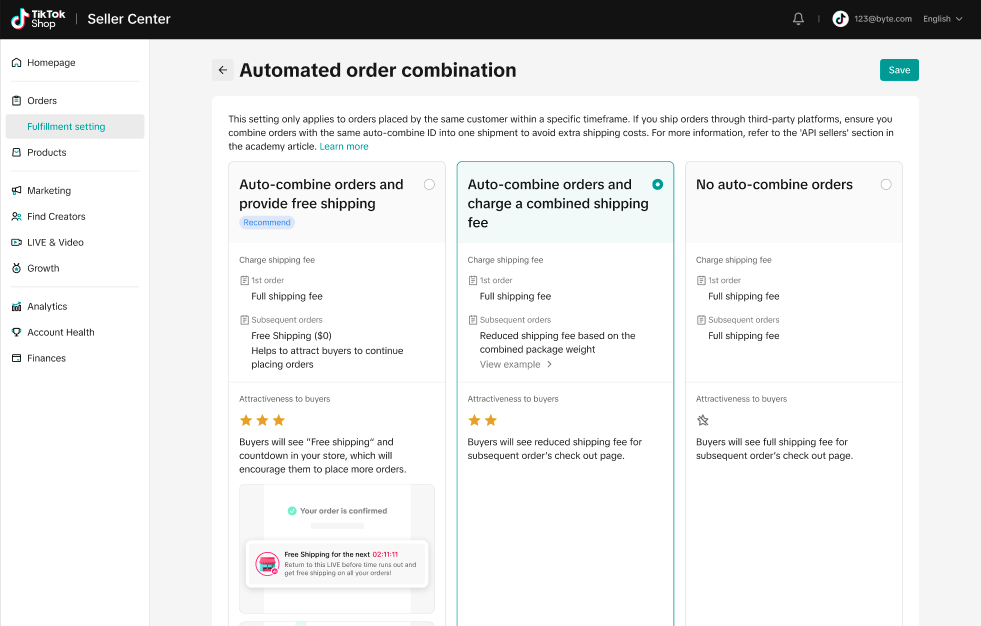
Seller not enrolled in Livestream Auto-combine feature:
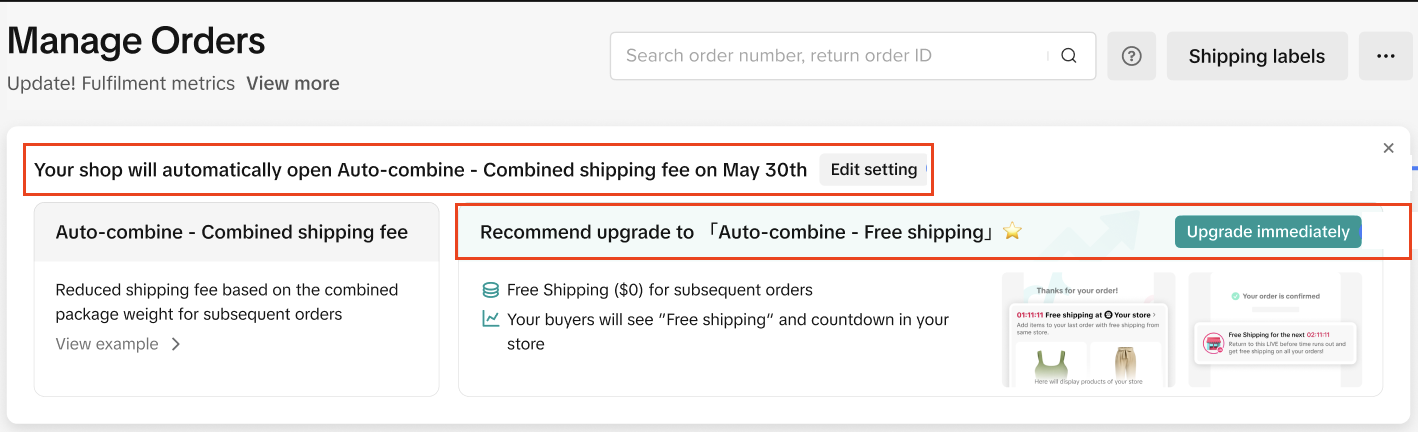
Enrollment of sellers who are not enrolled in Livestream auto-combine feature will be as follows:Existing TikTok Shippping Seller Center sellers - Sellers will be automatically enrolled in Auto-combine orders and charge a combined shipping fee
for all order channels option and recommend enrollment in free shipping option.- Sellers are able to opt-in to Auto-combine orders and provide free shipping by clicking the button for Upgrade Immediately.
- Sellers are able to change opt-in options or unenroll by clicking: Edit Setting in the banner in Manage Orders, alternatively by navigating to Orders > Fulfillment > Automated Order Combination and selecting their preferred options.
All Seller-Shipping sellers and TikTok Shipping API sellers
- No automatic enrollment, such sellers will only be notified of the new feature.- Sellers need to log into Seller Central -> Fulfillment Settings-> Combine Shipment settings to view the Auto-combine options to Opt-in.
- Auto-combine orders and provide free shipping
- Auto-combine orders and charge a combined shipping fee
- Click the relevant radio button, then click save to register selection.
Logistics Fulfillment
US TikTok Shipped Orders
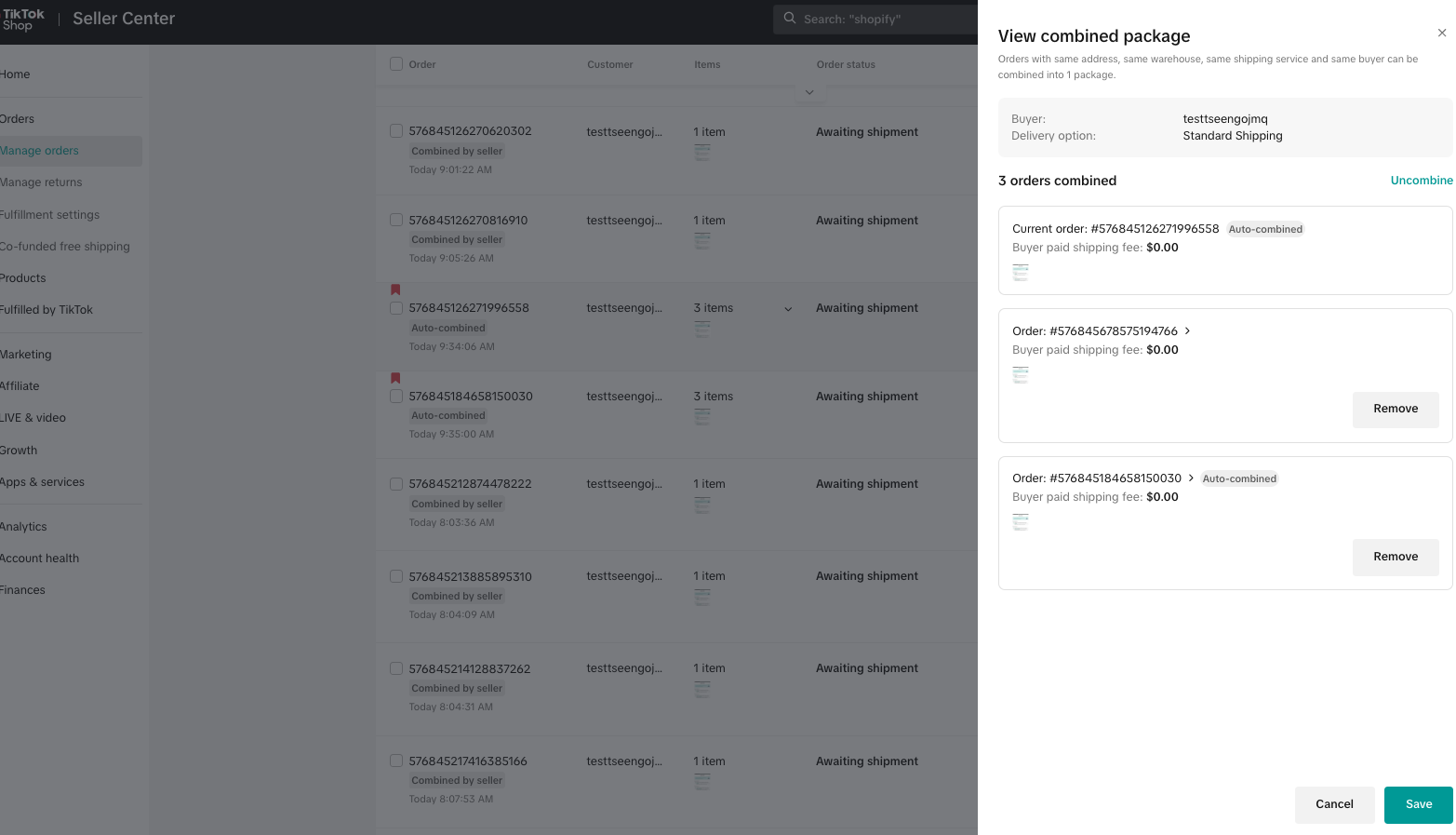
Auto-Combine Order Shipping- Manage order page shows auto-combine tag to sellers
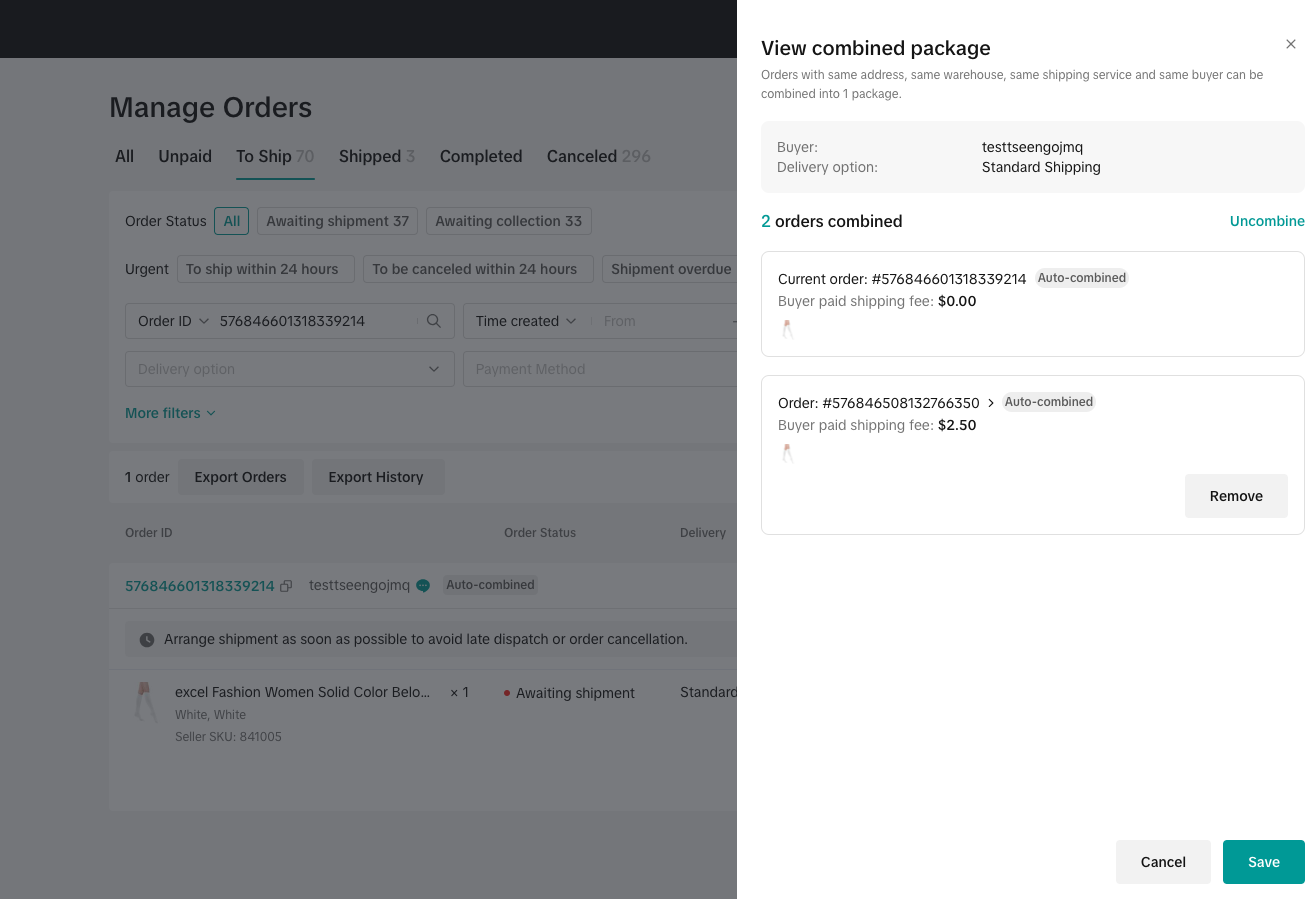
- When Seller Shipping, if the auto combine order can be combined with regular orders,we will show the recommended combine page,to let the seller choose whether they want to combine
- Create a shipping label page will show how (1) many orders have been combined, and (2) how many recommended combine orders
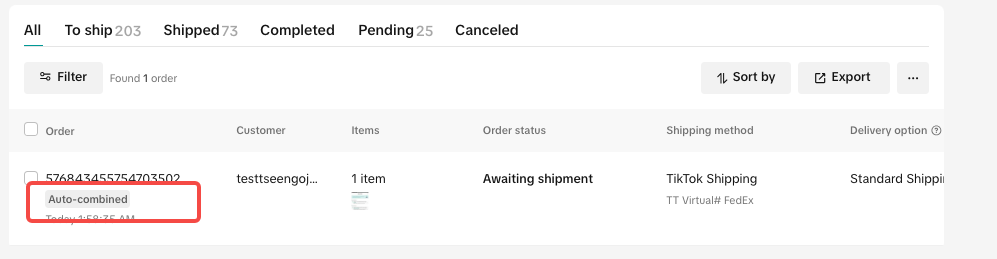
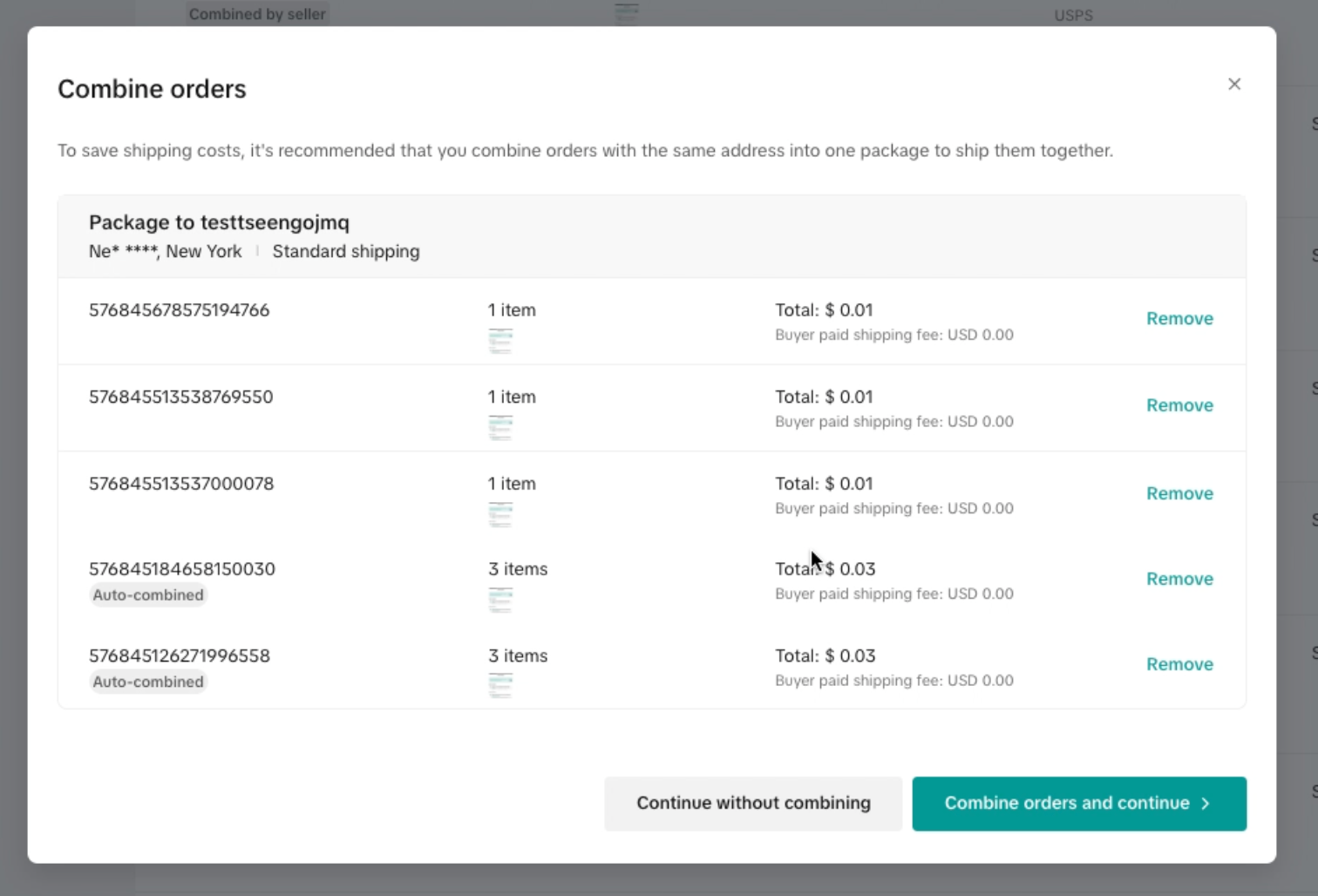
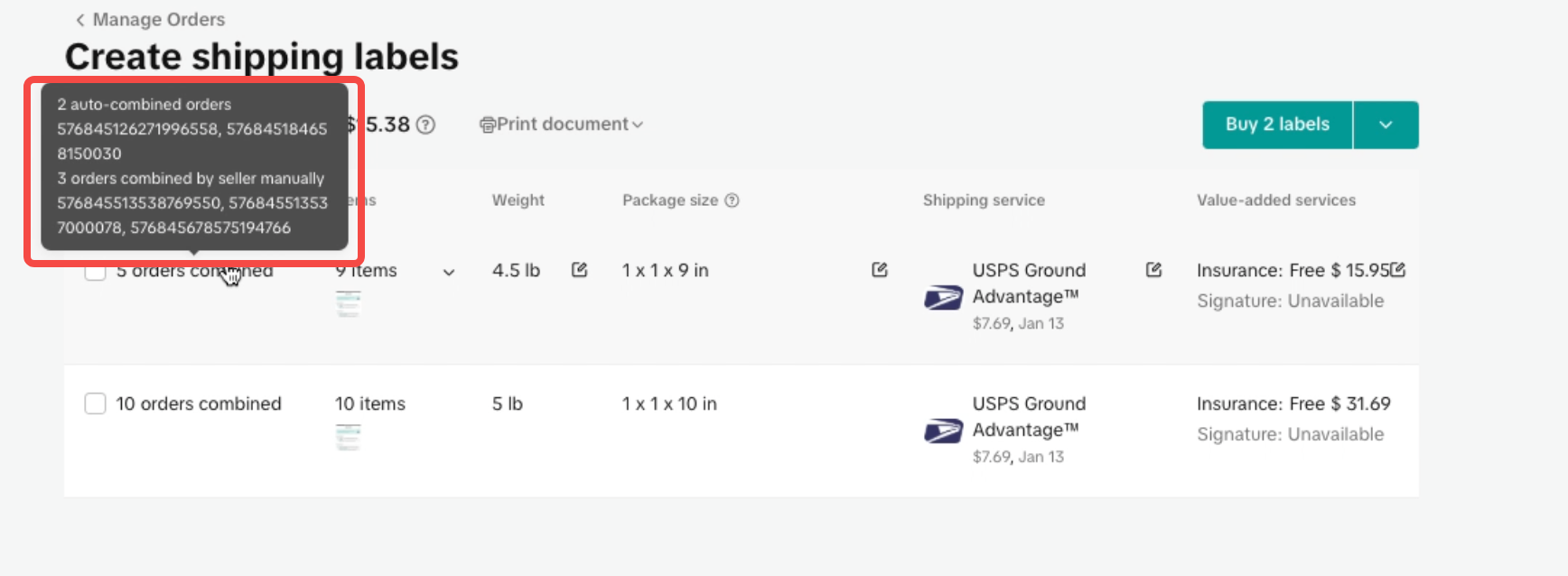
- This type of order will be automatically combined by default
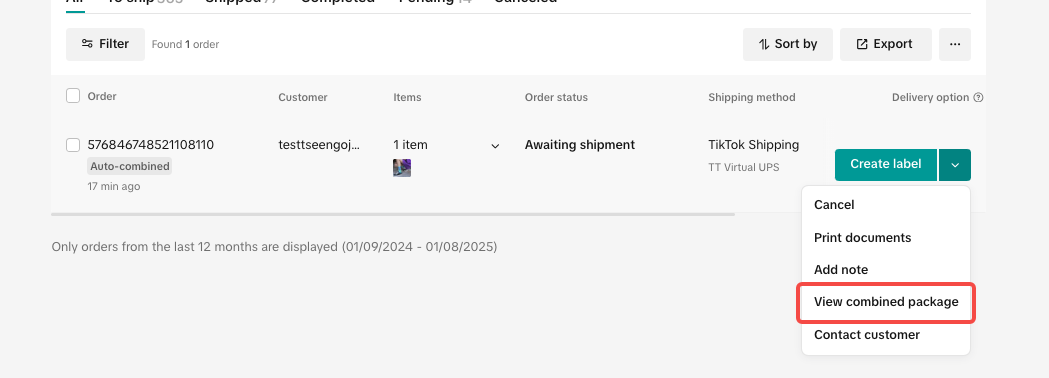
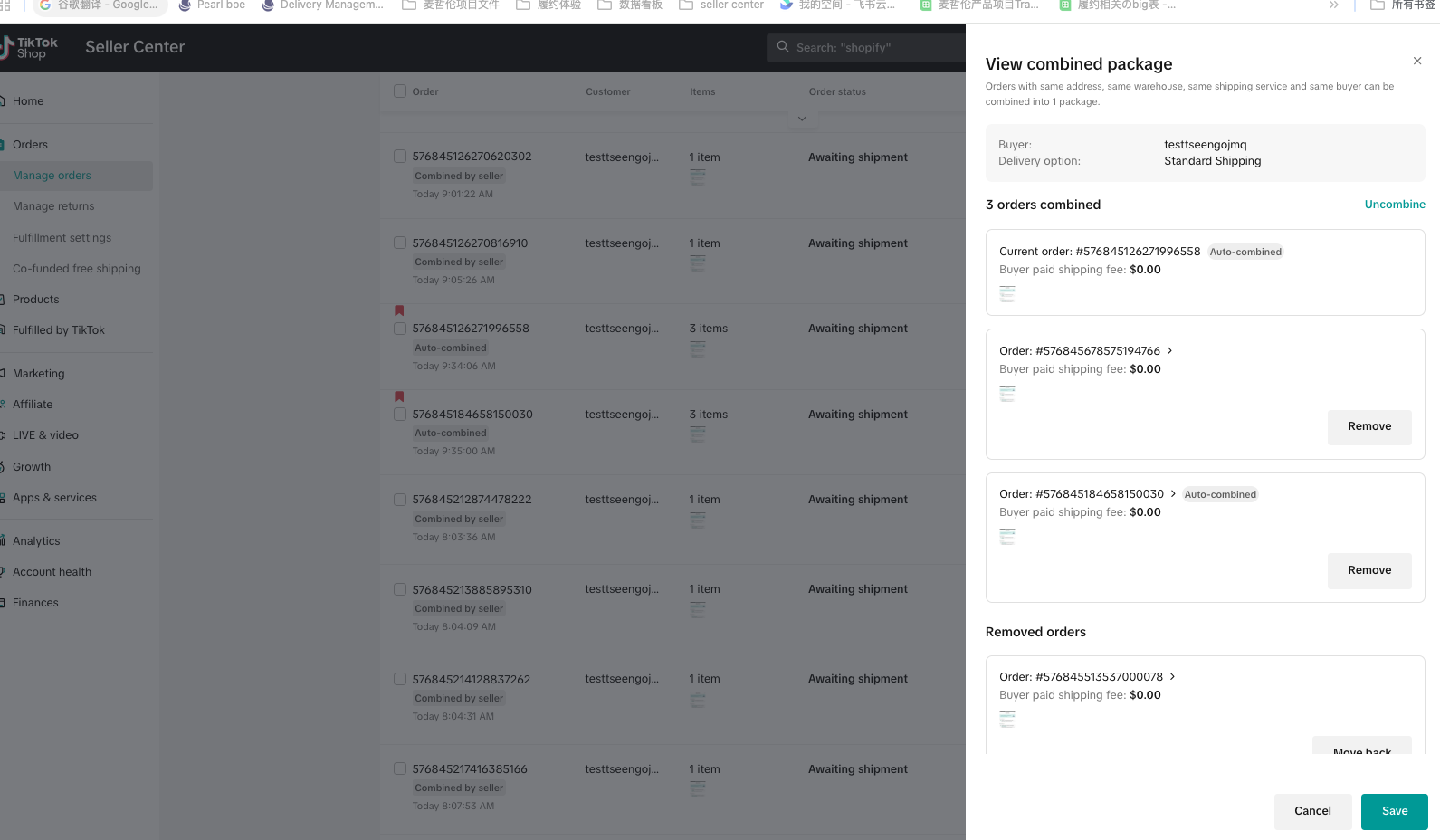
- Seller can click view combined package and remove some orders, then seller clicks save
- When the seller sees the combined list next time, we will only show the remaining orders
US Seller Shipped Orders
Auto combine order can combine with regular orders,and then seller can edit tracking number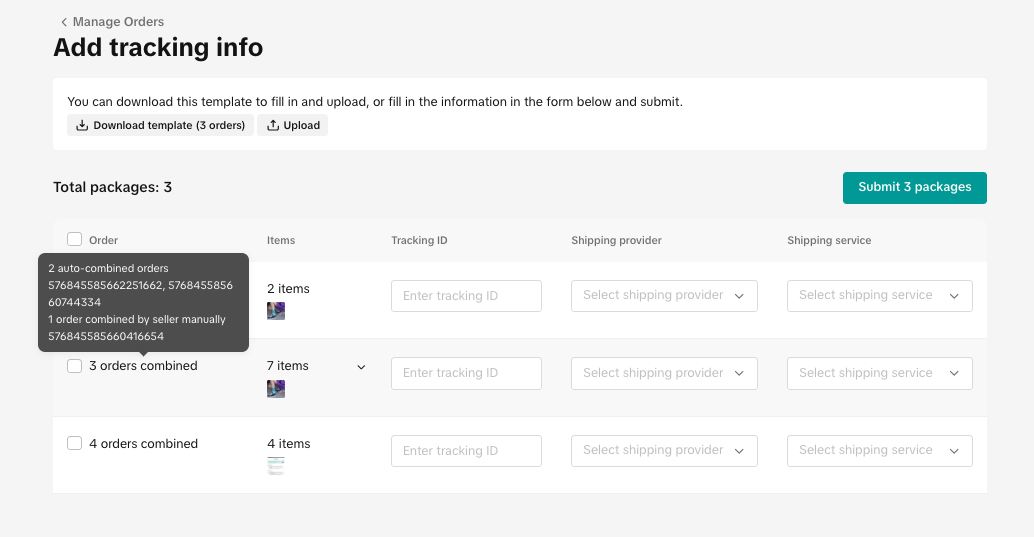
Cross-Border Seller Shipped Orders
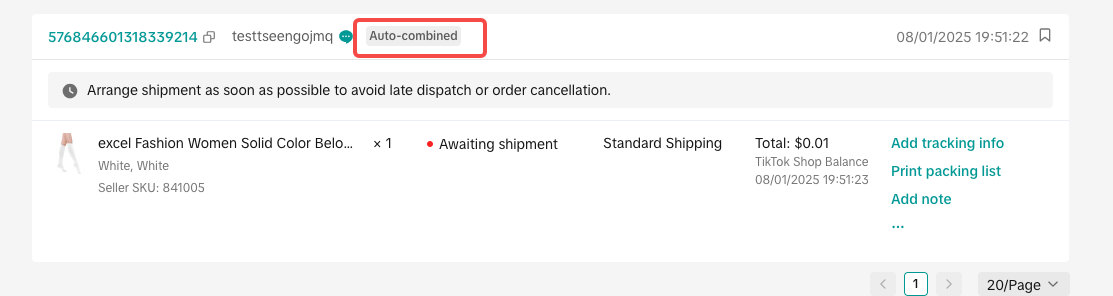
- Manage orders page will show the auto-combine tag.
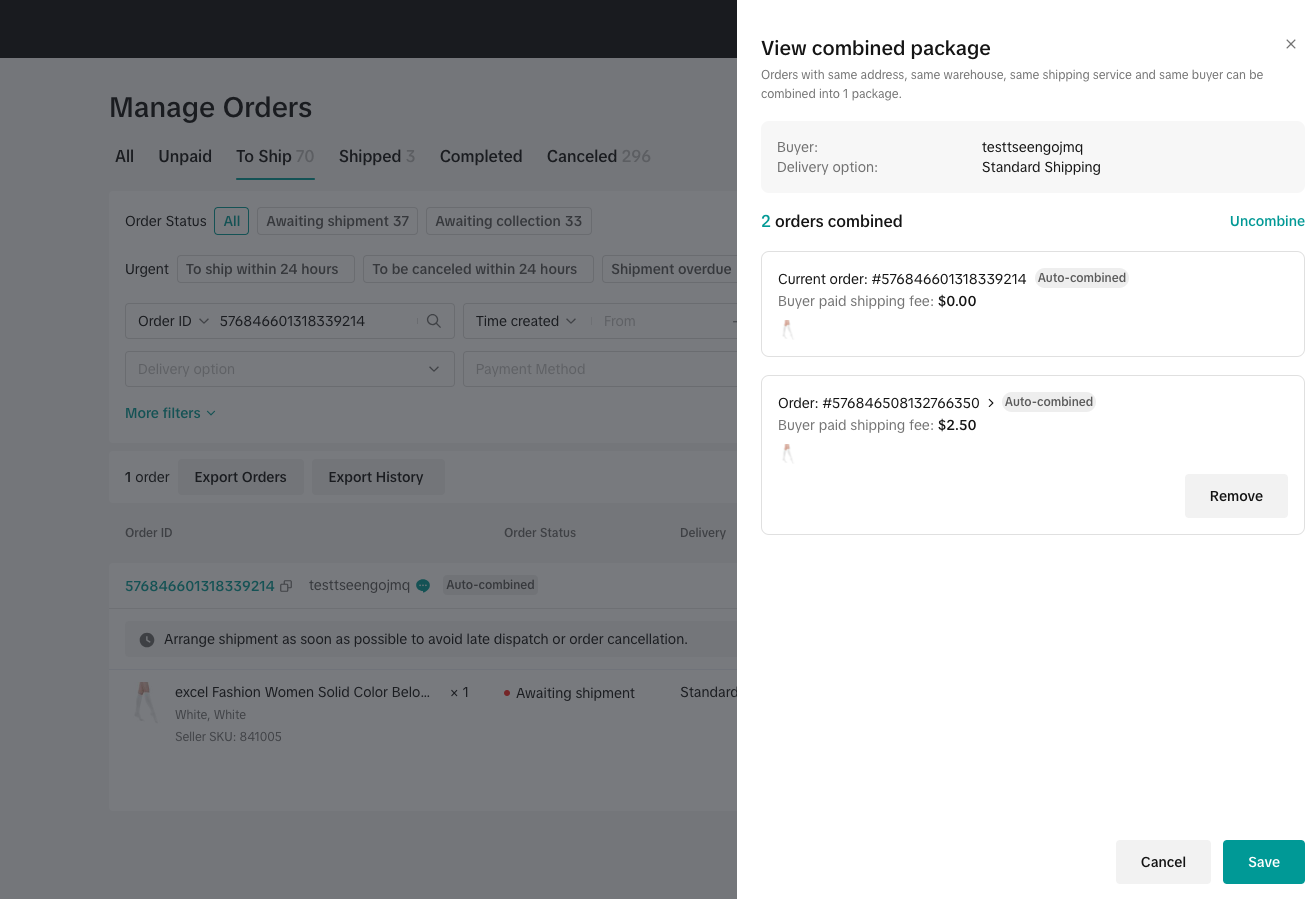
- Seller can click view combined package, we will show all the combined orders.
- The update tracking information page will show all the combined orders.
FAQs
- What are the order combination rules for US TikTok Shipping, Seller Shipping, Fulfilled by TikTok and Cross-border sellers?
| 4PL | 3PL | FBT | Cross-Border | GS FS | |
| Auto-combine and provide free shipping | 3 hours | 3 hours | 3 hours | 3 hours | 3 hours |
| Auto-combine and charge a combined shipping fee | 6 hours | 6 hours | 1 Hour | 6 hours | 3 hours |
- How will the feature work for different types of sellers?
- TikTok Shipping sellers will be able to opt-in to the feature, view auto combined orders in Manage Orders, view combined package details, uncombine and re-combine packages, and shopper and print shipping labels.
- Seller Shipping sellers will be able to opt-in to the feature, view auto combined orders in Manage Orders, view combined package details, uncombine and re-combine packages, and confirm shipment.
- Fulfilled by TikTok (FBT) sellers will be able to opt-in to the feature, TikTok platform will manage shipping and combination for them.
- Cross Border (FS) sellers will be able to opt-in to the feature, TikTok platform will manage shipping and combination for them.
- Cross border sellers will be able to opt-in to the feature, view auto combined orders in Manage Orders, view combined package details, uncombine and re-combine packages, and confirm shipment.
- Auto Combination will be available for sellers using PC, Open API and App.
- Can orders placed by shoppers on all shopping channels, e.g Shoptab, Videos and Livestreams, be considered for package combination?
- Can a seller ship packages during a Livestream?
- Yes, however, we would recommend waiting till the completion of the Livestream as the TikTok fulfillment system will calculate the combination logic and shipping fee based off the orders placed for the duration of the Livestream. Shipping earlier than the completion of the Livestream might incur an additional shipping fee.
- Do we notify shoppers of the benefits?
- Shoppers will be notified of the benefits when they join a seller livestream (not creator livestream) who has opted-in to the free shipping package combine.
- Can a seller separate the auto-combined packages?
- Yes, sellers can separate the auto-combined packages. However, they will need to be aware of the shipping fee gap, and bear any additional shipping fee expenses.
You may also be interested in

Guide to Seller-Fault Cancellation Rate (SFCR)
Key Points: Seller-Fault Cancellation Rate (SFCR) metric is used to evaluate the quality of a selle…
Proof Of Delivery
What is Proof of Delivery feature? TikTok has launched the Proof of Delivery feature which allows Ti…
Manage Orders
To make your order processing easier, TikTok Shop has upgraded our Manage Orders page. This redesign…
After-Sales Evidence Guide for Appeals and Disputes
Key Points: You need strong evidence when handling appeals, disputes, or refund rejections. Good pro…
'On Hold' Order Status
What is On Hold Status? On the Manage Orders page under the Pending tab, an order with an On hold st…
Validation of Tracking ID
What is the validation of tracking ID feature? TikTok Shop's feature to validate tracking IDs has th…
TikTok for Shopify: Shop Management Tab
Overview In the latest update of the TikTok for Shopify app, the "Shop Management" section of the ch…

Guide to Late Dispatch Rate (LDR)
Key Points: The Late Dispatch Rate (LDR) metric is used to assess how efficiently sellers dispatch…
Set Up Cancellation Auto-Approval Window(for Orders Shipped…
For Sellers who use Shipped by Seller (3PL) as an option to fulfill their orders, cancellation reque…
TikTok for Shopify: Free Sample Orders
TikTok for Shopify has launched a new feature to simplify handling free sample orders as $0 transact…