

Open Collaboration One Click Solution
Summary
What is the One Click Affiliate enrollment solution for TikTok Shop sellers and why is it important?
- It allows select sellers to fully enroll all their products into TikTok’s Open Collaboration affiliate program with one click, boosting product reach and sales by enabling creator promotions without manual setup.
- Data shows sellers with more products in Open Collaboration reach broader audiences and achieve higher sales, making this solution a key performance enhancer.
How does the One Click Affiliate enrollment solution work and what settings are automatically applied?
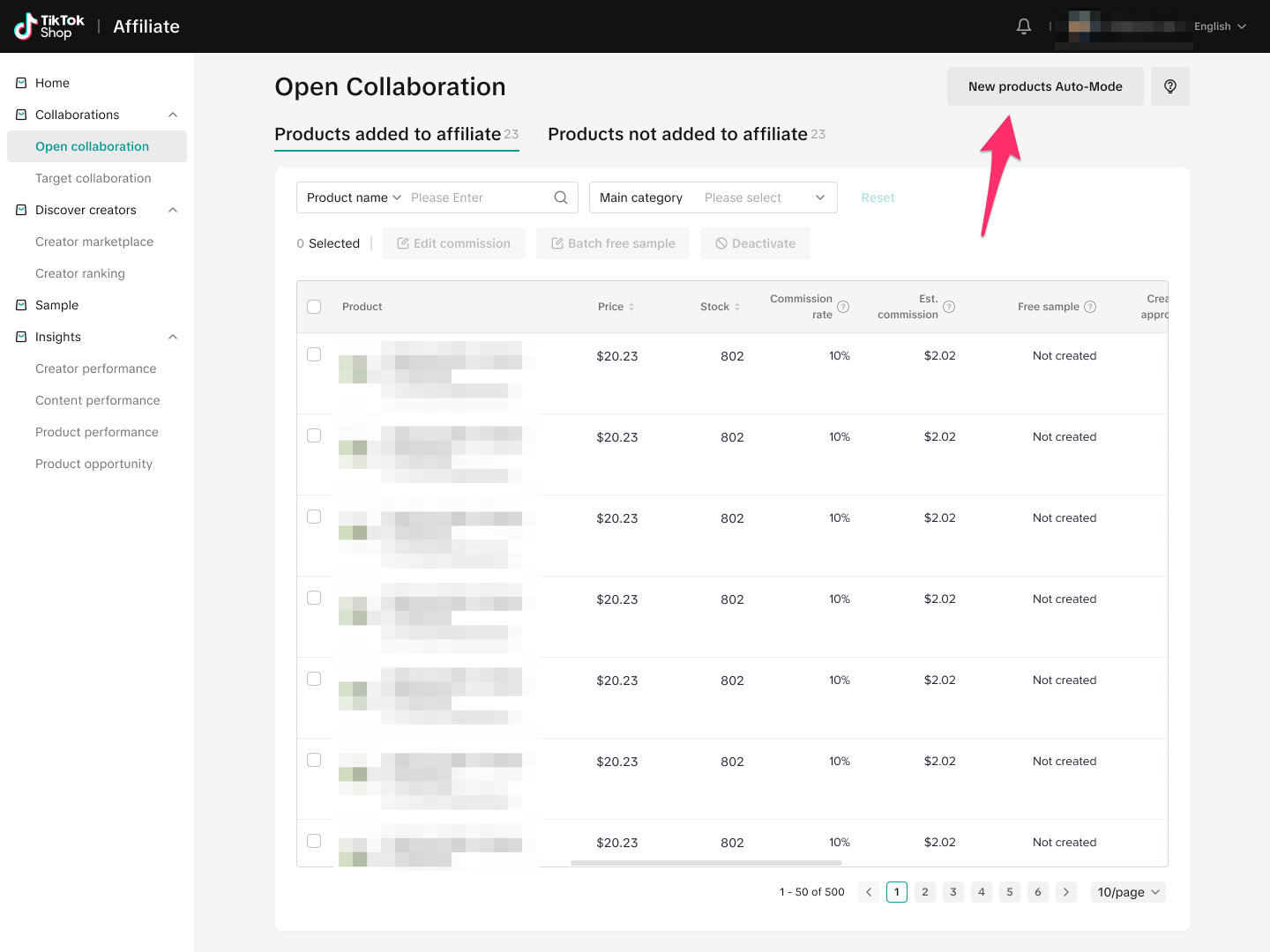
- Upon login, selected sellers see a pop-up to accept enrollment, which adds all eligible products to Open Collaboration with optimized commission rates and disables creator approval, allowing all creators to promote products freely.
- The Auto-add products toggle is enabled, so future products are automatically enrolled without creator approval enabled by default; sellers must manually toggle creator approval if desired.
Can sellers modify or revert the changes made by the One Click Affiliate enrollment solution?
- Yes, sellers can revert or update enrollment settings anytime via the Open Collaboration page, adjusting individual products or using batch updates for commission rates, creator approval, or product inclusion.
- The Auto-add products toggle can also be turned off with one click, giving sellers control over future product enrollments.
Are there any exceptions or special considerations sellers should be aware of with this enrollment?
- Free samples are excluded from these enrollment changes and remain unaffected by the One Click Affiliate solution.
- Sellers must manually enable the creator approval toggle for future products if they want to restrict which creators can promote their products.
Select sellers will be prompted with a pop up upon login into the Seller Center. Clicking accept on this pop up will help boost performance, by enabling the following actions for existing seller products:
- Enrollment of all available products in Open Collaboration
- Each product will be added with a commission rate based on the optimal range for the product category
- Creator approval toggle will be left off for all products added, meaning that all TikTok Shop creators will be able to promote your product
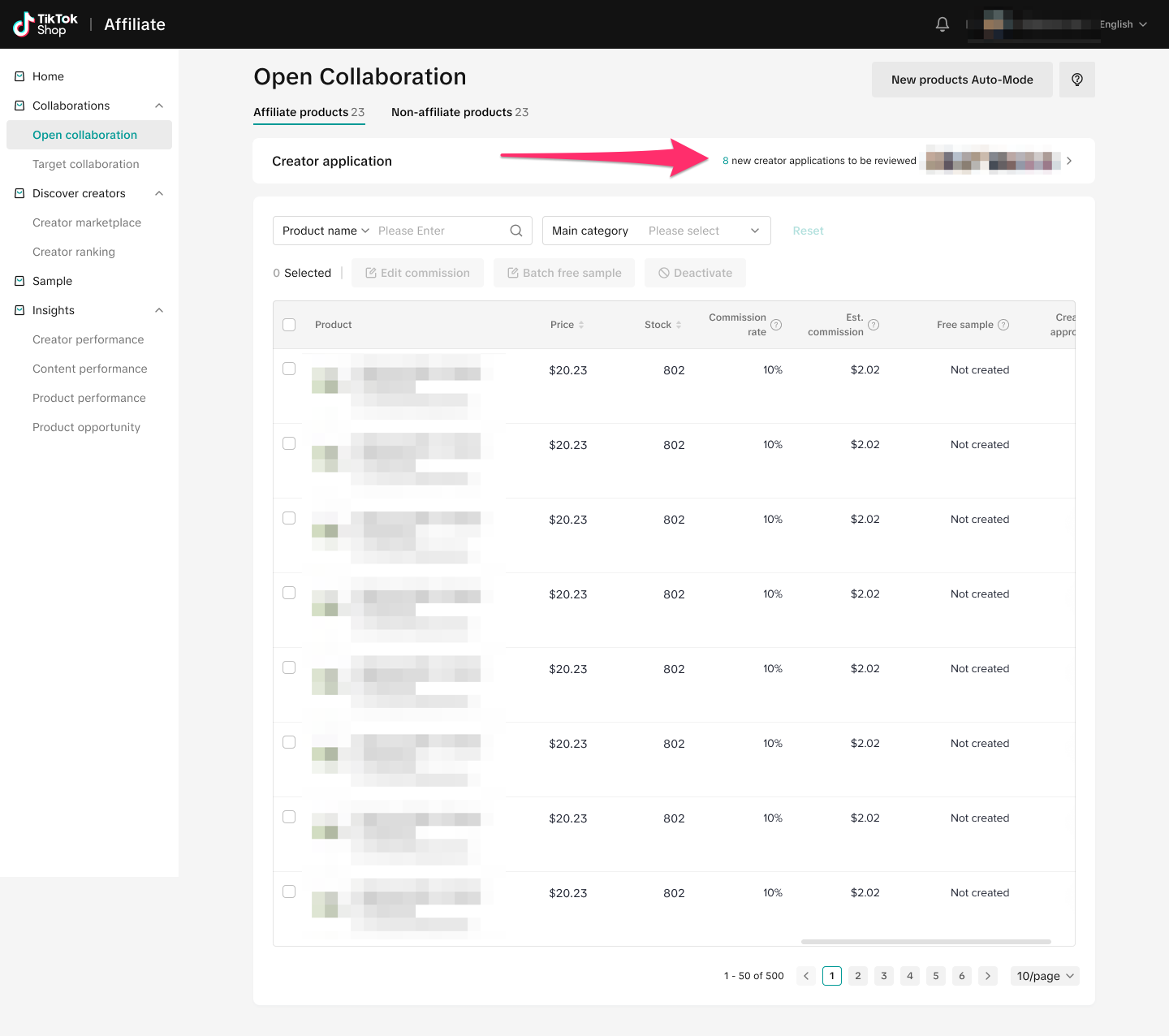
These changes will not affect free samples. We will also turn on the Auto-add products toggle in Open Collaboration, so that future products sellers upload in the Seller Center will automatically be added to Open Collaboration. This toggle can also easily be turned off again with one click.
You may also be interested in
How to use flat fee collaborations
Product overview Flat fee collaborations Secure top-tier creators with flat fees and drive sales wit…

8 Tips for Successful Seller & Creator Matchmaking
*Welcome to TikTok Shop Affiliate program *This playbook offers an end-to-end roadmap to empower US…
Affiliate Target Invite & IM Quotas
Overview The Affiliate Target Invite & IM quotas introduces a structured approach for optimizing sel…

How to use Affiliate Links
Product Overview Drive sales from beyond the TikTok app by empowering creators to share your product…

Refundable Samples Terms & Conditions for Sellers
Introduction The Refundable Sample program (“Program”) is offered by BD TikTok USA LLC (“TikTok”, “w…

Affiliate Partnerships Overview
*Introduction: What is Affiliate Partnerships Overview? Affiliate Partnerships are designed to help…

How to use SKU-level samples
Product Overview SKU-level samples is a smart, direct way to control exactly which product variants…

How to use Affiliate Center features in the app
Overview The TikTok Shop Seller Center App empowers sellers with the ability to manage their TikTok…

How to use refundable samples
Overview Refundable Samples is a TikTok Shop feature that allows you to connect with creators throug…