

Refining Your Product Selection Strategy with Recommended Product Tags
Summary
What are Recommended Product Tags and why are they important for creators on TikTok Shop?
- Recommended Product Tags highlight high-potential items with standout qualities like viral appeal or competitive pricing, helping creators boost engagement and conversions.
- They allow creators to strategically select trending, seasonal, or highly engaging products, keeping content fresh and relevant.
How can creators find and use Recommended Product Tags effectively on TikTok Shop?
- Use the LIVE Manager console to find Recommended Product Tags marked with green labels for high-performing products.
- Access the "Recommendations" tab to browse and add suggested products, each labeled with tags like Competitive Price, Top Selling, or Fan Favorite.
What are the best practices for using Recommended Product Tags during LIVE shopping sessions?
- Include around 25 recommended products per stream to increase engagement and offer variety.
- Mix Recommended Products with regular items and tease new products to build excitement and encourage viewer participation.
In this guide, you'll learn what Recommended Product Tags are, why they're essential for experienced creators, and how to find and use them effectively. By the end, you'll be equipped to optimize your product selection, create excitement, and drive more sales in your LIVEs.
Let's dive into how Recommended Product Tags can help you choose products that resonate with your audience and increase engagement!
Why Consider Recommended Product Tags?
Recommended Product Tags are a shortcut to finding high-potential items that can drive results. Here's why they're worth checking out:- Spotlight Unique Selling Points: These tags highlight products with standout qualities like viral appeal or competitive pricing. Mentioning these features during your stream can build excitement and motivate viewers to act quickly, boosting interest and urgency.
- Fine-Tune Your Product Selection: For creators who've mastered the basics, Recommended Product Tags allow for a more strategic approach. Rather than only choosing popular items, you can curate a lineup focused on trending, seasonal, or highly engaging products, keeping your content fresh and relevant.
What Are Recommended Product Tags?
In simple terms, Recommended Product Tags help you spotlight high-potential items that are likely to convert viewers into buyers. Here's what makes them a valuable tool:- Data-Driven Choices: Each tag highlights items proven to perform well, helping you add high-engagement products to your lineup confidently.
- Focused Recommendations: These tags emphasize trending, competitively priced, or in-demand items based on search and historical sales volume —products viewers are more likely to click on and buy. Think of it as a shortcut to finding items with built-in appeal.
How to Use Recommended Product Tags
Here's a quick guide to finding and using these tags effectively:Finding Recommended Product Tags
- On Desktop via LIVE Manager: Open your LIVE Manager console and check out Recommended Product Tags within your shopping bag. Look for the green labels that mark high-performing products based on qualities like virality and conversion potential.
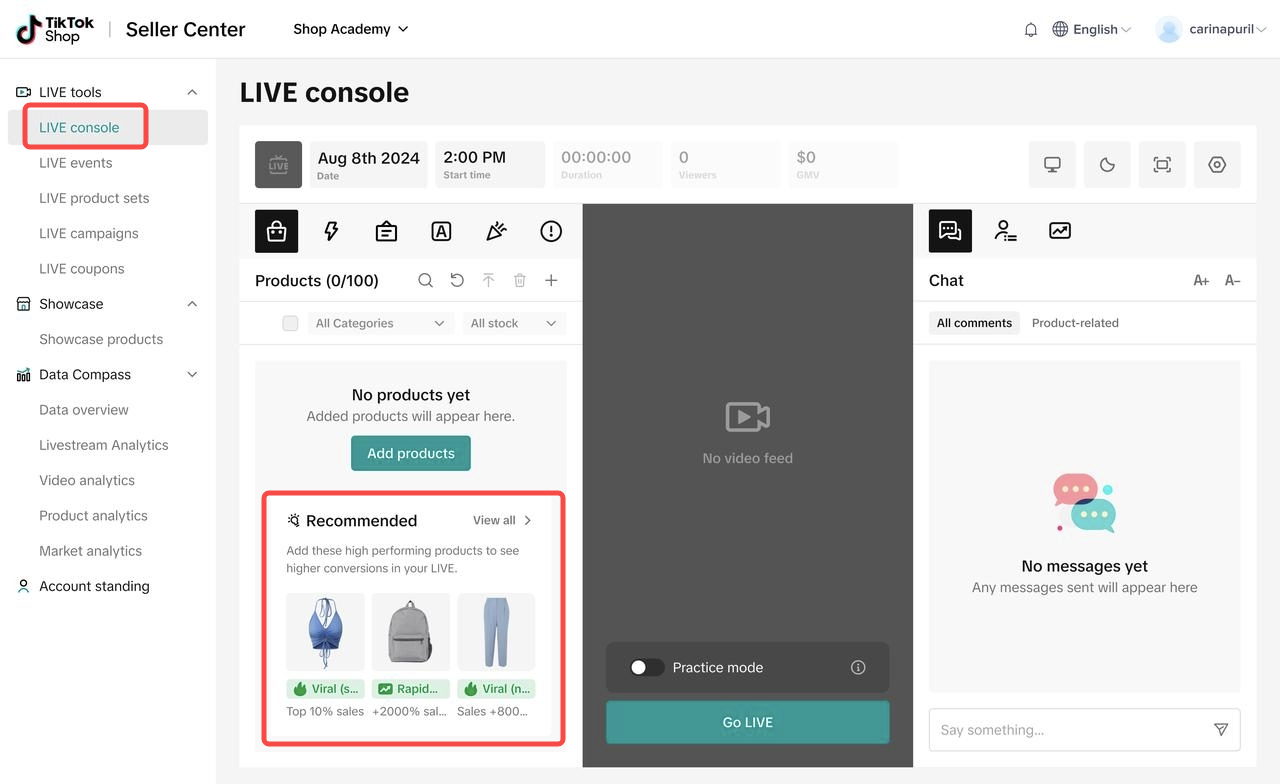
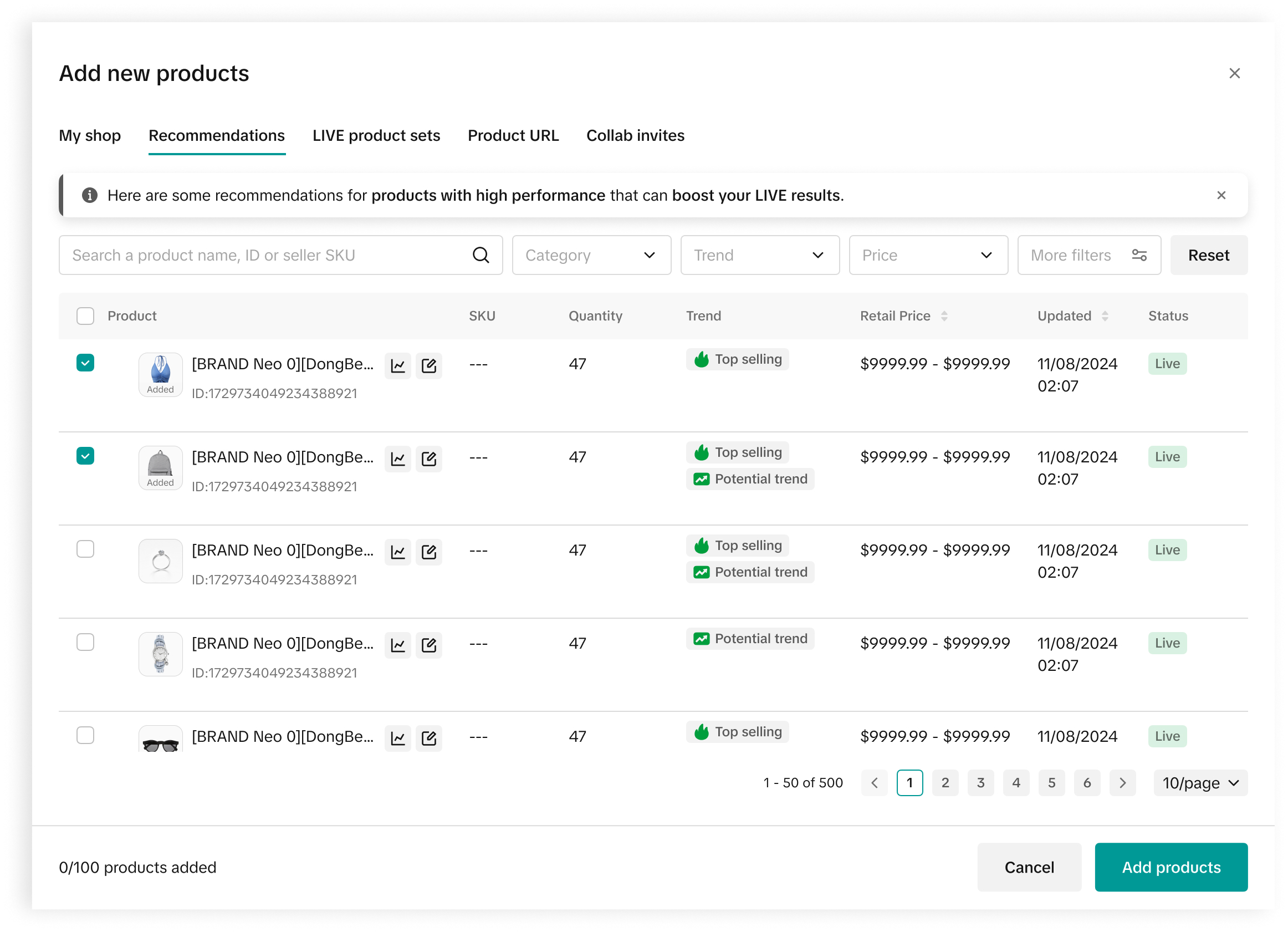
- Using the Recommendations Tab: When adding items to your shopping bag, simply head to the "Recommendations" tab. This feature offers a curated list of suggested products, allowing you to quickly browse and add items with ease.
- Competitive Price: This product is priced competitively compared to similar products on the market.
- Top Selling: This item is one of the top sellers in its category.
- Potential Trend: Sales for this product are growing rapidly and may continue to rise.
- Fan Favorite: This product is highly popular among buyers and has garnered significant attention.
- Highly Attractive / Frequently Purchased: This product stands out for having a higher number of orders relative to its exposure, outperforming other products in terms of purchases per thousand views.
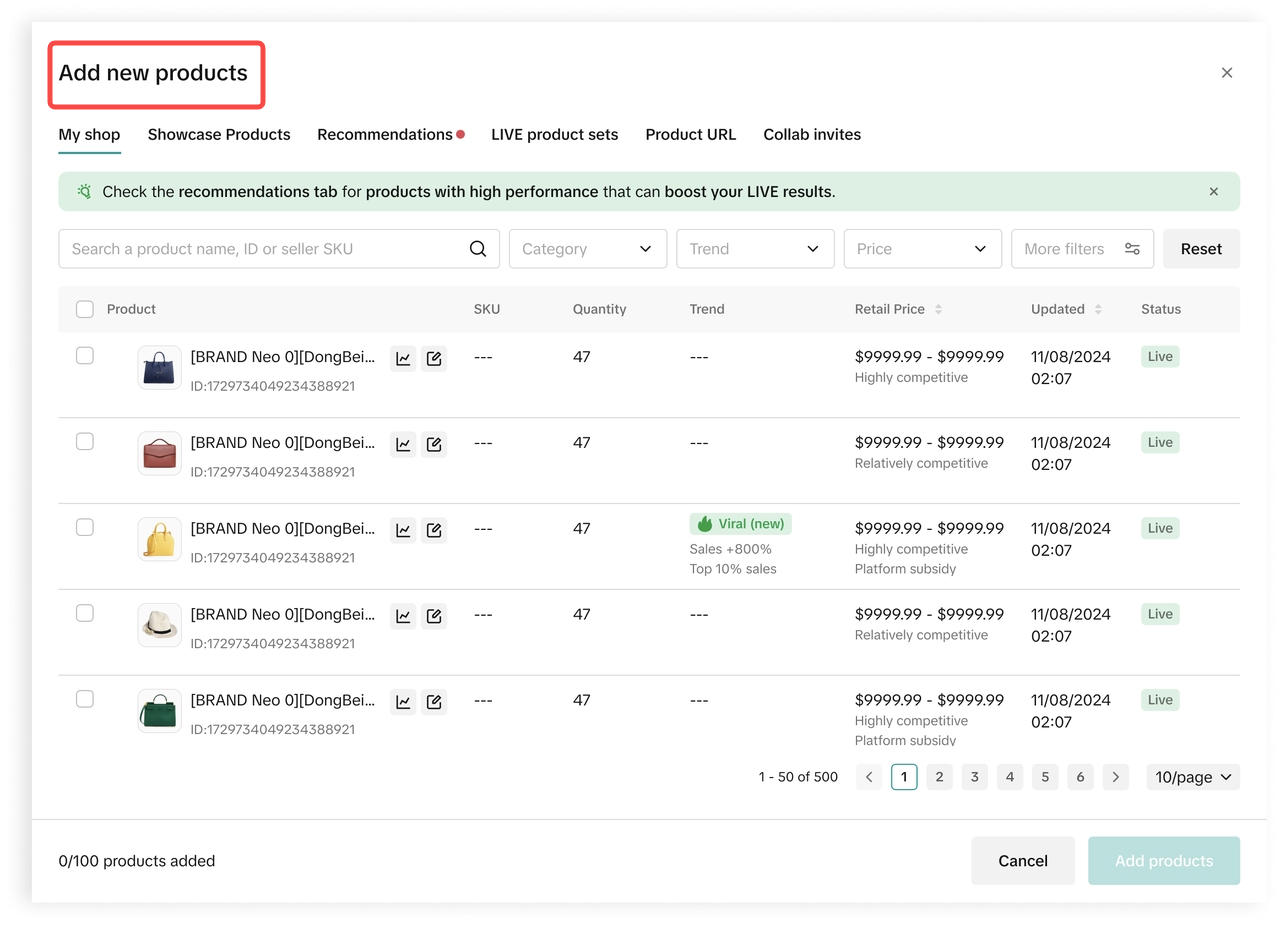
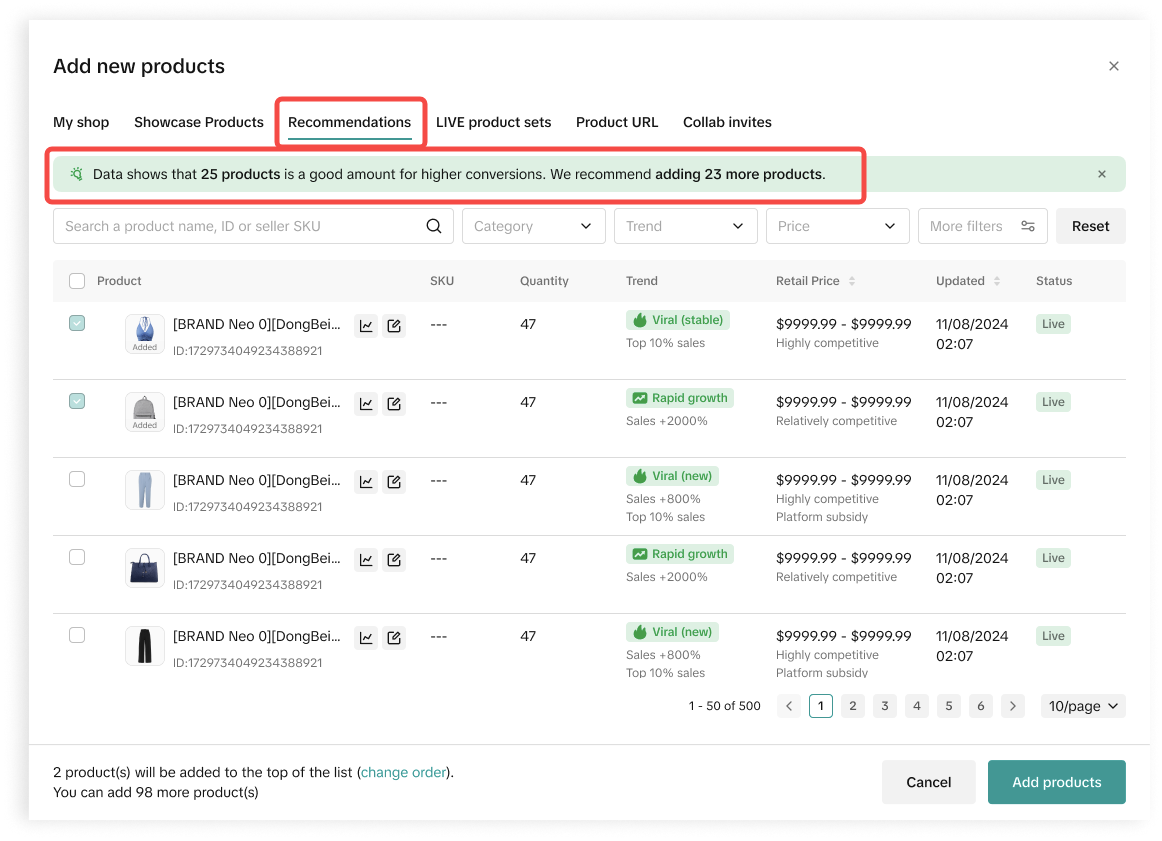
- Get Suggestions for Optimal Product Selection: If your shopping bag has fewer items than recommended for an effective LIVE session, you'll receive a suggestion to add more. A fuller bag keeps engagement high, giving viewers more to explore.
Best Practices for Using Recommended Product Tags
- Aim for ~25 Products per Stream: Including around 25 recommended products gives viewers a variety to explore and increases engagement. More options mean more chances for viewers to find something they love.
- Build Hype by Teasing New Products: Mix Recommended Products with your regular items and create excitement by previewing them before the LIVE. Posting a short teaser video can intrigue viewers and encourage them to join.
- Mix Things Up for More Engagement: Pair "viral" or "rapid growth" Recommended Products with your top-sellers or seasonal items to test different combinations. This lets you see what resonates best with your audience and keeps your selection fresh and versatile.
Summary
Recommended Product Tags make it easy to refine your product selection with items that attract attention and inspire action. They give you a strategic edge by curating products with high engagement potential, helping you stand out in your LIVE sessions.Ready to give them a try? Open LIVE Manager, check out the tags, and start building a lineup that's well-prepared to perform. Happy streaming!
You may also be interested in

Key Metrics to Observe & How to Access Data
Key Metrics to Observe Understanding key metrics is essential for optimizing your TikTok livestream…

LIVE Highlights - auto posting Short Videos
High level overview Are you looking for a way to easily capture the best moments of your LIVE sessio…
LIVE Promotion Tools: Coupon, Giveaway, Flash Sale
Intro Promotion is a powerful way to boost your LIVE selling sessions, drawing viewers in with excl…

Boost Your LIVE Sales: Advanced Techniques for Showcasing Pr…
Shoppable LIVE is changing the way we shop, bringing products to life and creating real-time connect…
Advanced Product Selection Tips for Your Livestream
Are you ready to take your product selection skills to the next level for your livestreams? A carefu…
Stream Like a Pro with LIVE Manager
Want to take your livestreams to the next level? With TikTok's LIVE Manager, creators can operate th…
Level Up TikTok LIVE with LIVE Manager Tools
Are you ready to level up your TikTok LIVE sessions? Streaming from your desktop can offer more cont…
Optimizing LIVE Performance: A guide to tracking and diagnos…
**All following data and figures are mock values and are NOT associated with any real-world user dat…

Track LIVE Performance in Real-Time
**All following data and figures are mock values and are NOT associated with any real-world user dat…

LIVE Flash Sale for Creators
Introduction to LIVE Flash Sales in LIVE Manager When sellers invite creators to sell exclusive Flas…