

Order Handling Capacity Tool
01/17/2026
Summary
What is the Order Handling Capacity (OHC) tool and how does it benefit TikTok Shop sellers?
- The OHC tool lets sellers set a daily max order volume to manage fulfillment capacity, protecting performance metrics during order surges.
- Benefits include automatic SLA and Estimated Delivery Time (EDT) extensions when capacity is exceeded, plus surge protection pacing orders if volume triples the set capacity.
How can sellers accurately estimate their shop’s daily order capacity for the OHC tool?
- Sellers should analyze historical order volumes, operational capacity (staff, space, speed), anticipate spikes during sales/events, and ensure consistent inventory levels.
- Providing a realistic estimate is crucial for the OHC and SLA extension features to function effectively and avoid fulfillment delays.
What are the key steps to set up and activate the OHC tool and related fulfillment deadline extensions in Seller Center?
- Navigate to Logistics > Fulfillment, toggle on the OHC tool, enter daily order capacity, and save.
- Then enable the Fulfillment deadline extension feature to automatically extend dispatch SLAs by 1 business day for regular orders and 2 days for pre-orders when capacity is exceeded.
What is Surge Protection in the OHC tool, and how can sellers manage it?
- Surge Protection activates automatically when orders exceed three times the daily capacity, pacing order intake to prevent fulfillment overload without hard limits.
- Sellers can toggle Surge Protection on or off; when on, they can adjust the surge threshold, balancing order volume control with deadline extensions.
What implications does using the OHC tool have for sellers’ fulfillment performance and customer experience?
- By managing order volume proactively, sellers reduce risks of delayed dispatches and maintain strong fulfillment metrics.
- Automatic EDT extensions keep customers informed with accurate delivery windows, improving transparency and satisfaction during high-demand periods.
To jump to the section on how to set this tool up, click here.Key Points:
- The Order Handling Capacity (OHC) tool enables sellers to set an estimated number of the maximum orders their shop can handle each day.
- By using the OHC tool, sellers can help to protect their shop's fulfillment performance metrics when handling surges in order volume.
- If the daily order capacity is exceeded, sellers will also automatically get an Estimated Delivery Time (EDT) and Fulfillment Deadline extension.
What is the Order Capacity Handling tool?
The Order Handling Capacity (OHC) tool is a feature in the Order Fulfillment settings within Seller Center that sellers can enable to help manage daily order capacity. A shop's daily order capacity refers to the volume of orders a shop can efficiently dispatch in accordance with our Customer Order Shipping Policy.Using the OHC tool, sellers can set an estimated maximum number of orders their shop can handle each day. To learn more about how to set up the OHC tool, jump to the Order Handling Capacity tool setup guide section in this article.
The three key benefits of enabling the Order Handling Capacity tool are:
- SLA Extension: When the estimated daily order capacity is exceeded, the tool adds an extra business day to after the handling time set by the seller.
- Automatic Estimated Delivery Time (EDT) Extension: When the estimated daily capacity is exceeded, the tool extends the EDT for the additional orders as well, ensuring customers receive an accurate delivery window.
- Order Surge Protection: If order volume exceeds three times the estimated daily capacity, the surge protection feature is triggered, which will pace orders to prevent additional order surges.
How does the Order Handling Capacity (OHC) tool work?
Once a seller sets their daily order capacity, the OHC tool uses that number as the capacity trigger for the Fulfillment deadline extension feature.When the daily order capacity is reached, the Fulfillment deadline extension will automatically adjust the Estimated Delivery Time (EDT) for further orders that day.
This helps protect fulfillment performance metrics for sellers' shops.
As an added safeguard, if a seller receives more than three times their daily set capacity (a surge), the OHC tool will trigger the surge protection feature to help maintain order capacity.
Sellers should review and update their daily capacity as needed to avoid fulfillment delays. This can be done as often as needed and the changes will be effective by the next day.
How to estimate your shop's daily order capacity
For the OHC and the SLA Extension features to work as intended, sellers should provide a realistic estimate of their shop's capacity.To calculate your shop's daily order capacity, consider the following factors:
- Historical Order Volumes: Analyze past order output volume and the time it takes to dispatch orders. This helps to identify an optimal daily order capacity.
- Operational Capacity: Assess how many orders your fulfillment process can manage each day. Be sure to consider staff, warehouse space, and processing speed, if applicable.
- Order Volume Spikes: Plan for increases during holidays, sales, and live events. Review previous order volumes during peak sales periods to determine the best strategy.
- Inventory Levels: Ensure you have consistent stock availability and regular restocking to meet daily demand.
Order Handling Capacity tool setup guide
To set up the OHC tool, go to Seller Center and follow the below steps:- Using the side menu (on the left), click on Logistics and select Fulfillment.
- Click on the Set Up button for Order handling capacity settings
 |
- Use the toggle to turn the OHC tool on
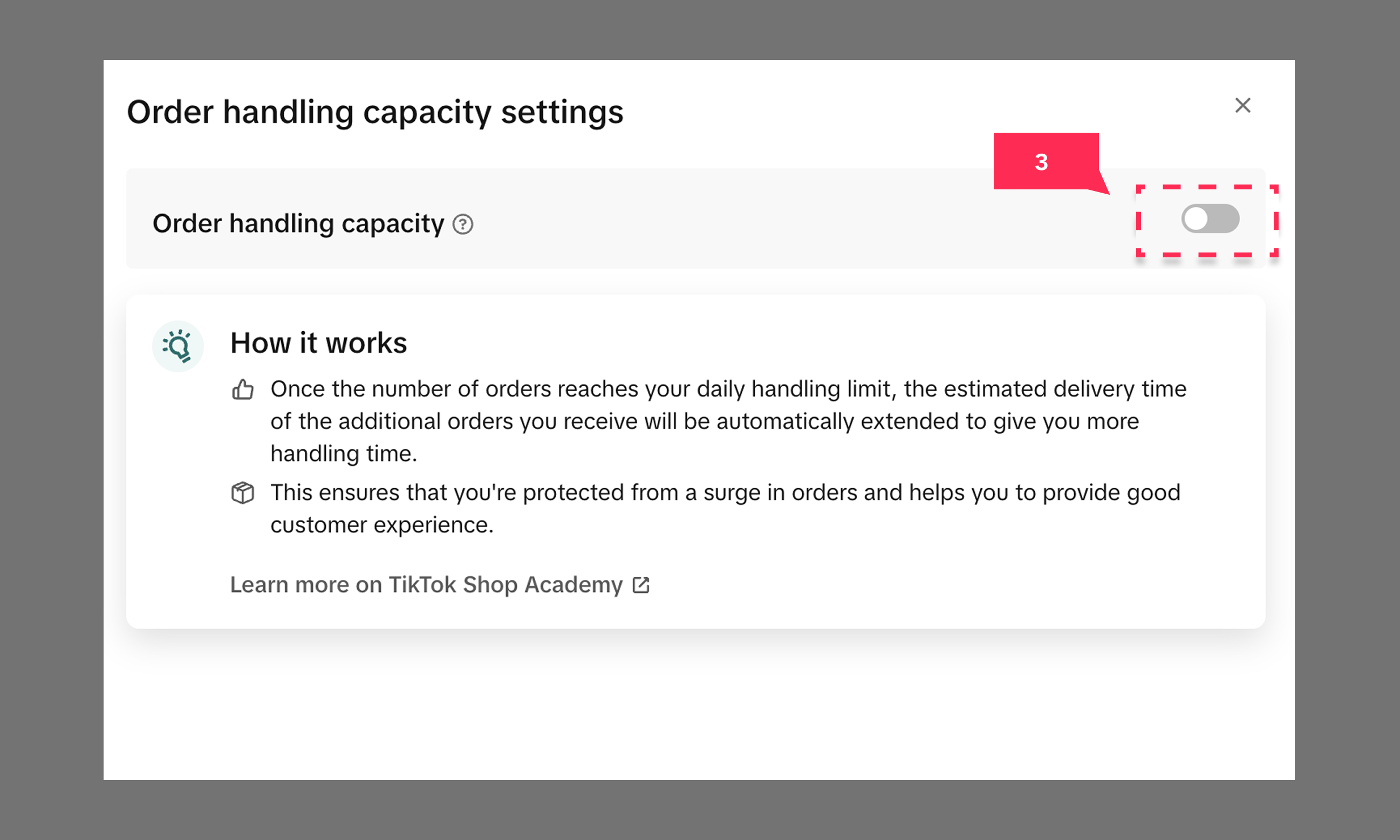
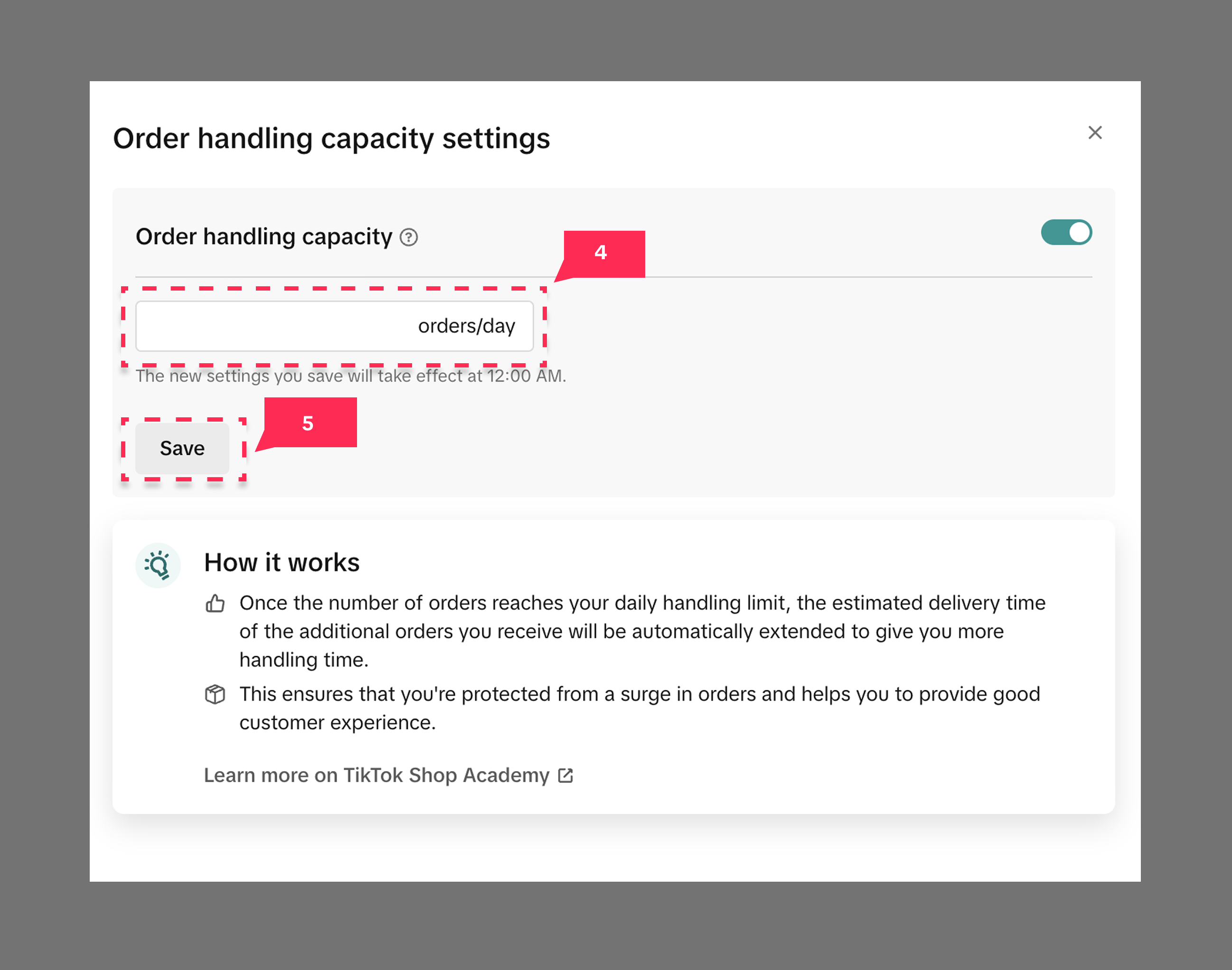
- Enter daily order capacity
- Click Save
Fulfillment deadline extension
The Fulfillment deadline extension feature will extend the dispatch SLA for orders that exceed the daily set capacity.- For regular orders, custom handling orders, backorders, and made-to-order: the dispatch SLA is extended by 1 business day, from the handling time set by the seller.
- For pre-orders: the dispatch SLA is extended by 2 business days, from the product release date.
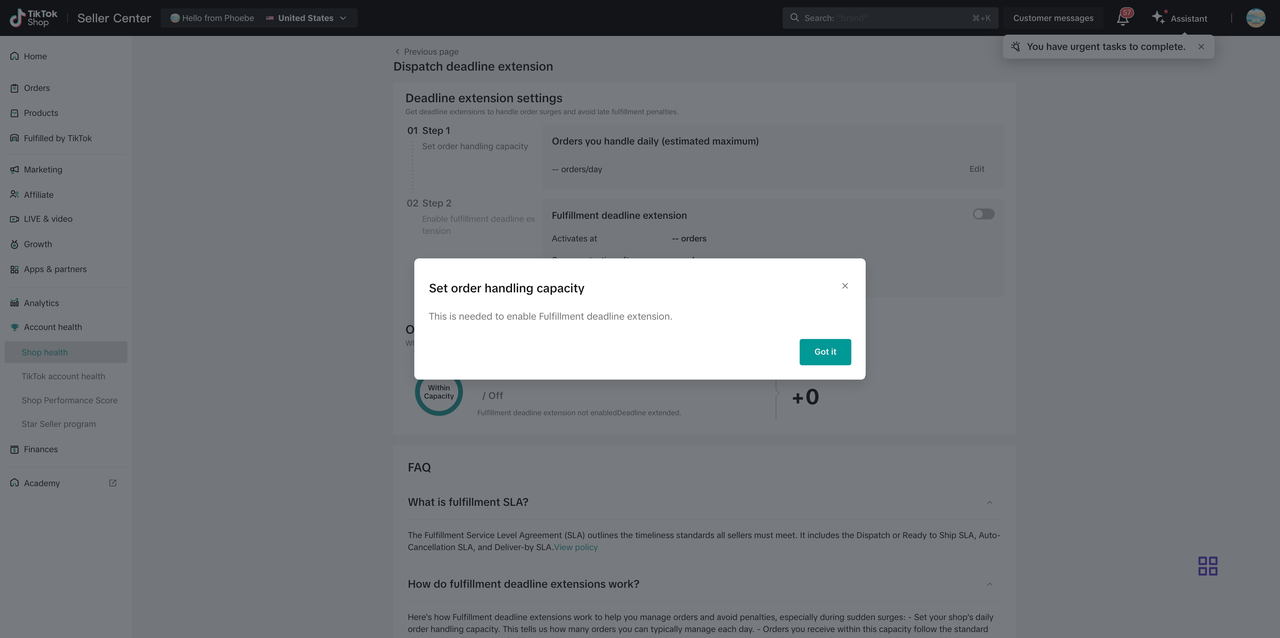 To enable the OHC tool, please refer to Order Handling Capacity tool setup guide section.To go directly to your Fulfillment deadline extension page in Seller Center, click here.
Fulfillment deadline extension setup guide
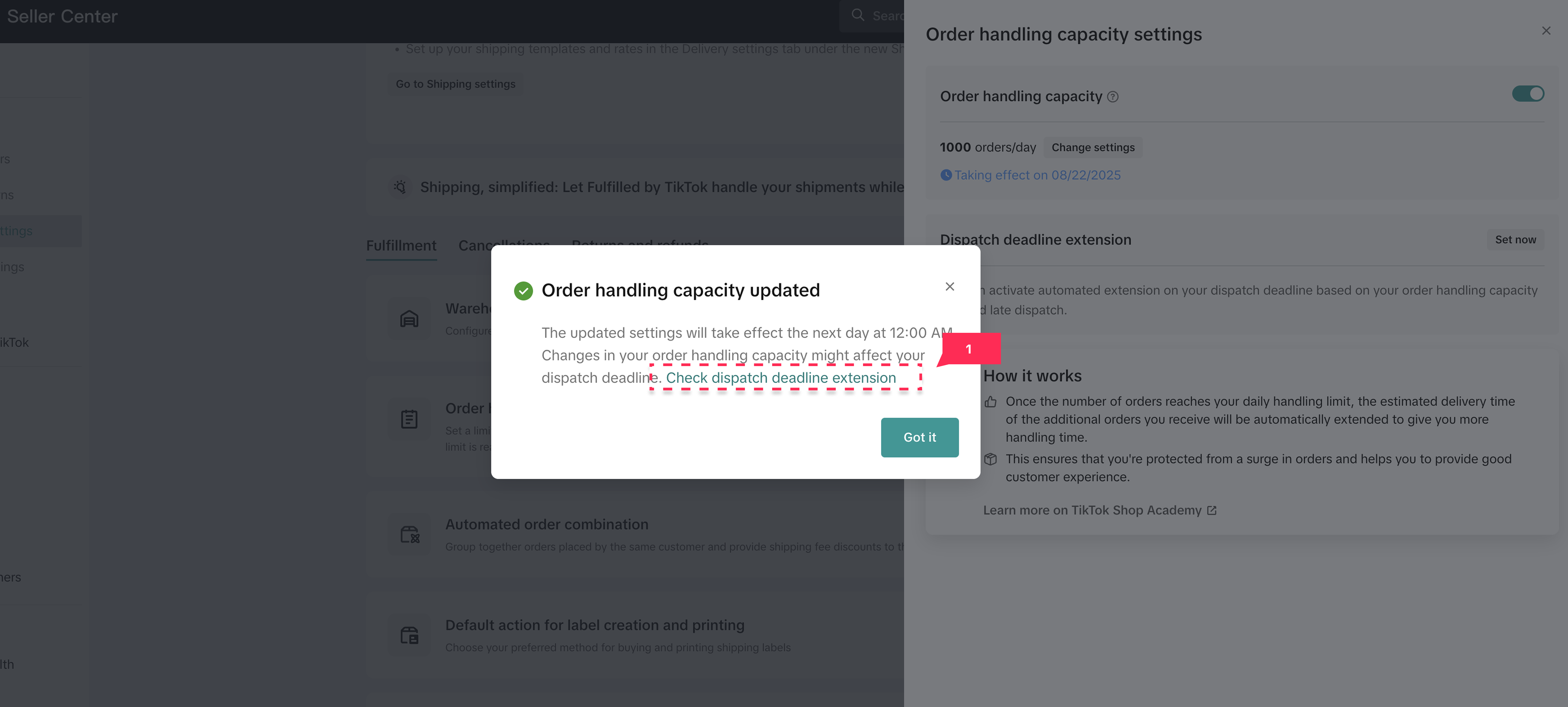
After clicking Save on the Order handling capacity settings page, you will follow the below directions to set up the Dispatch SLA deadline extension:- Click Check dispatch deadline extension
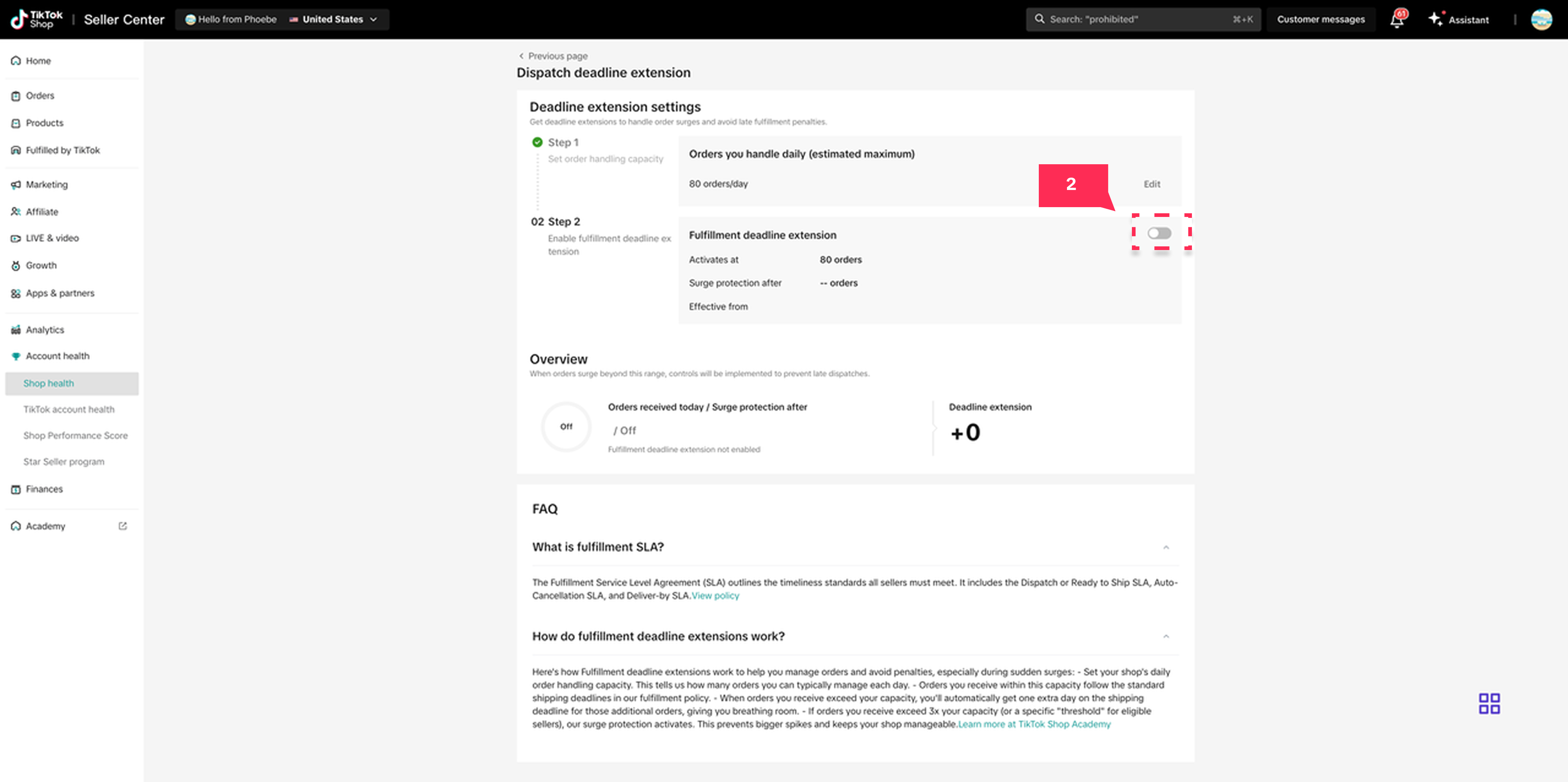
- Toggle on the Deadline extension to activate the dispatch SLA deadline feature
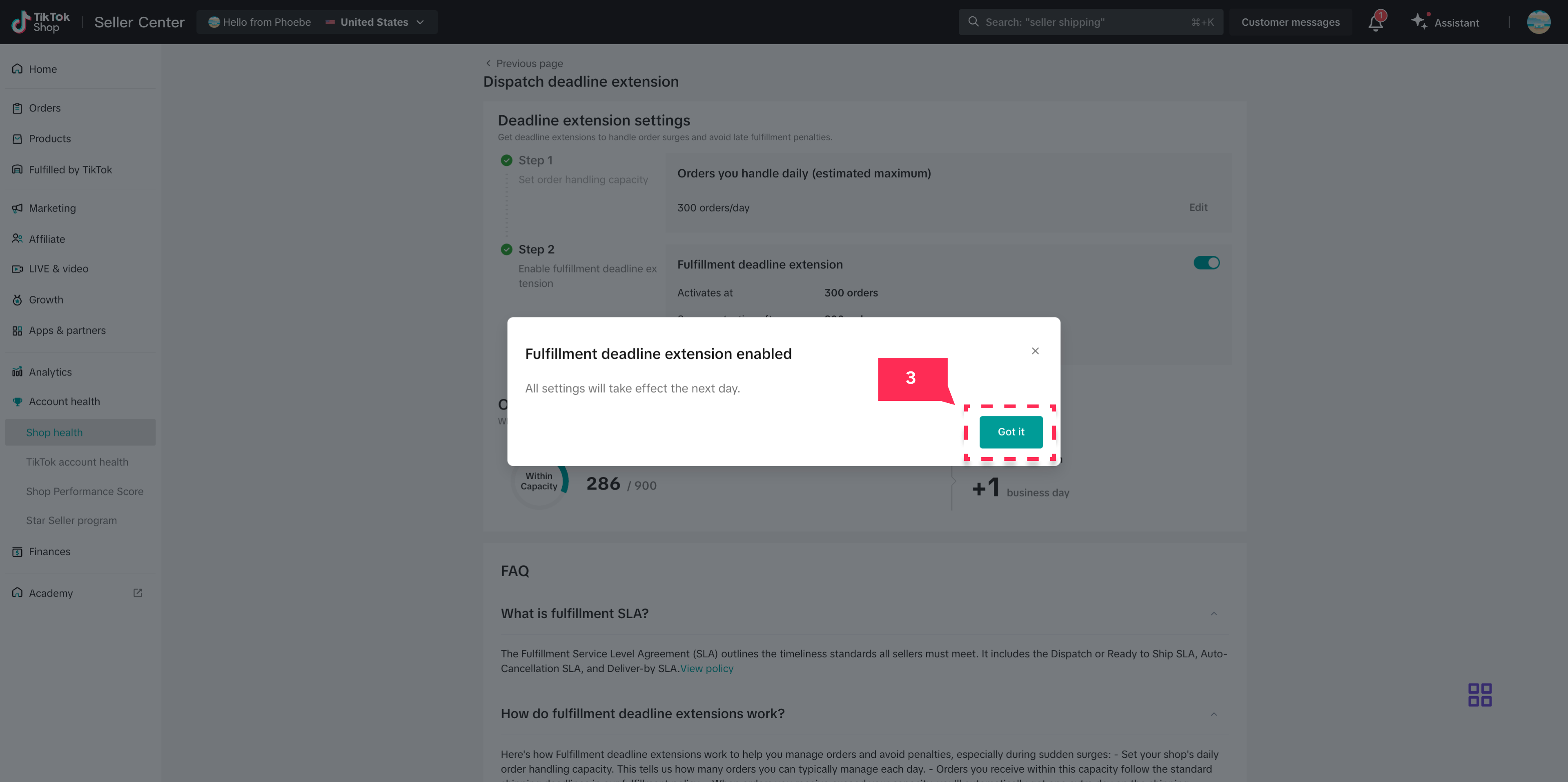
- After toggling the feature on, a pop up will appear confirming it's active. Click Got it.
Surge Protection
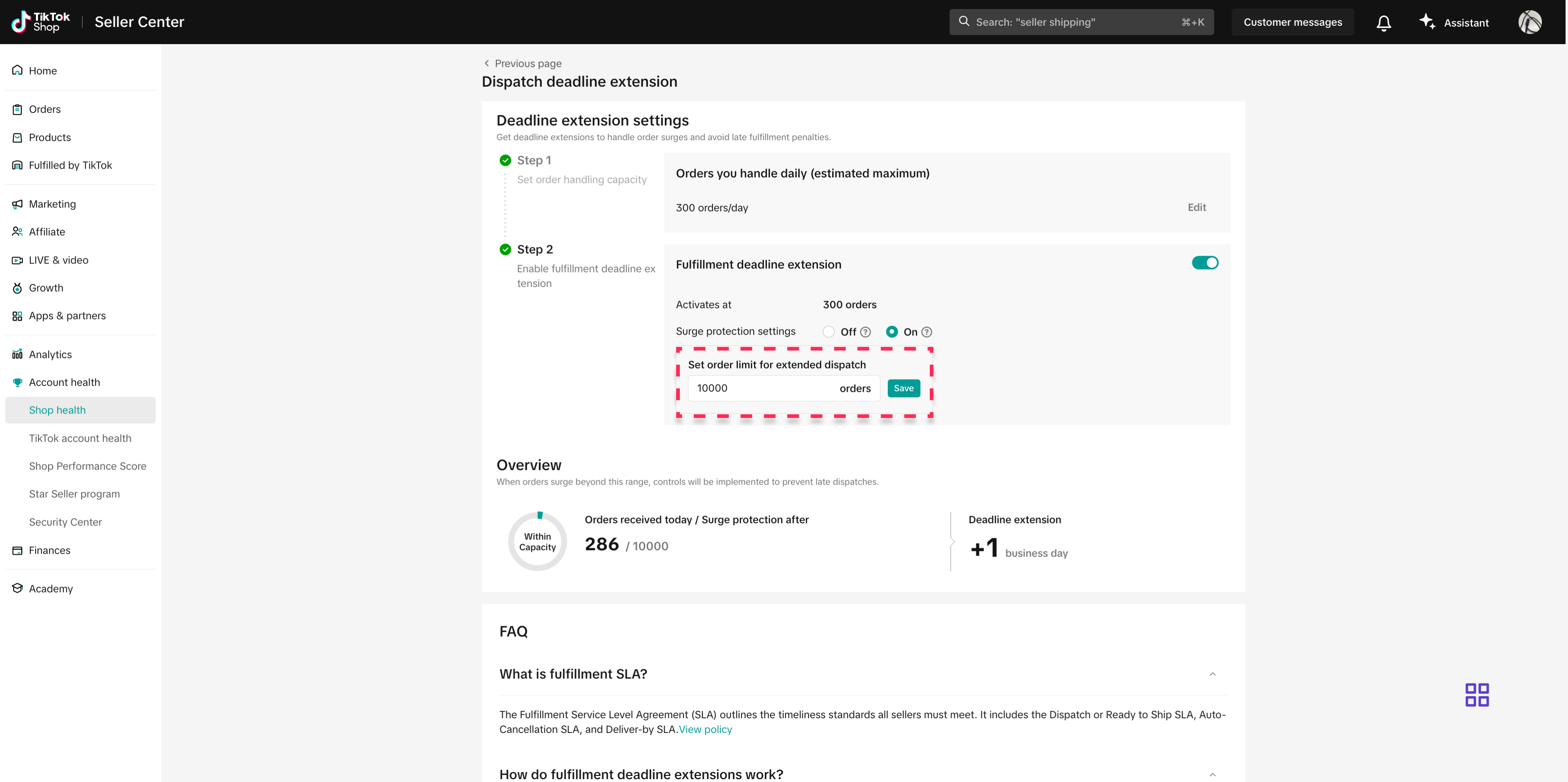
Select sellers will see an additional Surge protection setting option (pictured below).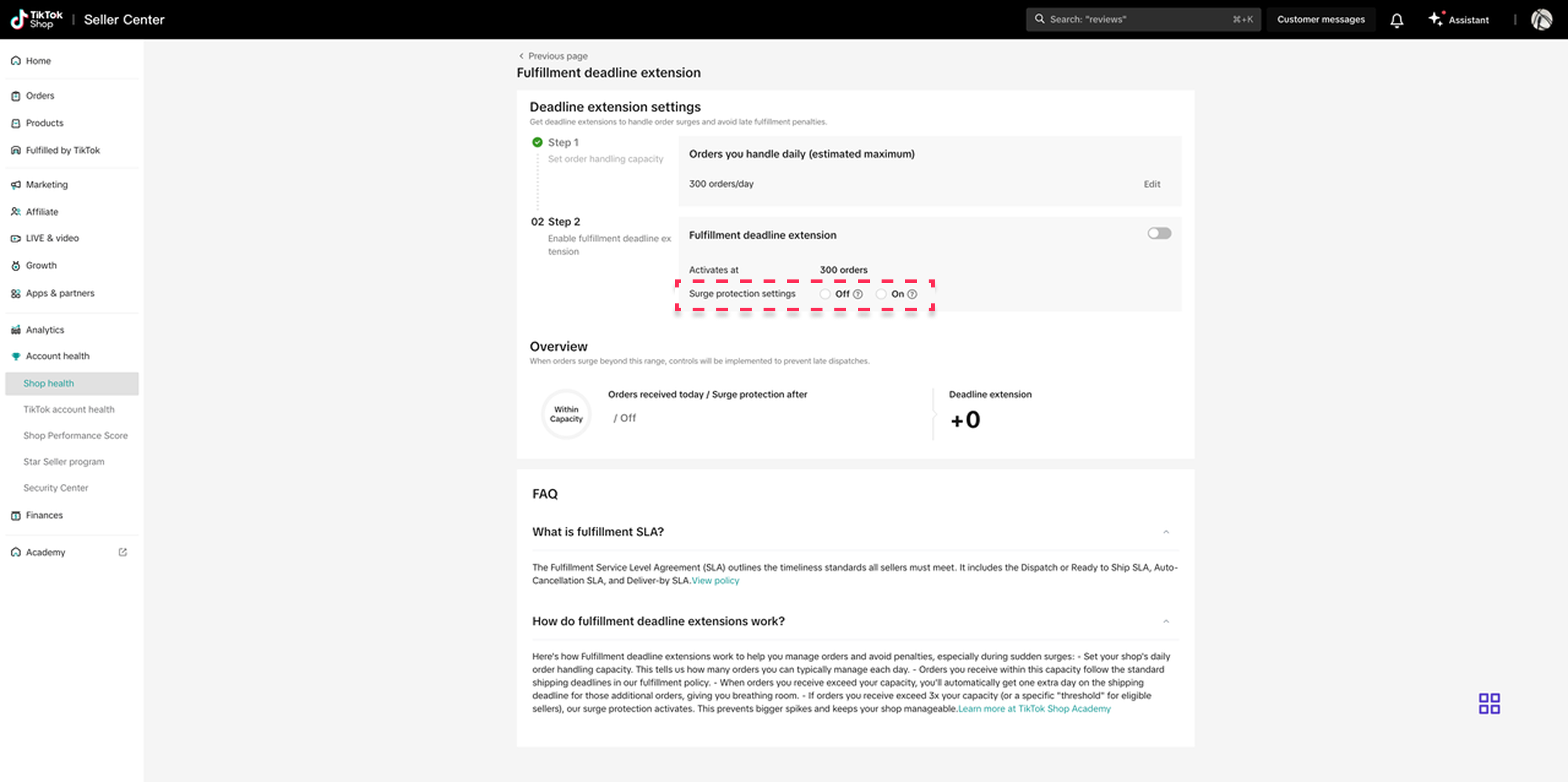 NOTE: If no Surge protection settings are shown, then it will be automatically enabled when orders exceed three times the set daily capacity. Surge protection helps pace the number of orders a shop receives after exceeding their set daily capacity. It does not set a hard limit on extended dispatch orders.
Surge protection setup guide
To finish setting up, sellers must select whether to turn Surge protection On or Off.- Surge protection settings Off: Shipping deadline extension applied, but no order volume controls will be enabled.
- Surge protection settings On: Shipping deadline extension applied, and seller is able to adjust the threshold to a higher order volume.
You may also be interested in

2025 BFCM TikTok Shop Readiness Guide
The holiday shopping rush is your single biggest opportunity to increase sales & grow your brand on…

How to Process "Shipped by Seller" Orders?
If you're using Seller shipping, our new tool makes the process of uploading your tracking number ea…

January 2026 Product Innovation
Logistics & Fulfillment New Logistics Module in Seller Center We’ve introduced a new Logistics modul…
September 2025 Product Innovation
Every month, we introduce new products and features designed to simplify store management, boost sal…

Guide to Seller-Fault Cancellation Rate (SFCR)
Key Points: Seller-Fault Cancellation Rate (SFCR) metric is used to evaluate the quality of a selle…

Definition and Calculation of FBT Penetration Rate
Definition and Calculation of FBT Penetration Rate Definition and Calculation Formula of FBT Penetra…

Splitting Orders into Separate Packages
Test accounts and orders for reference only. The actual interface may differ. Feature Overview The s…

How to combine multiple orders into a single package?
The demo screenshots are testing accounts for reference only. The actual interface may differ. Featu…

TikTok Shipping & Collection by TikTok (CBT) Pickup Rules &…
Background Lack of Clear Responsibility in Warehouse–Carrier Handover: Unlike Seller Shipping, TikTo…

Fulfilled by TikTok (FBT) Inbound & Packaging Requirements f…
To ensure compliant management and safety of flammable liquids and battery-containing products, FBT…