

How to Find Products in Product Marketplace
Summary
What is the Product Marketplace on TikTok Shop and how can creators use it to find products to promote?
- The Product Marketplace is a curated catalog within TikTok’s Creator Center where creators can search, discover, and add products to their showcase for promotion in videos and LIVE streams.
- Creators can explore via search bar, banners, new arrivals, samples, curated choices, product rankings, and Exposure Plus to find trending or niche products that fit their style.
How can creators add products to their showcase from different sources on TikTok Shop?
- Products can be added directly from the Product Marketplace by tapping "Add," from a shared TikTok Shop product URL via the Add by URL feature, or from other creators’ shoppable videos by selecting "Promote this product."
- Creators can also add trending products found on their For You Page using special Add Product cards, enabling quick addition to their showcase.
What happens after a creator adds a product to their showcase and how do commissions work?
- Once added, the product becomes part of the creator’s showcase, allowing them to feature it in shoppable content. Sales made through the creator’s product links are tracked and commissions are automatically credited.
- Eligible products may offer refundable samples, allowing creators to promote without upfront costs.
Are there any special considerations when promoting products from global brands on TikTok Shop?
- Some global brands require creators to agree to specific Terms & Conditions before adding their products to the showcase. A pop-up will prompt creators to review and accept these terms before proceeding.
Finding Products in Product Marketplace
Discover and select products to promote in your videos and LIVE streams. The Product Marketplace is your treasure trove of items ready to be shared with your audience. Think of it as a massive, curated catalog where you can find everything from useful gadgets to niche fashion pieces. It's designed to help you easily search, discover, and add products to your showcase that you're genuinely excited to promote. Scroll down for even more ways to find products to promote.How It Works
Here’s how you can navigate it like a pro and fill your showcase with amazing products. Start by heading to Creator Center.- Go to the Product Marketplace.
- Find products that fit your vibe
- Search bar: Looking for something specific? Search by product name, brand, or category. You can also sort and filter results by price, commission rate, and category to narrow down your options.
- Banners: Check the banners at the top of the page for featured campaigns and curated promotions. Products highlighted here may offer higher commission rates for a limited time or be tied to platform-wide trends, giving you more opportunities to earn.
- New Arrivals: Discover newly listed products with strong early potential.
- Samples: Easily find products with free or refundable sample options, all in one place.
- Curated Choices: Explore rising products that are gaining traction but have not gone viral yet.
- Product Rankings: Browse daily-updated rankings to find popular and trending products.
- Exposure Plus: Discover trending products with strong sales potential but lower content coverage, so you can spot untapped opportunities early.
- Add products to your showcase.
What’s happening?When you add a product, it becomes part of your showcase, which is the collection of products you can feature in your shoppable videos and LIVEs. When a viewer purchases through your product link, the sale is tracked to your account and eligible commission is credited automatically.
Tip: Want to promote products without paying out of pocket first? For eligible products, you may be able to use Refundable Samples. Click here to learn more!
Go to Product Marketplace | Discover products | Add product to your showcase |
 |  |  |
Other ways to discover products
Beyond browsing Product Marketplace, you can also add products to your showcase as you discover them across TikTok.Add with a Product URL
If a seller or TikTok Shop shares a direct product URL with you, you can add it to your showcase in just a few taps. This is especially helpful when you’re part of a specific campaign or working directly with a brand.- Go to Product Marketplace.
- Tap the Add by URL icon. Look for the plus icon in the top right corner of Product Marketplace.
- Paste the product URL. Enter the full TikTok Shop product URL into the field.
- Add the product. A preview will appear so you can confirm it’s the right one, then tap Add to place it in your showcase.
 |  |  |
Add from other creator content
See a product you love in another creator’s shoppable video or LIVE? You can add it to your own showcase and start promoting it right away.- Go to the product detail page. Tap the product link anchor in the video or LIVE.
- Tap the Share icon. This is usually shown as three dots (...) or an arrow in the top right corner of the product detail page.
- Select Promote this product. The product will be added directly to your showcase, and you’ll see a confirmation on screen once it’s added successfully.
Add from Your For You Page (FYP)
While scrolling your For You Page, you may come across a special Add Product card. This makes it easy to add trending products to your showcase in the moment.- Tap Add on the card to add the suggested product directly to your showcase.
- Want more options? Tap More products to head to Product Marketplace and keep exploring.
A Note on Global Brands
Specific Global Brands (e.g. Estee Lauder) may require Creators to agree to their Terms & Conditions (T&C) before you may add their products to your Showcase. A pop-up will appear, and you can review T&C by clicking on their terms. Once you click the Add button, it means you agree to the T&C, and the products will be added to your Showcase.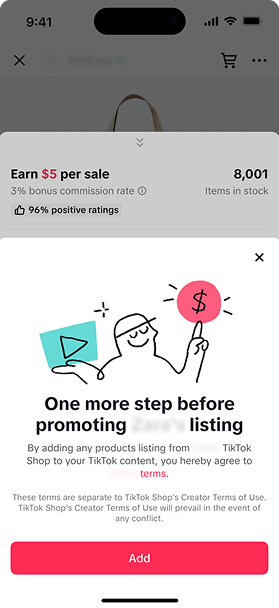 |