

How to combine multiple orders into a single package?
12/08/2025
Summary
What is the combined orders feature on TikTok Shop and how does it benefit sellers and customers?
- TikTok Shop automatically groups eligible orders with the same customer, address, and delivery option into one package to reduce fulfillment costs and improve delivery experience. Customers see a consolidated shipment and can track it easily.
- Sellers can accept, modify, or reject these recommendations before shipping, with up to 20 orders combined per package, enhancing operational efficiency and customer satisfaction.
What are the key criteria and steps for combining orders, and how can sellers manage combined packages?
- Orders must share the same customer, shipping address, delivery option, and be awaiting shipment without cancellation requests. Recommendations appear when creating labels or adding tracking info, and sellers can accept all, remove some, or ship separately.
- Combined orders can be filtered in Manage Orders, amended before shipping or collection status, and tracking numbers can be uploaded in bulk for up to 20 orders shipped together, simplifying order management.
How should sellers handle combined packages in different shipping scenarios, including TikTok Shipping and self-shipping?
- For TikTok Shipping, sellers must confirm combined packages before buying labels and ensure package dimensions meet carrier standards; the system prompts to combine even if previously rejected.
- For seller-arranged shipping, sellers can upload one tracking number for multiple orders shipped together, synchronizing logistics status; if orders shipped separately but packed together, tracking can be updated post-shipment.
What are the implications of order cancellations, returns, and refunds on combined packages?
- Customers can cancel orders within one hour; if a cancellation occurs in a combined package, sellers must approve/reject and adjust the package accordingly.
- For returns/refunds on delivered combined packages, customers can request returns without affecting combined status; if awaiting collection, approved refunds uncombine the package and remaining orders revert to separate fulfillment.
Feature Overview
You can merge eligible orders into a combined package to save on fulfillment costs while still providing a great customer delivery experience.When eligible shipments have the same recipient, Seller Center will automatically group these orders and recommend combining the shipments into a single package. You can accept these recommendations or make changes to them (e.g., removing orders) before shipping the package.
Combined package recommendations will appear if the following criteria are met:
- Same customer
- Same customer shipping address
- Same delivery option
- Shipping status is Awaiting Shipment and/or does not include a cancellation request
- Up to a maximum of 20 orders per combined package
Note:
Please ensure combined packages meet the size/weight/value guides for platform shipping or self-shipping services. Failure to do so may result in carriers rejecting your package, and/or other delivery issues that affect customer satisfaction.
Guidance on Combining Orders Feature
Viewing Recommended Combinations
If the criteria are met, the recommended combinations will pop up when you click Create Label or Add Tracking Info for orders.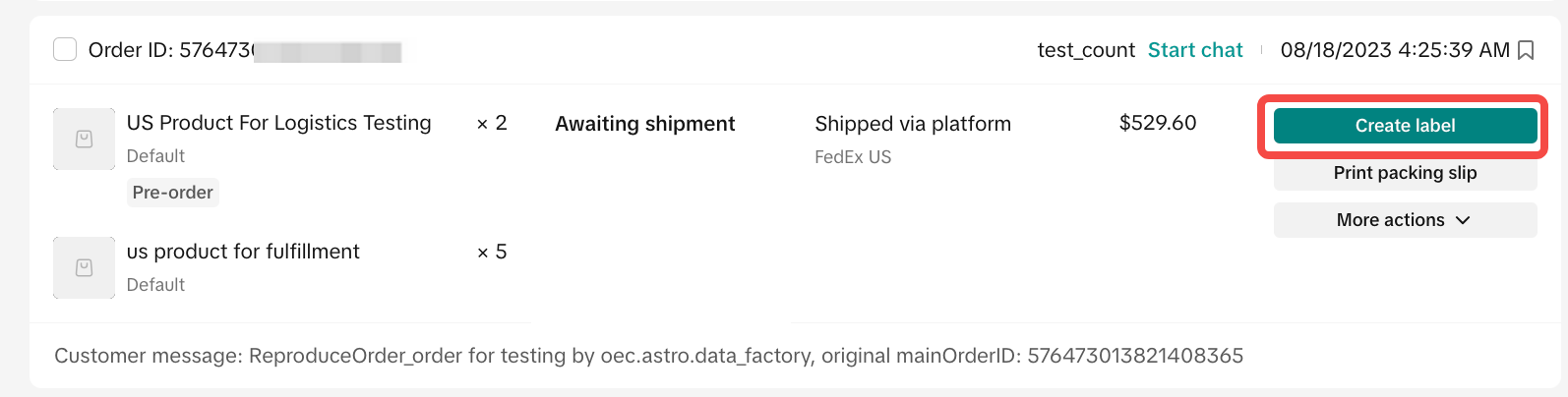 | 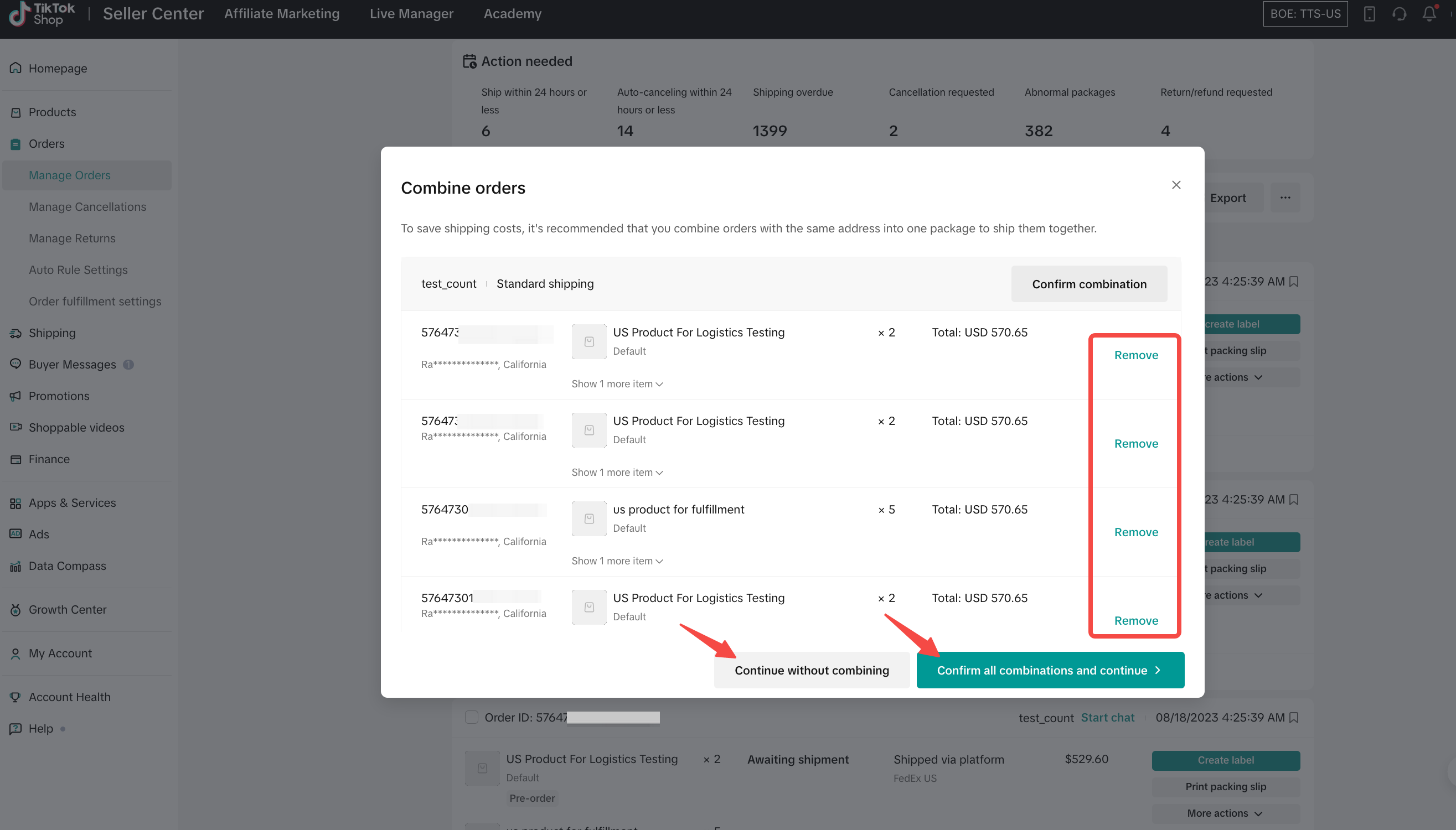 |
Accepting Recommended Combinations
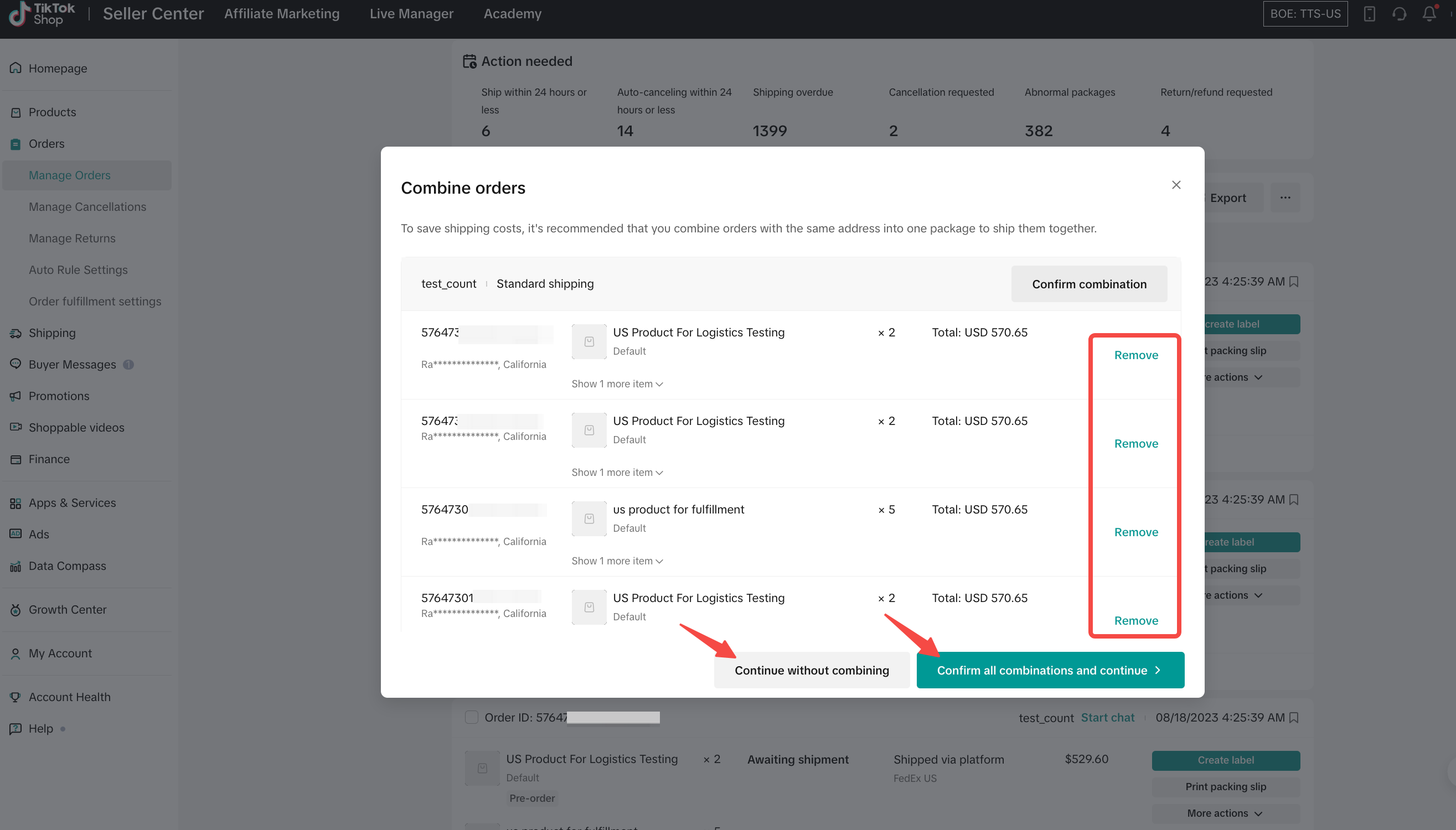
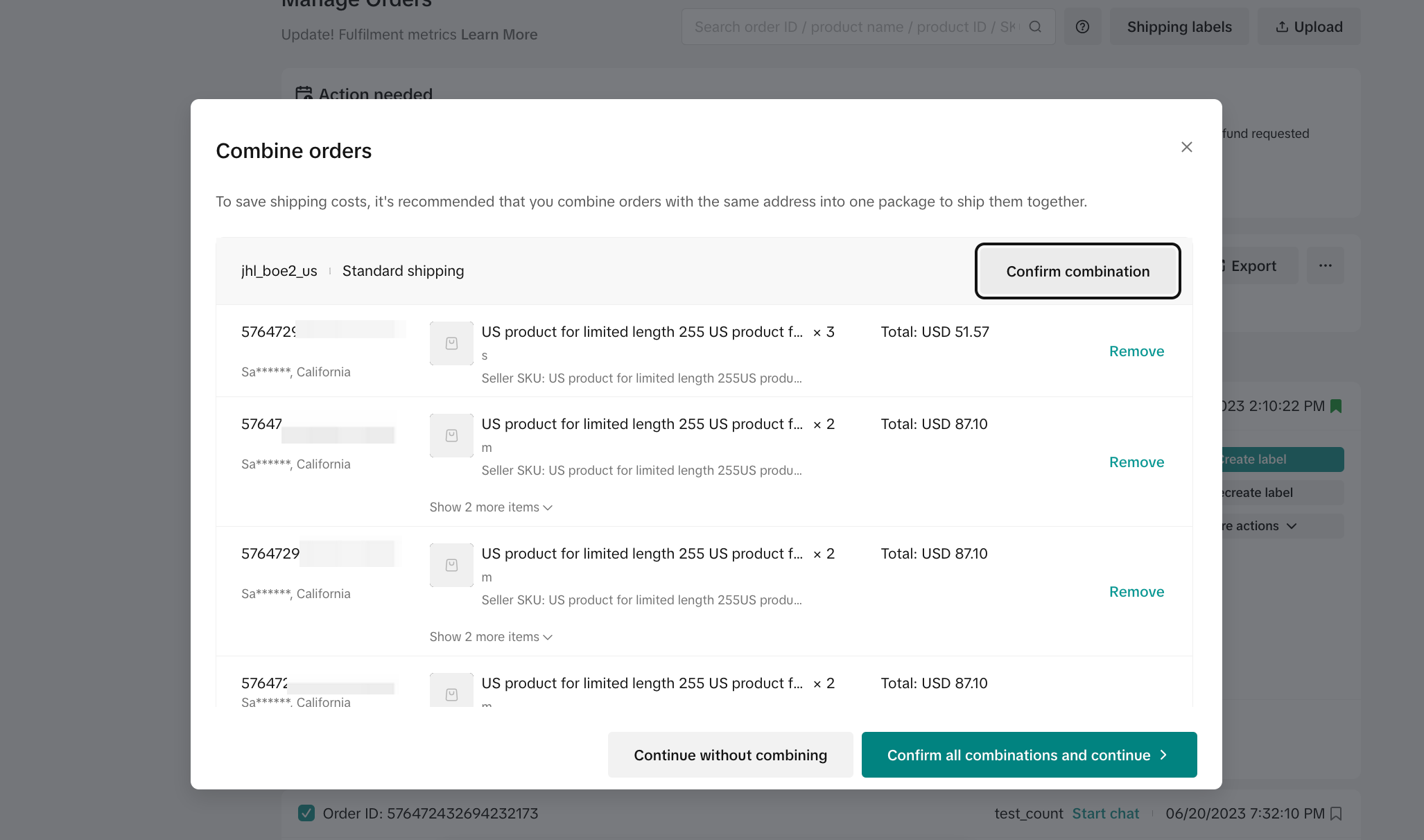
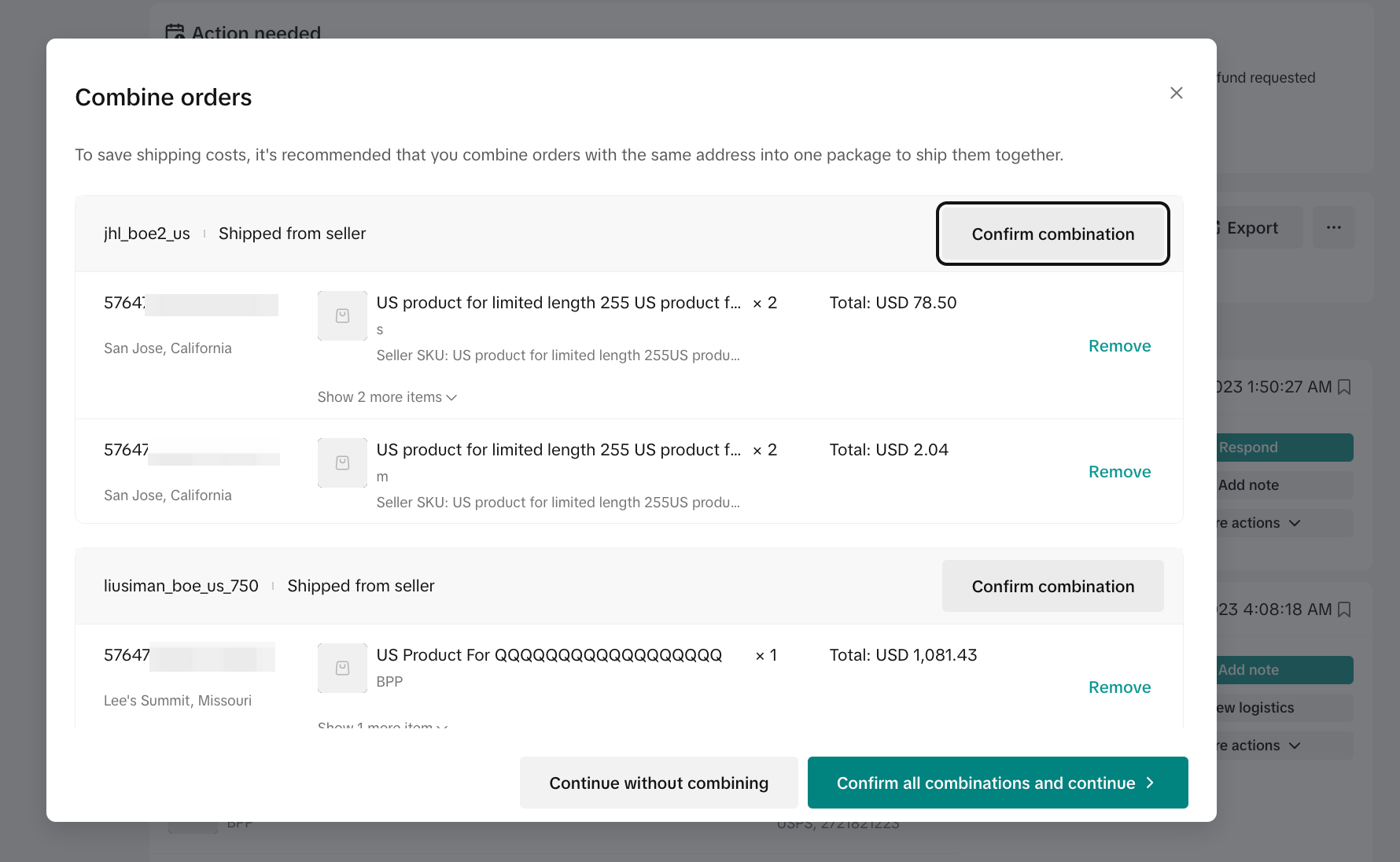
Once the Combine Orders pop-up appears, you have the option to:- Continue Without Combining — Reject the recommendation and ship each single order separately.
- Confirm All Combinations and Continue — View all suggestions and remove orders you do not wish to send in the combined package. All SKUs you remove will need to be processed separately.
Filter for Combined Orders
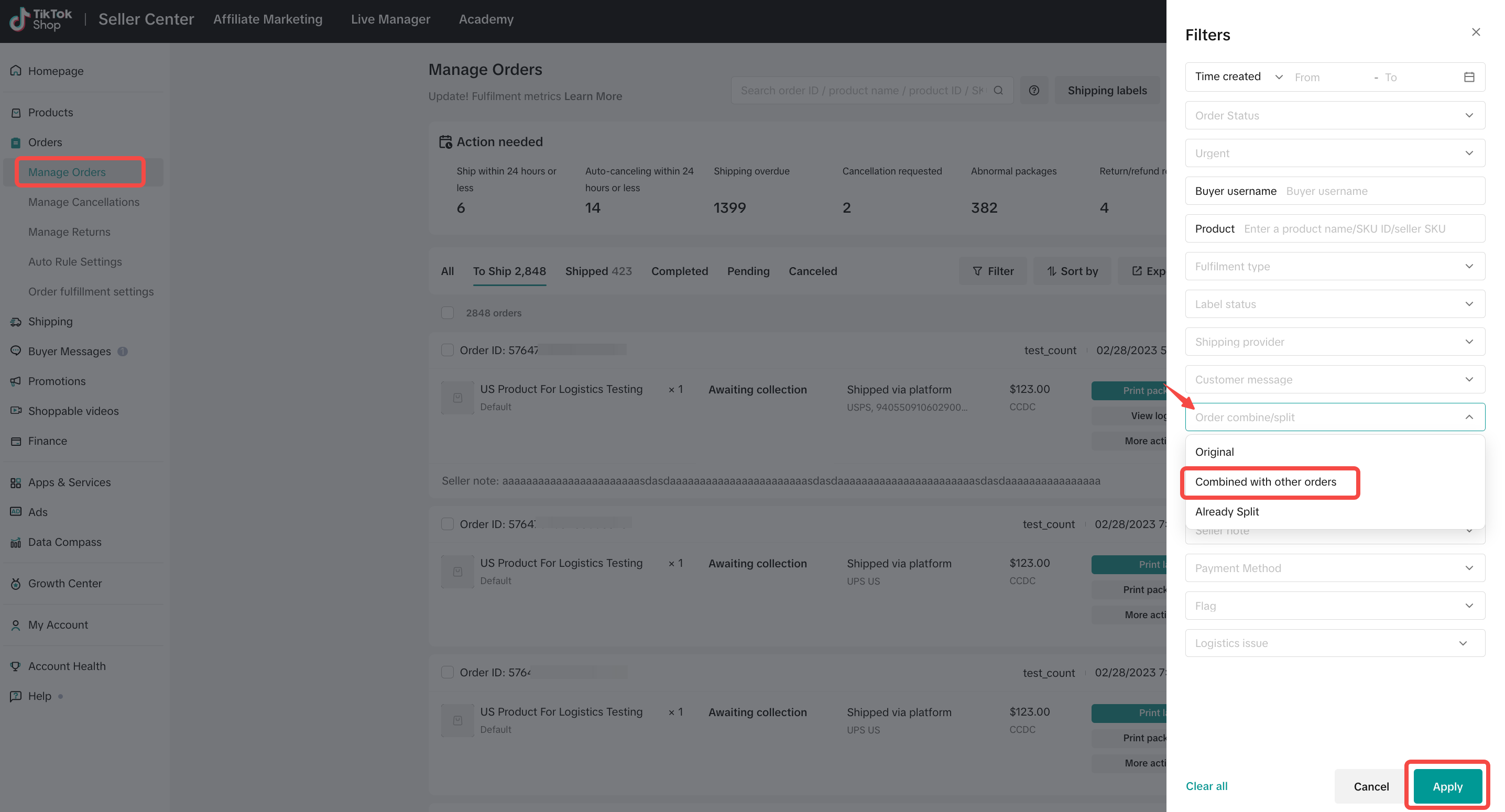
Once you have combined orders, they can then be filtered in the Manage Orders tab.- Navigate to Orders and then to Manage Orders.
- Click on the filter and select Original/Combined from the Order Combination category, then click on Apply.
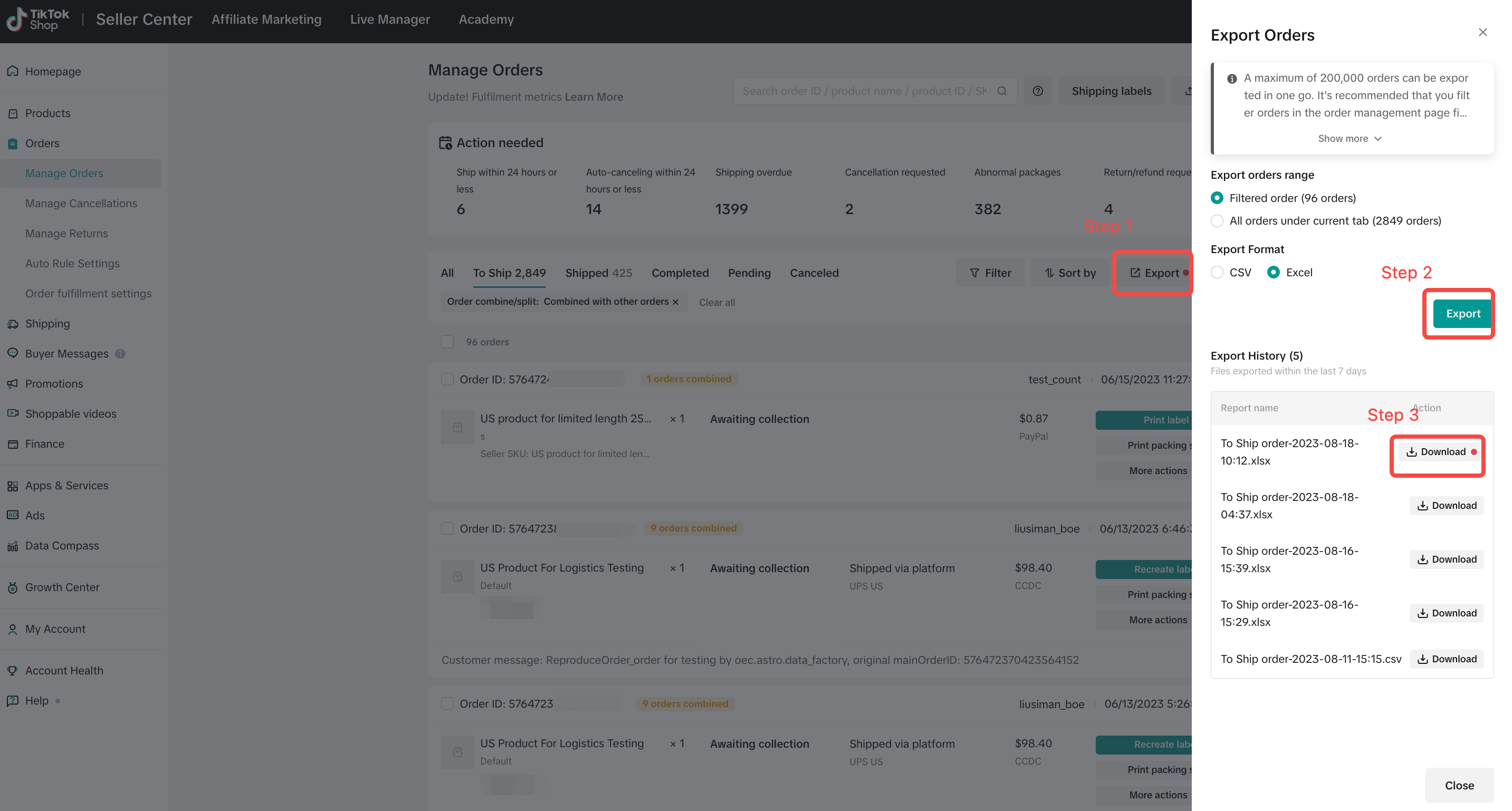
- Navigate to Orders, continue to Manage Orders and then click on Export.
- In the downloaded file, filter by Package ID to locate your target combined orders.
 |  |
Amend Combined Orders
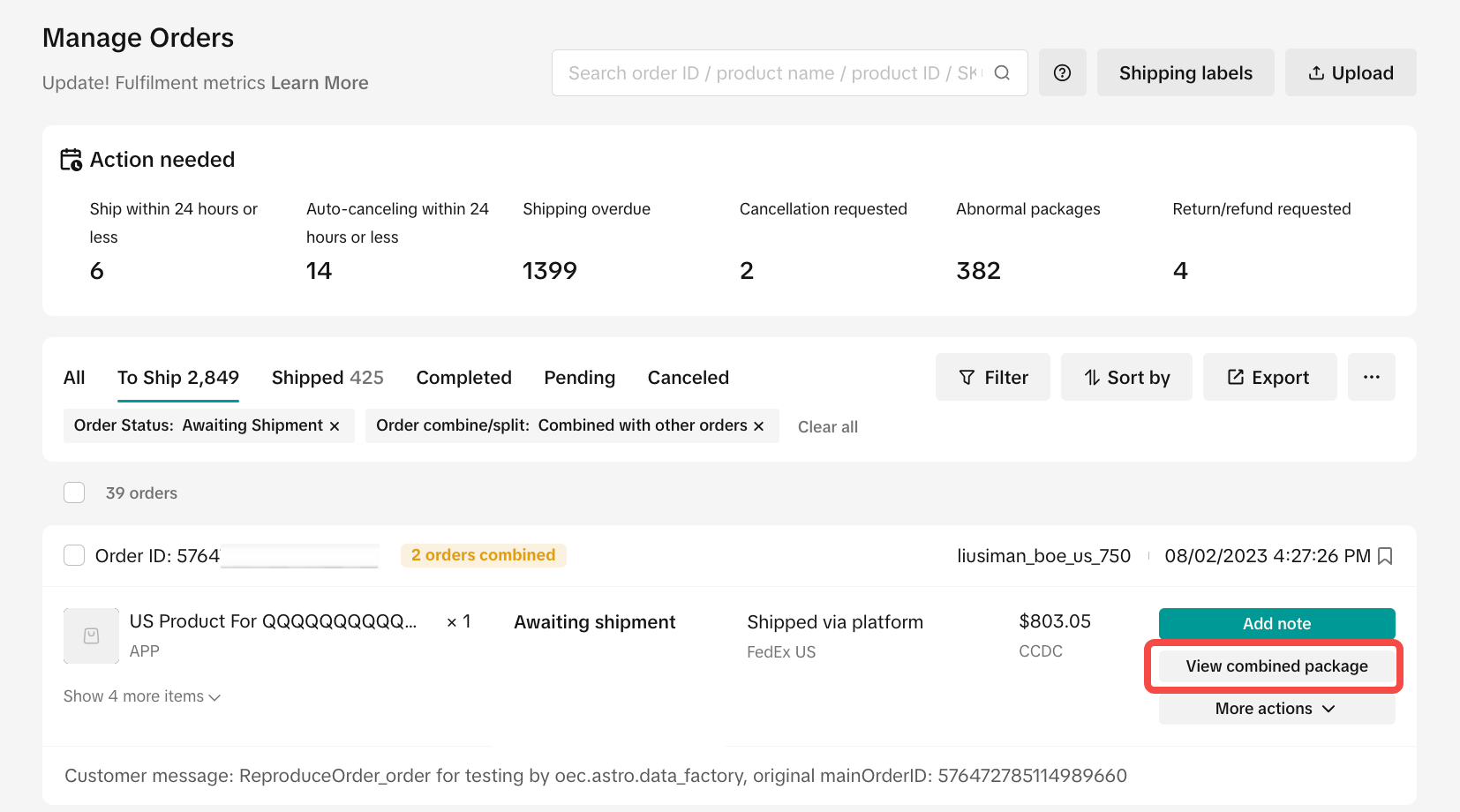
You can make changes to your combined order if it has not yet shipped or reached Awaiting Collection status. This can be done within the Manage Orders tab:- Filter for combined orders
- For selected combined package, click "View combined package"
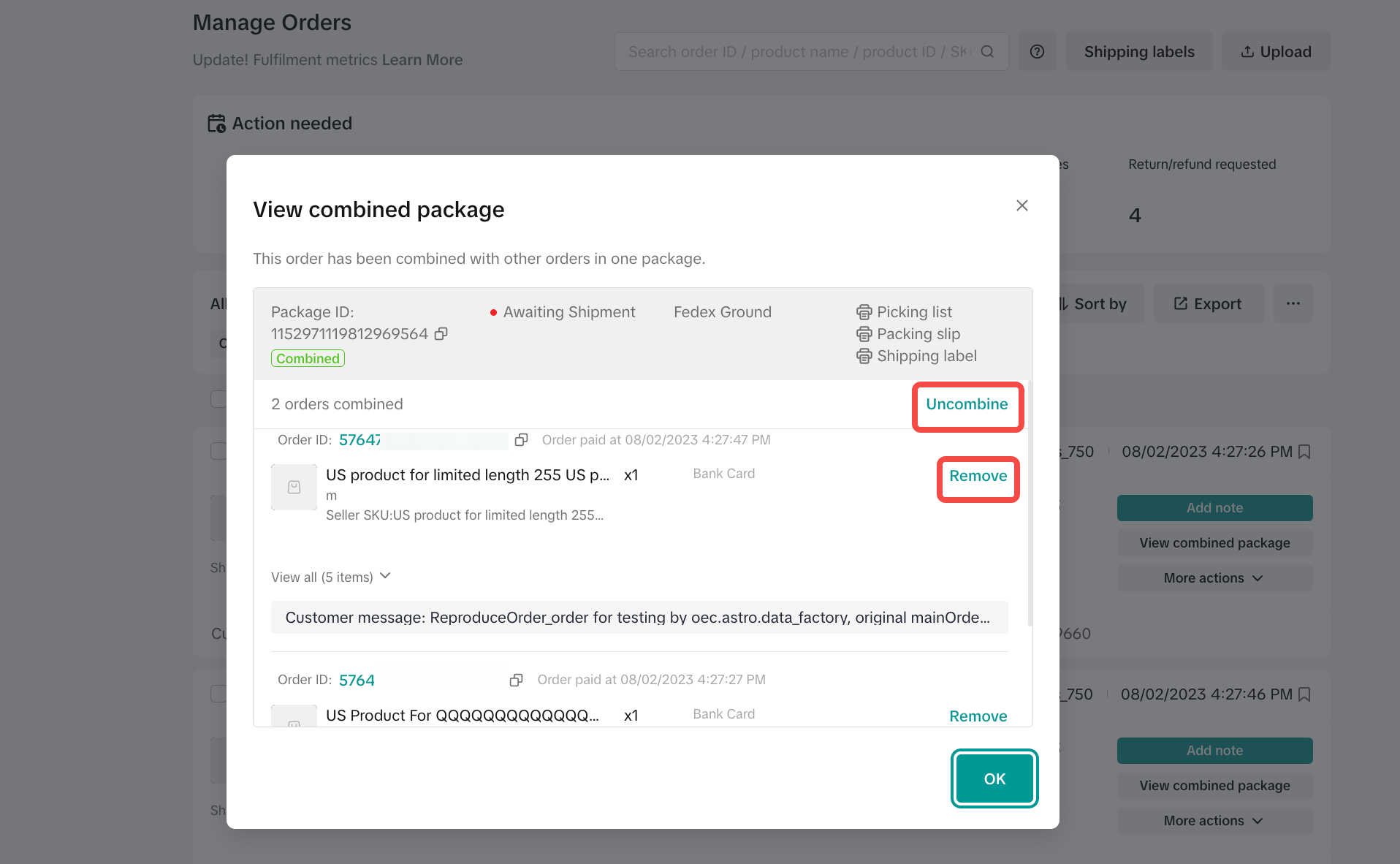
- Once you click View Combined Package, you can either Uncombine the entire package or Remove individual orders. Removed orders will need to be fulfilled separately unless they meet the combination criteria with other orders, in which case they will again appear in the combined package recommendations and may be shipped with those orders.
- TikTok Shipping
- If you are purchasing a shipping label on the platform, you need to click Combine Shipments before shipping. After orders are shipped, the combination cannot be amended.
- Seller Shipping
- If you have already manually shipped and packed the orders together but forgot to click Combine, you can amend this by uploading the tracking number of the combined shipment to each individual order included in the package.
- If you used seller-arranged shipping and already shipped with a prepaid label, you can upload one tracking number for up to 20 orders shipped in the same parcel to the same buyer and address on the same day. The logistics status will be synchronized for these orders.
Fulfilling Combined Packages
TikTok Shipping and Upgraded TikTok Shipping
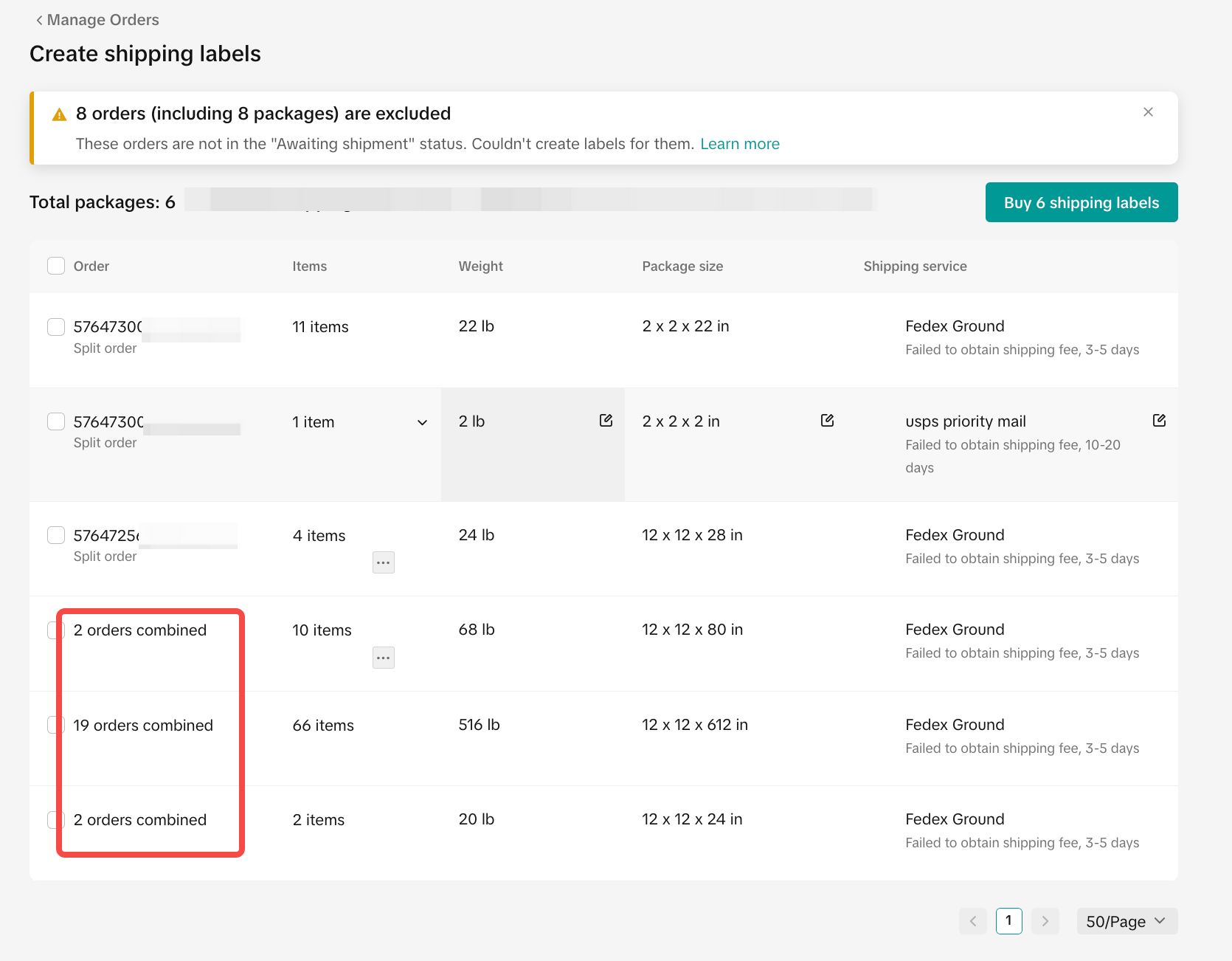
- Click on Create Labels for individual orders that have been recommended for combined packaging, and the system will ask if you want to ship as a combined package instead. This will happen even if you previously rejected the combination recommendation. You may still choose to ship orders separately if you'd like.
- You should then follow the standard fulfillment workflow to process the shipment.
 |  |  |
Shipped by seller
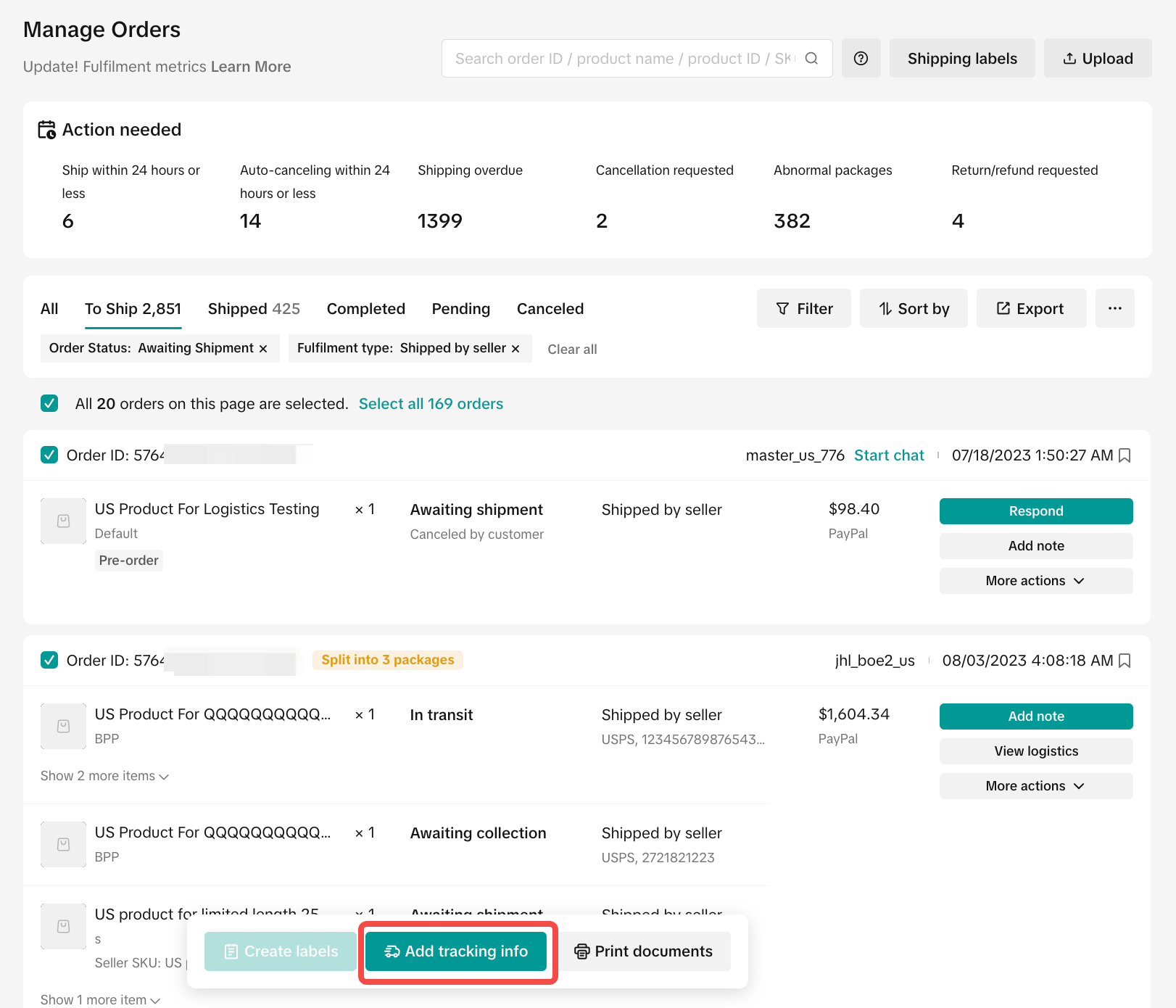
- For shipped-by-seller orders, click Add Tracking Info. For individual orders that have been recommended for combined packaging, the system will ask if you want to ship them as a combined package instead.
 |  | 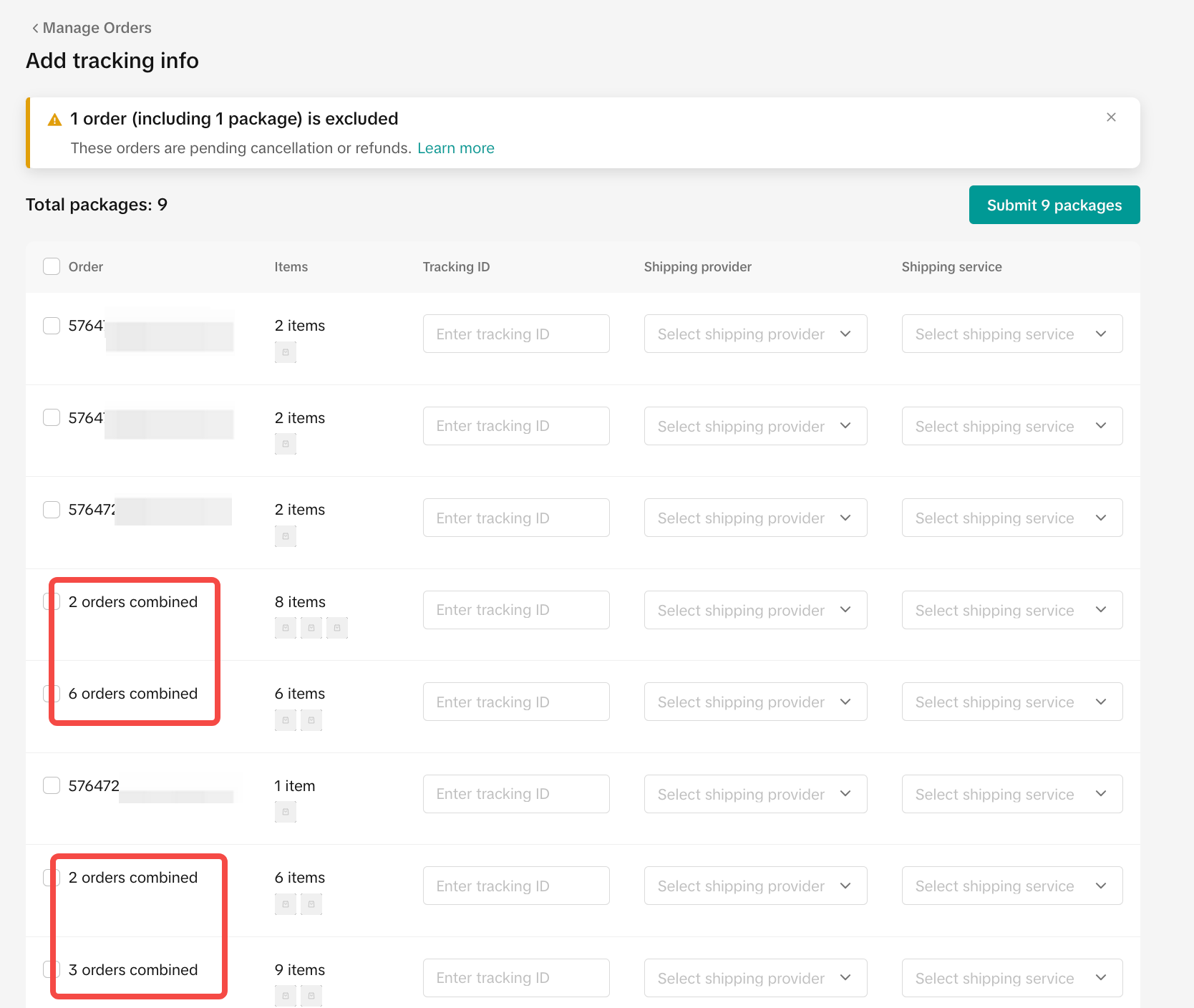 |
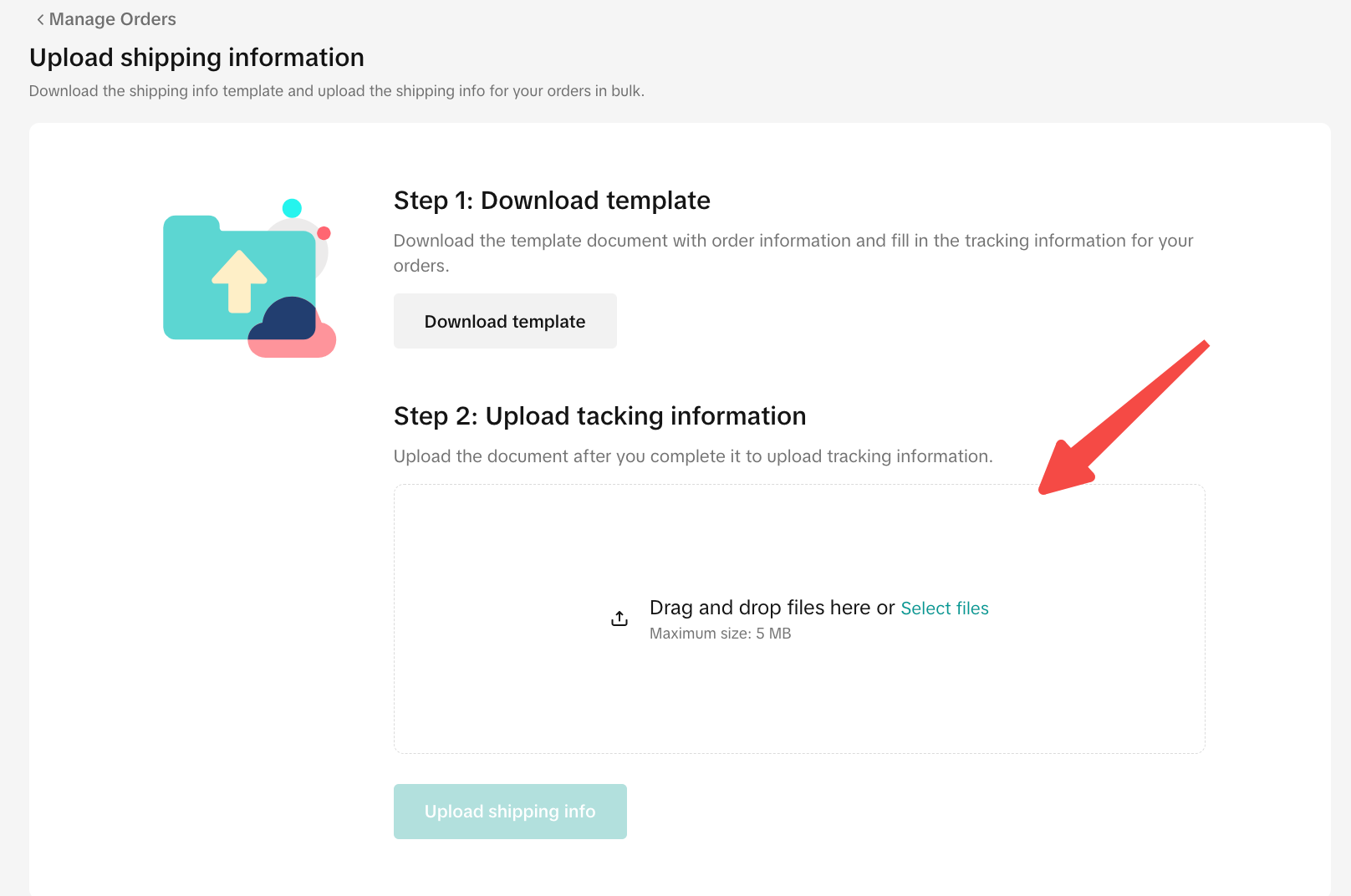
- If manually inserting each order’s Tracking ID is too time-consuming, you can upload the combined order’s tracking ID to the spreadsheet. Once the combined package’s information is downloaded, upload one tracking number for up to 20 orders shipping in the same parcel to the same buyer and address. The logistics status will be synchronized for these orders.
 |  |
Order Cancellations
Customers can cancel orders up to 1 hour after placing a purchase. If the customer cancels one of the orders within a combined package, then you will be prompted to approve/reject this decision and amend the combined package accordingly.Returns/Refunds
For successfully delivered combined packages, customers can request a return for orders included in the combined package without impacting the combined status.However, if the combined package is Awaiting Collection, follow these steps to resolve the customer request:
- Customer requests for refund on order(s) within the combined package
- Approve or reject the refund request. If the refund request is approved, the package will be uncombined after the refund is completed
- Remaining orders in the combined package will revert to a separate package to fulfill.
You may also be interested in
2025 BFCM TikTok Shop Readiness Guide
The holiday shopping rush is your single biggest opportunity to increase sales & grow your brand on…

How to Process "Shipped by Seller" Orders?
If you're using Seller shipping, our new tool makes the process of uploading your tracking number ea…

January 2026 Product Innovation
Logistics & Fulfillment New Logistics Module in Seller Center We’ve introduced a new Logistics modul…
September 2025 Product Innovation
Every month, we introduce new products and features designed to simplify store management, boost sal…

Guide to Seller-Fault Cancellation Rate (SFCR)
Key Points: Seller-Fault Cancellation Rate (SFCR) metric is used to evaluate the quality of a selle…

Definition and Calculation of FBT Penetration Rate
Definition and Calculation of FBT Penetration Rate Definition and Calculation Formula of FBT Penetra…
Splitting Orders into Separate Packages
Test accounts and orders for reference only. The actual interface may differ. Feature Overview The s…

Order Handling Capacity Tool
Key Points: The Order Handling Capacity (OHC) tool enables sellers to set an estimated number of the…

TikTok Shipping & Collection by TikTok (CBT) Pickup Rules &…
Background Lack of Clear Responsibility in Warehouse–Carrier Handover: Unlike Seller Shipping, TikTo…

Fulfilled by TikTok (FBT) Inbound & Packaging Requirements f…
To ensure compliant management and safety of flammable liquids and battery-containing products, FBT…