

How to register for content campaigns
11/17/2025
Summary
What are TikTok Shop content campaigns and how do they benefit sellers?
- Content campaigns are special promotional events tied to major sales, boosting product visibility via LIVE streams or short videos with benefits like prizes, ad credits, and increased exposure.
- Sellers gain prizes, grow their audience, and simplify product promotion through affiliate links and curated event features.
What are the different types of TikTok Shop content campaigns and their key rules?
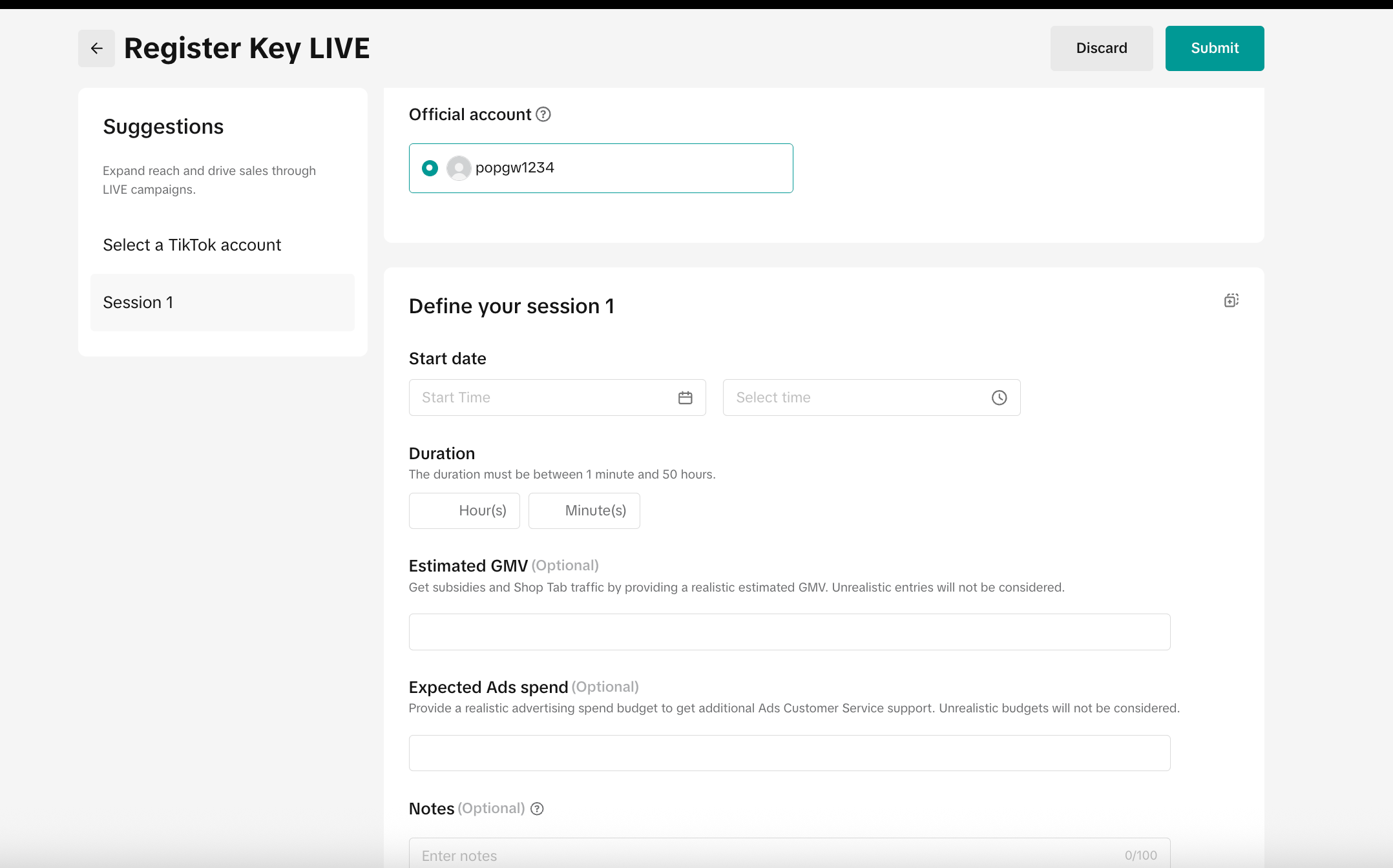
- Key Livestreams require official account binding, have recommended 2-hour minimum streams, and a 100-session cap per campaign; registration involves submitting estimated GMV and ad spend.
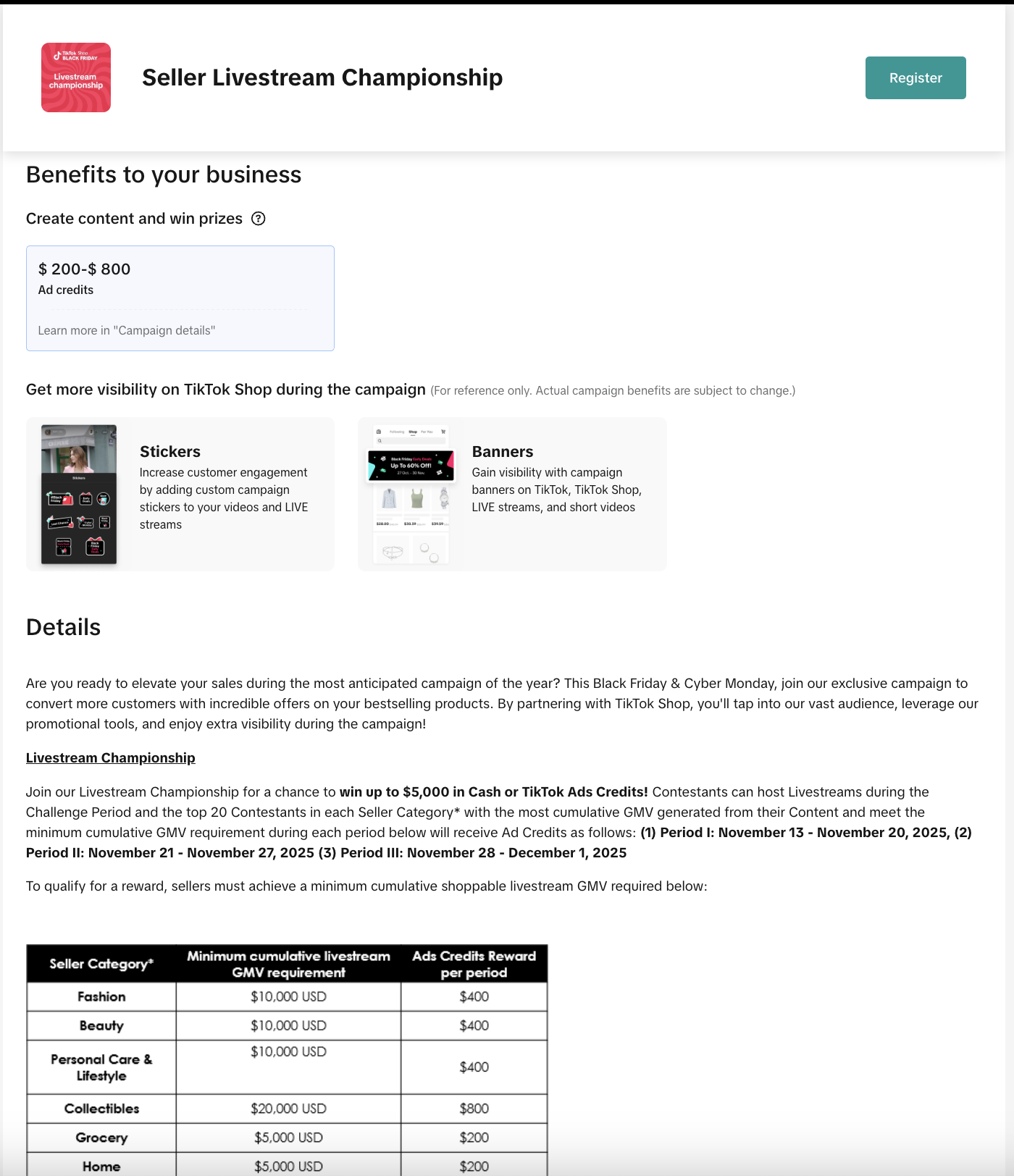
- Livestream Championships auto-approve registrations, require official or bound accounts, and recommend product registration for max exposure; same 100-session cap applies.
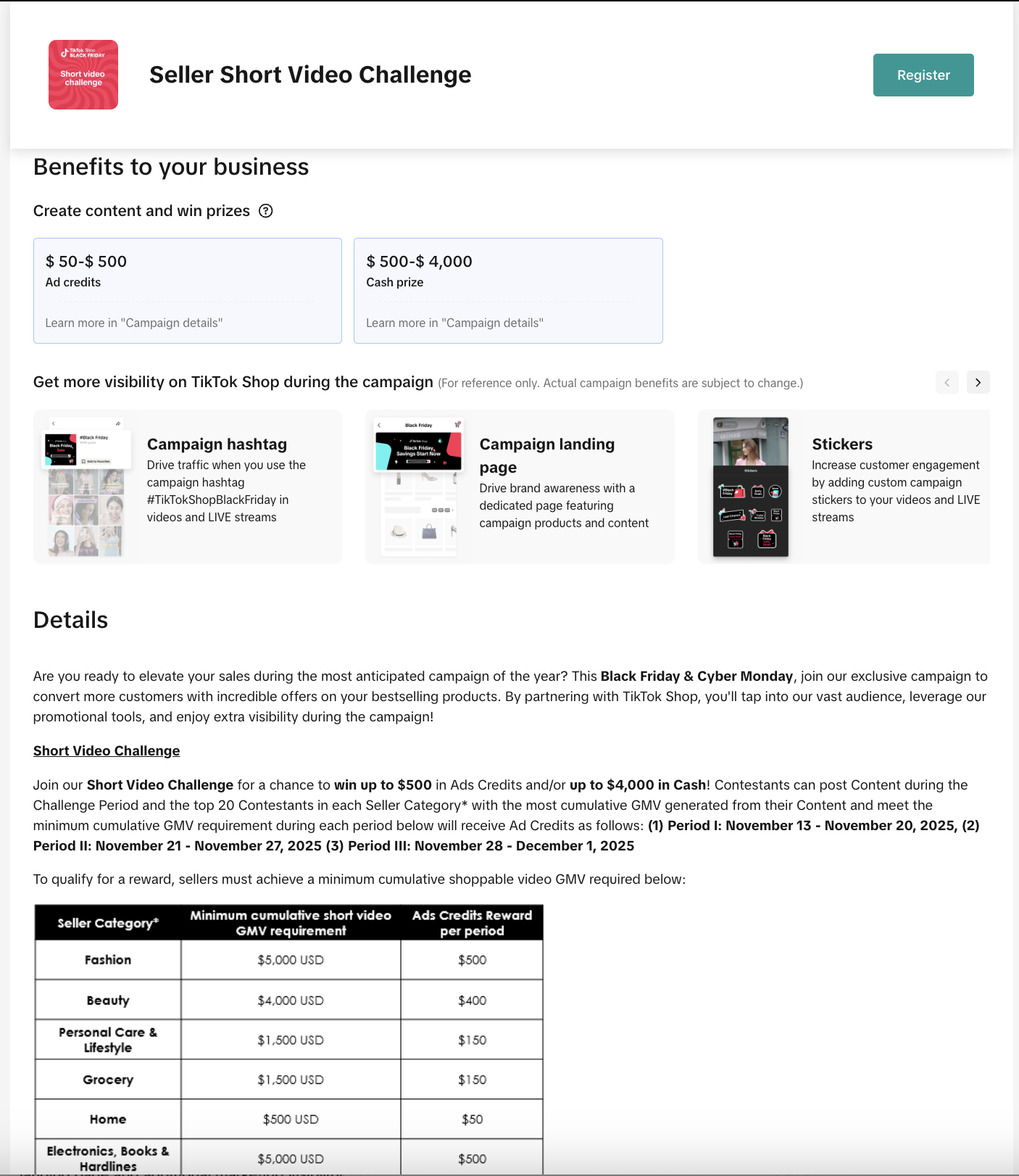
- Short Video Challenges auto-approve, require correct hashtags and product links for GMV counting, and allow posting 1–2 weeks before campaign start; product registration is recommended.
How do sellers register for and manage participation in TikTok Shop content campaigns?
- Sellers select campaigns in Seller Center under Marketing → Campaigns, review details, register with an official TikTok account, and submit required info to participate.
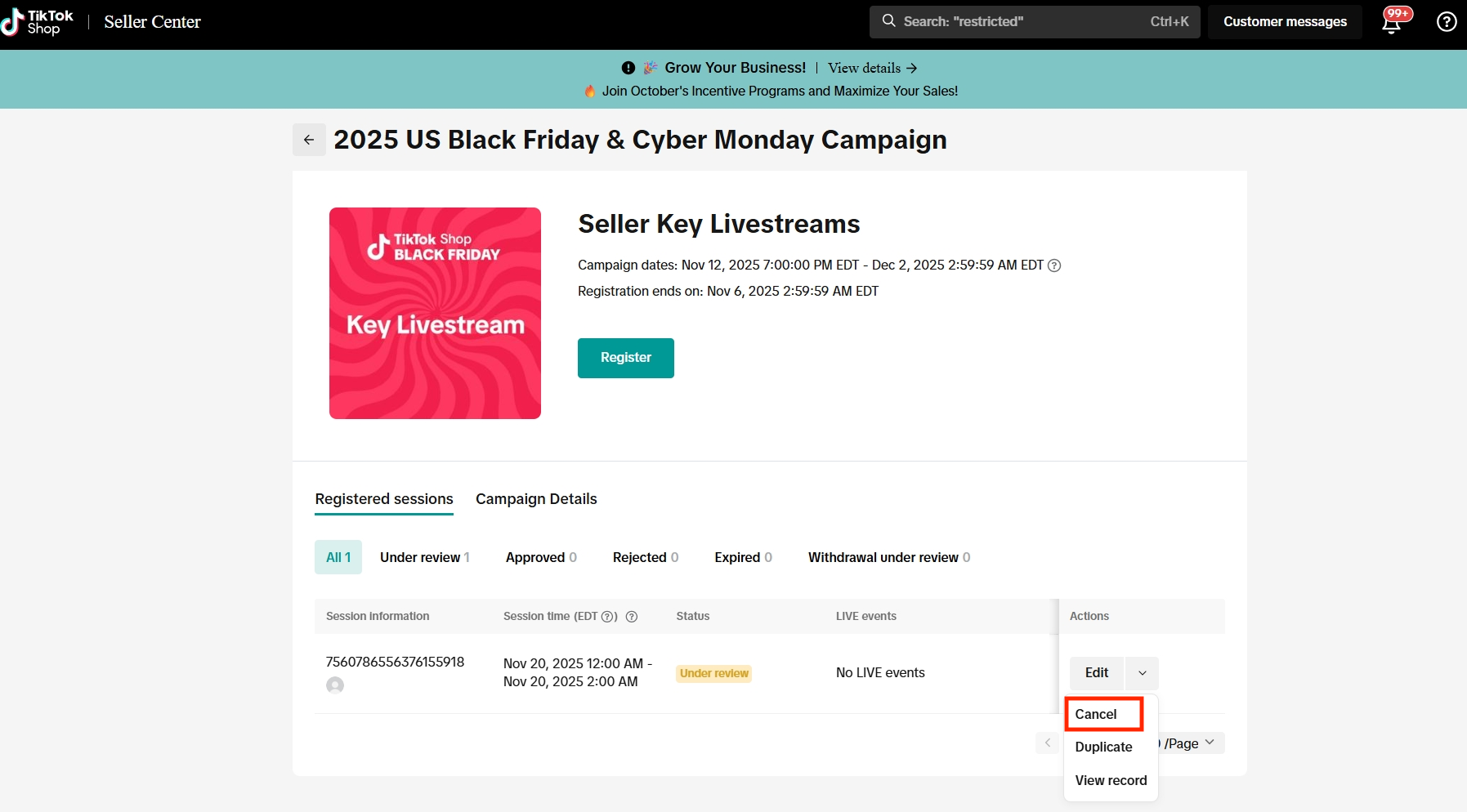
- Withdrawal is possible via "Cancel" if under review or "Withdraw" if approved; performance can be tracked in Seller Center under Manage Your Campaigns with detailed analytics.
What are the best practices for maximizing success in TikTok Shop content campaigns?
- Use official TikTok accounts bound to Seller Center for registration to avoid issues.
- Register eligible products and include product links in videos or livestreams to maximize exposure and reward eligibility.
- Adhere to campaign timing, duration, and hashtag rules to ensure participation counts toward rewards.
Product Overview
Content campaigns on TikTok Shop are special events that give you a chance to boost sales and visibility by promoting select products through LIVE or short-form videos. These campaigns are typically linked to major sales events and often come with special benefits, prizes, and greater exposure.Campaign type overviews
- Key Livestreams : High-impact livestreams that come with special benefits for participants, such as livestream coupons or subsidies, TikTok Shopping ads credits, and/or additional marketing support.
- Livestream Championships: Competitive events where participants host impactful LIVE sessions to compete for rewards.
- Short Video Challenges: Participants can earn rewards by posting high-performing short videos.
Key Benefits
- Win prizes: You can earn exciting prizes such as TikTok shopping ads credits, sample coupons, and/or cash rewards
- Increase exposure: Participating in these campaigns can significantly increase your content's exposure across the TikTok platform.
- Grow your audience: Stand out through curated events and get your content featured in recommended slots, helping you gain more followers.
- Promote products easily: These campaigns make it simple to access and promote eligible products with affiliate links, streamlining your promotional efforts.
How It Works
Step 1: Campaign selection & registrationGo to Seller Center -> Marketing -> Campaigns where you will see a list of available content campaigns. Click "Register now" to proceed.
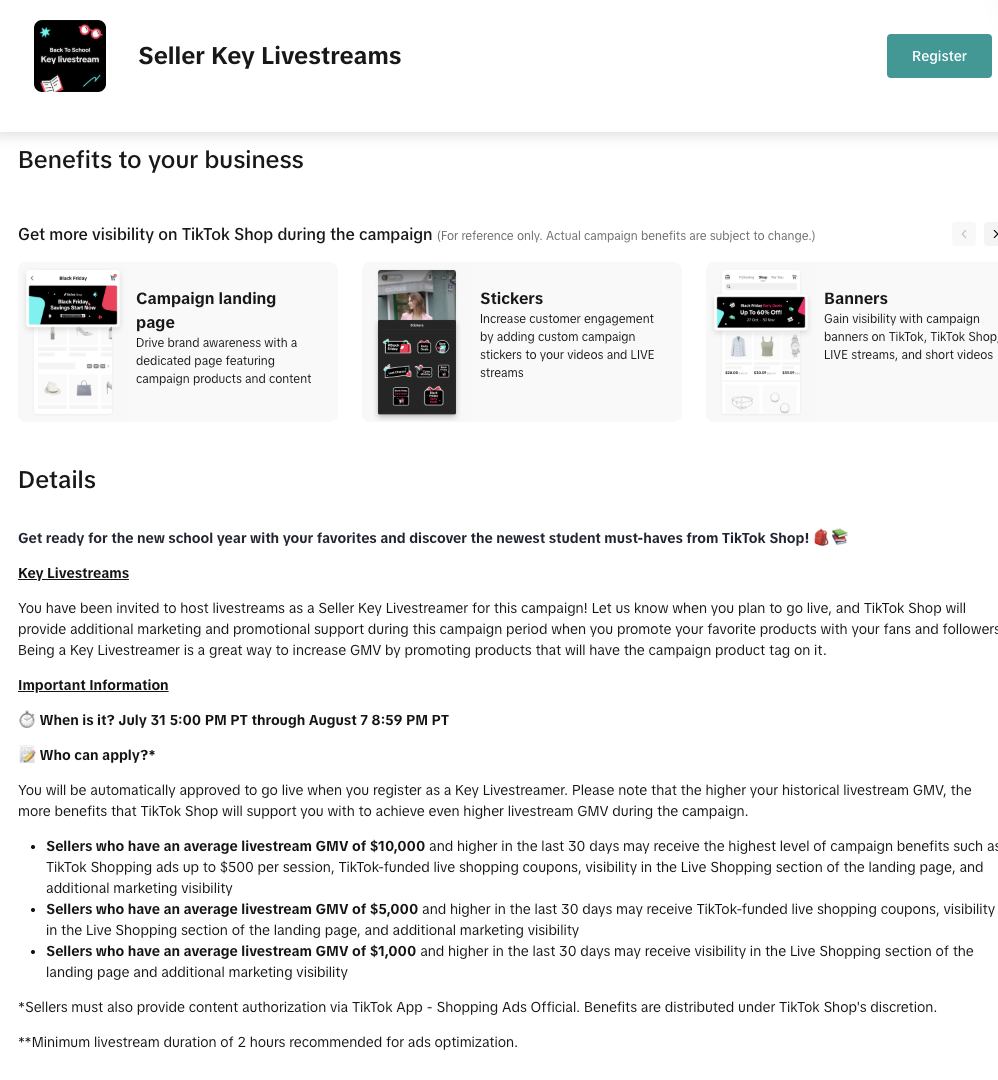
Key LiveStreams (KLS)
Eligibility Rules
- Official TikTok account binding
- You must bind your official TikTok account in Seller Center to register. Without this, you’ll see a notification preventing registration.
- If you don’t have an official TikTok account, you can temporarily register using your marketing or affiliate account in LIVE Manager. Please make sure your LIVE account is bound to your TikTok Shop account before registering.
- Campaign-specific rules: Each KLS campaign has different requirements listed in the details page
- Livestream period: The recommended duration for a KLS is at least 2 hours to maximize exposure and conversion performance.
- Timing: Your registered slot must be duringthe campaign period.
- Quota limits
- You can register up to 100 sessions per campaign (combined across Seller Center and LIVE Manager). Exceeding this cap will block new registrations.
Livestream Championships (LSC)
Eligibility Rules:
- LSC campaigns are usually auto-approved after you hit "Register". That means it won't go through the review process. If you sign up, you’re expected to show up and go LIVE.
- You need to register using an official TikTok account in Seller Center. If not, you can use an unofficial TikTok account (marketing or an affiliate account) in LIVE Manager
- Your registered livestream must fall inside the campaign dates and meet the minimum duration specified in the LSC campaign details. Missing these automatically invalidates your entry.
- While it’s not mandatory, it’s highly recommended to register eligible products and feature them during your LSC. Doing so helps ensure your session qualifies for maximum exposure and ranking opportunities.
- You can register up to 100 sessions per campaign (combined across Seller Center and LIVE Manager). Exceeding this cap will block new registrations

Short Video Challenges (SVC)
Eligibility Rules
- One-click registration & auto-approval
- Registration is instant and you’re auto-approved. That means it won't go through the review process. Once you sign up, the expectation is you’ll post within the campaign window.
- Product registration required
- While it’s not mandatory, it’s highly recommended to register eligible products and include product links in your video. Only shoppable videos with product links will have their GMV counted toward rewards and performance metrics.
- Correct hashtags & rules compliance
- Each challenge requires specific hashtags. If you don’t include them, the video won’t be counted towards the challenge.
- Timing & posting window
- Videos with hashtags can be posted up to 1–2 weeks before the campaign launch, but only GMV generated during the official campaign period will be counted toward rewards and performance metrics.


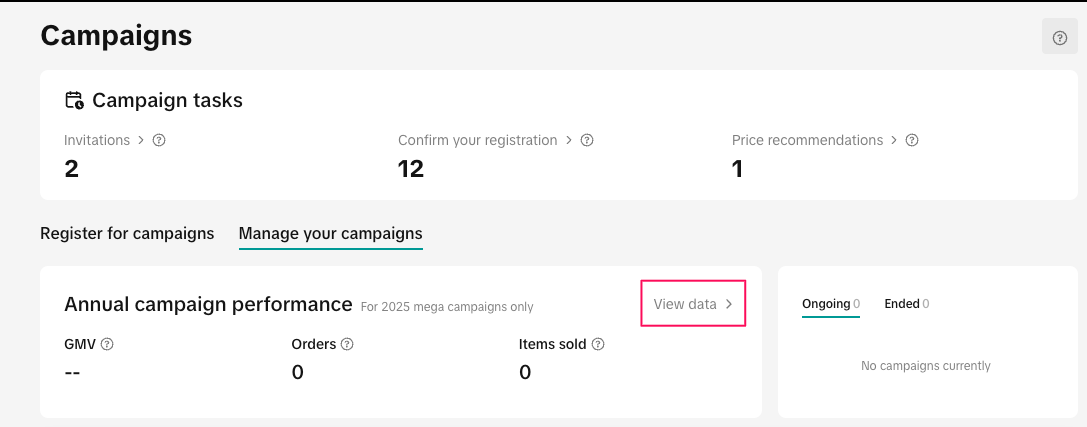
On the Manage your campaigns tab, you can view the annual performance for all of your campaigns.To see a detailed breakdown for each campaign, click View data and it will redirect you to the analytics page
You may also be interested in
2025 BFCM TikTok Shop Readiness Guide
The holiday shopping rush is your single biggest opportunity to increase sales & grow your brand on…

The Seller Guide to Shop Tab Success
What is Shop Tab? Shop Tab is another way for shoppers to discover your products on TikTok Shop. As…
How to resolve SKU errors
If you need to edit your product's retail prices or add, delete, or edit a SKU while it is registere…

LIVE Price Match Guarantee using Co-funded LIVE Flash Sale
Introduction: What is LIVE Price Match Guarantee? During Deal for You Days from July 7 - July 19, 20…

Marketing benefits package
Product Overview Marketing Benefits Packages are a collection of placements and promotions on TikTok…
Campaign FAQs
Key Points: Your shop is eligible to enroll in campaigns if you meet the minimum criteria, includin…
How to Register for Content Campaigns in the TikTok App
Content campaigns on TikTok Shop allow creators and sellers to participate in promotional events whe…
How to register through standard registration
What is Standard Registration? Standard Registration allows you to register products that meet speci…
How to register for flash sale campaigns
What is a TikTok Shop Flash Sale Campaign? A Flash Sale campaign is a limited-time promotion that le…

TikTok for Shopify: Promotions Sync
Overview: Shopify sellers can sync Promotions/Discounts except Free Shipping on Shopify directly to…