

Shelf-Stable Food and Beverage Requirements

This document outlines the requirements for selling Shelf-Stable Food and Beverages on TikTok Shop. Shelf-stable food and beverages are also subject to our Restricted Products Policy and Product Quality Policy. Sellers must comply with this document, the Restricted Products Policy, and the Product Quality Policy when listing shelf-stable food and beverages.Key Points:
- To sell Shelf-Stable Food and Beverages, you may need to submit documentation through the Qualification Center. Requirements vary depending on your role as a seller.
- For help with the review process and rejection handling, see Your Guide to Category Qualification.
Shelf-Stable Food and Beverages
Shelf-stable food and beverages can be stored safely at room temperature and do not require refrigeration until after opening.These requirements apply to the following shelf-stable product types. This list is non-exhaustive.
Cooking Staples
- Oils, sugar, salt, vinegar
- Beans and legumes
- Spices and herbs
- Pasta and noodles
- Flour and baking mixes
- Breadcrumbs
- Baking powder and baking soda
- Yeast
- Butter and margarine
- Condensed or evaporated milk
- Cream and creamers
- Food coloring and flavoring
- Cake decorations
- Breakfast cereals, granola, muesli, porridge
- On-the-go and instant cereals
- Instant noodles, rice, and hotpot meals
- Canned and packaged foods
- Nut butters
- Kimchi and pickled vegetables
- Chutneys and jellies
- Fruit and nut bars
- Protein and energy bars
- Biscuits, cookies, and crackers
- Chocolate and sweets
- Cheese and savory snacks
- Gum
- Dried fruit, nuts, seeds, and jerky
- Dried seafood or vegetables
- Popcorn and snack pastries
- Snack gift packs
- UHT milk
- Non-dairy milk
- Dried milk solids
- Whey powder
- Freeze-dried cheese
Prohibited Products
The following food and beverage products are not allowed on TikTok Shop:- Products containing meat from countries or facilities not approved by USDA FSIS
- Infant formula
- Food additives not approved by the FDA. This includes, but is not limited to:
- Flavor enhancers
- Colorings
- Flavorings
- Extracts
- Sugar
- Sweeteners
- Homemade food or beverage products
- Products packaged in non-durable containers, such as wrappers or carry-out boxes
Requirements To Sell Shelf-Stable Food and Beverages
You may be required to pass category qualification to sell Shelf-Stable Food and Beverages. This process requires submitting documents proving you are qualified to sell these products.In addition, you are responsible for:
- Ensuring shelf-stable food and beverage products, including packaging and labeling, comply with all applicable laws and regulations. This includes, but is not limited to:
- Nutrition Labeling and Education Act
- Federal Food, Drug, and Cosmetic Act
- Fair Packaging and Labeling Act
- Providing complete, accurate, and up-to-date product information for all listings.
- Complying with laws and regulations governing identity food claims. Claims such as gluten-free, sugar-free, or allergen-free must be verified and supported by evidence.
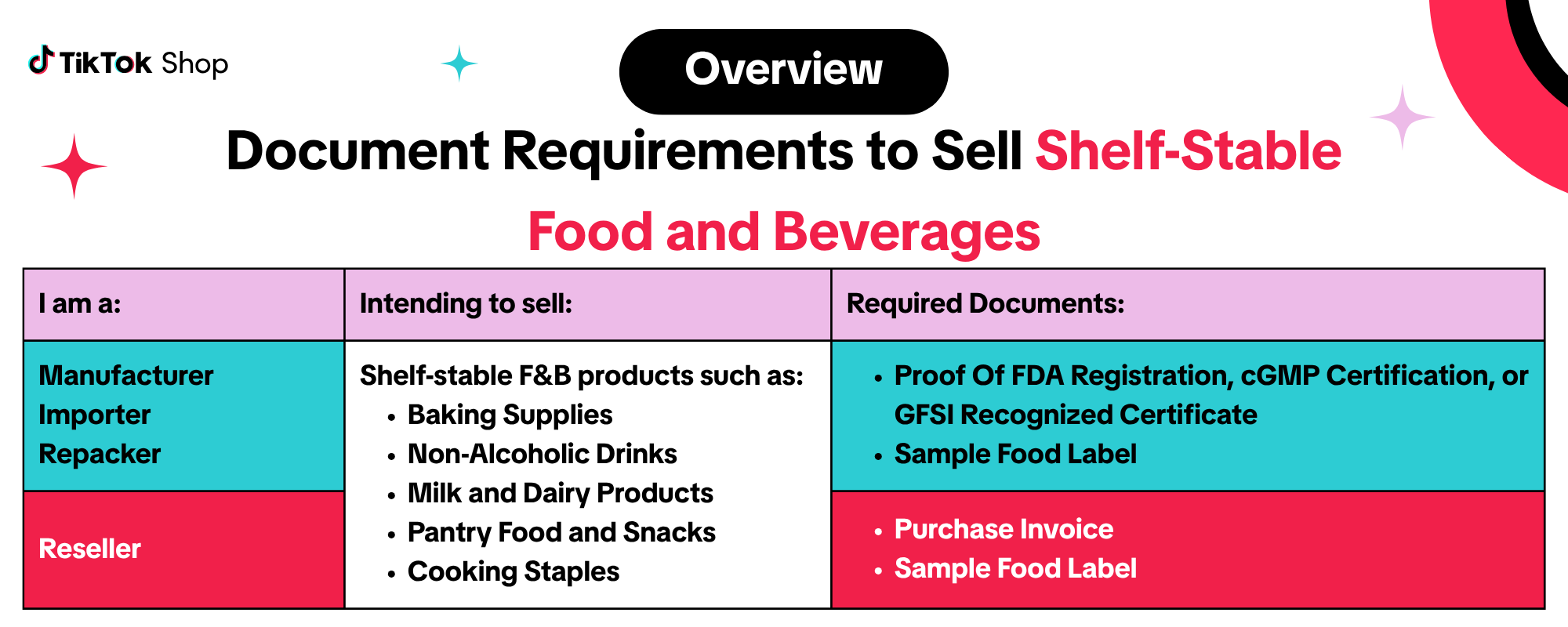
Manufacturers, Importers, And Repackers
- Proof Of FDA Registration, cGMP Certification, or GFSI Recognized Certificate

- A third-party FDA registration verification letter, or
- A screenshot from the FDA registration portal
- Physical address of the establishment
- Operation type of registered establishment
- Active FDA registration at the time of submission
- If submitting a screenshot, it must clearly show it is from the FDA website
- The verifier’s name and contact information must be clearly stated.

Requirements include:
- The certificate must not be expired at the time of submission
- It must confirm compliance with 21 CFR Part 117
- See FDA's cGMP Regulations for more information
- SQF
- BRCGS
- FSSC 22000
- Other internationally recognized food safety certifications
- Certificate must be valid and not expired
- Sample Food Label

- Images of the principal display panel and information panel
- The following required information:
- Product name
- Net weight
- Nutrition facts
- Ingredient list
- Allergen declarations (if applicable)
- Name and address of the manufacturer or distributor
Resellers
If you are applying to sell dietary supplements as a reseller, you may be required to submit the following documents:
 Resellers may be required to submit a legible purchase invoice issued by the product’s manufacturer. The invoice must include:
- Purchase Invoice
- Supplier company name and address
- Clear product description matching the listing
- Issued within the last 365 days
- Written in a language supported by TikTok Shop
- Sample Food Label

- Images of the principal display panel and information panel
- The following required information:
- Product name
- Net weight
- Nutrition facts
- Ingredient list
- Allergen declarations (if applicable)
- Name and address of the manufacturer or distributor
Enforcement Actions and Appeals
We regularly review your shop’s compliance with this document, our Restricted Products Policy, and our Product Quality Policy. If violations are identified, we will take enforcement actions on your shop. This may include, but is not limited to:- Rejecting your category qualification application
- Deducting points from your account health
- Removing product listings
How to Submit Your Documentation
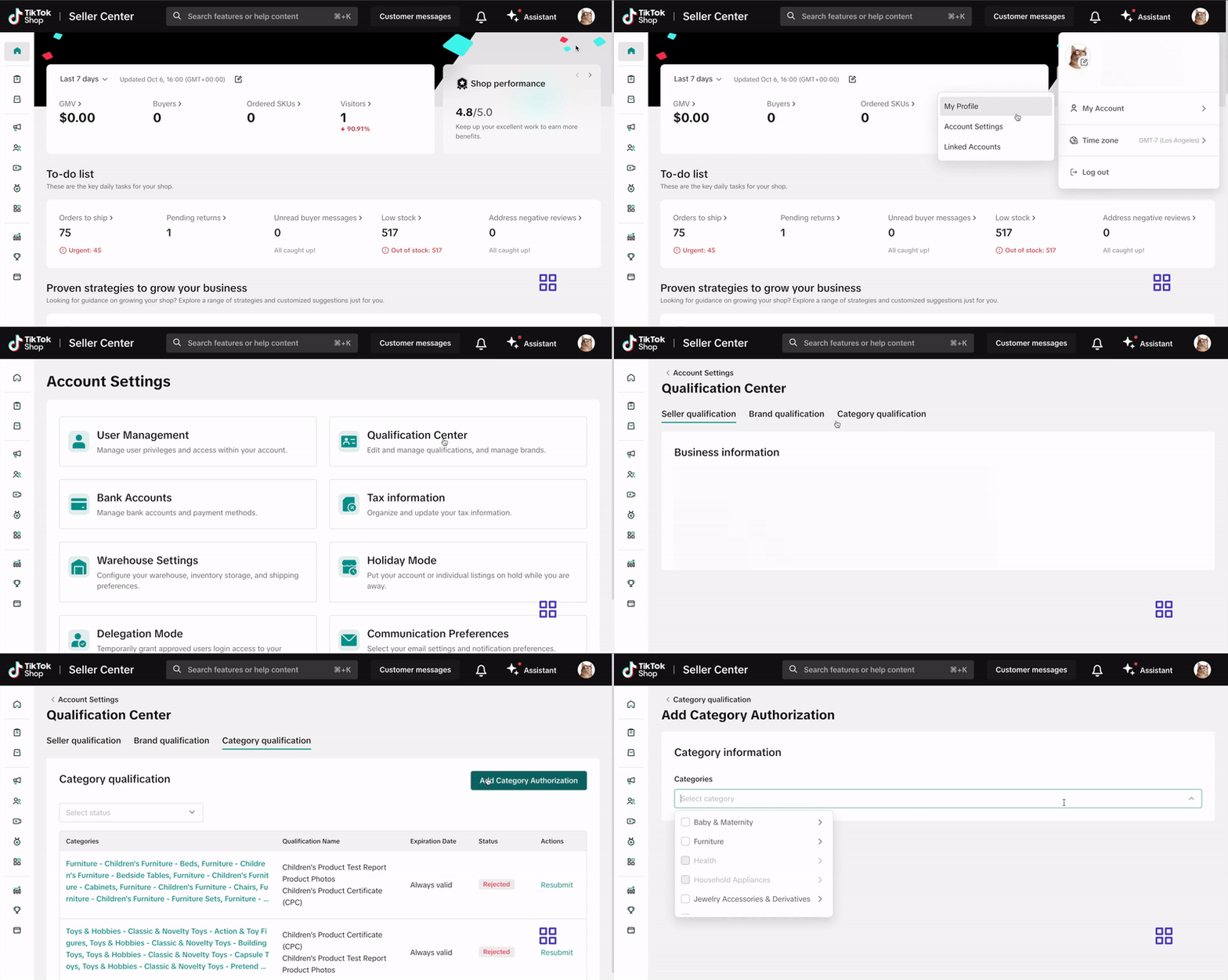
Submit your documentation via the Qualification Center in Seller Center. Click here or follow these steps:- Log into your Seller Center account.
- Click your shop icon in the top right corner.
- Go to My Account > Account Settings.
- Select Qualification Center.
- Click on Category Qualification.
- Click Add Category Authorization and follow the prompts to submit your application.
How To Address A Category Qualification Rejection

You can view your rejection message by:
- Clicking the bell icon at the top of your Seller Center homepage to go to your inbox
- Opening the rejected application in the Qualification Center.
- Go to the Qualification Center, then click Category Qualification.
- Click the rejected category to view the rejection reason.
- Review the related category requirements to confirm what’s needed
- Update or replace your documentation to meet the category’s requirements.
- Click Resubmit to submit your revised application.