

Pre-Owned Products Requirements
02/26/2026

This document outlines the requirements for selling Pre-Owned Products on TikTok Shop. Pre-owned products are also subject to our Restricted Products Policy. Sellers must comply with both this document and the Restricted Products Policy when listing pre-owned products.Key Points:
- To sell pre-owned products, you may need to complete a qualification process. This can be done through the Qualification Center.
- Pre-Owned Apparel, Fine Jewelry, and Luxury Watches are invite-only categories. It's available only to select qualified sellers.
- All Pre-Owned Products must include proof of authentication. This can be through an approved third-party service or in-house authentication.
- Product listings must clearly disclose condition, defects, and required attributes.
Pre-Owned Products
Pre-owned products are items that were previously owned, used, or secondhand. Any products with packaging that has been opened are also considered pre-owned.Requirements for Pre-Owned Product Categories
Selling in certain Pre-Owned categories requires additional steps to ensure product authenticity and quality.- Pre-Owned Luxury Bags, Luggage, Accessories, and Footwear may require a category qualification process. This involves submitting documentation to confirm eligibility. See the How to Submit Your Documentation section below for details.
- Pre-Owned Apparel, Fine Jewelry, and Luxury Watches are available to invited sellers only.
Permitted Pre-Owned Product Categories
Pre-Owned Luxury Bags, Luggage, and Accessories
- Defined as authenticated luxury or designer handbags with a minimum list price of $200. Minimum condition grade must be Good.
Pre-Owned Luxury Footwear
- Defined as authenticated footwear with a minimum list price of $50. Minimum condition grade must be Good.
- Invite-only
- Defined as authenticated luxury or designer apparel with a minimum list price of $50. Minimum condition grade must be Good.
- Invite-only
- Defined as authenticated luxury or designer apparel with a minimum list price of $200. Minimum condition grade must be Good.
- Invite-only
- Defined as authenticated watches with a minimum list price of $1,000. Minimum condition grade must be Good.
Condition Guide (All Categories)
To ensure transparency, all pre-owned products must clearly indicate their condition. The following guide defines the condition levels used across all pre-owned categories:- Pristine:
- No signs of use
- Minimal imperfections from handling or storage
- May include original packaging and accessories
- Excellent:
- Clean and very lightly worn
- Faint marks or surface wear visible only upon close inspection
- Very Good:
- Light signs of previous use
- Minor wear, creases, or faint scratches that remain subtle
- Good:
- Noticeable signs of prior use
- Visible wear or scratches that do not affect function or readability
Authentication Requirements
All pre-owned products must include a Certificate of Authenticity (COA).
- Pre-Owned Luxury Bags, Luggage, and Accessories & Footwear
- COA can be issued by:
- An approved third-party service; or
- The seller’s approved in-house authentication
- Pre-Owned Luxury Apparel and Fine Jewelry
- COA must come from an approved third-party service
- Pre-Owned Luxury Watches
- COA must come from the seller’s approved in-house authentication.
- Third-party authentication is not accepted.
- COA must come from the seller’s approved in-house authentication.
- Certificates must be submitted within 24 hours after purchase. This excludes weekends and holidays.
Orders will be canceled automatically if TikTok Shop cannot validate the COA. Sellers are responsible for all costs and inventory losses resulting from non-approved certifications.
Approved Third-Party Authentication Services and Agencies
The following product types are eligible for third-party authentication when verified by an approved service:
- Pre-Owned Luxury Bags, Luggage, Accessories, Footwear, Apparel, and Fine Jewelry
- Entrupy
- Real Authentication
- LegitMark
- LegitApp
- CheckCheck
- Pre-Owned Luxury Watches
- Third-party authentication is not accepted
Product Listing Requirements
Sellers must clearly disclose any product defects in product images, condition field, and product description. This includes, but is not limited to:Product Titles
- Bags must include:
- “Pre-owned”
- Brand name
- Fabrication
- Silhouette.
- Footwear must include:
- “Pre-owned”
- Brand name
- Style name
- Fabrication
- Type of footwear
- Apparel must include
- “Pre-owned,”
- Brand name
- Type of Apparel
- Jewelry must include
- “Pre-owned,”
- Brand name
- Type of Jewelry
- Watches must include:
- “Pre-owned,”
- Brand name
- Model
- Examples:
- Pre-Owned Louis Vuitton Neverfull Tote
- Pre-Owned Nike Air Force 1 Low Retro Sneakers
- Pre-Owned Prada Brushed Leather Black Loafer
- Pre-Owned Rolex Watch
Mandatory Attributes
All new listings for pre-owned categories must include the following attributes including, but not limited to:- Bags, Luggage, and Accessories
- Brand
- Bag Silhouette
- Condition Type
- Condition Description
- Color
- Fabrication
- Product Dimensions
- Footwear
- Brand
- Size
- Color
- Upper Material
- Outsole Material
- If Original Box is Included
- Condition Type
- Condition Description
- Apparel
- Color
- Condition Type
- Condition Description
- Fine Jewelry
- Size
- Material
- Condition Type
- Condition Description
- Watches
- Band Width
- Condition
- Model
- Movement
- Watch Height
- Wrist Circumference
Additional Requirements for Certain Pre-Owned Categories
Pre-Owned Fine Jewelry
Sellers offering pre-owned fine jewelry must clearly disclose:- Any gemstone treatments, enhancements, or stone replacements
- Gold purity and metal composition, where applicable
- Any repairs, polishing, resizing, or alterations made to the item
- “Guaranteed authentic”
- “Investment grade”
- Any similar claims that are unverifiable or misleading
Pre-Owned Luxury Apparel
Sellers offering pre-owned luxury apparel must clearly disclose:- Any repairs, polishing, resizing, or alterations
- Any re-stitching, dyeing, modifications, or missing components
- Any condition issues that materially affect the item’s appearance or wearability
- “Guaranteed authentic”
- “Investment grade”
- Any similar claims that are unverifiable
Order and Fulfillment Requirements
Dispatch and Authentication- For pre-owned products that need post-sale authentication, the dispatch timeline starts after TikTok Shop approves the COA. See Fulfillment Policy for details.
- Sellers are required to purchase signature confirmation or Signature on Delivery.
- Sellers are required to purchase shipping insurance if their pre-owned products have a value of $250 or more.
- Sellers must provide evidence if there is a payment dispute or if the customer does not receive the item. Evidence may include:
- Proof of Delivery
- Proof of Direct Delivery
- Proof of Shipping Insurance
- Sellers must allow a one-hour cancellation window after a purchase.
- Customers may request cancellation after this window. Sellers are not obligated to accept.
- Returns and refunds are only eligible for items that are damaged or defective upon arrival.
- For more information, see Customer Order Cancellation, Return, and Refund Policy.
Enforcement Actions and Appeals
We regularly review your shop’s compliance with this document and our Restricted Products Policy. If any violations are identified, TikTok Shop may take enforcement action at our sole discretion. This may include, but is not limited to:- Rejecting your category qualification application
- Deducting points from your Account Health Rating
- Removing product listings
- Revoking your access to offer products for sale
- Issuing refunds to customers
How to Submit Your Documentation
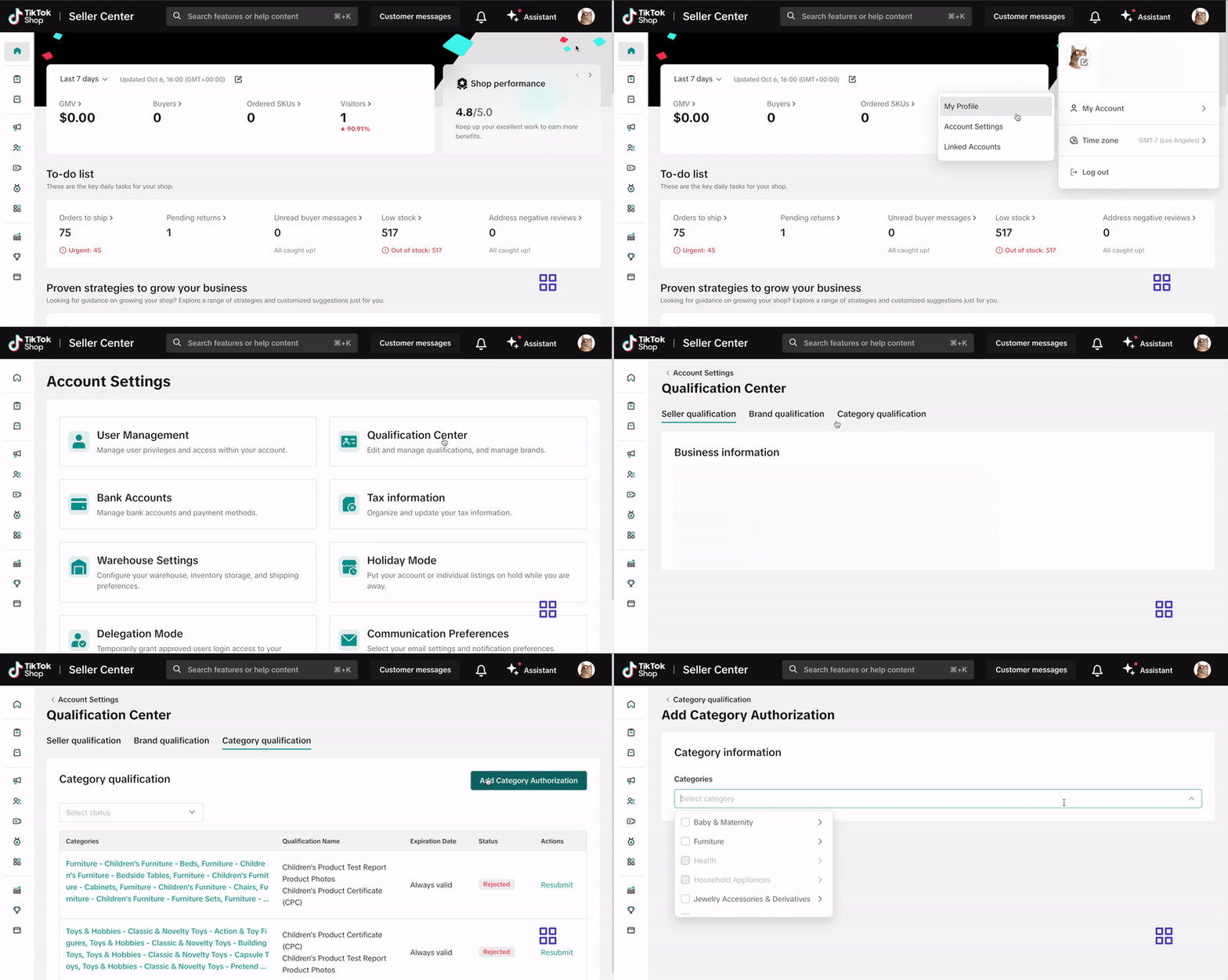
Submit your documentation via the Qualification Center in Seller Center. Click here or follow these steps:- Log into your Seller Center account.
- Click your shop icon in the top right corner.
- Go to My Account > Account Settings.
- Select Qualification Center.
- Click on Category Qualification.
- Click Add Category Authorization and follow the prompts to submit your application.
How To Address A Category Qualification Rejection
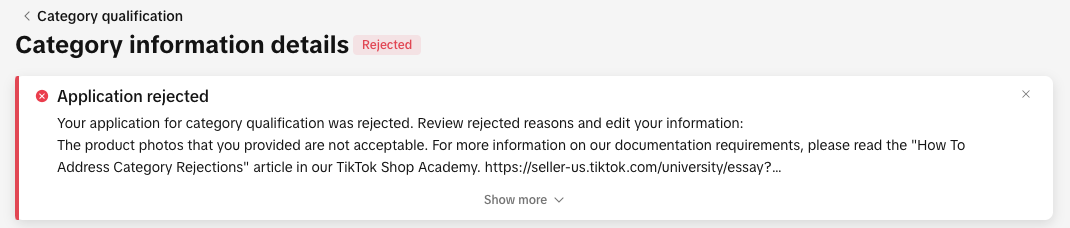
You can view your rejection message by:
- Clicking the bell icon at the top of your Seller Center homepage to go to your inbox
- Opening the rejected application in the Qualification Center.
- Go to the Qualification Center, then click Category Qualification.
- Click the rejected category to view the rejection reason.
- Review the related category requirements to confirm what’s needed
- Update or replace your documentation to meet the category’s requirements.
- Click Resubmit to submit your revised application.
Frequently Asked Questions
What happens if my COA is rejected?
You will receive a notification with the reason.
Can I submit another COA if the first is rejected?
Yes, within 24 hours. If rejected again, the order will be canceled.