

How to Use Pre-Order (PO) Feature
01/17/2026
Summary
What is the TikTok Shop Pre-Order feature and how does it benefit sellers?
- Pre-Order allows sellers to list exclusive or limited-edition products before market release, with shipping delayed until a set release date (3-60 days ahead). It helps generate sales, build shopper relationships, and grow brand buzz.
Who is eligible to use the Pre-Order feature and what are the key eligibility requirements?
- The Pre-Order feature is available only to select qualified sellers as per TikTok Shop’s Custom Orders Policy. Sellers must create new product listings (existing listings cannot be converted) and accurately set a release date.
What are the essential steps for sellers to create and manage a Pre-Order listing on TikTok Shop?
- Confirm your time zone in profile settings, add a new product, check the Pre-Order box, and set a fixed Product release date (3-60 days ahead). This date cannot be changed once published. For SKUs, enable variations and set release dates individually.
How are Pre-Order orders managed and what are the shipping and payment requirements?
- Orders remain in "Awaiting release" status until the release date, then switch to "Awaiting shipment." Sellers must update product status to "In Transit" within 2 business days post-release date and ship within 1 business day. Payment is pre-authorized at order and captured upon shipment; failed re-authorization cancels the order.
What shopper-facing information and notifications are provided for Pre-Order products?
- Product pages display "Pre-order product, ships after: release date" with estimated delivery times. During checkout, orders show a "Pre-order" label with delivery estimates. Order details indicate status as "Pending release date" until the product ships.
Introduction: What is Pre-Order ?
Pre-Order is a new listing option available for all products that are exclusive or limited edition, not released on the market yet, and shipped at a later time.Sellers can use the 'Pre-Order' checkbox and set a 'Product release date' - 3 to 60 calendar days from current day to activate the listing as a pre-order. The checkbox is only available for new product listings, existing listings cannot be edited and made pre-order listings.
What are the benefits?
- Generate more sales: Grow excitement and sales by offering pre-order opportunities on exclusive or limited-edition items, while gaining valuable shopper insights for future sales opportunities
- Build shopper relationships: By offering pre-orders, you can engage with shoppers early, build anticipation for the product, and foster loyalty that encourages repeat business
- Grow your brand: Pre-orders can be used as a marketing tool to create buzz, generate media coverage, and amplify your brand to your community
Who is eligible?
TikTok Shop's Pre-Order feature is only available to select qualified sellers. See the Custom Orders Policy for more details.
Steps: How to access pre-order
Confirm your time zone is accurate.
In your profile settings, confirm if the 'Time zone' is accurate. The '3 to 60 days' handling time available for pre-order listings is calculated based on your local time zone.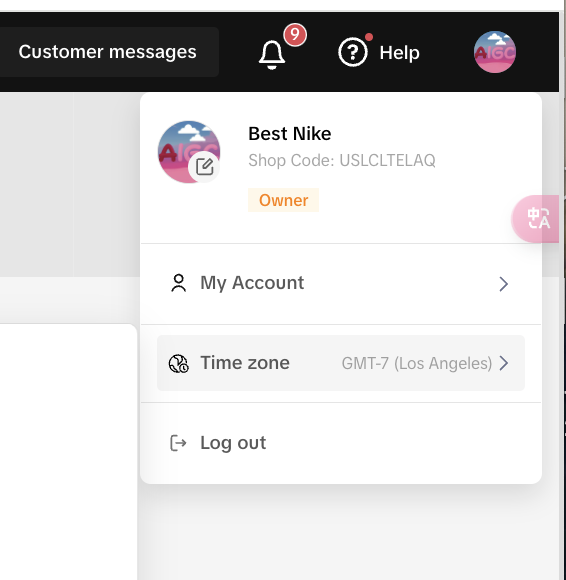
Add new products as pre-order.
To start using the pre-order feature, log into Seller Center, and click Products on the left-hand navigation bar. Select Manage Products, and click on Add new product. While the pre-order feature checkbox is available for all products, only new product listings can be listed as pre-order.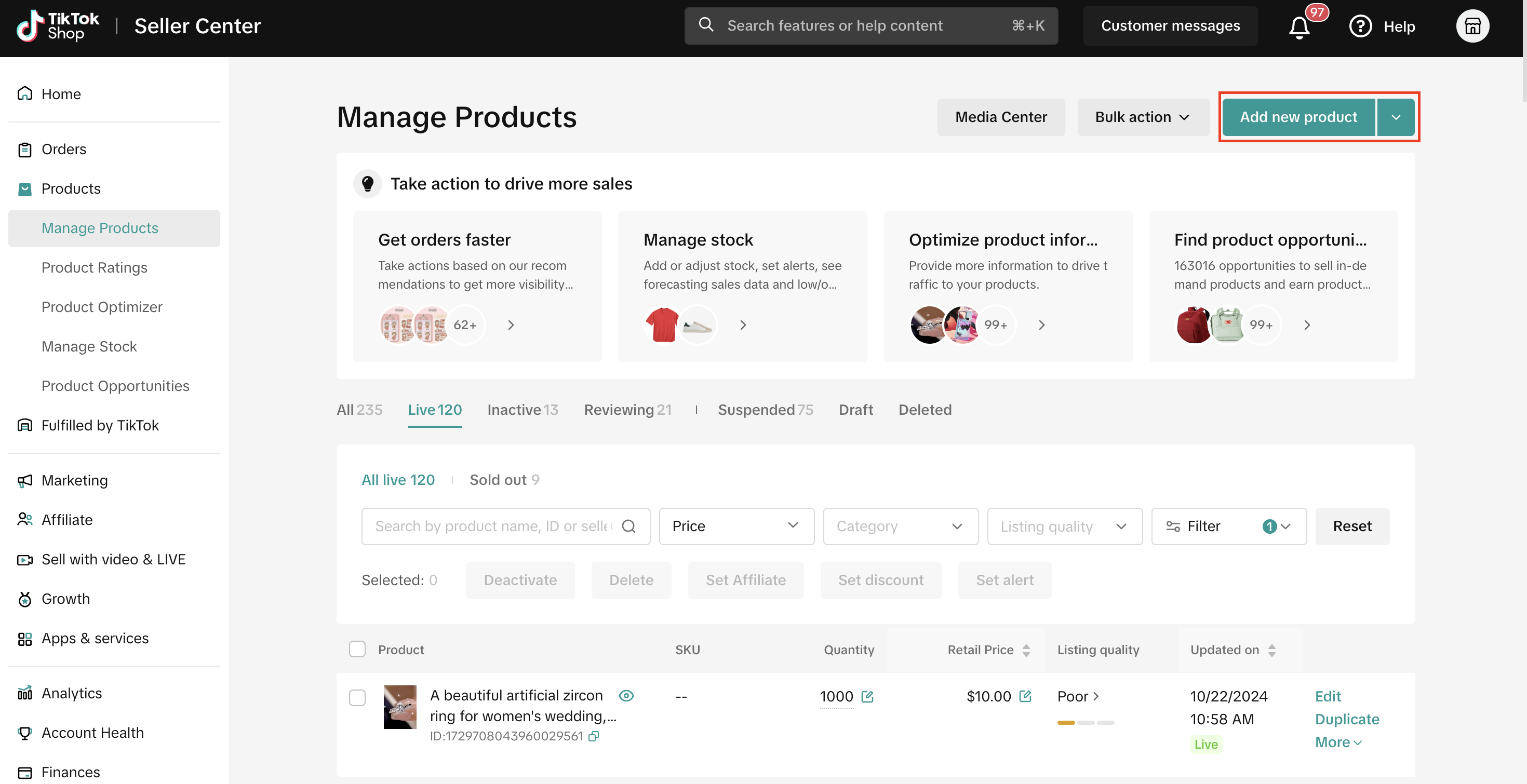
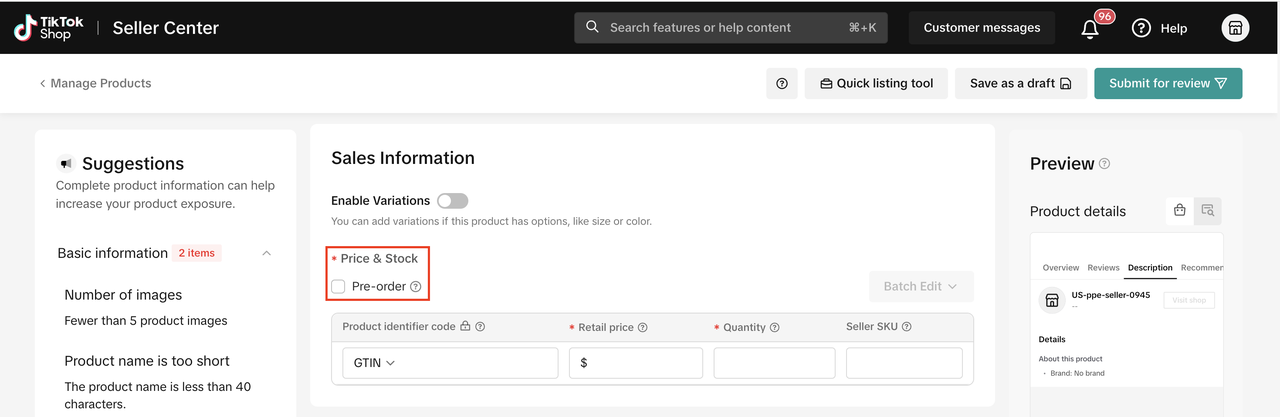
Fill in Basic Information and Product Details. Then, under Sales Information, check the 'Pre-order' checkbox
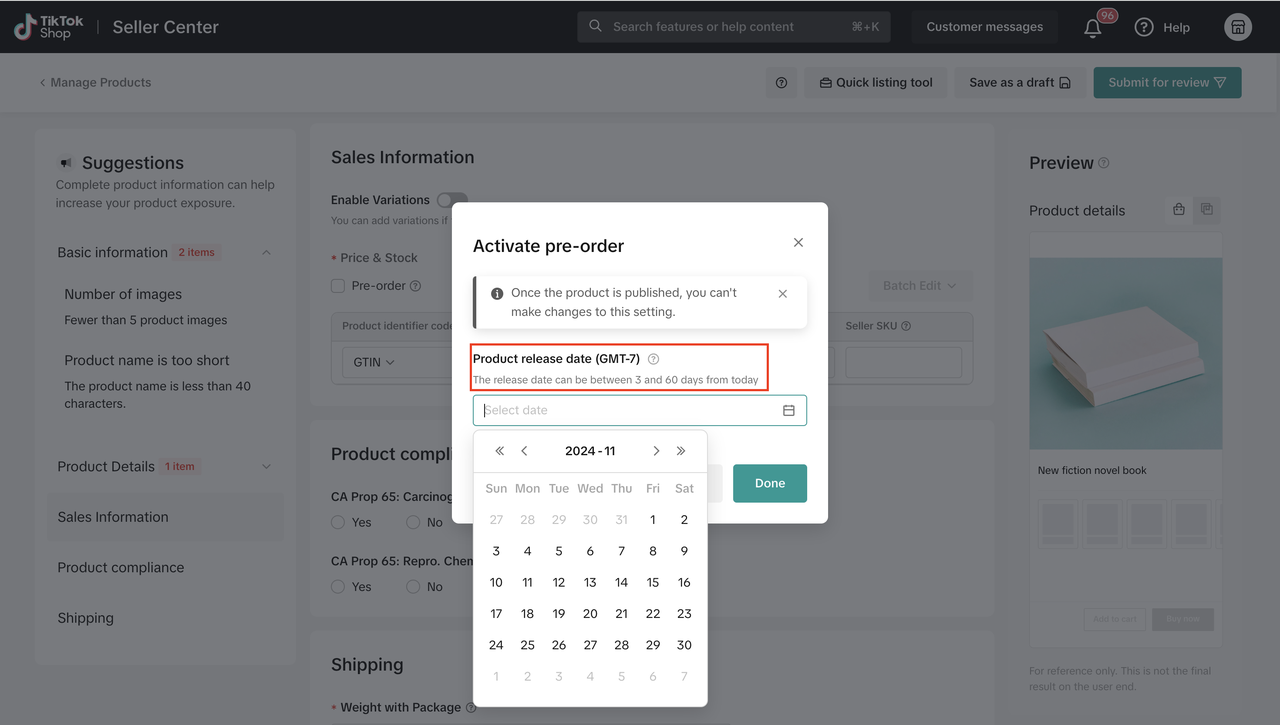
Set the Product release date accurately. This date cannot be modified once the listing is published.
The Product release date marks the day the product becomes available for purchase, starting at 12:00 AM based on the time zone specified in your profile settings (as mentioned in Step #1). Sellers can set the Product release date as one of the 3 to 60 calendar days available from today.Important:
- Once the product listing is published, the product release date cannot be modified for this listing. We highly recommend you enter this date carefully to avoid issues in the future.
- Pre-order products must be updated to the "In Transit" status by 2 business days after the pre-order release date to meet our dispatch SLA. Refer to our Fulfillment Policy for more information.
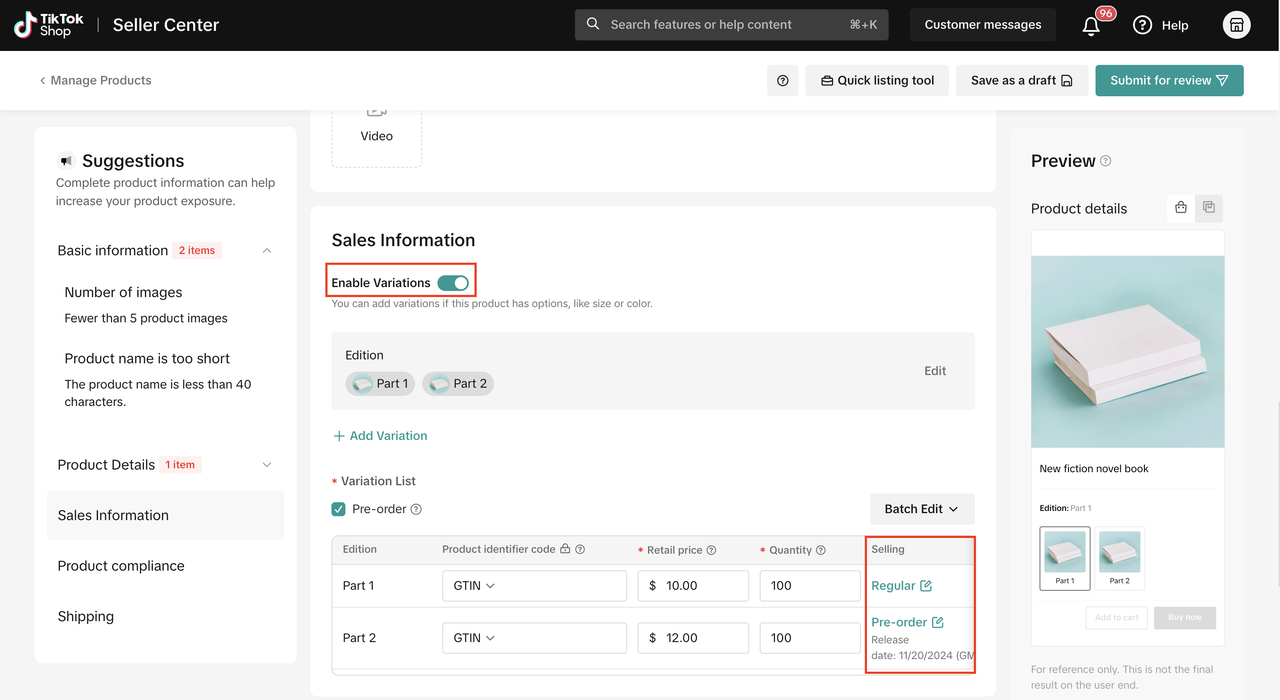
Set a Product release date for specific SKUs
- Turn on the Enable Variations toggle and add relevant SKUs to the listing.
- Set a Product release date for each SKU added by clicking the Pre-Order edit link under the Selling column.
- Sellers can also disable the Pre-Order option by clicking Pre-Order under the Selling column for that SKU, and selecting Regular as the selling option.
Pre-order products' orders will maintain 'Awaiting release' status until their release date
Click Orders on the left navigation bar. Select Manage Orders to check the status of all your orders. Pre-order product orders can be seen under the Pending tab with Order status as Awaiting release until the product release date set for that product SKU. Once the release date has passed, this status will change to 'Awaiting shipment' as per regular orders and move to To ship tab.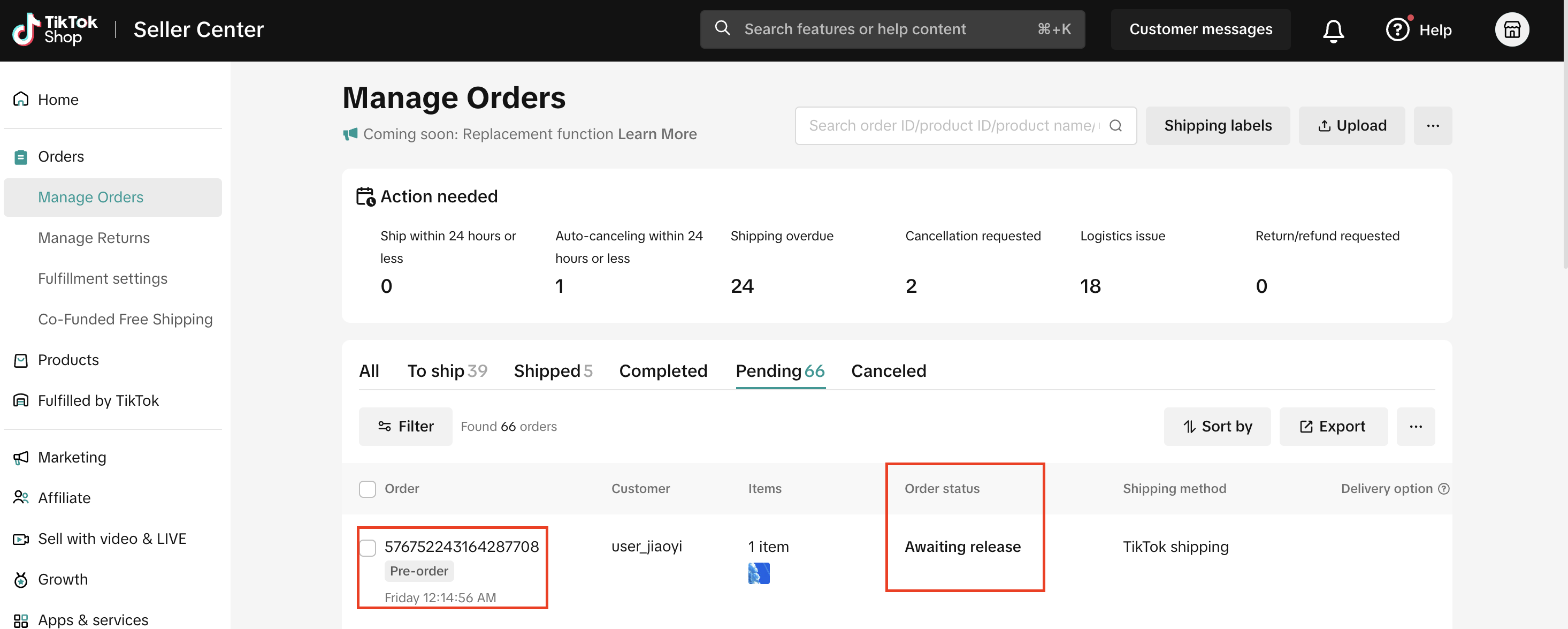
Once the 'Product release date' has passed, the listing will automatically change to normal sales mode and will follow the standard 2-day dispatch SLA
.The product and corresponding SKUs will no longer be eligible for pre-order in the future as it has officially released on the market on its release date.
Fill out the remaining product information fields and list your pre-order product(s).
Users will be notified that products are on pre-order, and will know the release date and estimated delivery date of their products.
- In the Shipping & returns section of the product detail page (PDP), users will see a new callout stating "Pre-order product, ships after: release date". The estimated delivery time will also automatically reflect the product's specific handling time.
- During checkout, users will see an additional callout in the Shipping method section that states the order is 'Pre-order' along with the estimated delivery date.
- On the Order details page, users will be able to see their pre-order product's order status as 'Pending release date' until the product's specific release date mentioned in the listing.
Payment for pre-order products is authorized during order placement and captured when order is shipped.
- Payments for pre-order products are pre-authorized during order placement. When the product is ready to ship, the payment is re-authorized and captured. If for any reason, the user's payment fails during re-authorization, the order is canceled by TikTok Shop.
- Please ensure pre-orders are shipped within 1 business day of the pre-order release date.
You may also be interested in
2025 BFCM TikTok Shop Readiness Guide
The holiday shopping rush is your single biggest opportunity to increase sales & grow your brand on…

List with a URL
Note: This feature is currently in beta to a limited set of pre-selected sellers. Introduction: Wh…

Made-to-Order (MTO)
Introduction: What is Made-to-Order (MTO)? Made-to-order is a new listing option available for eligi…

New Product Rewards
🚀 Introducing New Product Rewards to Accelerate Your Success The New Product Rewards program is Tik…

Applying for Category Permission
Introduction Some product categories on TikTok Shop are restricted and require sellers to apply for…

TikTok for Shopify - Product Listing Upgrade
Overview: With this new listing update, sellers will have the same product listing experience whethe…
How to Use Size Chart Tool & Guidance
Introduction to our Size Chart Tool With the Size Chart tool, you can now update key sizing informat…

Edit products in your shop
Introduction to editing products in your shop Maintaining accurate and appealing product listings is…

Luxury Resale Products and Uploading Certificates of Authent…
What are Luxury Resale Products? Luxury Resale products are luxury items, including pre-owned luxury…

TikTok for Shopify: Promotions Sync
Overview: Shopify sellers can sync Promotions/Discounts except Free Shipping on Shopify directly to…