

Made-to-Order (MTO)
01/17/2026
Summary
What is the Made-to-Order (MTO) feature on TikTok Shop and which product categories are eligible?
- MTO allows sellers to list products requiring 3-14 business days handling time, offering flexibility beyond the standard 2-day dispatch SLA. Eligible categories include menswear, womenswear, fashion accessories, kitchenware, furniture, electronics cases, shoes, sports gear, and more.
How can sellers enable and manage the Made-to-Order option for their products?
- Sellers access MTO via Seller Center by adding a new product in an approved category, enabling the MTO toggle, and setting handling time (3-14 days). Handling time can be customized per SKU if variations are enabled. Existing listings cannot be converted to MTO.
What are the key benefits of using Made-to-Order for sellers on TikTok Shop?
- MTO increases flexibility to sell products with longer production times, expands product offerings beyond the 2-day dispatch limit, and reduces inventory/storage costs by minimizing unsold stock risks.
What important policies and customer-facing information relate to Made-to-Order listings?
- Sellers must update MTO orders to "In Transit" within 1 business day after handling time to meet dispatch SLA. MTO products are not buyer-customized and must be resellable if returned. Buyers see clear "Made-to-order" notices and estimated delivery dates on product pages and at checkout.
Introduction: What is Made-to-Order (MTO)?
Made-to-order is a new listing option available for eligible products that require additional handling time to produce. Sellers can enable the made-to-order functionality and enter an expected handling time of 3 - 14 business days to offer greater flexibility than the standard 2-day dispatch SLA. Eligible product categories currently include:- Menswear and Womenswear
- Fashion Accessories
- Kitchenware
- Books, Magazines & Audio
- Some Computers & Office Equipment (hardware computers not included)
- Furniture
- Home Improvement
- Home Supplies
- Kitchenware
- Luggage & Bags
- Some Pet Supplies (food items not included)
- Phones & Electronics (cases only)
- Shoes
- Sports & Outdoor
- Textiles & Soft Furnishings
- Tools & Hardware
What are the benefits?
- Enhance your flexibility: Making it easier for sellers who create made-to-order products to sell them on TikTok Shop.
- Generate more sales: Offering extended handling time for made-to-order products creates opportunities to offer additional products that previously could not be sold due to the current 2-day dispatch SLA.
- Reduce inventory and costs: Eliminating the need for storing a large inventory of products will decrease storage costs and minimize the risk of unsold stock.
Who is eligible?
TikTok Shop's made-to-order feature is only available to select qualified sellers. See the TikTok Shop Made-to-Order Policy for more details.
Steps
How to access made-to-order
To start using made-to-order, log into Seller Center, click Products on the left-hand navigation bar, select Manage Products, and Add new product.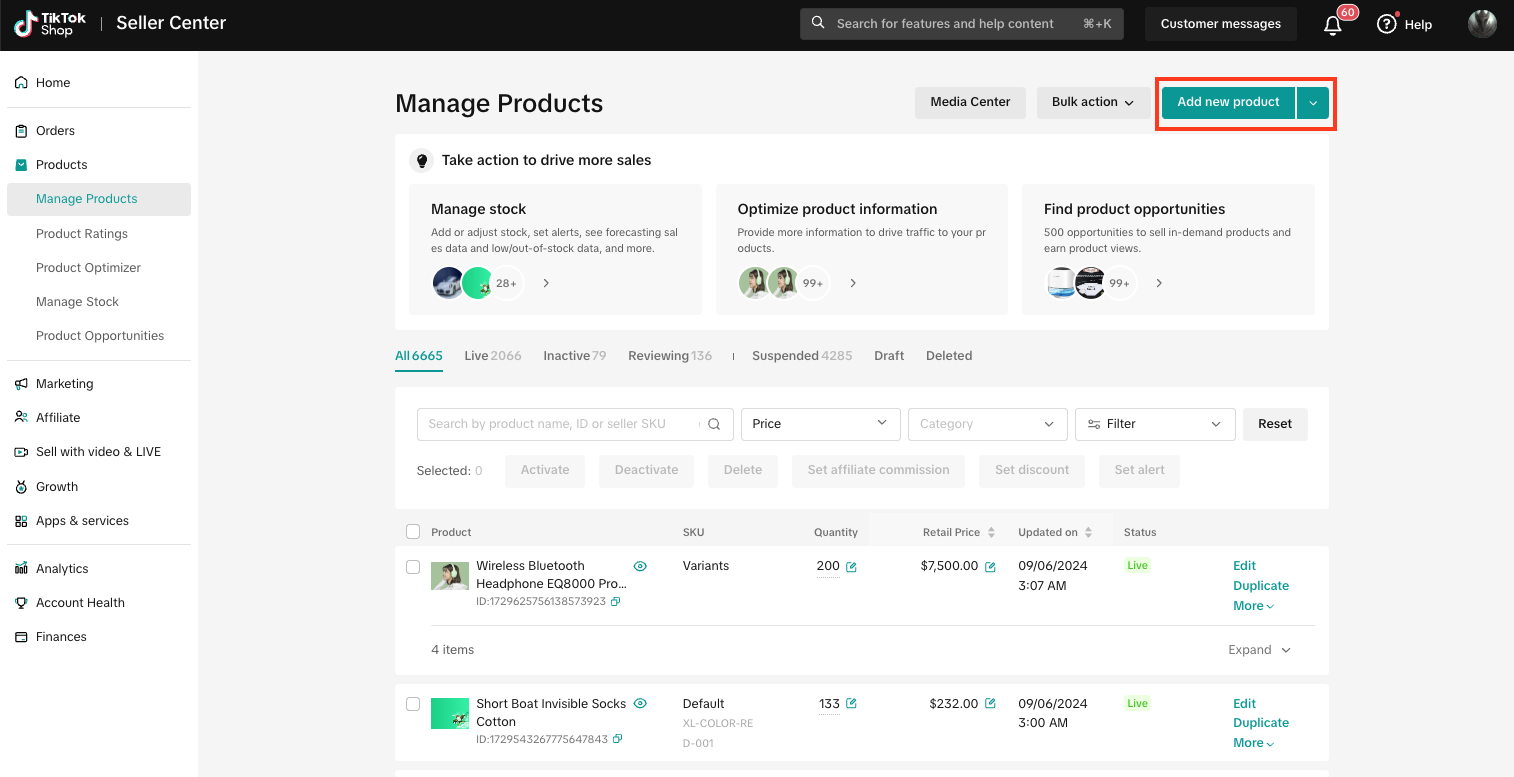
Fill out product details and ensure the product matches one of the approved made-to-order categories
Please see above bulleted list for approved made-to-order categories. The made-to-order toggle will only show up if one of these categories is selected.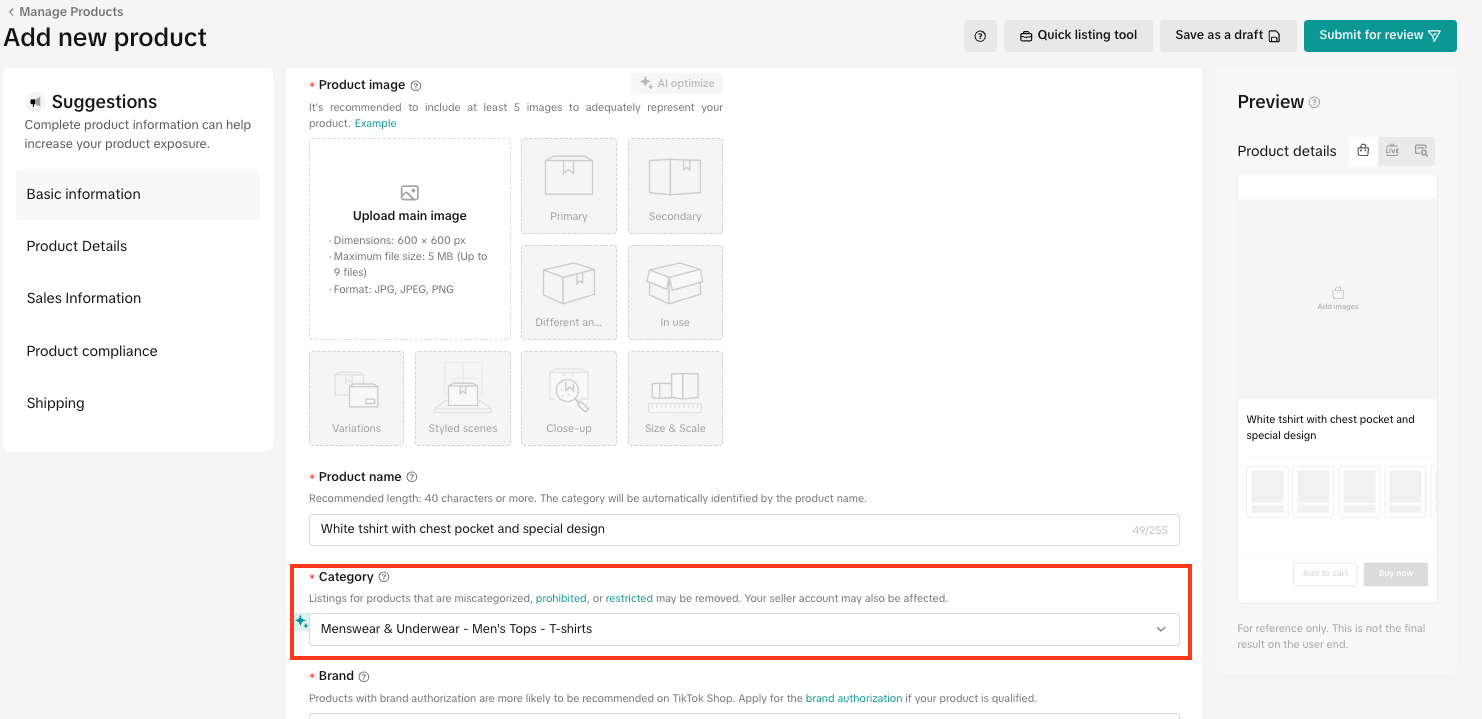
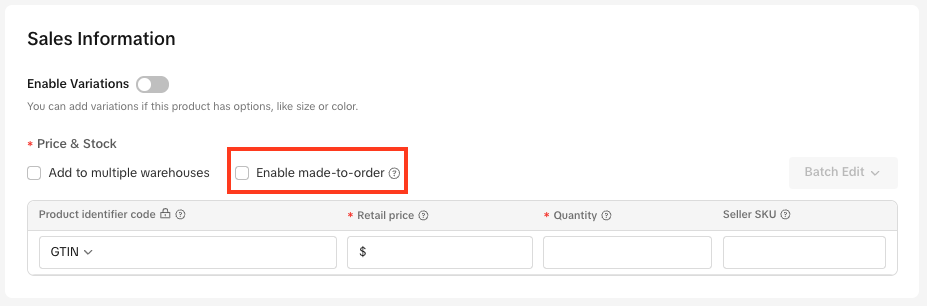
Enable made-to-order and input the expected handling time
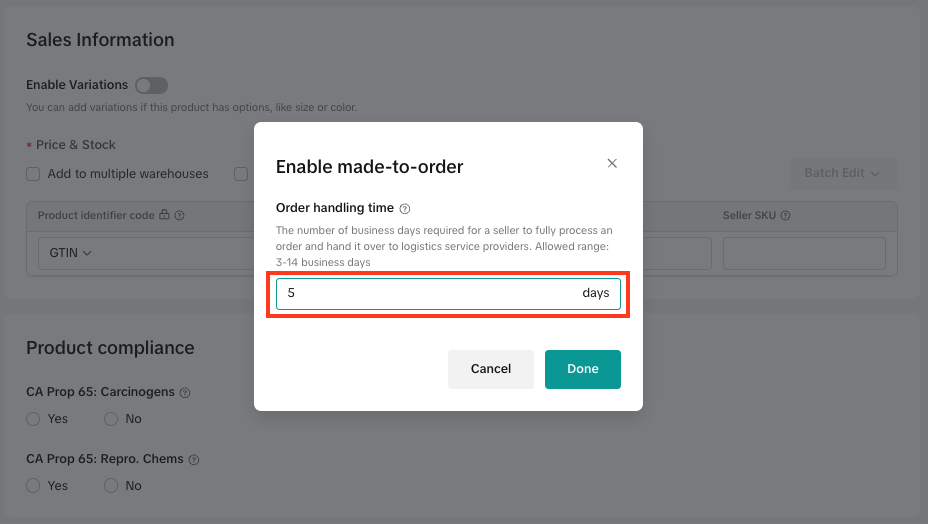
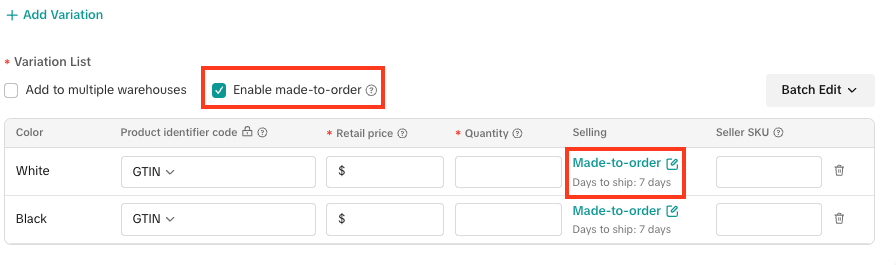
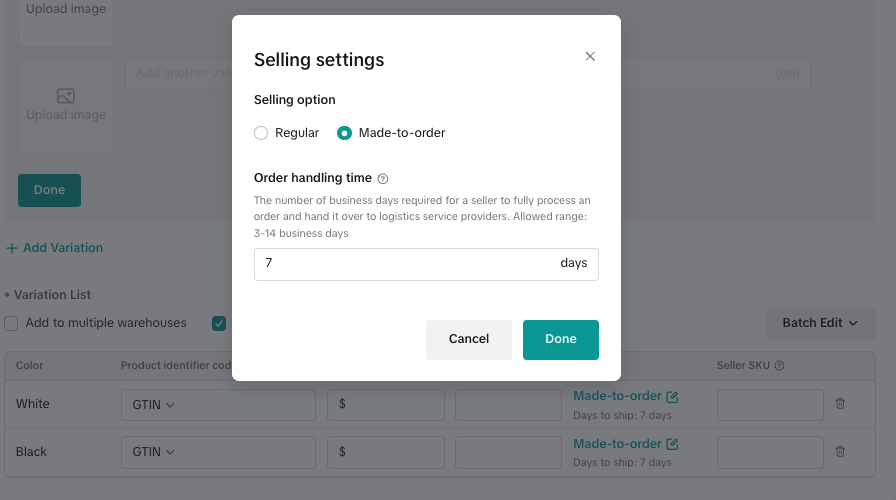
If one of the approved categories is selected, the made-to-order option will appear in the Sales Information module. Check the box next to Enable made-to-order, and enter the expected handling time.- Handling time refers to the number of business days required for a seller to fulfill/process an order and hand it over to the selected shipping carrier.
- Sellers can enter an order handling time of 3 - 14 business days.
- Made-to-order products must be updated to the "In Transit" status within 1 business day after the seller's specified handling time to meet our dispatch SLA. Refer to our Fulfillment Policy for more information.
Change handling time for specific SKUs
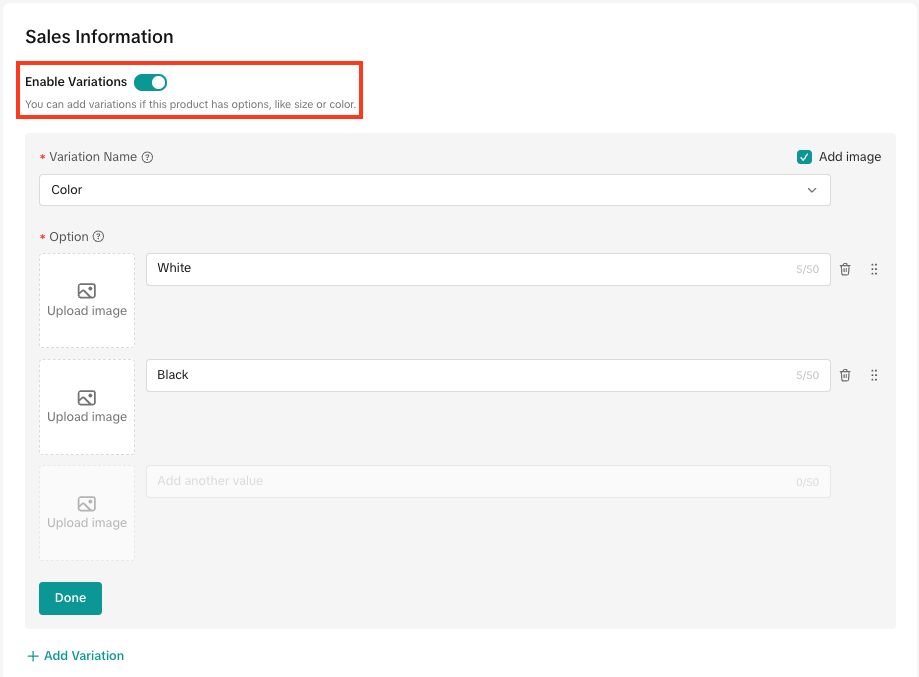
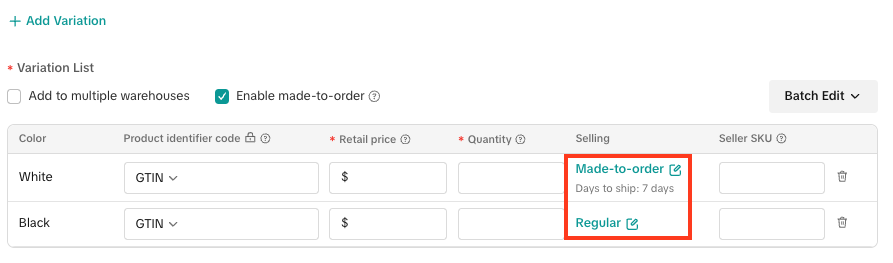
- If applicable, sellers can change the handling time depending on SKU. Sellers must first turn on the Enable Variations toggle and add relevant SKUs.
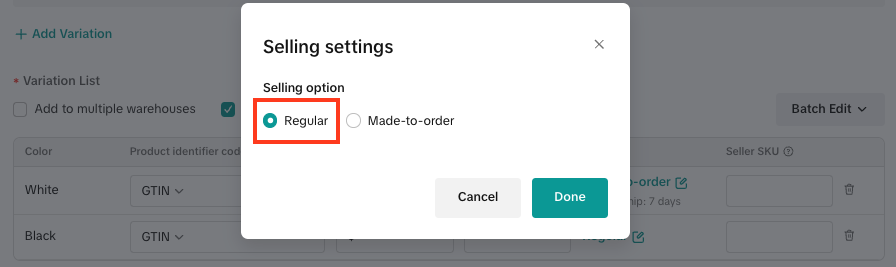
- Sellers can input a handling time for each SKU added by clicking Made-to-order under the Selling column for a specific SKU. Sellers can also turn off the made-to-order option by clicking Made-to-order under the Selling column for that SKU, and selecting Regular as the selling option.
Fill out the remaining product information fields and list your product
Users will be notified that products are made-to-order and will view the expected delivery date
- In the Shipping & returns section of the product detail page (PDP), users will see a new callout stating "Made-to-order, includes production time." Estimated delivery date will also automatically reflect the product's specific handling time.
- During checkout, users will see an additional callout in the Shipping method section that states the item is "Made-to-order" along with the estimated delivery date

Notes
- Made-to-order products are NOT buyer-customized products and must be eligible to be resold if returned.
You may also be interested in
2025 BFCM TikTok Shop Readiness Guide
The holiday shopping rush is your single biggest opportunity to increase sales & grow your brand on…

List with a URL
Note: This feature is currently in beta to a limited set of pre-selected sellers. Introduction: Wh…

New Product Rewards
🚀 Introducing New Product Rewards to Accelerate Your Success The New Product Rewards program is Tik…

Applying for Category Permission
Introduction Some product categories on TikTok Shop are restricted and require sellers to apply for…

TikTok for Shopify - Product Listing Upgrade
Overview: With this new listing update, sellers will have the same product listing experience whethe…
How to Use Size Chart Tool & Guidance
Introduction to our Size Chart Tool With the Size Chart tool, you can now update key sizing informat…

Edit products in your shop
Introduction to editing products in your shop Maintaining accurate and appealing product listings is…

Luxury Resale Products and Uploading Certificates of Authent…
What are Luxury Resale Products? Luxury Resale products are luxury items, including pre-owned luxury…

TikTok for Shopify: Promotions Sync
Overview: Shopify sellers can sync Promotions/Discounts except Free Shipping on Shopify directly to…

How to List Dangerous Goods
Overview When creating a new product listing, TikTok Shop may identify your product as a potential D…