

Guide to Obtaining a Safety Data Sheet (SDS)
02/26/2026

Step 1: Confirm whether your product requires an SDS
TikTok Shop requires an SDS for any product that contains harmful or potentially hazardous chemicals, even if the product does not require special hazmat shipping labels.Products that often require an SDS include those containing:
- Lithium batteries
- Aerosols or pressurized containers
- Flammable liquids (such as alcohol-based products)
- Corrosive substances (acids or alkalis)
- Pesticides or insect control chemicals
- Other toxic, oxidizing, or reactive materials
Step 2: Understand when an SDS is required
Even if your product is not regulated for shipping as dangerous goods, TikTok Shop may still require an SDS to confirm this.Important notes:
- An SDS is required for any product containing harmful chemicals.
- If no SDS is provided, TikTok Shop will remain cautious and restrict the listing.
- For lithium battery products, a UN38.3 lithium battery test report is accepted instead of an SDS.
- For more information, see Guidelines for Listing Products Containing Batteries.
Step 3: Obtain the correct SDS (do not use a generic version)
You must submit the exact SDS for your specific product.The SDS must:
- Match the exact formulation, SKU, and packaging
- Be issued by the manufacturer or a qualified SDS authoring service
- Reflect the product exactly as it is sold on TikTok Shop
- Do not upload a generic or self-made SDS.
- Using an SDS for a similar product is not allowed.
- Creating your own SDS without proper testing and documentation is not compliant with federal regulations.
- You may prepare the SDS only if you have the proper laboratory data and expertise.
- Otherwise, work with a certified third-party laboratory or SDS authoring service.
Step 4: Make sure the SDS follows the 16-section GHS format
TikTok Shop only accepts SDS documents that follow the Globally Harmonized System (GHS) format. This includes 16 required sections.Documents with fewer than 16 sections will be rejected.
Step 5: Required SDS sections
Your SDS must include all 16 sections listed below.Section 1 — Identification
- Product name (must match the listing and product label)
- Manufacturer or supplier name
- Full business address
- Business phone number
- Emergency phone number (including hours of availability and region)
- Intended use of the product
Section 2 — Hazard(s) identification
- GHS classification
- Signal word (Danger or Warning)
- Hazard pictograms
- Hazard statements (H-codes)
- Precautionary statements (P-codes)
- Other hazards, using official GHS wording
Section 3 — Composition / information on ingredients
- Hazardous ingredients
- CAS numbers
- Concentration ranges
Section 4 — First-aid measures
Clear first-aid instructions for:- Inhalation
- Skin contact
- Eye contact
- Ingestion
Section 5 — Fire-fighting measures
Firefighter information, including:- Suitable extinguishing methods
- Combustion hazards
- Required protective equipment
Section 6 — Accidental release measures
- Personal precautions
- Protective equipment
- Cleanup methods
- Environmental precautions
Section 7 — Handling and storage
- Safe handling instructions
- Storage conditions
- Incompatibilities
- Ventilation requirements
Section 8 — Exposure controls / personal protection
- Exposure limits (if applicable)
- Engineering controls
- Recommended PPE
- Hygiene measures
Section 9 — Physical and chemical properties
Key properties, such as:- Appearance
- Odor
- pH
- Flash point
- Boiling point
- Density
- Solubility
Section 10 — Stability and reactivity
- Stability information
- Conditions to avoid
- Incompatible materials
- Hazardous decomposition products
Section 11 — Toxicological information
- Routes of exposure
- Symptoms
- Toxicity data (if available)
- Health effects
Section 12 — Environmental information
Potential environmental impact, including:- Ecotoxicity
- Persistence
- Bioaccumulation
Section 13 — Disposal considerations
Guidance on safe disposal of the product and packaging in accordance with regulations.Section 14 — Transport information
- UN number
- Proper shipping name
- Hazard class
- Packing group (if applicable)
Section 15 — Regulatory information
- Applicable safety
- Health
- Environmental regulations
Section 16 — Other information
Date of preparation or last revision, abbreviations, and references used.Tip: The hazard classification in your SDS must match:
- Product labels
- Transport documents
- TikTok Shop product attributes (battery details, flammability, aerosol volume, etc.)
Step 6: Translation and market language
The SDS must be provided in the official language of the market where the product is listed.If you sell in multiple countries, you may need translated SDS versions for each market.
Step 7: Upload the SDS in Seller Center
- Log in to Seller Center
- Go to Products > Add Products
- Select Add product or edit your product
- Complete all product information
- Complete required hazmat or restricted product attributes
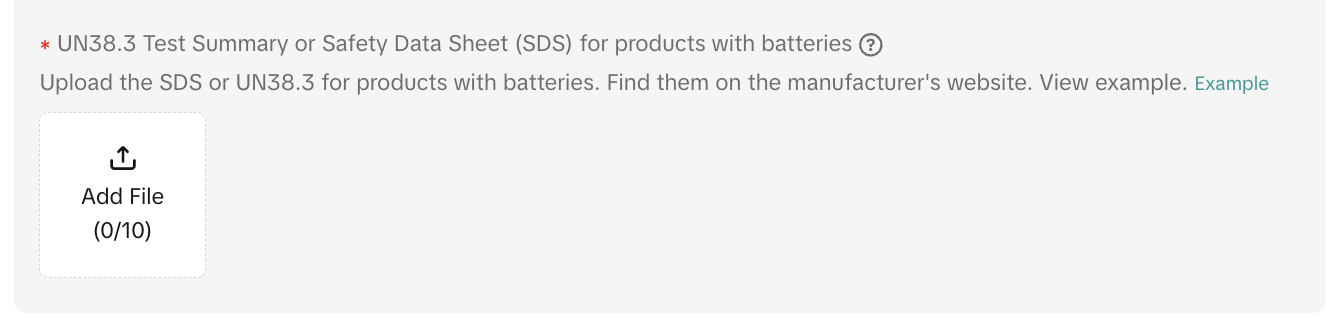
- Upload the SDS or UN38.3 report in the Product Certification / Documents section
Step 8: Final checks before uploading (SDS quality checklist)
Before uploading, confirm that:- The SDS includes a preparation or revision date
- The manufacturer or qualified author is clearly identified
- The emergency phone number is valid and reachable
- Ingredient CAS numbers and concentration ranges are included
- GHS classifications, hazard statements, and pictograms are consistent
- Transport information (Section 14) is complete
- The file is a searchable PDF with a clear file name
- The SDS language matches the listing country
- Product attributes in the listing match the SDS
Common Mistakes to Avoid
- Uploading a generic SDS that does not match your product or the brand
- Missing or unreachable emergency phone numbers
- Conflicting hazard classifications across documents
- Submitting an outdated SDS without a revision date
- Uploading an SDS in the wrong language
If you don't have an SDS
If you don’t have an SDS:- Request the current SDS from your manufacturer or supplier
- If you are the manufacturer or importer, work with:
- A certified laboratory, or
- A qualified SDS authoring service or chemist
For more information on listing these products, see Dangerous Goods Policy.
You may also be interested in
2025 BFCM TikTok Shop Readiness Guide
The holiday shopping rush is your single biggest opportunity to increase sales & grow your brand on…

List with a URL
Note: This feature is currently in beta to a limited set of pre-selected sellers. Introduction: Wh…

Made-to-Order (MTO)
Introduction: What is Made-to-Order (MTO)? Made-to-order is a new listing option available for eligi…

Applying for Category Permission
Introduction Some product categories on TikTok Shop are restricted and require sellers to apply for…

TikTok for Shopify - Product Listing Upgrade
Overview: With this new listing update, sellers will have the same product listing experience whethe…
How to Use Size Chart Tool & Guidance
Introduction to our Size Chart Tool With the Size Chart tool, you can now update key sizing informat…
Edit products in your shop
Introduction to editing products in your shop Maintaining accurate and appealing product listings is…
Luxury Resale Products and Uploading Certificates of Authent…
What are Luxury Resale Products? Luxury Resale products are luxury items, including pre-owned luxury…

TikTok for Shopify: Promotions Sync
Overview: Shopify sellers can sync Promotions/Discounts except Free Shipping on Shopify directly to…

How to List Dangerous Goods
Overview When creating a new product listing, TikTok Shop may identify your product as a potential D…