

Having Issues Printing Labels?
Summary
What are the common causes of shipping label printing errors on TikTok Shop, and how can sellers troubleshoot them?
- Common mistakes include incorrect address formatting (e.g., putting city on address line 1, using PO boxes, missing suite/street numbers, special characters), outdated phone/email info, and carrier setup issues.
- Sellers should disable and re-enable the carrier on the Shipping Options page, re-sign agreements, and retry printing. Contact Customer Support if problems persist.
Can sellers cancel or reprint shipping labels if they made mistakes in dimensions, shipping options, or addresses?
- Labels cannot be canceled or reprinted for dimension errors; the entire order must be canceled and reordered by the customer.
- Shipping options cannot be swapped for existing orders; changes only apply to future orders.
- Business or return warehouse address errors on printed labels cannot be corrected.
How can sellers manage shipping label access and carrier preferences on TikTok Shop?
- Shipping labels are found under Seller Center > Manage Orders > Shipping Labels.
- Preferred carriers must be enabled in Shipping Options to appear during label creation. If unavailable, verify carrier settings and recheck.
What steps should sellers take if they encounter errors like "Failed to obtain shipping fee" or registration failures?
- Refresh the page and retry after 2-3 minutes if shipping fees fail to load; contact Customer Support if the issue continues.
- For shipper account registration failures, update info on the Shipping Options page and resubmit; error messages will indicate specific issues.
What should sellers do if delivery to a buyer’s address fails or if label printing fails due to carrier restrictions?
- Contact the buyer to verify and correct the address, advising them to check USPS address validation tools.
- Review TikTok Shipping carrier weight and size limits in Seller Academy; adjust shipments accordingly to avoid print failures.
The content below applies to Legacy TikTok Shipping. For more information about the upgraded TikTok Shipping service, please refer to: Overview of Upgraded TikTok Shipping
Error code troubleshooting
- Earlier this year, TikTok Shop rolled out an updated shipping label page to make it easier than ever to print labels. While seller feedback to the change has been overwhelmingly positive, we still want to provide you with the necessary tools to quickly and reliably debug any label printing problems.
- Below, we've provided some additional context and clear steps to address some of the most common label printing errors.
Error | Formatting Requirements / Next Steps |
| Failed to obtain Shipping Fee | There may have been a timeout with your shipping provider when attempting to obtain shipping fees for your order. Please try again in 2-3 minutes. If you still experience issues, please contact Customer support using the instructions below this table. |
| Seller shipper account registration failure |
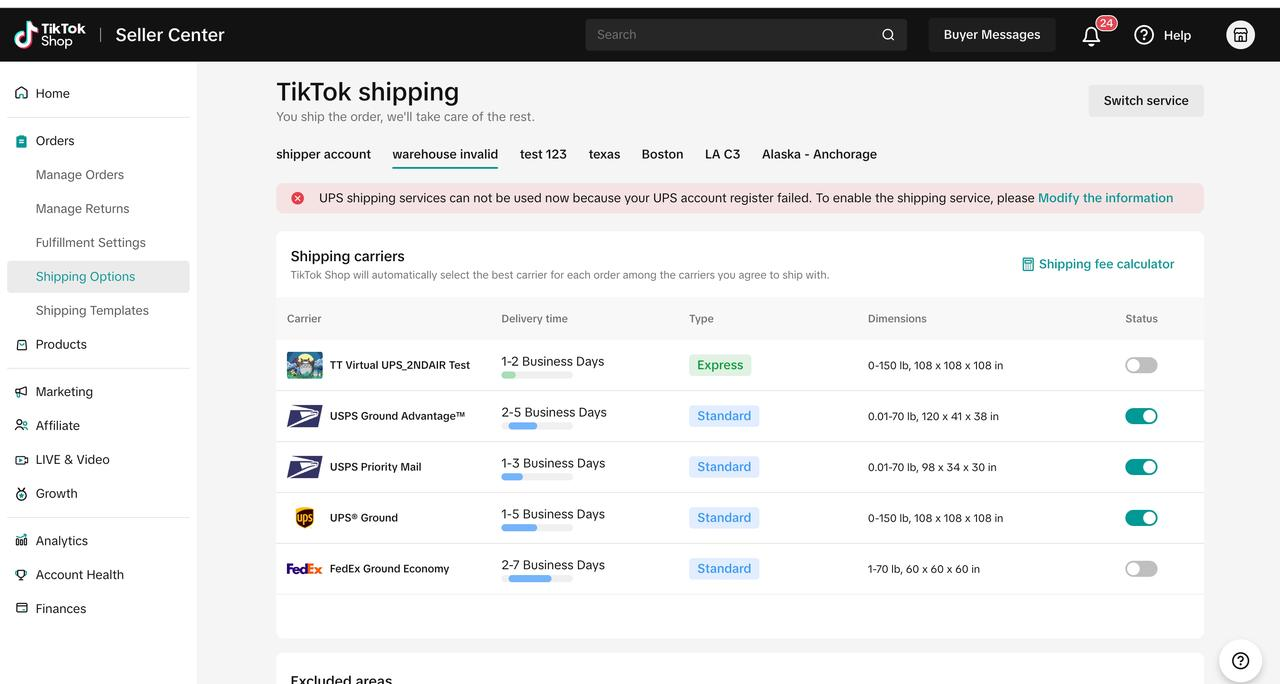 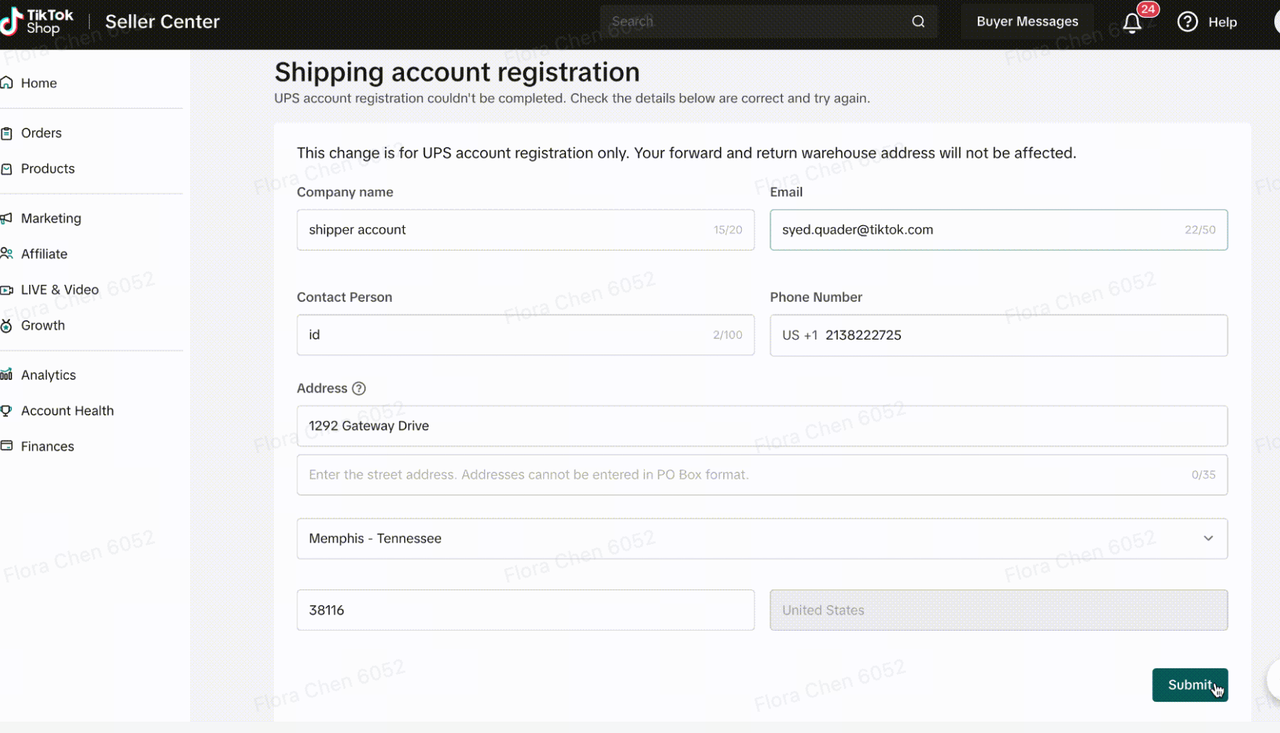 |
| Unable to deliver to buyer address | Please contact the customer and inform them that their address is invalid, and to check for any typos, etc. Please check to make sure to advise the buyer to check whether the address is accepted on this website:https://tools.usps.com/zip-code-lookup.htm |
| No error | Please contact customer support using the instructions below this table so we can further assist you |
| Print failed - Logistics Provider | Different shipping carriers have different weight and size limits that their sellers must adhere to. You can see weight and size limits for all relevant TikTok Shipping carriers in the TikTok Shipping Overview in Seller Academy. |
| Length/Width/Height exceeds shipping provider limits |
- Common mistakes include:
- Putting the city on address line 1, using a PO box, missing suite# or street#, including special characters like ( ) * & in the name or address line
- Using an inaccurate or out of date phone # or email address in your account registration
- If you have any other issues, please feel free to contact TikTok Customer Support team by going to the Help Center in Seller Center
FAQ
- I made a mistake on the dimensions, can I cancel label and re-print it?
- Unfortunately, you cannot. The entire order would have to be cancelled and the customer would have to place a new one.
- Where can I find my shipping labels?
- This can be found on Seller center under Manage orders > Shipping labels
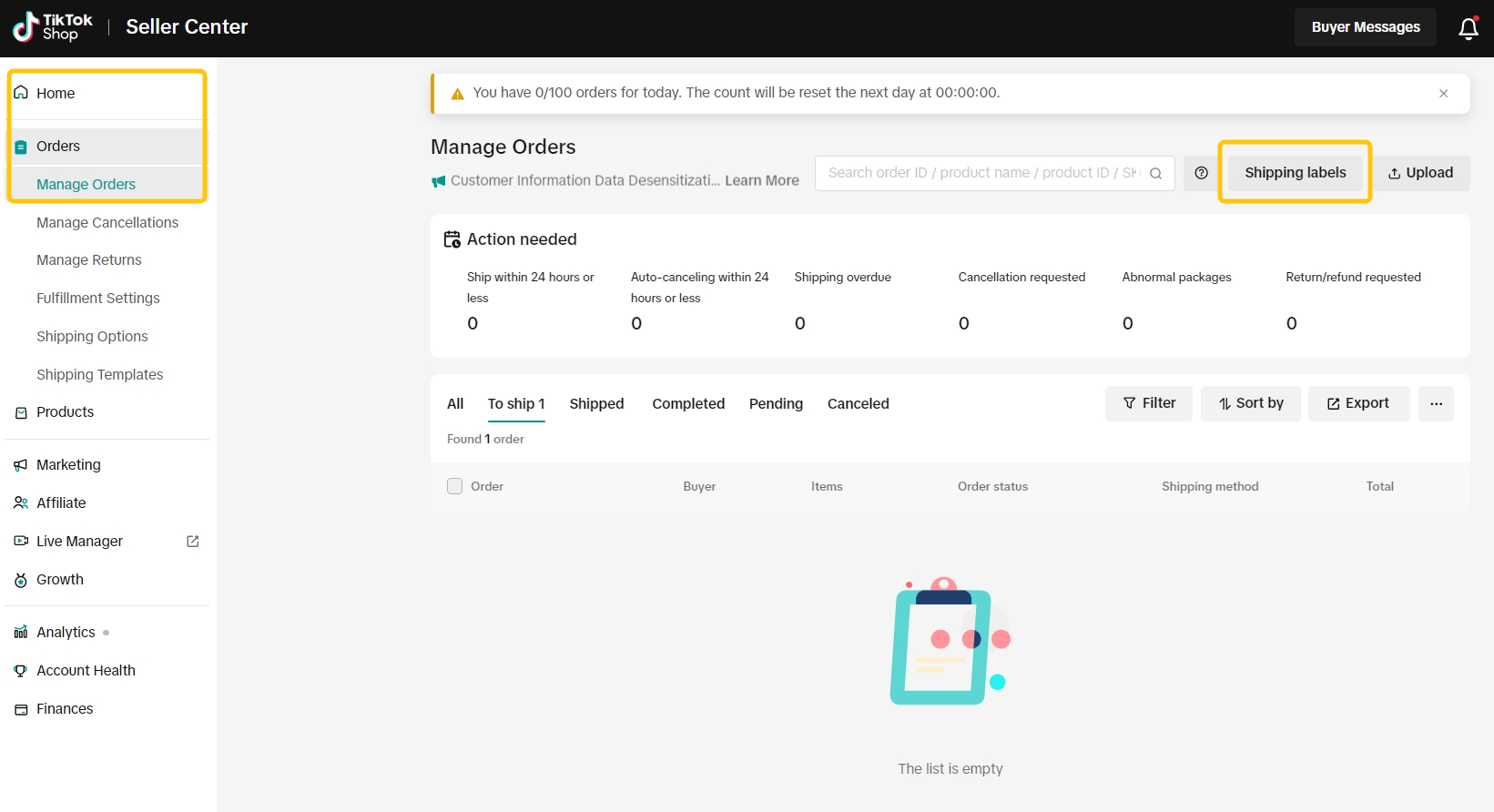
- This can be found on Seller center under Manage orders > Shipping labels
- I made a mistake on the Shipping options. Would I be able to swap between Merchant Shipping (formerly known as Ship via Seller) and TikTok Shipping (formerly known as Ship via Platform) on orders that are placed on my store?
- At the moment, this is not possible. Changes made on the shipping options only reflect future orders placed after the change has been made. Please fulfill the orders that were placed on your shop as the shipping option it came in as. Communicate any updates to your customer as needed.
- I made a mistake on my business/return warehouse address on the shipping label, can I cancel and re-print it?
- If you have already printed it, there is no way to correct the ship from address at this time.
- I am unable to choose my preferred carrier from the list at the shipping labels page. How can I fix this?
- Please check to see if the desired preferred carrier is enabled on the shipping options. Then check again to see if the option is available at label creation page.
- I am currently seeing "Failed to obtain shipping fee" where the shipping fee is normally shown. How can I fix this before I purchase the label?
- Please refresh the page. If the issue persists and you are still unable to view the shipping fee, please contact Customer Support.