

Shipment Optimization
Summary
What is the TikTok Shipment Optimization Service and how does it benefit sellers?
- It automatically selects the most cost-effective shipping option based on the buyer’s chosen delivery speed (Express or Standard), helping sellers save on shipping costs while meeting TikTok’s delivery standards.
- Benefits include cost savings, accurate shipping fees matching customer payments, late delivery alerts, improved delivery date accuracy, and transparent pricing with upfront surcharges.
How can sellers manage or customize shipping options using the Shipment Optimization Service?
- Sellers can update available shipping services in Seller Center under Orders > Shipping settings > Shipping and delivery, but it’s recommended to keep most services active to maximize optimization benefits.
- If sellers choose a shipping option more expensive than the default, they must pay the difference; only shipping services matching the buyer’s selected speed (standard or express) are available for selection.
What are the implications of the “May arrive late” alert for sellers and how should they respond?
- This alert indicates a risk of delayed delivery beyond TikTok’s timeframe (7 business days for standard, 4 for express), which can harm customer experience and lead to refund requests.
- Sellers should consider switching to a faster shipping service if available, especially to maintain eligibility for co-funded free shipping subsidies that require on-time delivery.
What restrictions exist when selecting shipping speeds different from the buyer’s choice?
- Sellers cannot downgrade from express to standard shipping if the buyer chose express; similarly, if the buyer chose standard, only standard shipping options appear.
- This ensures shipping options align with customer expectations and TikTok’s delivery policies.
The content below applies to Legacy TikTok Shipping. To know more about the TikTok Shipping claim process, please refer to: Overview of Upgraded TikTok Shipping
Shipment Optimization Service
The shipment optimization service automatically recommends the most cost-effective shipping option based on the delivery speed selected by the customer (Express or Standard). The customer's selected option will show as "default". If desired, you can opt for a different shipping service other than the default and pay the difference.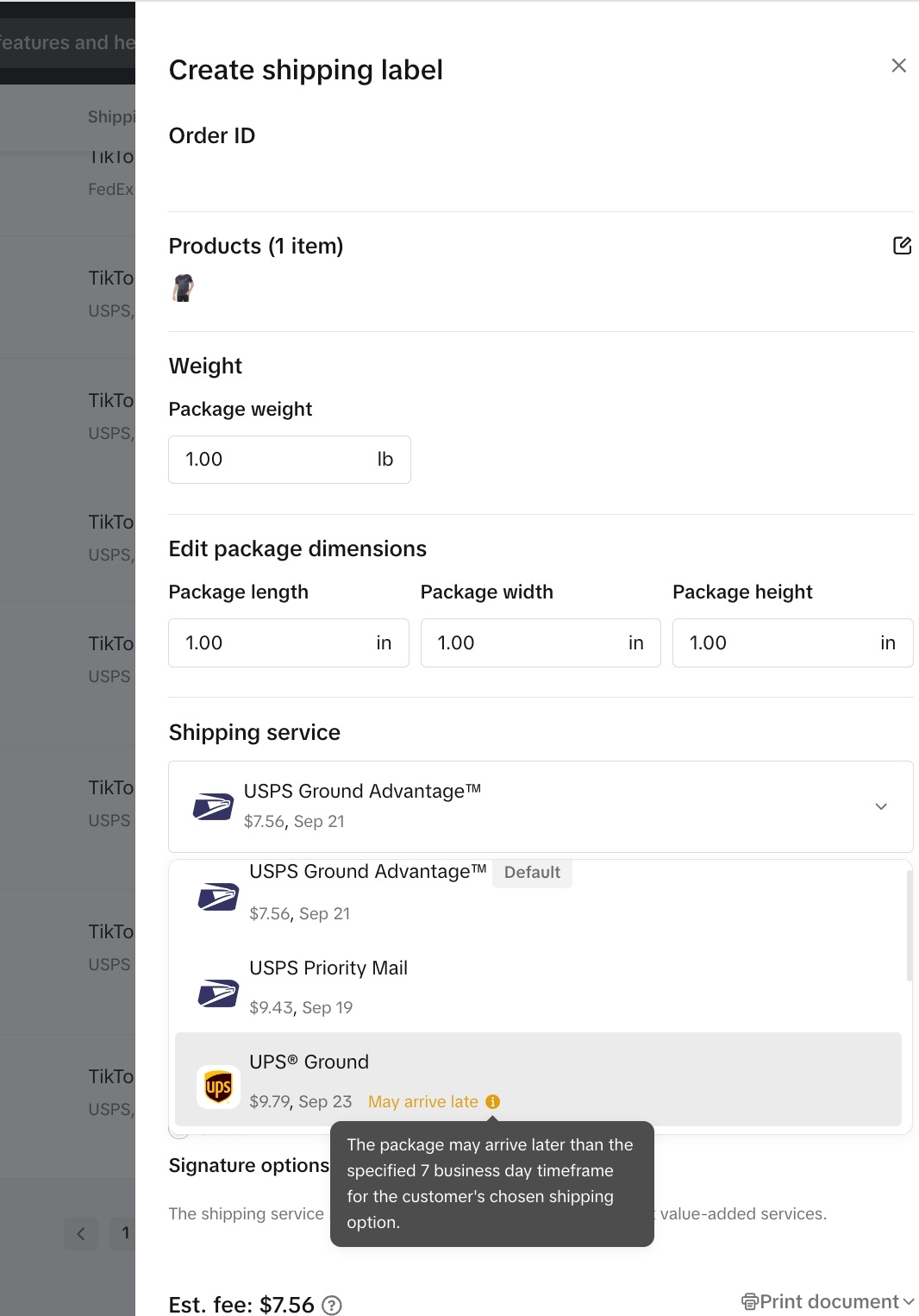
- Cost savings: The service automatically chooses the most economical shipping option that meets TikTok’s delivery guidelines, helping you cut down on shipping expenses.
- Accurate fees: No more confusion about shipping costs—the default shipping service will always match the amount the customer pays for their shipping.
- Late delivery alerts: If an order is at risk of being delayed or doesn’t meet TikTok Shop’s delivery standards, you’ll get a “May arrive late” alert. This gives you the chance to choose a faster shipping service if necessary.
- Improved delivery estimates: We’ve improved the accuracy of delivery dates in Seller Center, so you can have greater confidence in your shipment timing.
- Transparent pricing: All shipping options display mandatory surcharges upfront, providing you with a clear picture of the total shipping costs.
FAQ
- What happens if I choose a different shipping option than the default?
If you select a different shipping option that costs more than the default, you will be responsible for the difference.
- Can I select an expedited speed when the default is standard?
- Can I select standard speed when the default is expedited option?
- If the option says "May arrive late", what happens if I select it?
- If your order isn't eligible for co-funded shipping subsidy: The package may arrive later than the specified timeframe from the order placed date, based on customer's chosen shipping option - 7 business days (standard) or 4 business days (express). This may lead to poor customer experience, and refund requests for delayed delivery.
- If your order is eligible for Smart Promotion subsidy: To qualify for a Smart promotion subsidy, the order has to be delivered within the specific timeframe. Review Smart Promotion Program for full details on Smart promotion program eligibility.