USPS Manifest
Summary
What is the USPS manifest feature in TikTok Shipping and how does it benefit sellers?
- The USPS manifest allows sellers to batch scan hundreds of packages at once by documenting all daily shipments in one form, saving time and reducing errors during high-volume shipping periods.
- It provides tracking numbers and updates to buyers efficiently, streamlining the shipping process for sellers using USPS via TikTok Shipping.
What are the key requirements and constraints for creating a USPS manifest on TikTok Shipping?
- Labels must be USPS standard or express, created via TikTok Shipping, have status "Awaiting Collection," and not appear in previous manifests; manifests must be created before 8pm local time.
- Only packages from a single warehouse and with the same shipping origin can be included; manifests can include up to 7,000 packages, with multiple manifests allowed if volume exceeds this limit.
How do sellers create, manage, and use USPS manifests within TikTok Shipping?
- Sellers select "Create Manifest" under "Shipping Label" in "Manage Orders," choose the warehouse, generate the manifest if eligible, then download and print the manifest sheet for USPS.
- The "Manage Manifest" page helps track which manifest each package belongs to and view shipping status; an automatic manifest creation option can generate daily manifests at a set cut-off time.
What should sellers do if they miss the 8pm manifest cutoff or exceed the 7,000 package limit?
- If the 8pm cutoff is missed, enabling automatic manifest creation helps generate manifests for up to 7,000 packages daily; shipments beyond this require manual creation of additional manifests.
- For shipments exceeding 7,000 packages, sellers must prepare multiple manifests to ensure all packages are documented and accepted by USPS.
What practical tips or considerations should sellers keep in mind when using USPS manifests on TikTok Shipping?
- Remind USPS associates to scan the manifest sheet, especially if they are unfamiliar with the seller’s updated process, to ensure smooth package acceptance.
- If manifest generation fails, sellers can still hand over packages for individual scanning but must print labels within dispatch SLA to avoid late dispatch violations.
The content below applies to Legacy TikTok Shipping. For more information about the upgraded TikTok Shipping service, please refer to: Overview of Upgraded TikTok Shipping
What is a Shipping Manifest?
During high-volume periods, sellers are picking, packing, and shipping hundreds or thousands of packages everyday. Scanning these packages one by one after dropping them off at the post office is inefficient during busy shipping seasons or for businesses that regularly ship large volumes of packages.A manifest is a form documenting all of your day's shipment details for your carrier. It allows USPS to batch scan hundreds of packages at once and provides tracking numbers, and subsequently tracking updates to buyers, for each package. This saves sellers and carriers time and reduces errors. Manifest document scans cannot be used as a Package Acceptance Scan for pickup or dropoff.
How Does it Work?
- Select "Create Manifest" under the "Shipping Label" menu in "Manage Orders"
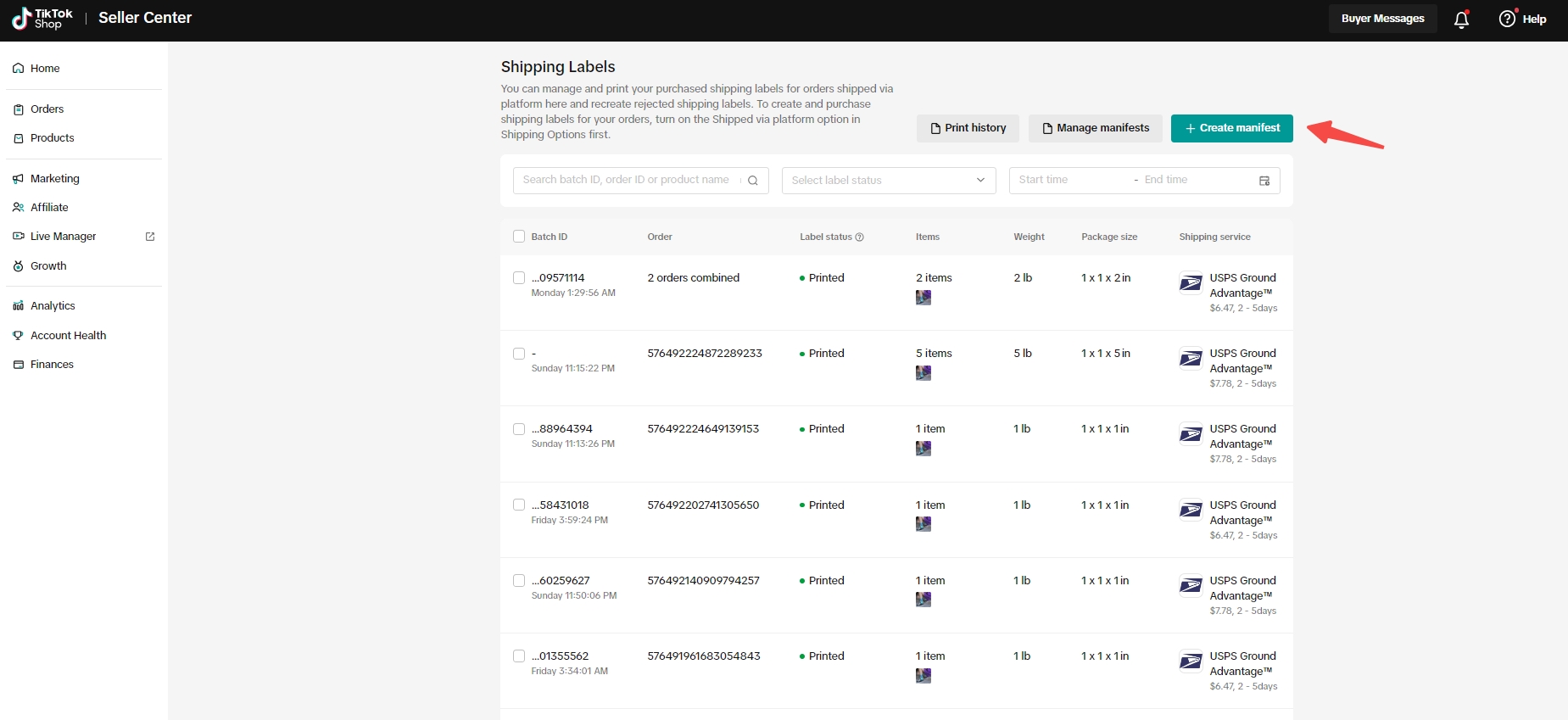
- The seller must then select a warehouse. If the seller has multiple warehouses, they must ensure that all the labels in the manifest have the same shipping origin.
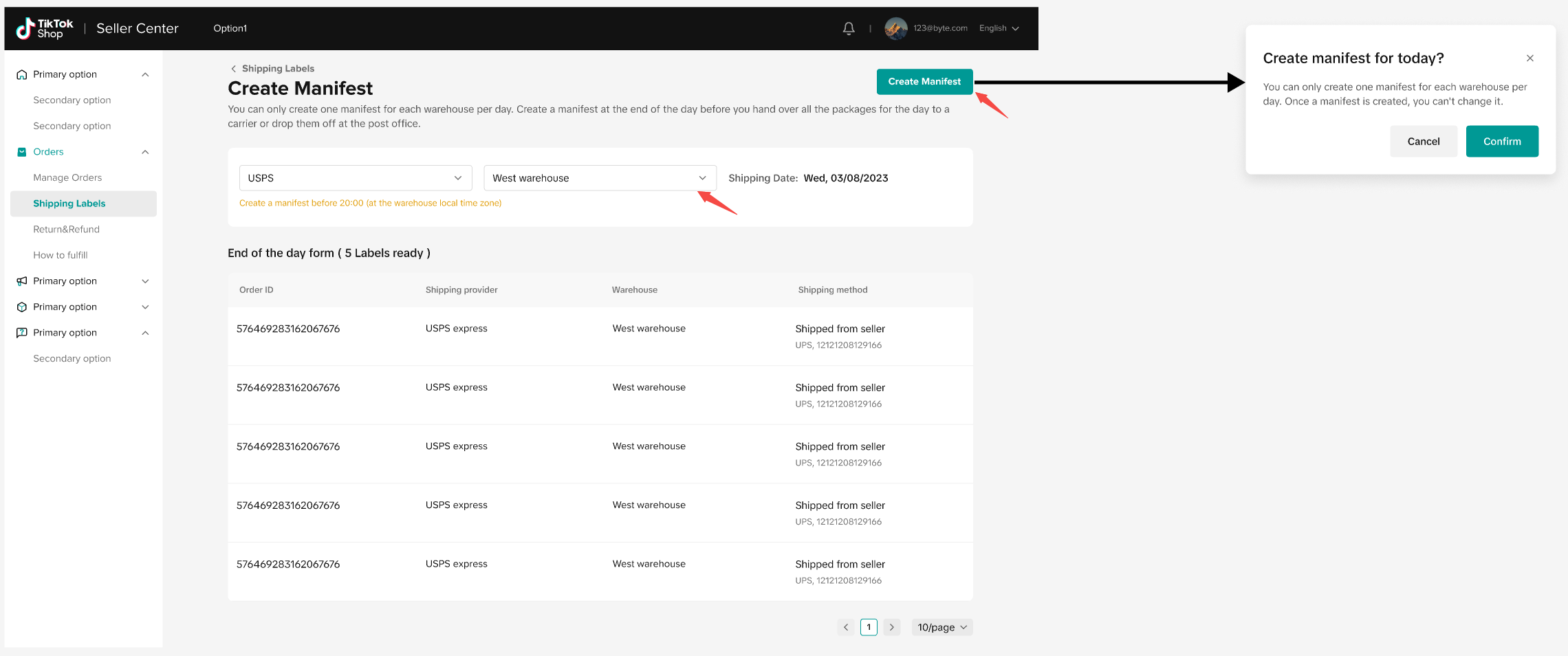
- To return a result, your labels must meet the following criteria:
- USPS standard or express label purchased through TikTok Shipping
- You have created the shipping label, and the package status is now "Awaiting Collection"
- The tracking number does not appear in any previously generated manifest
- If the above criteria are not met, the "Generate Manifest" button will be disabled (as seen in the screenshot below), and you will not be able to proceed with creating and printing your USPS shipping manifest.
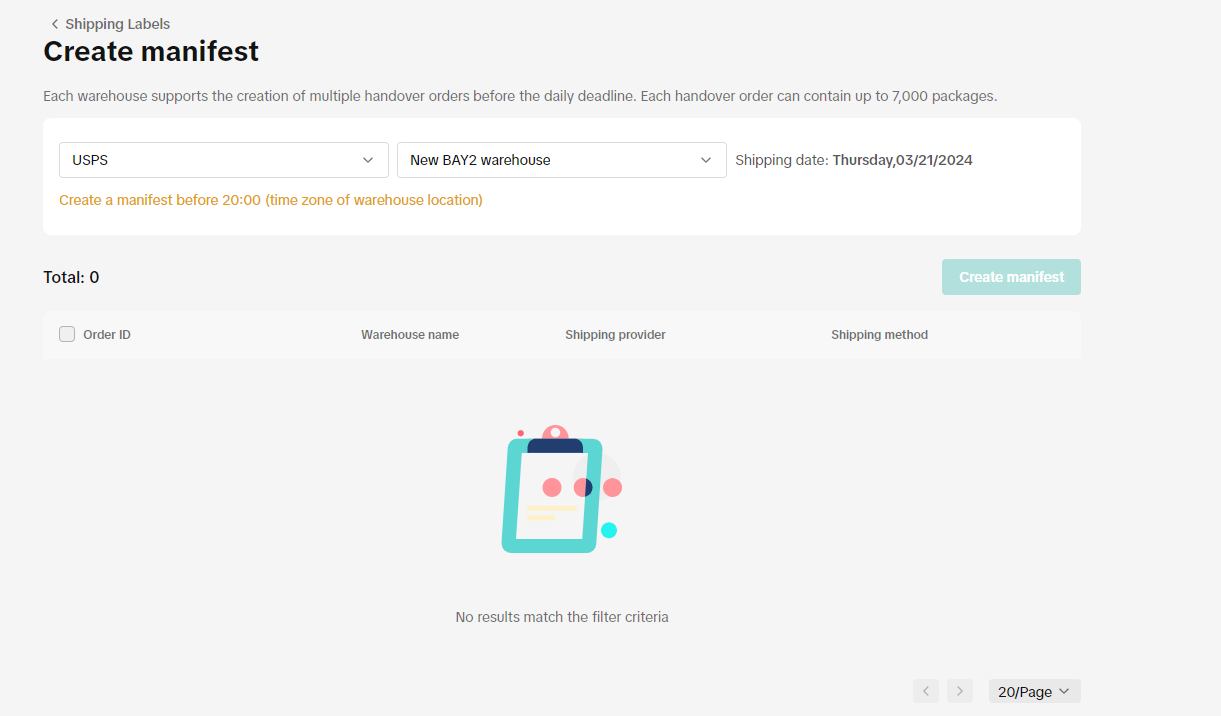
- Our system now enables merchants to create multiple manifests per day if needed. In the "Create Manifest" interface, merchants are presented with a default list of packages eligible for manifest generation.
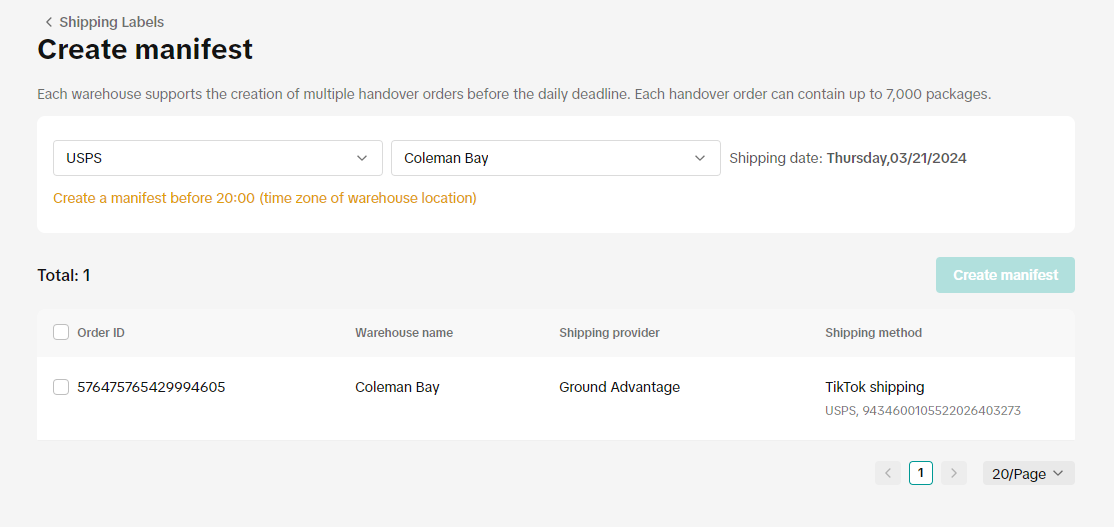
- When a manifest is successfully generated, it will become available for download. If the generation process is unsuccessful, you may attempt to generate the manifest again.
- Finally, select "download" and print out the manifest sheet.
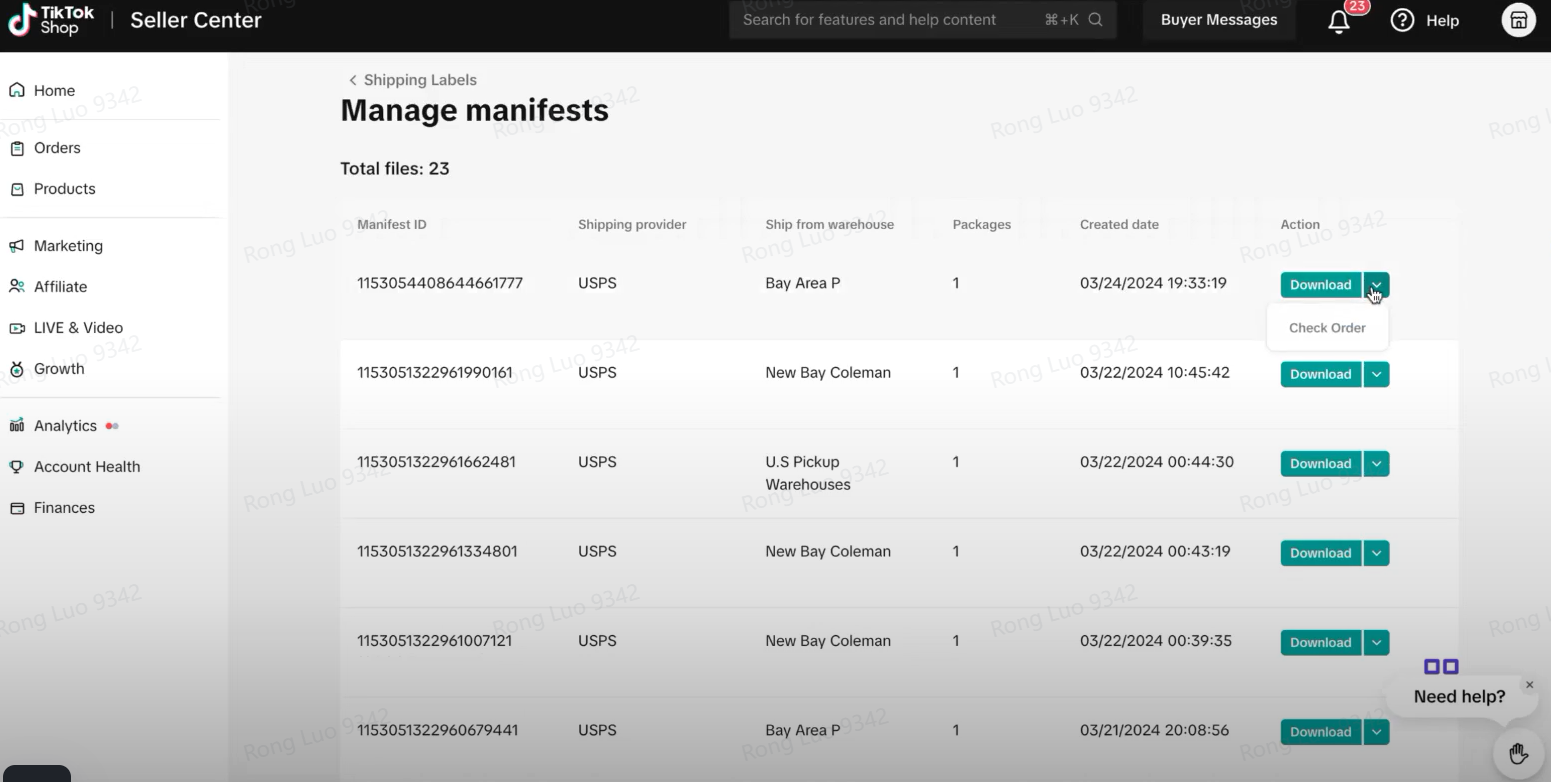
- The "Manage Manifest" interface enables users to swiftly navigate and identify the manifest each package belongs to, as well as verify the most recent shipping status of every package. This facilitates sellers in seamlessly transitioning to the "Manage Orders" page for detailed information.
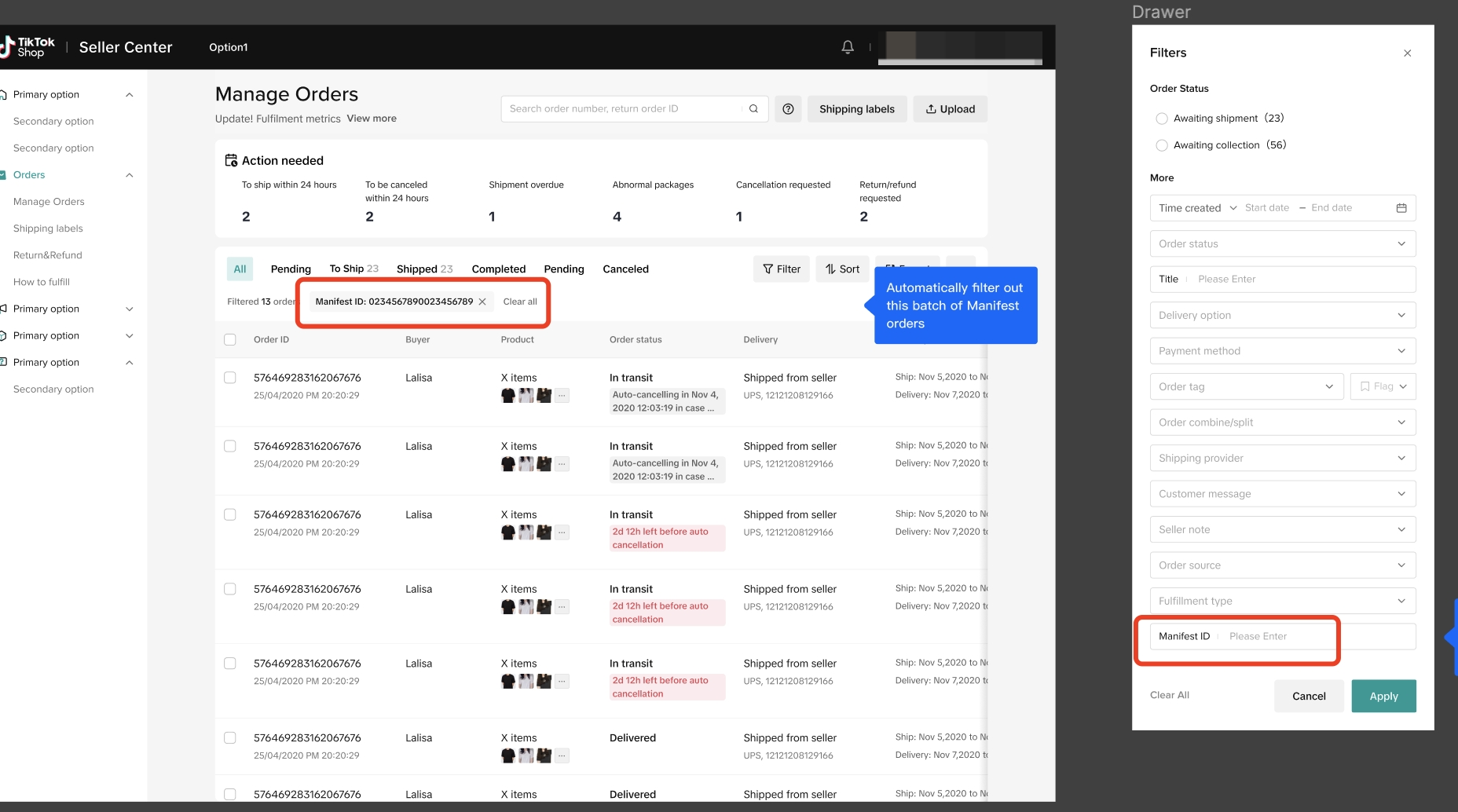
- The "Logistics-Fulfillment" page now features an option for automatic manifest creation, which, when enabled, automatically generates a daily manifest at the specified cut-off time. However, it's important to note that manifests cannot be generated for more than 7,000 packages. Should your shipments surpass this limit, you will need to manually prepare additional manifests or explore other solutions to manage the surplus, ensuring all your packages are accurately documented for USPS processing.

- We recommend reminding the USPS associates to scan the manifest sheet. If you routinely visit a given USPS location, the associates there may not be used to your updated process.
What are the Constraints?
- Manifests must be created before 8pm local time - USPS no longer accepts shipments that are postmarked after 8pm. After that time, packages should be postdated for the following day.
- Only shipping labels with a ship date on or after the day you are creating the form will be eligible.
- Only include shipments that are shipping that day - if you accidentally include a shipment that will not ship that day, you may still be able to cancel that given label. Labels can be cancelled on TikTok as long as the package has not moved past the "Accepted" status.
- Manifests are based off of the pickup location zip code - if you have several pickup addresses, you should generate different manifests for each location.
- Enabling the automatic manifest creation feature allows for the automated generation of manifests for up to 7,000 packages. Should your shipments exceed this threshold, you will need to manually create additional manifests.
FAQ
Q: Is there a limit to how many packages can be included in a single shipping manifest?A: Today, a manifest can include up to 7,000 labels.
Q: If I am having issues getting the manifest to work, am I unable to give my packages to the carrier?
A: You are still able to provide your packages to USPS and have them scanned one by one. Confirming the order by printing your labels within the designated dispatch SLA is critical to avoiding late dispatch violations.
Q: Why is USPS the only carrier available for the manifest?
A: USPS is the most popular carrier in the US - in the future, we may consider any manifest capabilities to additional carriers offered on TikTok Shipping.
Q: Can I include packages from different warehouses in a single manifest?
A: No. At this time, we only allow packages from a single seller warehouse to be included in a manifest form.
Q: If I am a TikTok Shipping Seller using TikTok for Shopify, can I generate the manifest directly in the app?
A: No, you will need to process the end-of-day manifest directly in Seller Center.
Q: I missed the 8pm cutoff to include packages in the manifest. Now what?
A: If you miss the 8pm cutoff for USPS manifest inclusion, enabling the automatic manifest creation feature is a useful workaround. This feature automatically generates a manifest for up to 7000 packages, ensuring all shipments are accounted for without manual intervention. However, it's important to keep in mind that if your shipments exceed the 7000 package limit, you may need to create additional manifests manually or make arrangements to accommodate the extra volume.
PreviousScheduling a Pickup or DropoffNext How to File a Reimbursement Claim for Legacy TikTok Shipping Logistics Issues