

How to Use Seller Flash Sale
Summary
What is a Seller Flash Deal on TikTok Shop and what are its main benefits?
- Seller Flash Deal is a limited-time promotional tool in Seller Center to boost sales by creating urgency with high discounts or limited inventory, increasing product visibility, clicks, orders, and shop visits.
- It helps clear inventory or promote best-sellers, with Flash Deal prices displayed prominently, overriding regular prices.
What are the key requirements and limitations when setting up a Flash Deal?
- Flash Deal prices must be ≤ the lowest price paid in the past 30 days for products with sales history, or below the original retail price for new products; discount rates range from 5%-99% (adjusting to 10%-90% after Sept 30).
- Flash Deals apply at product or SKU level, cannot be used by Shopify sellers, and co-funded flash sales take precedence; the longest promotion period is 72 hours, typically set around 40 hours.
How can sellers create, manage, and bulk upload Flash Deals effectively?
- Sellers create Flash Deals via Seller Center under Promotions > Promotional Tools, entering promotion name, period, selecting products/SKUs, setting deal prices and purchase limits (per SKU), then submit.
- Bulk setup involves downloading an Excel template, filling product/SKU IDs and discount info, uploading the file (xlsx only), and troubleshooting upload failures by correcting file size or format errors.
How do consumers interact with Flash Deals and how does it affect product visibility?
- Consumers see Flash Deal prices, original prices, and countdown timers on product detail pages, showcases, short videos, and live streams, with a “Flash Deal” or “lightning” logo to highlight urgency.
- This visibility encourages immediate purchases during livestreams or browsing, increasing chances of products selling out and driving traffic to the seller’s shop.
What common issues might sellers face with Flash Deal pricing display and how can they resolve them?
- Strikethrough pricing may not show if the product is new without sales history or if the retail/list price conflicts with historical sales data, potentially causing misleading marketing concerns.
- Sellers should ensure retail/list prices reflect true retail value and align with past sales to enable strikethrough pricing and maintain customer trust.
What is Seller Flash Sale
Seller Flash Deal is a promotion tool in the Seller Centre to create limited-time promotions.The benefits of using Flash Sale
- Create a sense of urgency by indicating high discounts or limited inventory, encouraging users to make immediate purchases.
- Boost sales of best-selling products or clearance items.
- More visibility! Get more views, clicks and orders
- Have higher chances of products getting sold out
- More visits to your shop, increasing exposure to other products
- Notes on use:
- Flash Sale takes precedence and its price will be displayed instead.
- Flash Sale apply to the Product or SKU dimension
- Flash Sale does not work for shopify sellers.
How to create Flash Deal
Entrance
- Seller Center->Marketing -> Promotions -> Flash Sale-> Create

Basic Information
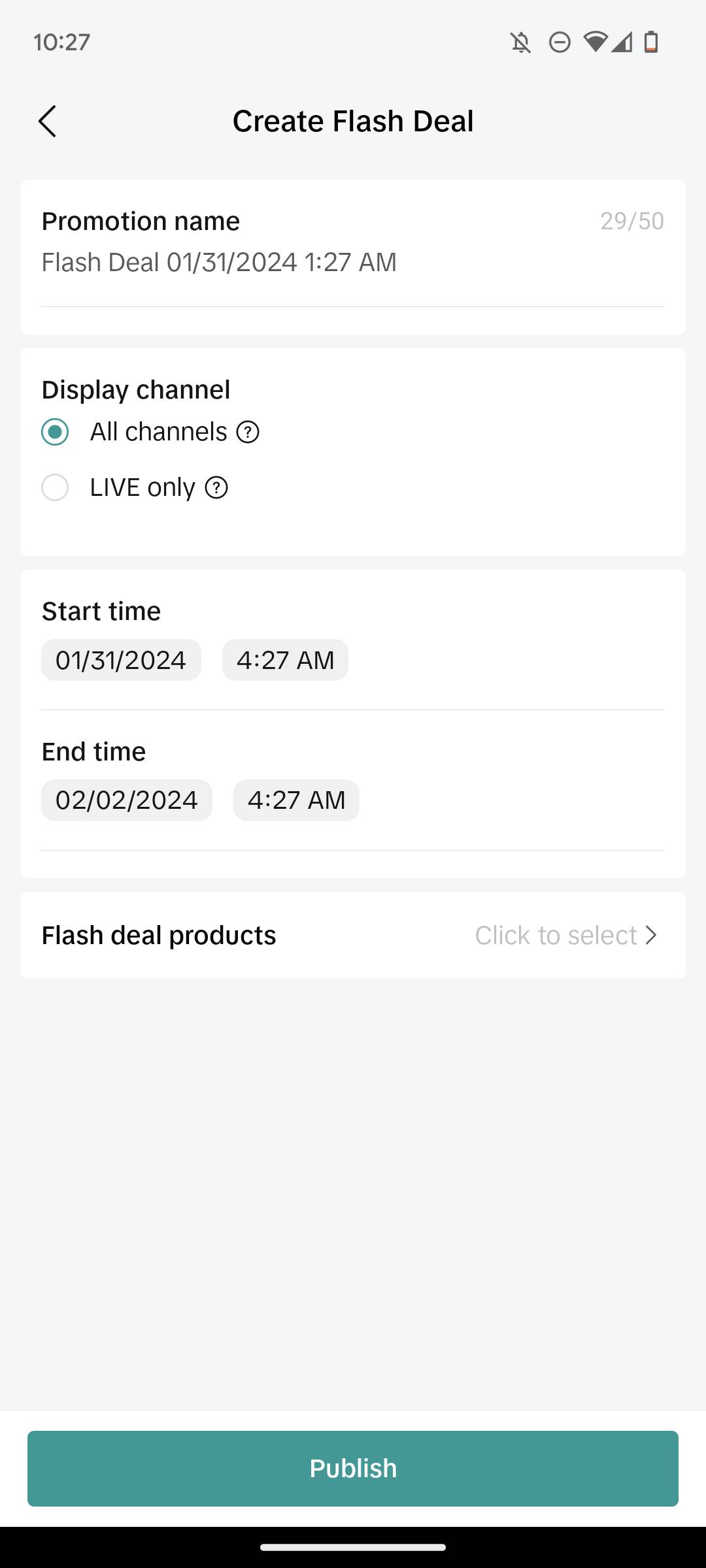
You need to add the following basic information about your Flash Sale:- Promotion Name
- Promotion Period

- Set yours according to your business needs.
Select Products
- Select Product level or SKU level
- Two ways to set "Deal Price" and "Purchase Limit"
- Need to be set separately
- After filling in the information in "Deal Price" and "Purchase Limit" at the top, check all the products, and click "Update" to perform batch settings
- If the purchase limit is set to a specific value (such as n), the user can buy n pieces per SKU under the product, instead of only n pieces of one product
- The setting of Flash Deal must meet the requirements. You can check the details from the information mentioned above.
- Add products that are seeing a sudden surge in demand (Trending Products) to maximise your sales potential.
- Ensure the products with flash deals are enticing enough to drive a stronger call-to-action of the buyers and increase overall store traffic.


Submit

How consumers participate in seller Flash Deal
Place an order in PDP
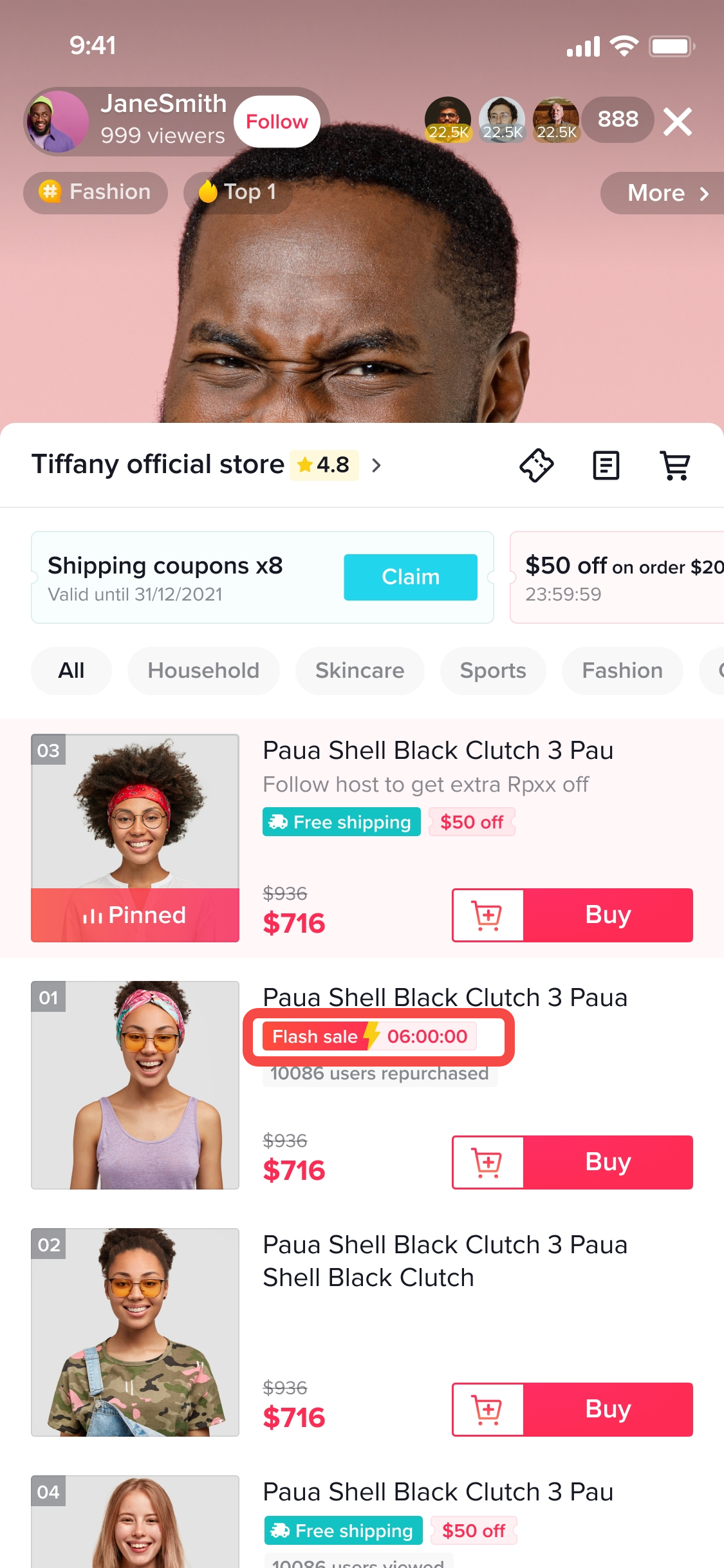
Enter the product details page through the showcase, short video, live broadcast room and other channels;More visibility! Users can see the "Flash Deal" logo and the remaining time of the Flash Deal; they can also see the Flash Deal price and the original price of the product.

Place an order in LIVE
Consumers can place an order directly during the Livestream;Users can see the 'lightning' logo of the Flash Deal information and the remaining time of the Flash Deal, as well as the Flash Deal price of the product.
How to set it up in seller app?
Seller App
How to create a Flash Deal
Entrance
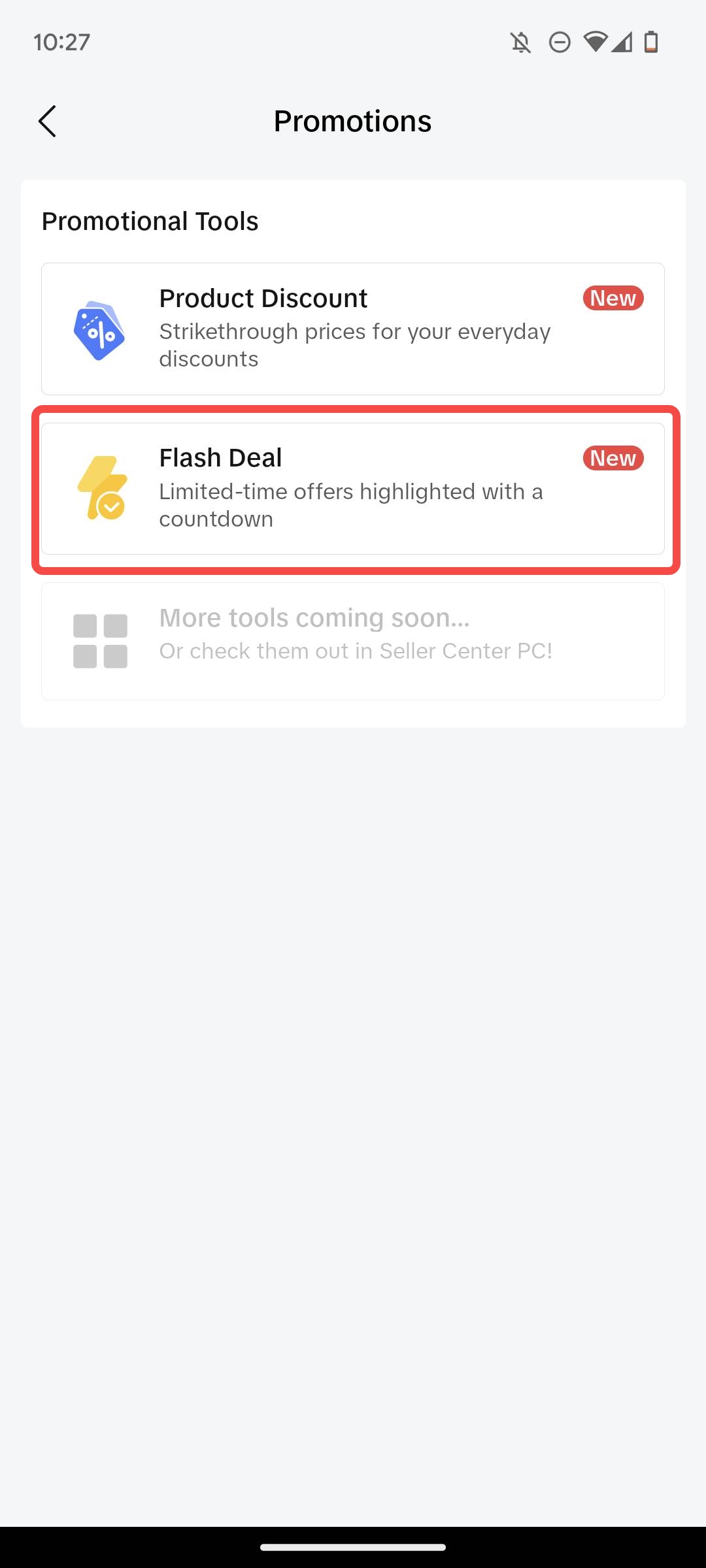
- Home -> Promotions -> Flash Deal -> Create Flash Deal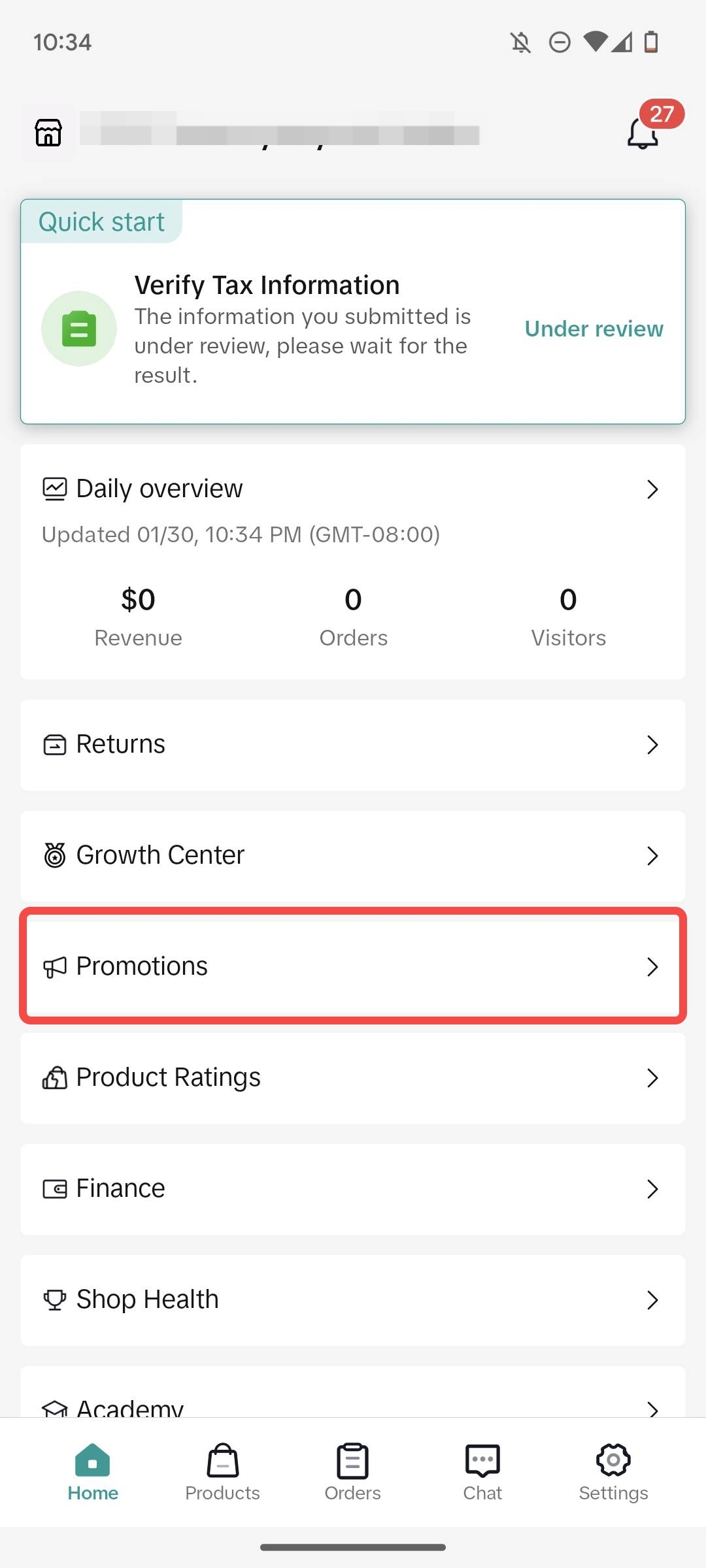
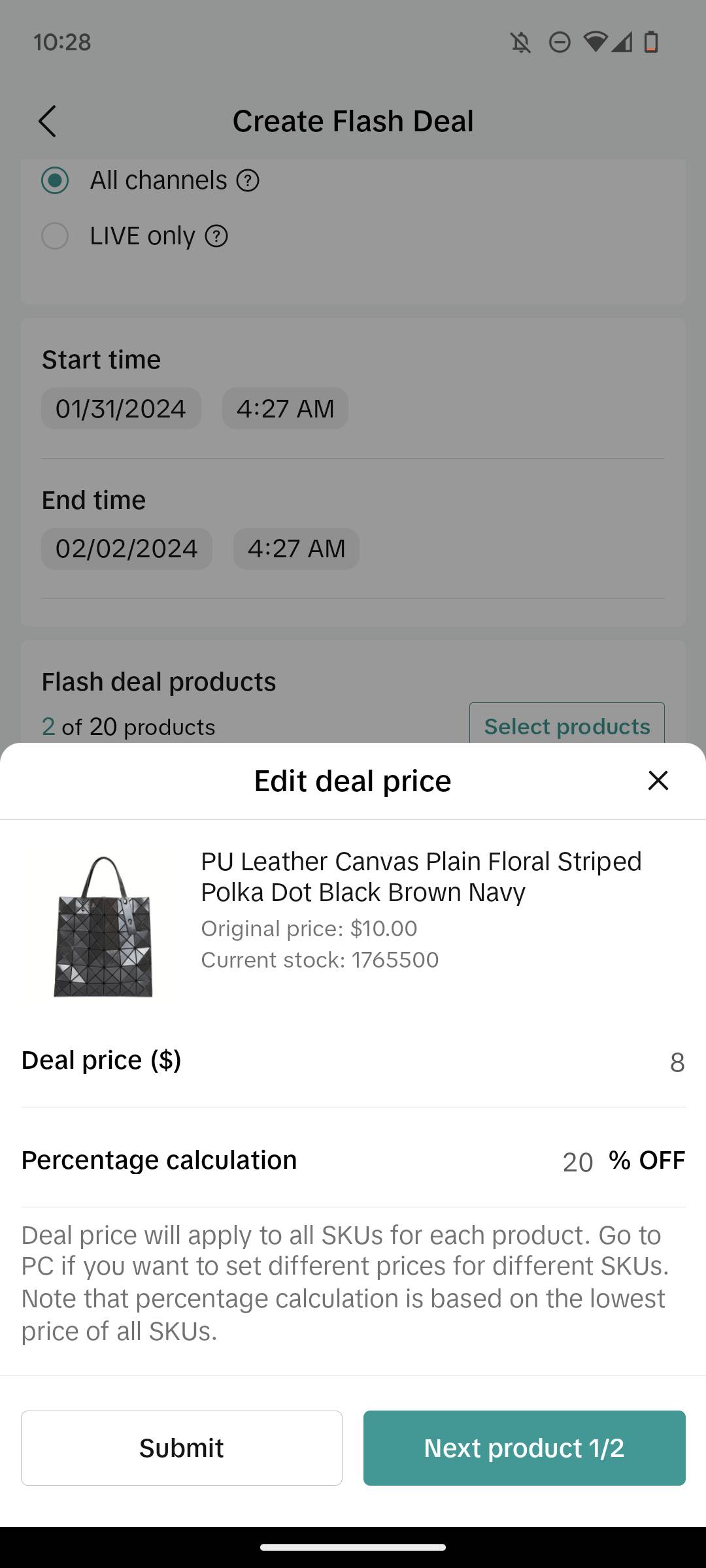
FAQ
- Why doesn’t my product discount show a strikethrough after I set it up?
- To maintain customer trust in our platform, strikethrough pricing may not be displayed on your product listings under certain circumstances:
- For newly listed products without any sales history, if TikTok cannot verify the provided retail or list price, strike-through pricing may not be displayed initially. Once the product generates sales that align with the retail or list price, the strike-through pricing may appear.
- For products with a sales history, strike-through pricing may not be shown to customers if potential misleading marketing is detected with the seller's retail/list price. This is caused by the seller setting a price that does not align with the historical price paid for that item. Sellers are advised to review and adjust their retail/list prices to ensure they reflect the true retail value of the item.
You may also be interested in

Promotion stacking rules
Learn how promotions work together What you'll see and what your customers get: On TikTok Shop, you…
TikTok for Shopify: Strikethrough Pricing Integration
TikTok for Shopify - Strikethrough Pricing Integration for Shopify Overview: Strike-through pricing…

Seller LIVE Flash Sale
What is LIVE Flash Sale ? LIVE Flash Sale is a seller-funded promotion tool that allows sellers to c…

The Seller Guide to Shop Tab Success
*What is Shop Tab? Shop Tab is another way for shoppers to discover your products on TikTok Shop. As…

How to register through standard registration
What is Standard Registration? Standard Registration allows you to register products that meet speci…

How to register for flash sale campaigns
What is a TikTok Shop Flash Sale Campaign? A Flash Sale campaign is a limited-time promotion that le…

TikTok for Shopify: Promotions Sync
*Overview: Shopify sellers can sync Promotions/Discounts except Free Shipping on Shopify directly to…

Buy More Save More & BXGY
Product Overview You can configure both Buy More, Save More (BMSM) and Buy X, Get Y (BXGY) campaigns…

The smart pricing suite: Pricing insights and campaign price…
Product Overview TikTok Shop Pricing Suite is your complete smart pricing system built directly into…

How to Use Seller Coupon
Overview: What are coupons? Seller coupons are seller-funded discounts customers can claim and apply…