

Review coupon
12/05/2025
Summary
What is the TikTok Shop Review Coupon and how does it benefit sellers?
- The Review Coupon is a seller-funded promotion that incentivizes buyers to leave detailed reviews (11+ words or media), enhancing product credibility, increasing conversions, and encouraging repeat purchases through richer customer feedback.
- It automates coupon issuance to qualifying buyers, streamlining review collection and boosting shopper confidence with verified incentivized reviews.
How do sellers create and manage a Review Coupon promotion on TikTok Shop?
- Sellers create a Review Coupon via Seller Center under Marketing > Promotions, setting promotion name, claim period (30-180 days), coupon validity (default 60 days), discount type (fixed ≥$3 or 5%-50% off), and product selection (up to 2,000 products).
- Only one active review coupon can run at a time; sellers manage promotions by viewing, duplicating, or deactivating campaigns and tracking performance via the Manage Your Promotions tab or Product Rating section.
What are the key rules and conditions for buyers to qualify for and use Review Coupons?
- Buyers must purchase specified products and submit an approved review with at least 11 words or media; both positive and negative reviews qualify.
- Coupons are automatically issued upon qualifying reviews, can be combined with other promotions except seller coupons, and buyers can receive multiple coupons for multiple orders but use only one coupon per order.
What should sellers know about coupon settings and budget control when using percentage-off Review Coupons?
- Percentage-off coupons range from 5% to 50% with no maximum discount cap, so sellers should limit claimable coupon quantity to control budget exposure and avoid excessive discounts on high-value orders.
- Fixed-amount coupons must be at least $3 off, providing a straightforward discount option without percentage variability.
How can sellers monitor the effectiveness of their Review Coupon promotions?
- Performance data is accessible via the Manage Your Promotions tab by selecting the promotion and clicking View Data, or through the Product Rating section under the Incentivized Review tab for detailed insights on ongoing and past campaigns.
- This allows sellers to evaluate impact on review quality, conversion rates, and overall product credibility.
Product Overview
The Review Coupon is a TikTok Shop promotion tool designed to help you collect detailed product reviews. You fund the coupon, and our system automatically issues it to buyers who meet the review criteria. This incentivizes customers to share richer feedback, boosting your product credibility, conversions, and repeat purchases.Key Benefits
- Generate Credible Detailed Reviews: Incentivize buyers to leave rich reviews with images/videos or detailed text (11 words) to drive conversions.
- Enhance Product Credibility: By encouraging high-quality reviews, this feature helps you establish a seamless review collection process that enhances product credibility and strengthens customer trust.
- Boost marketplace growth: Detailed, high-quality feedback builds shopper confidence, leading to more conversions and repeat purchases.
How It Works
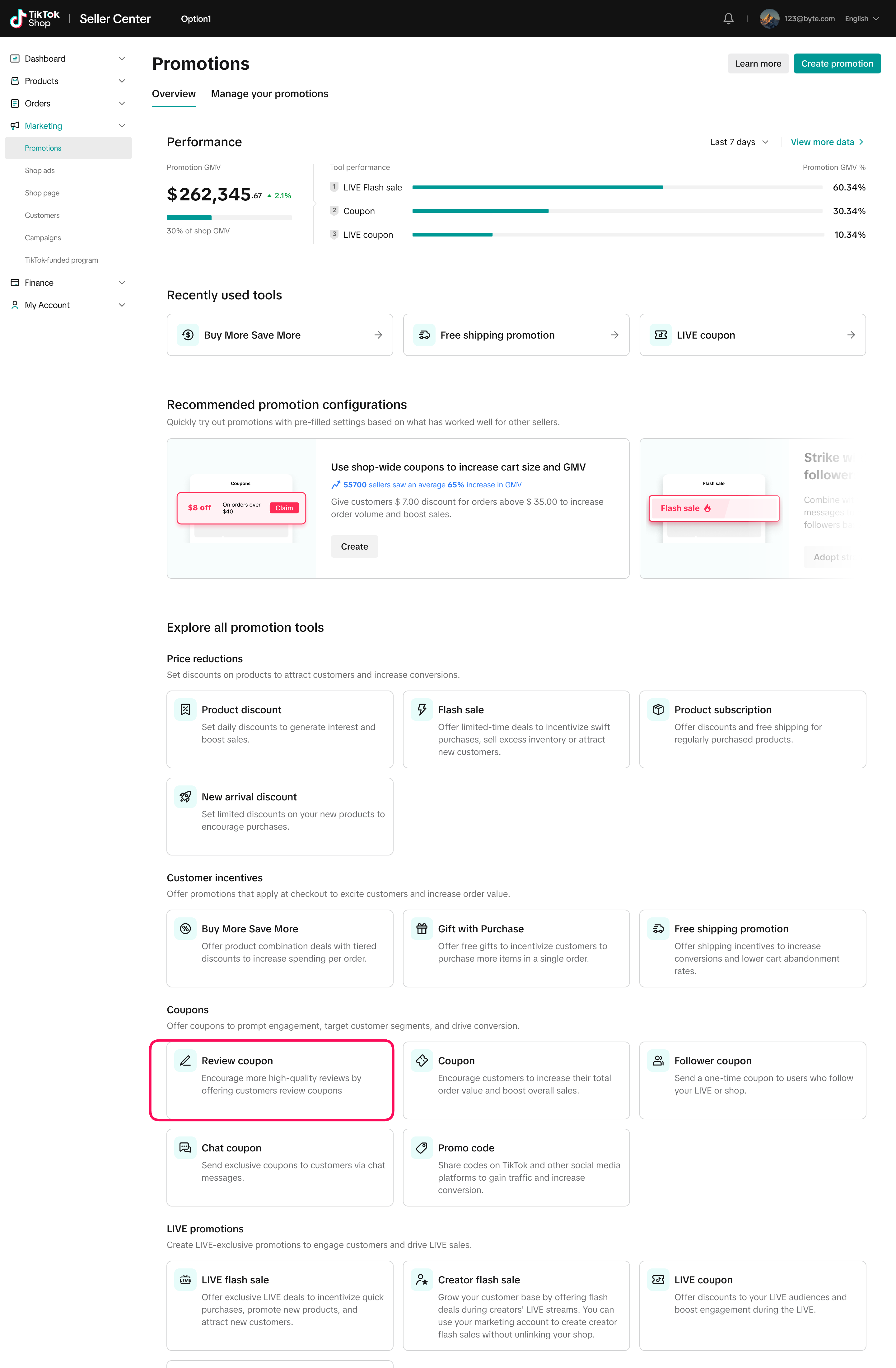
Step 1: Log in to Seller Center
- From the left-hand menu, click Marketing, select Promotions.
- In the Coupons section, find Review Coupon.
- Click Create to start setting up your promotion.
Step 2: Create the coupon
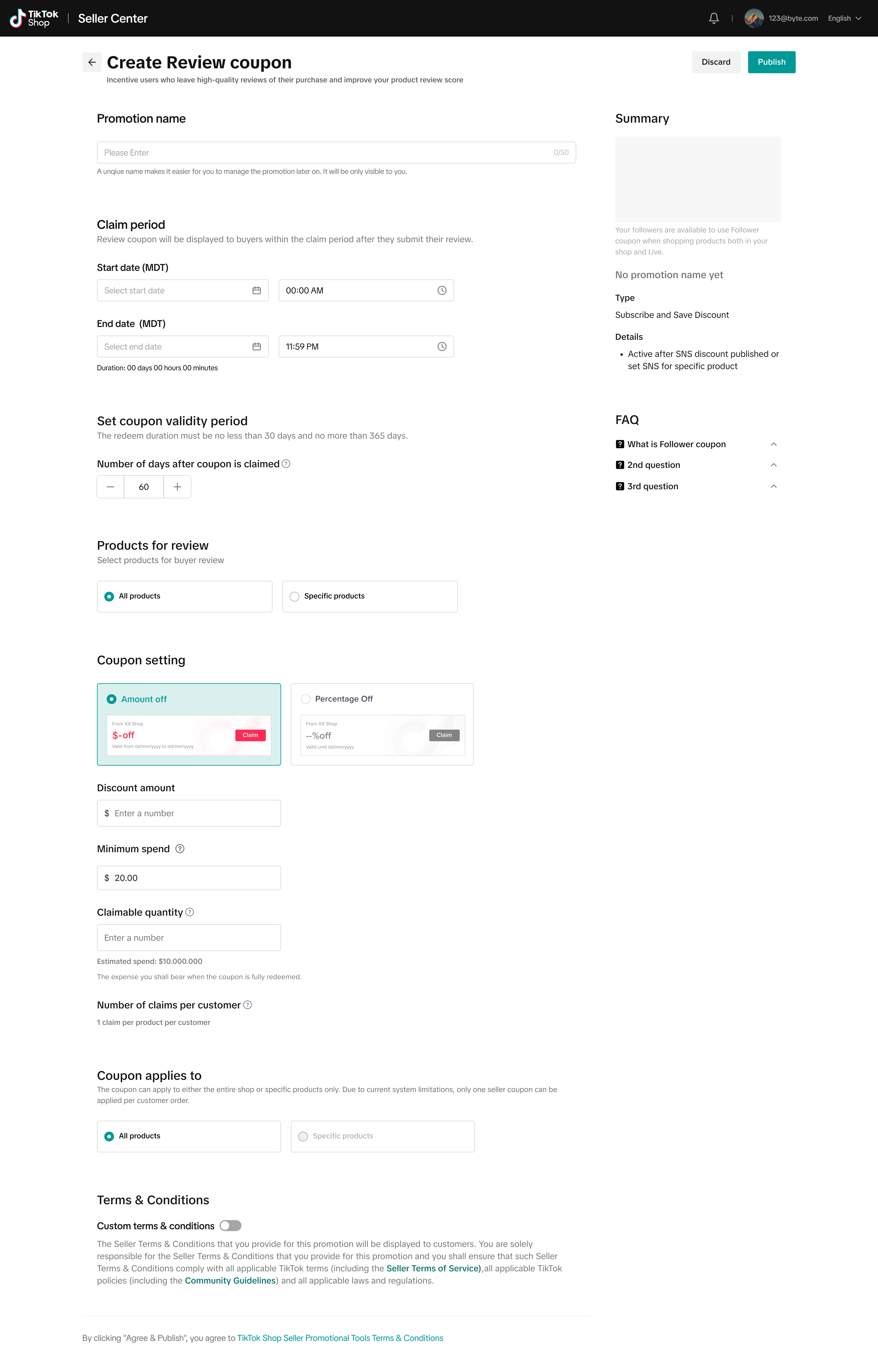
On the creation page, you'll set up the promotion details- Fixed amount: Must be at least $3 off.
- Discount range: You can set percentage-off coupons between 5% and 50%.
- Promotion name: A unique name to help you manage the promotion
- Claim period: The duration during which buyers can submit a qualifying review and receive a coupon. The minimum duration is 30 days and the maximum is 180 days
- Coupon validity period: How long the coupon is valid after it's claimed, with a default of 60 days and a maximum of 180 days.
- Coupon settings: You can choose between a fixed-amount coupon or a percentage-off coupon.
- Product selection: You can apply the coupon to all products in your store.
- Trigger: The coupon is automatically issued when users submit VHQ reviews (11+ words or media such as a photo/video) for a qualifying product
Step 3: Manage promotions
After creating a promotion, go to the Manage Your Promotions tab to view an overview of all promotions by status. From there, you can take actions such as viewing campaign data, duplicating a promotion, or deactivating itStep 4: Reviewing performance
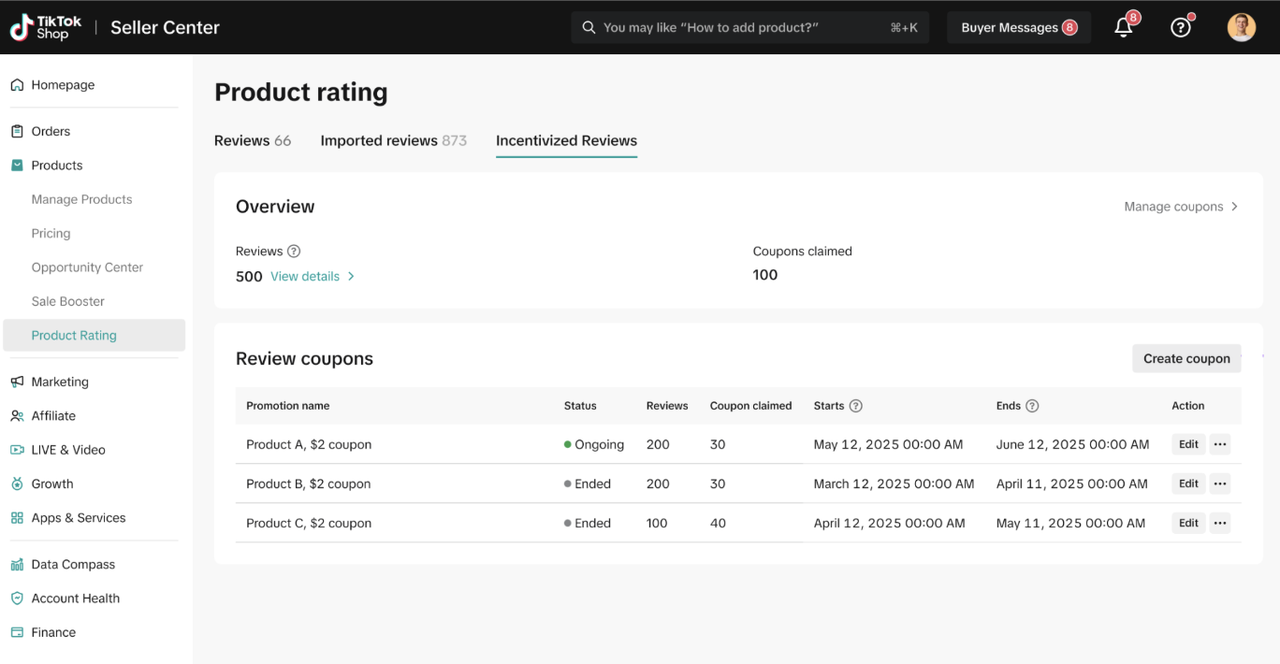
There are two ways to review the performance of your review coupons:Option 1: Go to the Manage Your Promotions tab, select your Review Coupon promotion, and click View Data under Action to see its performance.
Option 2: In Seller Center, go to the left-hand menu and select Products > Product Rating. Under the Incentivized Review tab, you’ll see a table with details of both ongoing and past review promotions. For more information, refer to the Product Ratings feature guide.
Customer's Experience
Reviews from promotional activity will be labeled with an “Verified purchase Incentivized Review” tag.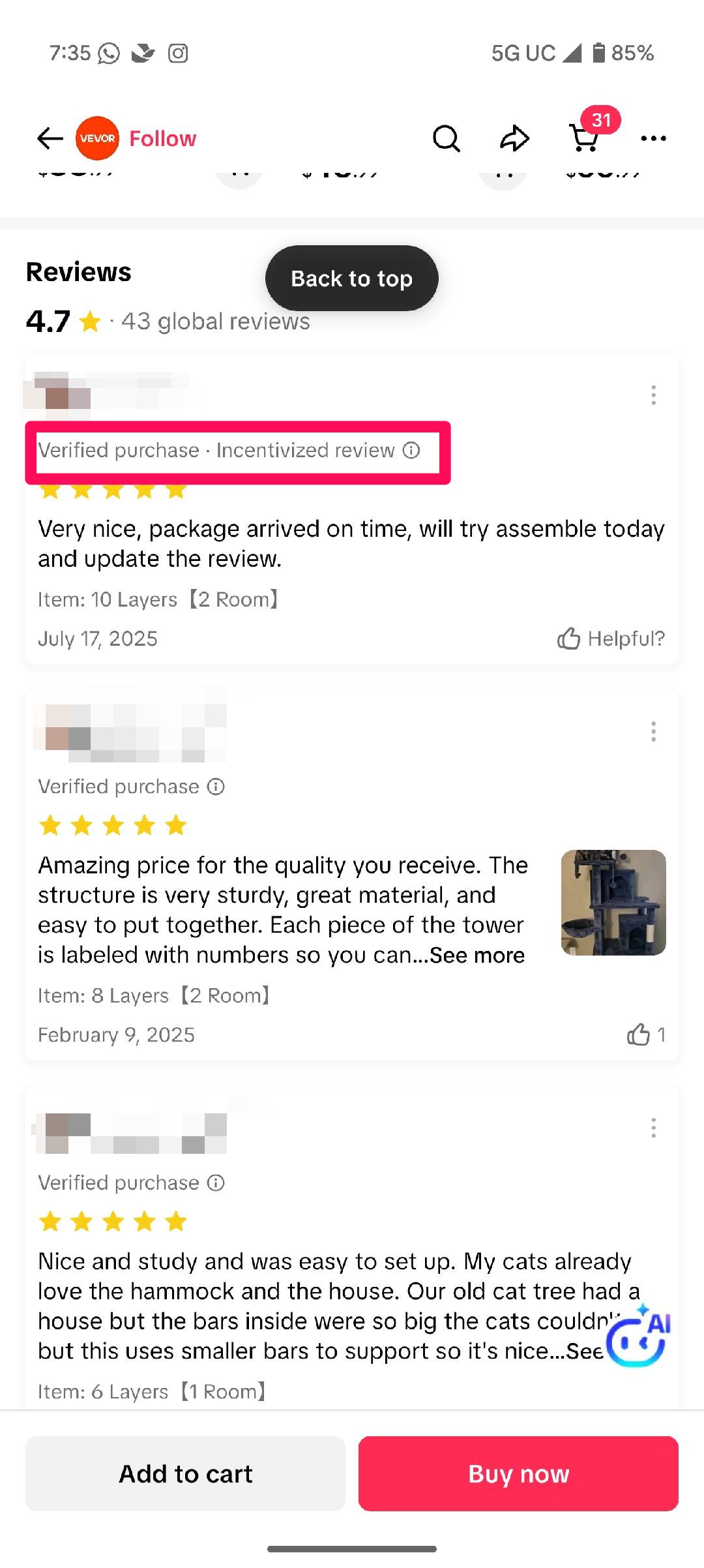
Q&A
Q: What are the conditions for a consumer to receive a review coupon?A: To get a coupon, a consumer must purchase one of the specified products and submit a product review of at least 11 words or with just media (pictures or videos). The review must also be approved by TikTok and meet the requirements.Q: Do negative reviews qualify for a coupon?A: Yes, as long as the review meets the requirements (11+ words or media) and is approved by the platform, a buyer will receive a coupon regardless of whether the review is positive or negative.
Q: Can review coupon be used with other promotions?A: Review coupons can be combined with single or multi-product promotions (such as product discounts, flash sales, product subscriptions, early access deals, Buy More Save More, and Gift with Purchase) and free shipping promotions. However, they can't be stacked with other seller coupons, including regular, follower, or promo codes
Q: Can I have multiple review coupon promotions running at the same time?A: No, there can be only one active review coupon at a time. However, you can create a new review coupon if its start and end dates don't overlap with an existing promotion.
Q: What is the maximum number of products I can select for a review coupon promotion?A: You can select up to 2,000 products for a single review coupon promotion
Q: Will the product review indicate it was received through a promotion?A: Yes. Reviews from promotional activity will be labeled with an “Verified purchase Incentivized Review” tag.
Q: How many seller-funded reviews can each I get for each product?A: Each order with a review counts separately. For example, if a shopper buys the same product twice in different orders and reviews both, they can receive 2 coupons. However, shoppers can only use one review coupon per order.
You may also be interested in
2025 BFCM TikTok Shop Readiness Guide
The holiday shopping rush is your single biggest opportunity to increase sales & grow your brand on…

Promotion stacking rules
Learn how promotions work together What you'll see and what your customers get: On TikTok Shop, you…
TikTok for Shopify: Strikethrough Pricing Integration
TikTok for Shopify - Strikethrough Pricing Integration for Shopify Overview: Strike-through pricing…

Seller LIVE Flash Deal
What is LIVE Flash Deal ? LIVE Flash Deal is a seller-funded promotion tool that allows sellers to c…

The Seller Guide to Shop Tab Success
What is Shop Tab? Shop Tab is another way for shoppers to discover your products on TikTok Shop. As…

How to register through standard registration
What is Standard Registration? Standard Registration allows you to register products that meet speci…

How to register for flash sale campaigns
What is a TikTok Shop Flash Sale Campaign? A Flash Sale campaign is a limited-time promotion that le…

TikTok for Shopify: Promotions Sync
Overview: Shopify sellers can sync Promotions/Discounts except Free Shipping on Shopify directly to…

How to Use the 'Buy More Save More' Feature
Product Overview Buy More Save More is a seller-funded promotional tool designed to reward customers…

The smart pricing suite: Pricing insights and campaign price…
Product Overview TikTok Shop Pricing Suite is your complete smart pricing system built directly into…