

Gift with Purchase
Summary
What is the Gift with Purchase (GWP) promotion on TikTok Shop and how can it benefit sellers?
- GWP is a seller-funded tool offering free gifts when customers meet purchase criteria, boosting average order value, conversion rates, and product discovery by incentivizing larger or repeat purchases.
- It allows sellers to launch new products as free samples, encouraging future full-price sales.
How do sellers create and manage a Gift with Purchase promotion on TikTok Shop?
- Sellers create GWP via Seller Center > Marketing > Promotions, setting promotion name, active dates, customer eligibility, minimum purchase requirements, eligible products (up to 100), and gift items (up to 5).
- Promotions can be viewed, edited, duplicated, or deactivated anytime; segmented promotions are visible only to targeted customer groups.
What are the requirements and best practices for selecting gift items in a GWP promotion?
- Gifts must be active products with stock ≥1, total gift value ≤ $75, exclude virtual bundles/pre-orders, and can be either for-sale or not-for-sale (promotional only).
- Not-for-sale gifts must be created and approved in Seller Center, are hidden from storefront, and should not duplicate existing products to avoid rejection.
How does inventory, shipping, and returns work for GWP promotions?
- Gift stock is deducted from seller inventory; gifts may ship separately if stored in different warehouses, with sellers covering all shipping costs.
- Returns require customers to return gifts if all eligible products are returned; sellers can reject refunds if gifts are missing or damaged. Partial returns may allow customers to keep gifts if remaining items meet promotion criteria.
What are the key limitations and compatibility rules for running GWP promotions?
- Only one GWP promotion can be active per eligible product at a time; multiple GWP promotions can run concurrently if product pools differ.
- GWP cannot be combined with "Buy More Save More" promotions but can stack with other discounts or coupons. Sellers can limit GWP usage per customer and set claim limits on gifts.
Product Overview
Gift with Purchase (GWP) is a seller-funded promotional tool designed to incentivize customers to complete a purchase by offering a complimentary item. You can set specific criteria that buyers must meet to unlock the gift, such as purchasing a specific product or buying a certain quantity of items (e.g., "Buy 2 items, get a free accessory").Key Benefits
- Increase Average Order Value (AOV): Encourage shoppers to add more items to their cart to qualify for the free gift.
- Boost Conversion Rates: The added value of a free gift can be the deciding factor that turns a browser into a buyer.
- Drive Product Discovery: Use GWP to launch new items. Offering a new product as a free sample helps customers test it, potentially leading to full-price purchases in the future.
How to create a Gift with Purchase promotion
Step 1: Go to Visit Seller Center > Marketing > Promotions > Gift with Purchase > Create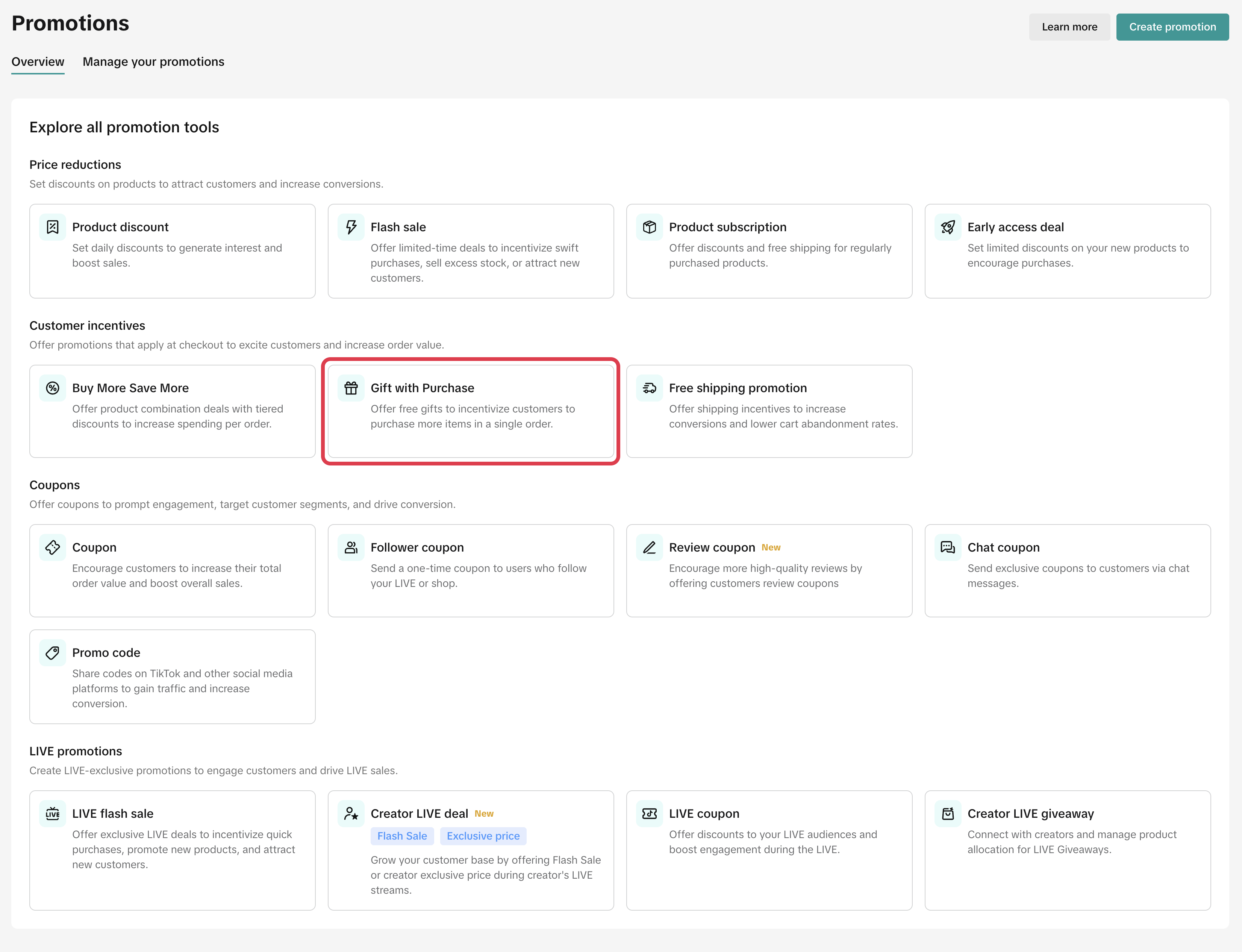
- Promotion name
- Active dates: Select the dates and time when the promotion starts and ends (minimum 10 minutes, maximum 30 days)
- Eligible customer(s): Choose who is eligible for this Gift with Purchase promotion.
- All Customers (Default): Available to every shopper. This setting applies to all legacy promotions created before customer segmentation was available.
- New Customers: Shoppers who have never purchased from your shop before.
- Existing Customers: Shoppers who have completed at least one purchase from your shop in the past.
- Repeat Customers: Loyal shoppers who have completed two or more purchases from your shop.
Marketing best practice: Segmented promotions are only visible to eligible shoppers, so be mindful mentioning them in LIVE or Short Videos. If viewers cannot see the deal, it may cause confusion.
- Minimum purchase requirement:
- Minimum purchase amount of $XX
- Minimum purchase quantity of X items
- Eligible Products
- You can select up to 100 eligible products customers can purchase to qualify for a GWP promotion
- The eligible products chosen here cannot be selected as gift items in the next step.
- Gifts : You can choose between two types of products to offer as gifts:
- For-Sale Gifts (Standard Inventory): These are active products currently listed in your shop. Customers can purchase them individually or receive them as a gift. Note: Inventory is shared. When a customer claims a gift, it is deducted from your main product stock.
- Not-for-Sale Gifts (Promotional Only): These are exclusive items created specifically for promotions. They are hidden from your shop page, search results, and recommendations, meaning customers cannot buy them as standalone items.
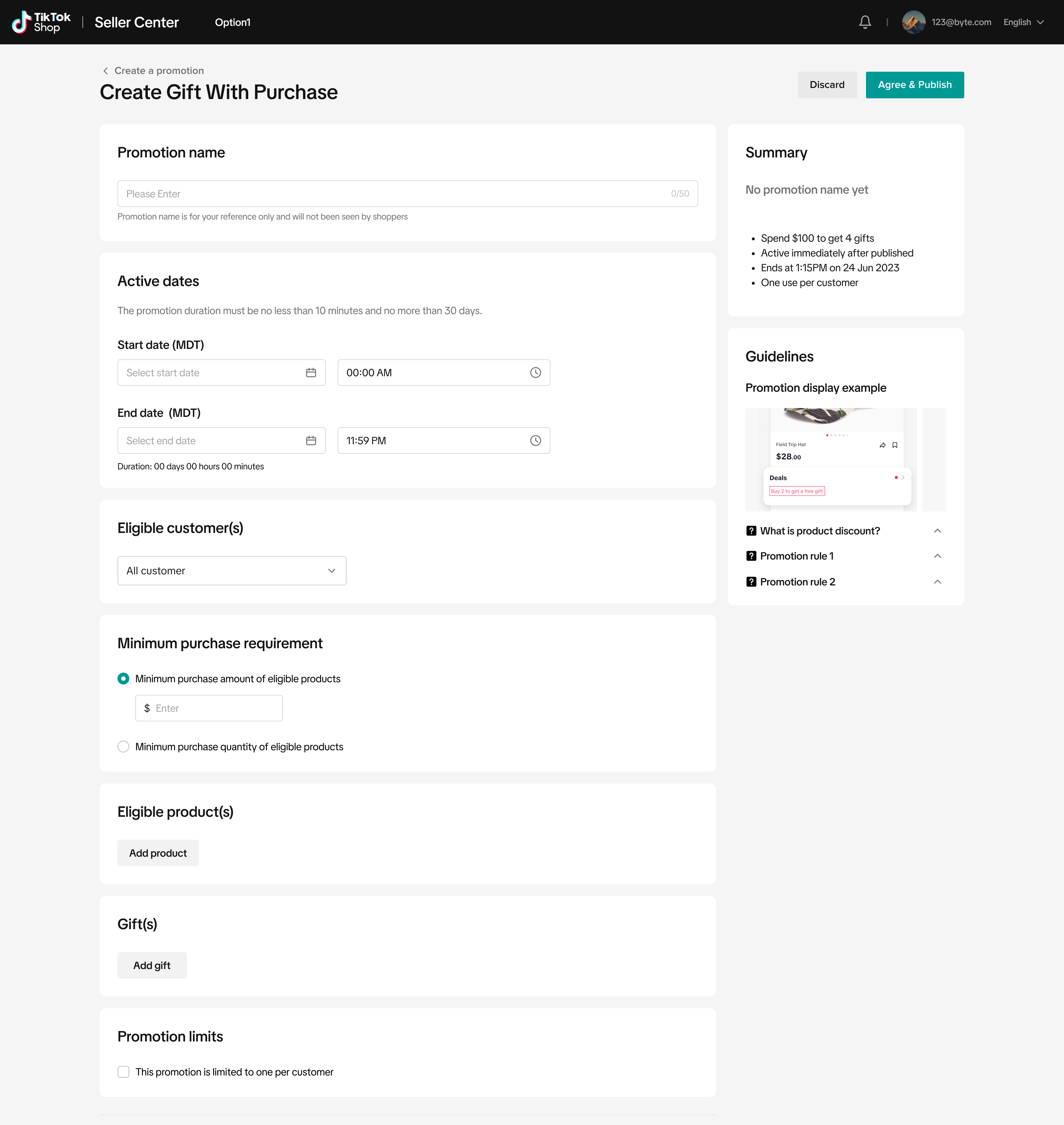
How to Create Not-For-Sale Gifts
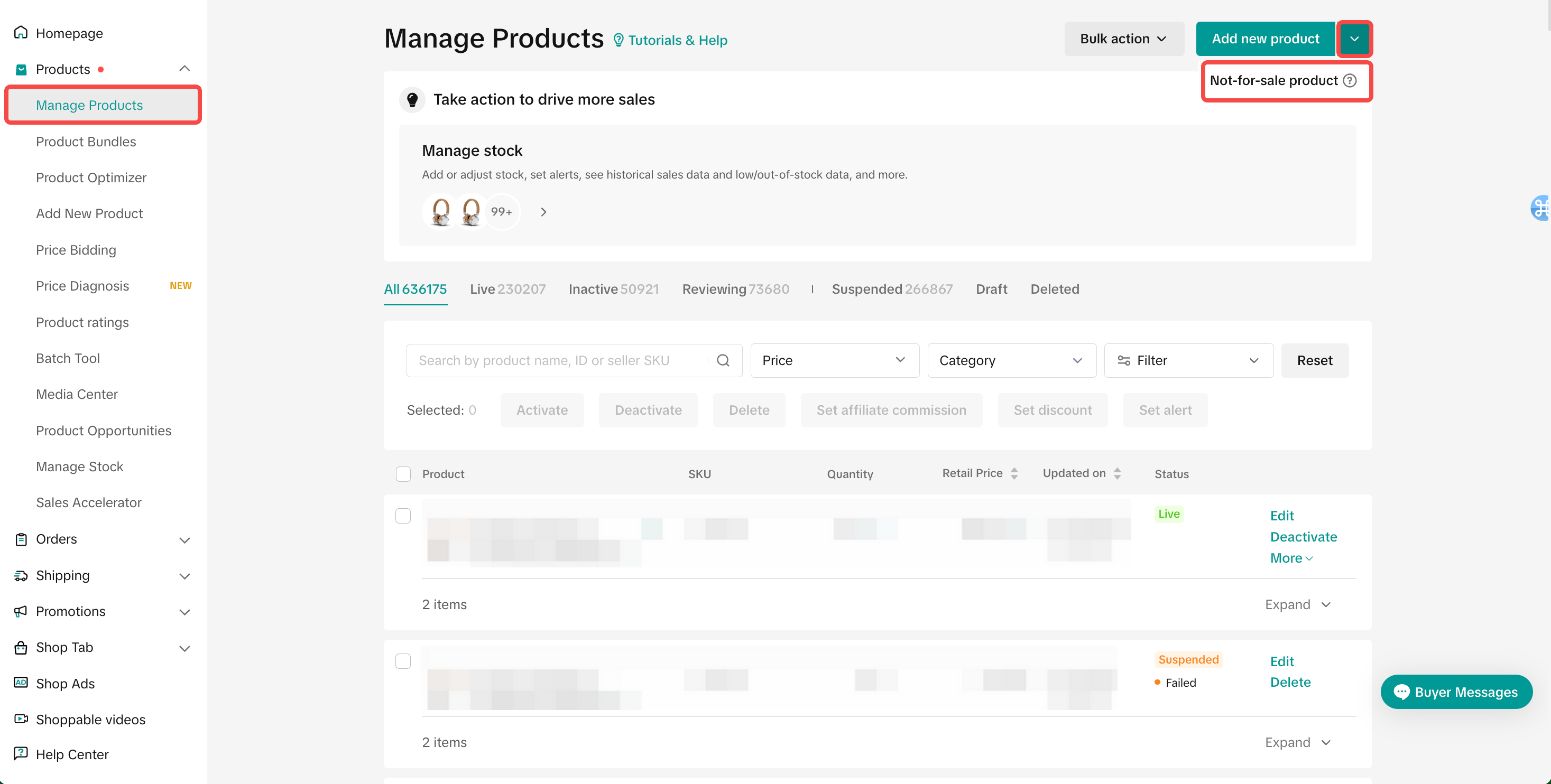
To offer a free sample or an exclusive reward, you must first create a specific "Not-for-Sale" product listing in your inventory. Unlike standard inventory, these items are invisible in your storefront, search results, and recommendations. Customers can't purchase them directly, they can only receive them as a reward by meeting the criteria of your Gift with Purchase promotion.- Visit Seller Center > Products > Manage Products > Add new product > Not-for-sale product
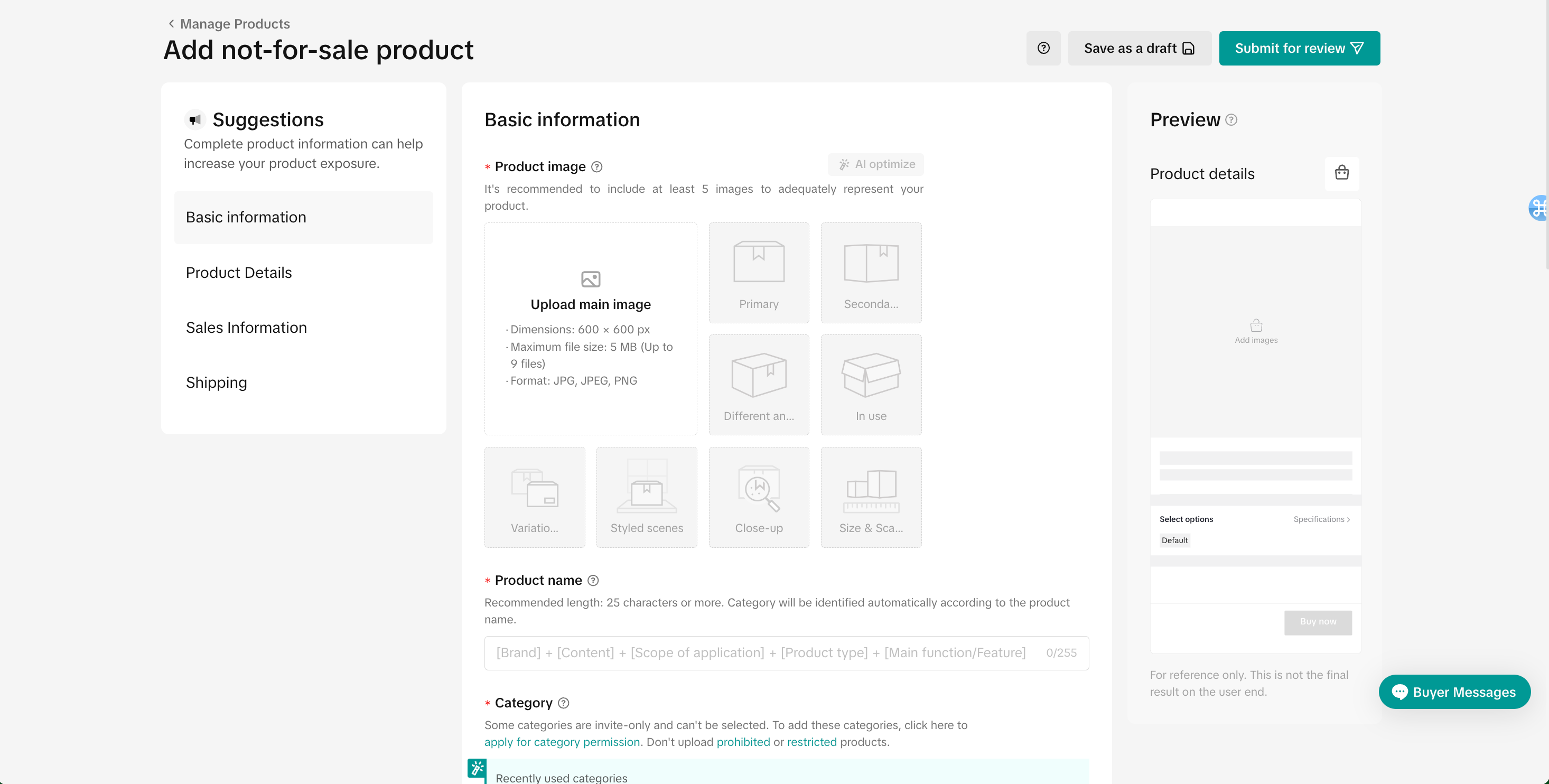
- Complete Details: Fill in all mandatory fields and product attributes.
- Submit: Click Submit for Review.
- Wait for Approval: The product must be approved and listed as "Active" before it can be added to a promotion.
- Go to your product management page.
- Select the "Sale Type" filter.
- Choose "Not-for-Sale".
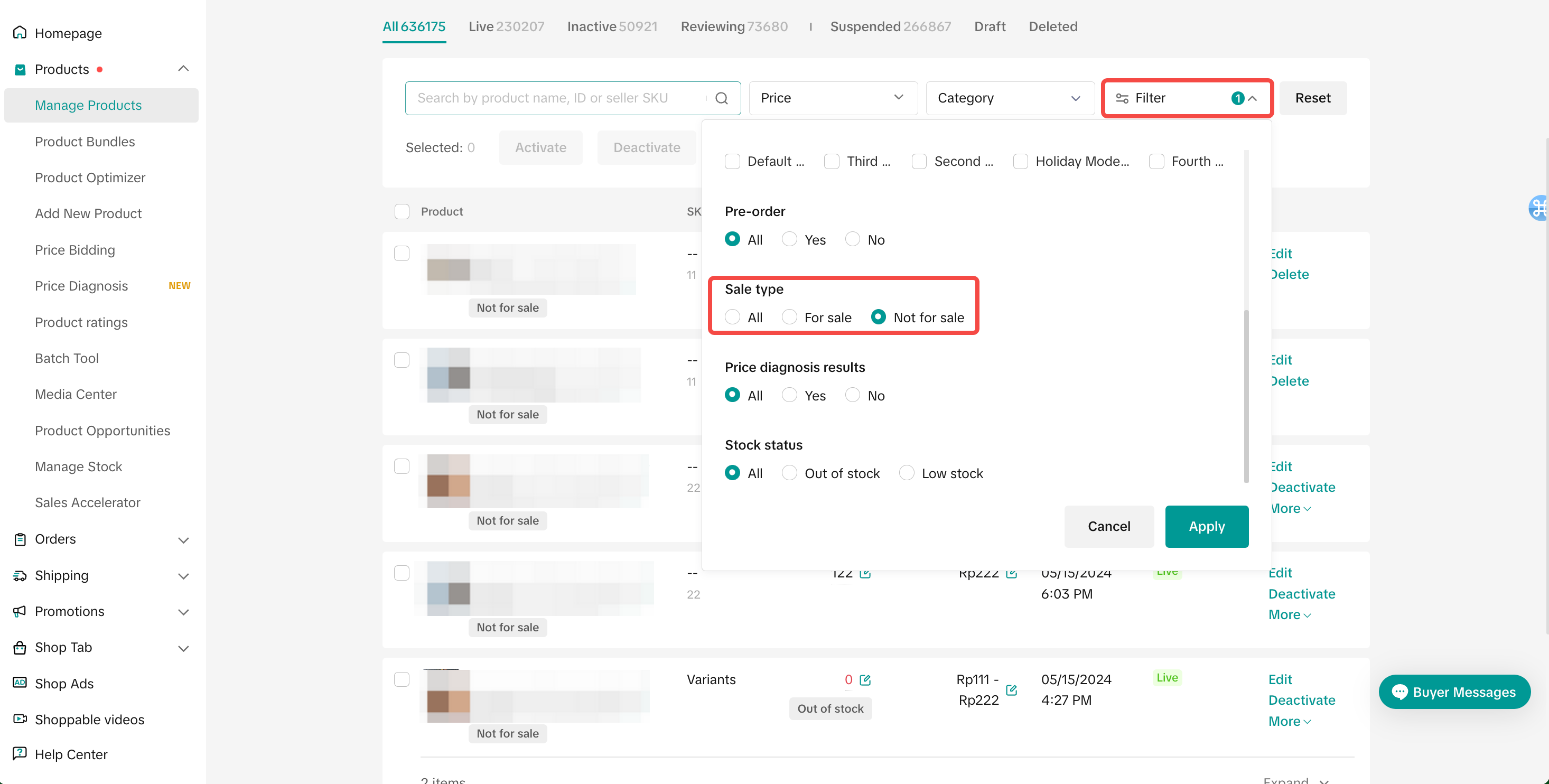
Managing Your GWP Promotions (Seller Center > Marketing > Promotions > Manage promotions)
Once your promotion is created, you can manage it using the following actions:- View: Access performance data and monitor your budget usage.
- Edit: Modify settings for upcoming or currently active promotions.
- Deactivate: Stop an ongoing promotion or cancel a scheduled one.
- Duplicate: Clone a past promotion to quickly set up a new campaign.
- View history: Access audit logs to review your promotion creation and edit history, so you can track what changes were made and when.

Gift Eligibility & Limits
- Active Inventory: Gifts must be active products listed in your shop with at least 1 unit of stock.
- Price Cap: The total value of a gift set cannot exceed $75 USD.
- Exclusions: Virtual bundles and Pre-order products can't be used as gifts.
- Gift Count: You can add a maximum of 5 items per gift set.
- Fixed Bundles: Customers can't choose or swap items. They will automatically receive every item in the gift set, provided stock is available.
- Partial Fulfillment: If one item in a set goes out of stock, the customer will still receive the remaining available gifts. The promotion automatically ends only when all gift items are out of stock.
- Inventory Location: Gifts may ship separately if they are stored in a different warehouse than the purchased products.
- Shipping Costs: As the seller, you cover shipping costs for all gifts.
Shipping & Return Policies
Shipping Costs: As the seller, you are responsible for the return shipping costs for both the purchased products and the free gift items.Refunds & Gift Returns
- Full Returns: If a customer returns all eligible items from an order, they must also return the free gift.
- Seller Protection: If the gift is missing or returned damaged, you have the right to reject the refund request.
- Partial Returns: If a customer returns only some items, they may keep the free gift only if the remaining items in their order still meet the promotion's minimum criteria.
Promotion Compatibility (Stacking Rules)
- Combinability: Gift with Purchase (GWP) can be combined with most other seller promotion tools (such as Coupons or Discounts).
- Exclusion: GWP can't be combined with "Buy More Save More" (BMSM). You can't run a GWP promotion and a BMSM promotion on the same product during the same time period.
FAQ
- How many GWPs can be active at the same time?
- How many eligible products and gifts can be set per promotion event?
- Is it possible to set the total number of gift sets, and what happens if they run out?
- Can Sellers limit the GWP promotion usage quota per buyer?
- Can buyers enjoy more than one GWP in one order?
For example:
- GWP 1: Buy 2 items, get gift A
- GWP 2: Buy 3 items, get gift B
- A Buyer who purchases 5 items in the product pool will receive gifts A and B.
- The eligible items from GWP 1 and GWP 2 must be different
- Can buyers purchase the same products to enjoy the GWP promotion?
For example:
- GWP 1:
- Tier 1: Buy 2 items (Eligible Products: B, C, D), get gift item A.
- A buyer who purchases one unit of Product B + one unit of Product C from the eligible product pool will meet the eligibility criteria and receive gift item A.
- A buyer who purchases two units of Product B, C, or D from the eligible product pool will also meet the eligibility criteria and receive gift item A.
- For the SKUs that are chosen as "free gifts" in the GWP promotion, when buyers purchase and order with GWP, will the stock be deducted from the total inventory in the Seller Center?
- If Sellers' products and gifts are located in multi-warehouses, can they use GWP promotion?
- What is the return policy of orders with GWP promotion?
For example:
- Return of all eligible products — Buyer needs to return the gift with the eligible products.
- Return some of the eligible products — If the non-returned eligible products still meet the minimum criteria, the buyer may keep the gifts.
- How come I cannot select a not-for-sale gift item when creating a GWP promotion?
You may also be interested in

Promotion stacking rules
Learn how promotions work together What you'll see and what your customers get: On TikTok Shop, you…
TikTok for Shopify: Strikethrough Pricing Integration
TikTok for Shopify - Strikethrough Pricing Integration for Shopify Overview: Strike-through pricing…

Seller LIVE Flash Sale
What is LIVE Flash Sale ? LIVE Flash Sale is a seller-funded promotion tool that allows sellers to c…

The Seller Guide to Shop Tab Success
*What is Shop Tab? Shop Tab is another way for shoppers to discover your products on TikTok Shop. As…

How to register through standard registration
What is Standard Registration? Standard Registration allows you to register products that meet speci…

How to register for flash sale campaigns
What is a TikTok Shop Flash Sale Campaign? A Flash Sale campaign is a limited-time promotion that le…

TikTok for Shopify: Promotions Sync
*Overview: Shopify sellers can sync Promotions/Discounts except Free Shipping on Shopify directly to…

Buy More Save More & BXGY
Product Overview You can configure both Buy More, Save More (BMSM) and Buy X, Get Y (BXGY) campaigns…

The smart pricing suite: Pricing insights and campaign price…
Product Overview TikTok Shop Pricing Suite is your complete smart pricing system built directly into…

How to Use Seller Coupon
Overview: What are coupons? Seller coupons are seller-funded discounts customers can claim and apply…