

TikTok Shop LIVE Promotions Tools
01/23/2026
Summary
What are the main TikTok Shop LIVE promotion tools available for sellers and creators, and how do they help increase engagement and sales?
- TikTok Shop offers LIVE Flash Sales, LIVE Coupons, Creator LIVE Deals, Creator LIVE Giveaways, and Creator Exclusive Prices to boost urgency, participation, and conversions during livestreams by providing limited-time deals, exclusive discounts, and interactive giveaways.
- These tools help sellers host their own LIVE sessions or partner with creators to extend reach, add social proof, and convert new audiences with exclusive offers and real-time incentives.
How can sellers set up a LIVE Flash Sale and what are the key requirements and steps involved?
- Sellers with official accounts can set up LIVE Flash Sales via Seller Center by registering their LIVE session, selecting products with the lowest discount price in the past 14 days, and scheduling the promotion with a unique name and period; unlimited products can be added on PC, with limits on app and TikTok selections.
- Prices must be lower than recent discounts or original prices if no order history exists; the promotion includes a 5-minute pre-launch countdown to engage viewers and create urgency.
What are the specific steps and conditions for setting up Creator LIVE Flash Sales and Creator Exclusive Prices?
- Creators or marketing accounts can create Creator LIVE Flash Sales by entering promotion details, selecting products by SKU, and collaborating with up to 50 creators; prices must be the lowest in 14 days, and reserved stock is locked during the sale.
- Creator Exclusive Prices require a minimum 5% discount, allow purchase limits, and share inventory across multiple creators, with real-time stock updates to ensure transparency and control.
What tips and best practices can sellers use to maximize the effectiveness of LIVE promotions on TikTok Shop?
- Announce upcoming deals during LIVE sessions to build anticipation, use countdown timers to retain viewers, and offer better pricing than standard discounts to drive maximum impact and conversion.
- Combining limited-time offers with interactive elements like giveaways or coupons can increase viewer engagement, watch time, and sales velocity during livestreams.
How do LIVE Coupons and Creator LIVE Giveaways function, and what benefits do they provide to sellers during livestreams?
- LIVE Coupons are time-limited discounts claimable only during LIVE, set with minimum spend and applicable to the whole shop or specific products, helping attract viewers early and boost quick conversions.
- Creator LIVE Giveaways run interactive prize contests during LIVEs to spike comments, sustain traffic, attract new viewers, and keep audiences engaged until the end, increasing watch time and conversion rates.
Overview
Livestreaming is one of the most powerful ways to connect with your audience, deepen engagement, and increase sales in real time. TikTok Shop offers a suite of LIVE promotion tools that turn real-time attention into real results, whether you are hosting the LIVE yourself or partnering with creators to reach new audiences.Seller LIVE Promotion Tools
Use these tools when you are hosting your own LIVE session and want to boost urgency, participation, and conversion.- LIVE Flash Sales
- LIVE Coupons
Partner With Creators for LIVE Promotions
Use these tools when you want creators to extend your reach, add social proof, and convert their audiences with exclusive offers. Partnering with creators gives your products access to their audiences, while exclusive promotions help strengthen conversion.- Creator LIVE Deal
- Creator LIVE Giveaway
- Creator Exclusive Price
| Tool | What is it | Ideal for | Key Benefits |
| LIVE Flash Sale | Limited-time seller-funded deal shown only on the livestream, with countdown timer and pre-launch countdown. |
|
|
| Creator LIVE deal | Exclusive limited-time deal shown only on a designated creator’s livestream. |
|
|
| LIVE Coupon | A coupon buyers can claim only during LIVE. |
|
|
| Creator LIVE Giveaway | LIVE prize giveaway run by sellers or creators during a TikTok Shop LIVE session. |
|
|
| Creator Exclusive Price | Price advantaged offer that only creators can promote during their LIVEs. It gives your products a special, creator focused price that is easy to feature and highly visible to viewers. |
|
|
How to set up a LIVE Flash Sale
Display Channel:- Account type: Official account
- Channel: Livestream only
- Lowest product discount price from the past 14 days and the lowest campaign price from the last 24 hours.
- If there is no order history in the last 14 days, LIVE Flash Deal and Creator LIVE Flash Deal prices are required to be lower than the original price.
- Seller Center PC - Unlimited
- Seller Center App: Select up to 20 products from 50 of your latest updated products.
- TikTok App - Only products that were added to LIVE Shopping Bag
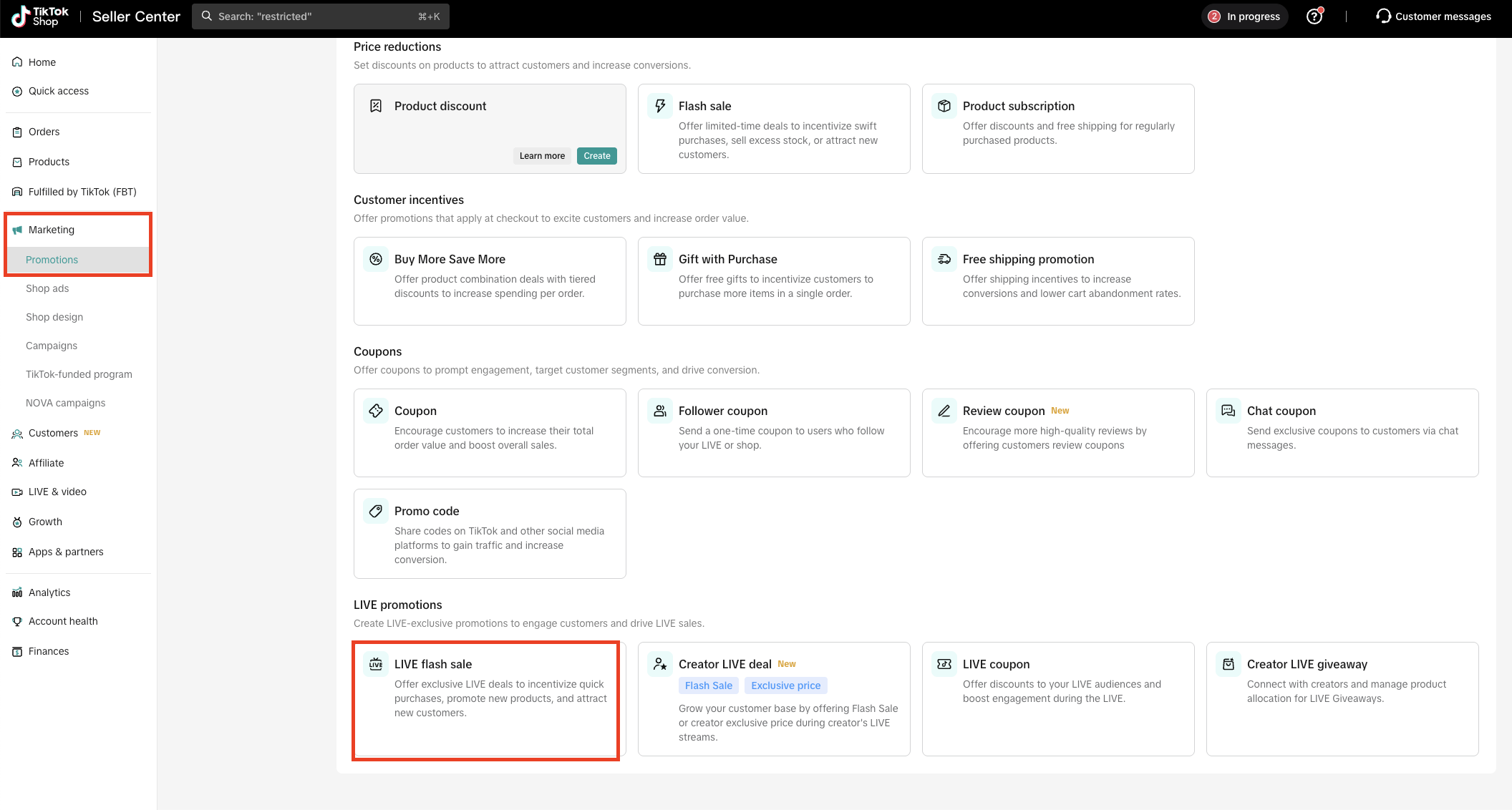
Enter basic information and click Agree & Publish to proceed
- Promotion name : A unique name to help you manage the promotion
- Promotion period : To start immediately or schedule a start date
- Products : You can select products at product-level or varation-level
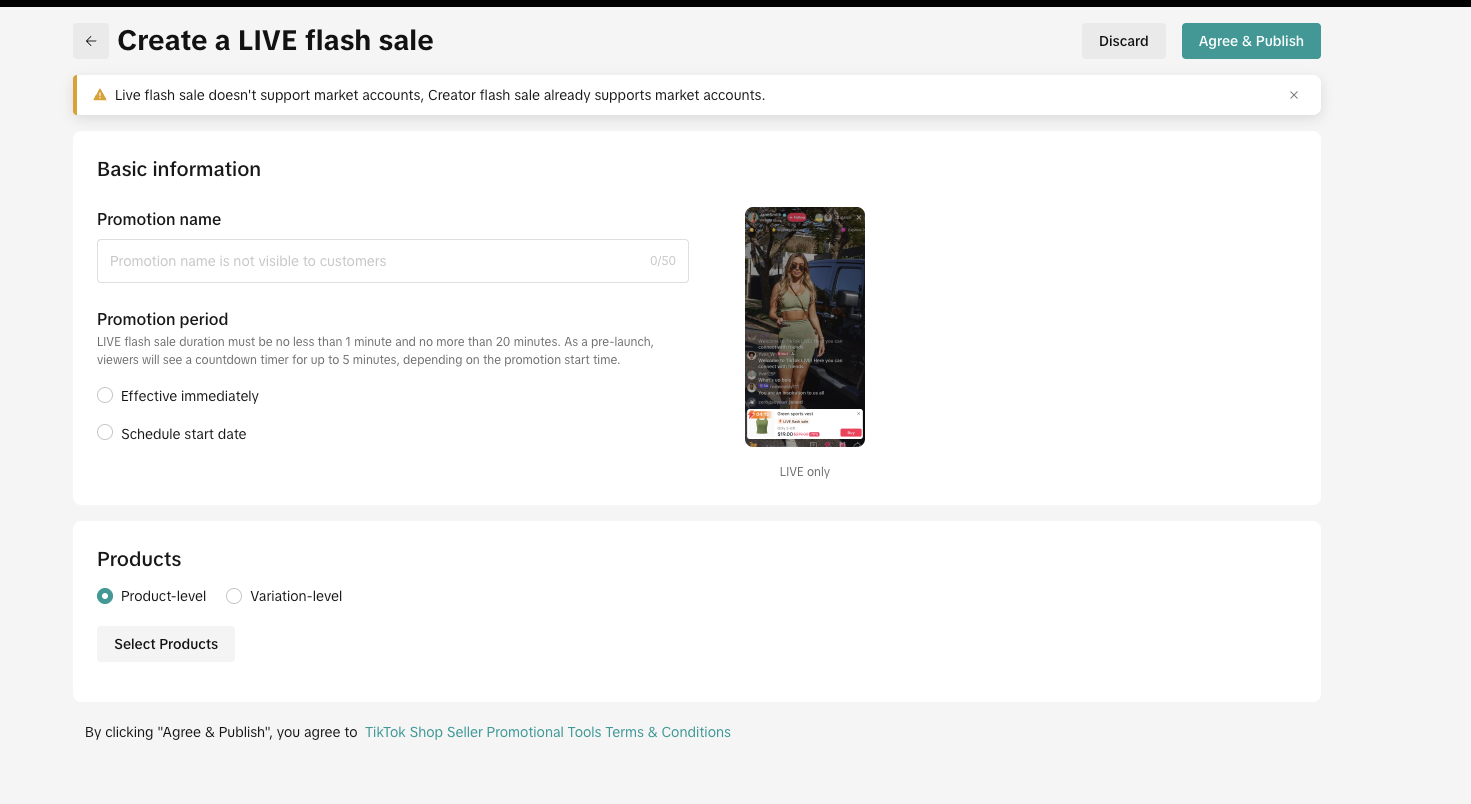
How to set up a Creator LIVE Flash Sale
Display Channel:- Account type: Creator affiliate account, marketing account
- Channel: Livestream only
- Lowest product discount price from the past 14 days and the lowest campaign price from the last 24 hours.
- If there is no order history in the last 14 days, LIVE Flash Deal and Creator LIVE Flash Deal prices are required to be lower than the original price.
- Seller Center PC - Unlimited
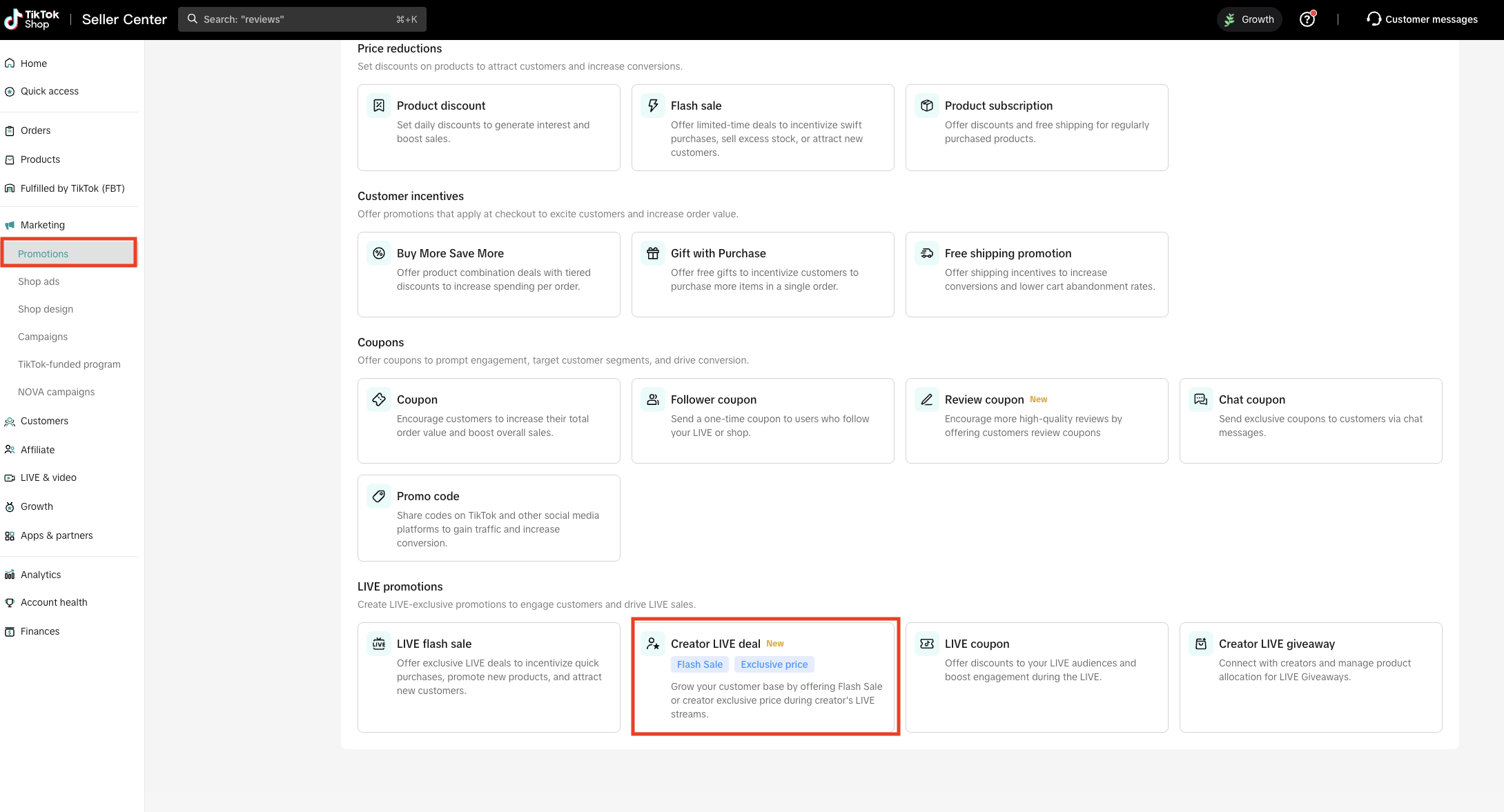
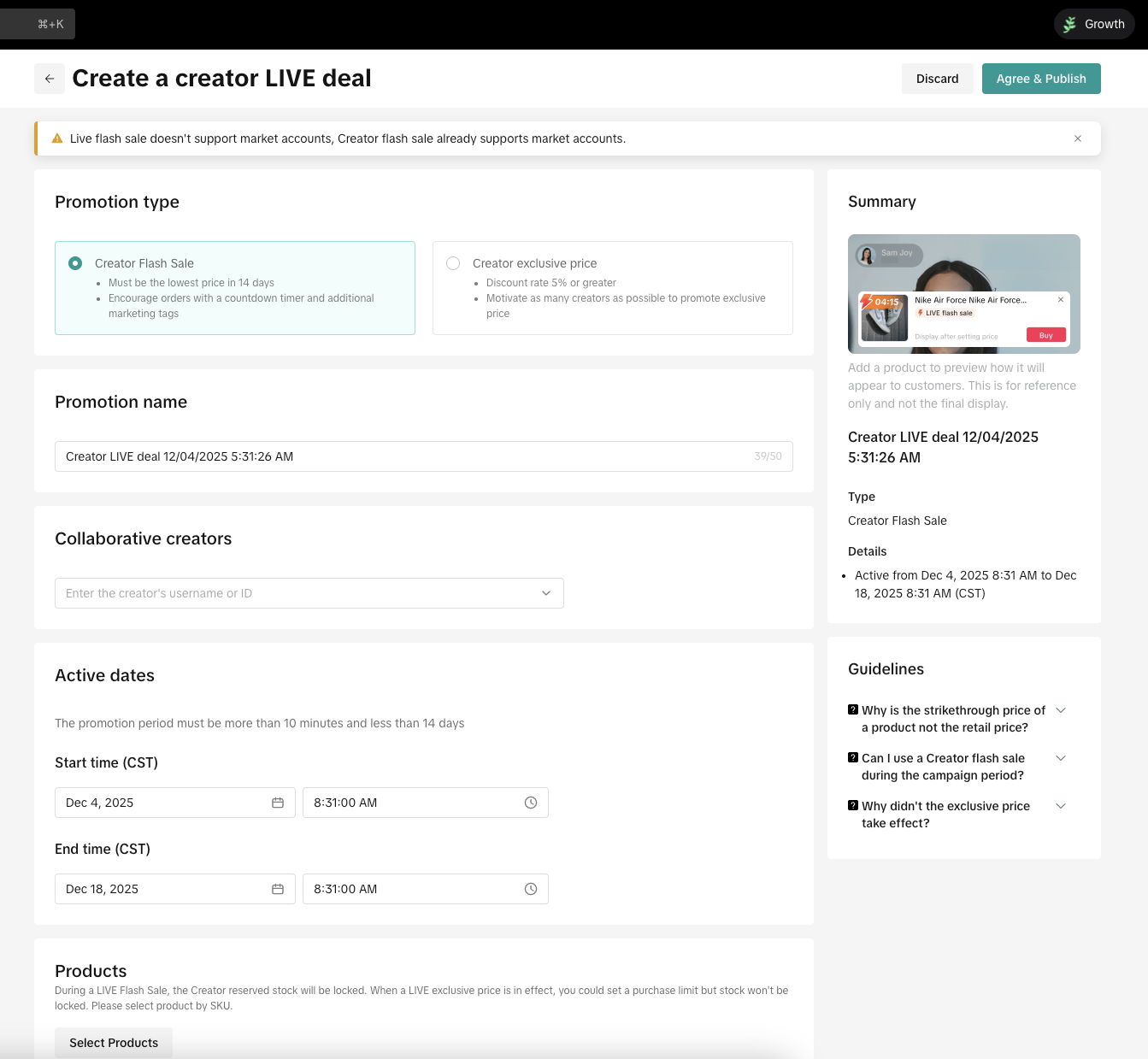
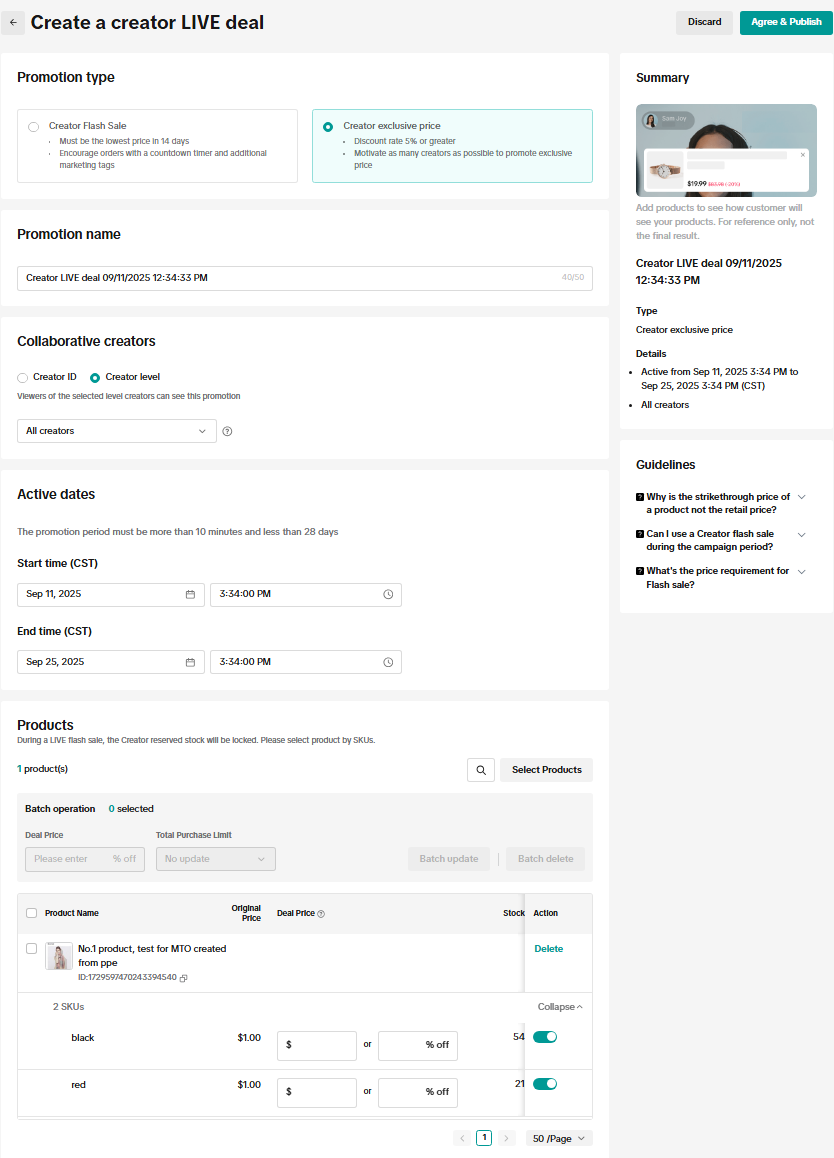
- Promotion type:
- Creator Flash Sale : Must be lowest price in 14 days
- Creator exclusive price: Discount rate 5% or greater
- Promotion Name : A unique name to help you manage the promotion
- Collaborative creators : Enter the creator's username of ID, you can select up to 50 creators
- Active dates : The promotion must be more than 10 mins and less than 14 days
- Products : During a LIVE Flash Sale, the creator's reserved stock will be locked. When a LIVE exclusive price is in effect, you could set a purchase limit but stock won't be locked. Please select product by SKU.
- Promotion Name : A unique name to help you manage the promotion
- Collaborative creator: You can select up to 50 creators by entering either the creator ID or creator name
- Active dates, select when you want your Exclusive Price promotion to run.
- Products: Select the products and SKUs for this promotion. The original price is automatically pulled from your listing.
- Deal price: Enter the discounted price.
- Total purchase limit: Specify the amount of inventory you want allocated to this promotion. By default, it is set to No limit, which means the entire inventory for the selected SKU will be included.
- Announce upcoming deals in LIVE to build anticipation
- Use the countdown feature to retain viewers
- Offer better pricing than your standard discounts for maximum impact
How to set up LIVE Coupon
Step 1: Go to Seller Center → Marketing → Promotions → LIVE coupon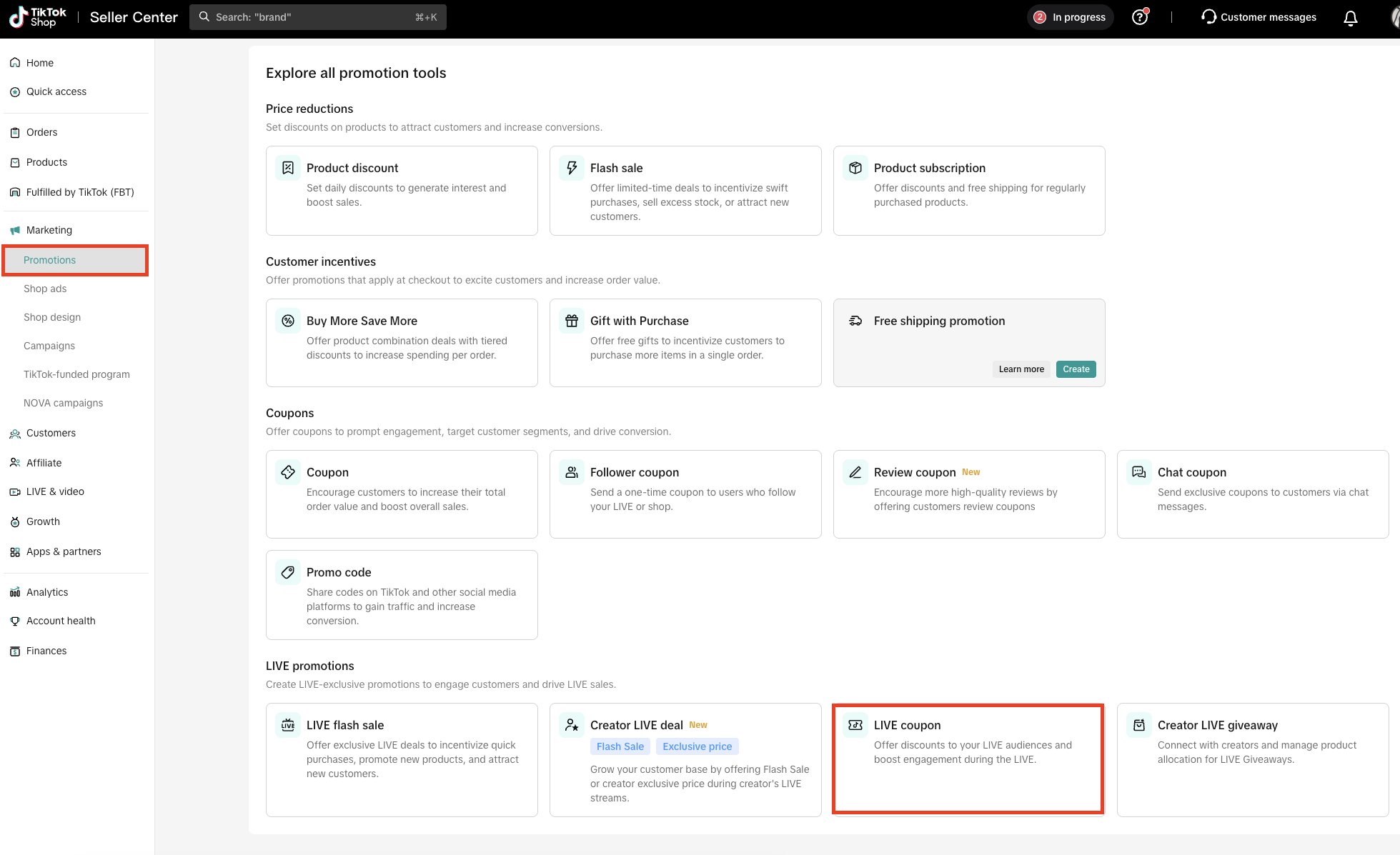
- Coupon name : A unique name to help you manage the coupon
- Start time and end time
- Coupon validity period : Choose between number of days after coupon is claimed or specific range
- Coupon Settings
- Discount amount: Enter a discount of at least $0.50
- Minimum Spend : Minimum spend thresholds are applied based on the order value after all product-level discounts are deducted.
- Claimable quantity: Set and review estimated spend
- Applies to : The coupon can apply to either the entire shop or specific products.
How to set up Creator LIVE giveaway
Please refer to this guide for more detailsYou may also be interested in
2025 BFCM TikTok Shop Readiness Guide
The holiday shopping rush is your single biggest opportunity to increase sales & grow your brand on…

Promotion stacking rules
Learn how promotions work together What you'll see and what your customers get: On TikTok Shop, you…
TikTok for Shopify: Strikethrough Pricing Integration
TikTok for Shopify - Strikethrough Pricing Integration for Shopify Overview: Strike-through pricing…

Seller LIVE Flash Deal
What is LIVE Flash Deal ? LIVE Flash Deal is a seller-funded promotion tool that allows sellers to c…
The Seller Guide to Shop Tab Success
What is Shop Tab? Shop Tab is another way for shoppers to discover your products on TikTok Shop. As…

How to register through standard registration
What is Standard Registration? Standard Registration allows you to register products that meet speci…

How to register for flash sale campaigns
What is a TikTok Shop Flash Sale Campaign? A Flash Sale campaign is a limited-time promotion that le…

TikTok for Shopify: Promotions Sync
Overview: Shopify sellers can sync Promotions/Discounts except Free Shipping on Shopify directly to…

Buy More Save More & BXGY
Product Overview You can configure both Buy More, Save More (BMSM) and Buy X, Get Y (BXGY) campaigns…

The smart pricing suite: Pricing insights and campaign price…
Product Overview TikTok Shop Pricing Suite is your complete smart pricing system built directly into…