

TikTok for Shopify: Promotions Sync
12/16/2025
Summary
What is the new feature for Shopify sellers regarding promotion syncing to TikTok Shop, and what are its main benefits?
- Shopify sellers can now sync most promotions (except Free Shipping) directly to TikTok Shop with one click, saving time and ensuring consistent marketing across platforms.
- This improves efficiency, maximizes promotional reach, and streamlines management, helping sellers engage customers better.
How do Shopify promotions sync to TikTok Shop, and what types of discounts are supported?
- Supported synced discounts include Amount off orders, Amount off products (as Buy More Save More), and Buy X Get Y (currently as Gift with Purchase). Some fields like combination and eligibility must follow TikTok Shop policies.
- Shopify-synced promotions are tagged on TikTok Shop and cannot be edited there; closing events stops syncing, and re-syncing requires manual action in Shopify.
What controls do sellers have over promotion syncing between Shopify and TikTok Shop?
- Sellers can turn off future automatic syncing via the TikTok app in Shopify under Shop management > Marketing > Promotion Sync Settings.
- Promotions can be unsynced or re-synced manually from either the TikTok sales channel or Shopify Discounts interface, including bulk unsync options.
What are the key rules and priorities for combining or stacking synced promotions on TikTok Shop?
- Only one discount applies per product if it belongs to multiple Buy More Save More promotions; priority is based on event type, minimum purchase requirements, discount strength, and creation time.
- Buy More Save More discounts are not combinable with other “Amount off products” except when first; Gift with Purchase won’t sync if a Buy More Save More is live on the same product.
What limitations or restrictions should sellers be aware of when syncing promotions from Shopify to TikTok Shop?
- Discount codes must be under 70 characters; discount percentages must be between 5% and 60%.
- Some targeting options (email subscribers, specific/customized customers) and subscription purchases are not supported for syncing. Gift product value cannot exceed $75.
Overview:
Shopify sellers can sync Promotions/Discounts except Free Shipping on Shopify directly to TikTok Shop (TTS) with a one-click sync feature. This capability ensures sellers can efficiently manage their promotions across all platforms without manual duplication.Key Benefits:
✅ Improved Efficiency – Saves time by eliminating the need to recreate promotions manually.✅ Increased Marketing Penetration – Ensures consistent promotions across platforms, helping maximize reach and conversion.
✅ Streamline Promotion Management - Empowers Shopify sellers to streamline their promotions, maintain consistency, and drive better engagement with customers.
Understanding Your Discount Sync Policy:
- Shopify-synced events are now clearly identifiable via dedicated tags. To protect data integrity, editing these events in TTS Seller Center is not supported.. Here is the breakdown of the feature and its behavior
Feature | Behavior |
Identification | Shopify-synced events now have dedicated tags |
Editing | ❌ Not supported in Seller Center |
Closing event | ✅ Allowed — stops syncing |
Re-sync | Must re-trigger manually in the Shopify–TikTok App |
- Your Shopify promotions will be synced to TikTok Shop as the following:
- Amount off orders and Amount off products = "Synced to TTS Buy More Save More" on TikTok Shop
- Buy X get Y = "Gift with Purchase" on TikTok Shop
- Buy X get Y = "Synced to TTS as Buy X Get Y "(Coming Soon)
- While we will ensure that your discount form, discount rate, discount time and other key information are synchronized, some fields like "combination" and "eligibility" will need to follow TTS policy guidelines.
Types of discounts we currently sync:
- Amount off orders
- Amount off products
- Buy X get Y
Easy View Promotion Sync Guide
| Setting Type | Shopify Setting | TikTok Shop Sync | ||
| Discount Method |  | Discount Code | ✅ - Will syncUPDATED May 2025 - will only sync discount codes with NO usage limit and NO targeting. Dicount will be auto applied as a product discount and not a promo code application. | |
| Automatic discount | ✅ - Will syncShopify has not enabled a method to remove sales channels from automatic discounts, so these will auto sync as a product discount | |||
 | Amount off Products | ✅ - Will sync as Buy More Save More (BMSM) on TikTok Shop | ||
| Buy X Get Y | ✅ -Any Buy X and get Y Free will sync as Gift with Purchase on TikTok Shop for now. | |||
| Amount off Order | ✅ - Will sync as Buy More, Save More on TikTok Shop |
Promotion Specific Settings on TikTok App
We’ve introduced a new Promotion Sync Settings feature!This gives you more control over your promotions — you can now turn off future promotion syncs if you don’t want new promotions to automatically sync to TikTok Shop.
To Turn off the settings
- Go to Shopify --> TikTok --> Shop management --> Shop settings tab
- Go to Marketing tab
- Turn OFF the sync you do NOT want to sync
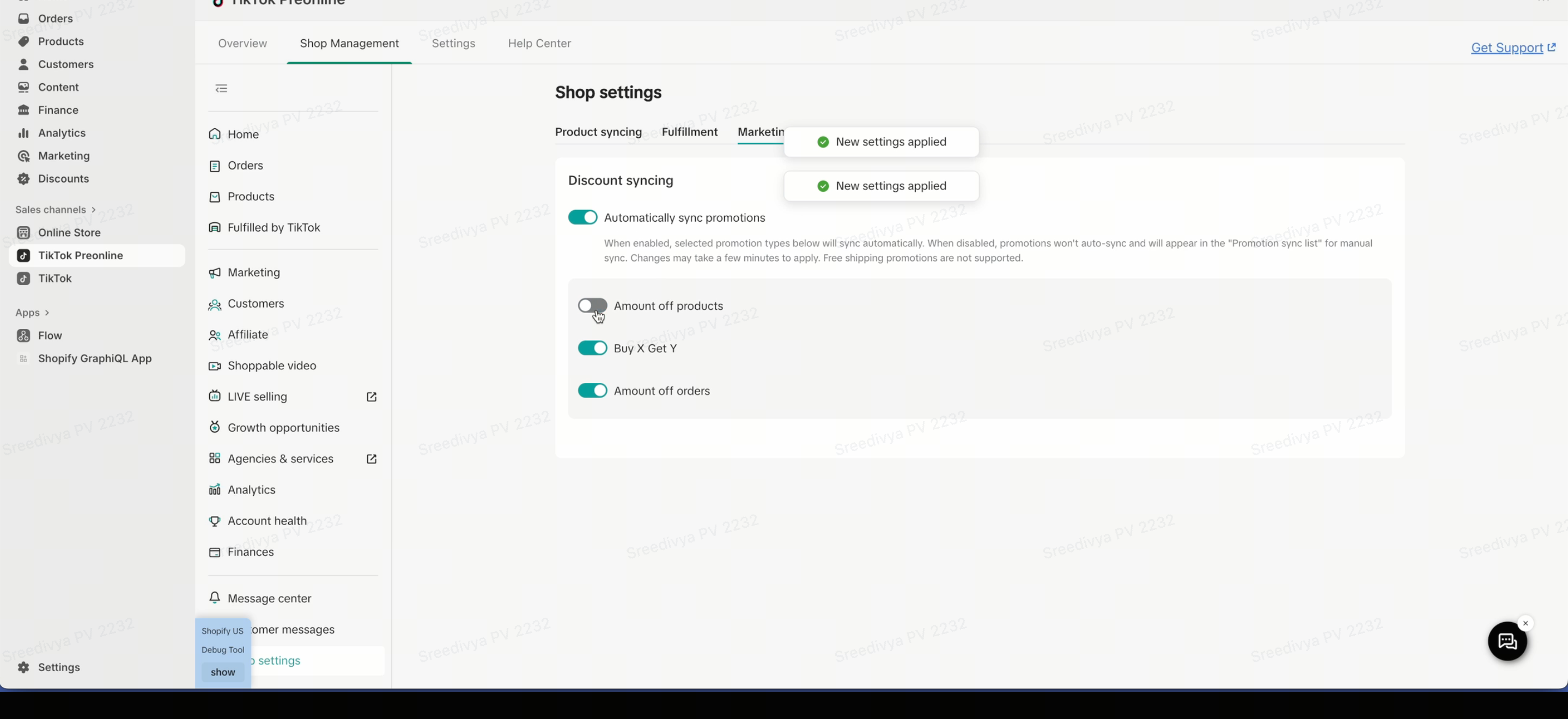
Demo video
Promotion Specific Settings on Shopify
Promotion Specific Settings | |||||
Setting Type | Shopify Setting | Priority | Amount off Products & Amount off Orders = BMSM | Buy X Get Y(Gift with Purchase on TikTok | |
Targeting |  | All customers | 1 | ✅ - Will sync | ✅ - Will sync |
Customers who haven't made a purchase | 2 | ✅ - Will sync | ✅ - Will sync | ||
Customers who have made at least one purchase | 3 | ✅ - Will sync | ✅ - Will sync | ||
Abandoned checkouts in the last 30 days | 4 | ✅ - Will sync | ✅ - Will sync | ||
Customers who have made more than one purchase | 5 | ✅ - Will sync | ✅ - Will sync | ||
Email subscribers | - | ❌ Not supported | ❌- Will not sync | ||
Specific customers | - | ❌ Not supported | ❌- Will not sync | ||
Customized segments | - | ❌ Not supported | ❌- Will not sync | ||
Specific customers | - | ❌- Will not sync | ❌- Will not sync | ||
Max Discount Uses |  | Nothing is checked (no max discount uses) | - | ✅ - Will sync | ✅ - Will sync |
Limit to one use per customer | - | ✅ - Will sync | ✅ - Will sync | ||
Limit number of times this discount can be used in totol | - | ❌- Will not sync | ❌- Will not sync | ||
Minimum Purchase Requirements |  | No minimum requirements | - | ✅ - Will sync | N/A |
Minimum purchase amount ($) | - | ✅ - Will sync | ✅ - Will sync | ||
Minimum quantity of items | - | ✅ - Will sync as “Once Per Order” by Default | ✅ - Will sync | ||
| Purchase Type |  | One-time purchase | - | ✅ - Will sync | ✅ - Will sync |
Subscription | - | ❌- Will not sync | N/A | ||
Both | - | ✅ - Will sync | ✅ - Will sync | ||
Discounted Value(Buy X Get Y only) |  | Percentage | - | N/A | ❌- Will not sync |
Amount off each | - | N/A | ❌- Will not sync | ||
Free | - | N/A | ✅ - Will sync | ||
| Additional Limitations | - | Discount code and name NOT to exceed 70 characters.Discount % can NOT be <5% or >60%De-selecting Sales channel removes any ongoing/synced discounts |
| ||
Combination Settings
Here are some general promotion stacking rules:Scenario | Result |
| Stacking rules match currently live promotion types | Auto sync allowed |
| Stacking rules do not match live promotion types | Detected as risk, auto sync blocked |
| Risk promotion | Merchant can proceed via Manual Sync |
Buy More, Save More Combined discounts:
Note: If a product is included in multiple Buy More, Save More promotions (including both product-level and order-level discounts), a priority logic is applied on the Seller Center side. As a result, only one discount will be applied to the product.Shopify Setting | Sync to TikTok BMSM | Notes |
| NOT combinable with other “Amount off products” | ❌ Not synced | Except when it's the first such event |
| Combinable with other “Amount off products” | ✅ Synced | Fully supported |
If a Product Belongs to Multiple Discount Events
Sync Behavior
Condition | Behavior |
| Product in multiple discount events | All events sync |
| Which discount applies | Only one event is applied to the buyer |
Priority Logic (Which Event Applies) based on Seller center rules:
Events are evaluated in this order:Priority | Rule | Description |
P0 | Event type | Full amount discount > Full amount reduction > Full quantity discount |
P1 | Minimum purchase requirements | Lower requirement wins |
P2 | Discount strength | Higher discount wins |
P3 | Event type tie-breaker | Amount off order > Amount off products |
P4 | Creation time | Older event wins |
Promotion Specific Set Up Information
How to sync during promotion set up:
Using "Amount off orders" as an example of the flow:- Login to Shopify
- In the Discounts tab, click on Create discount
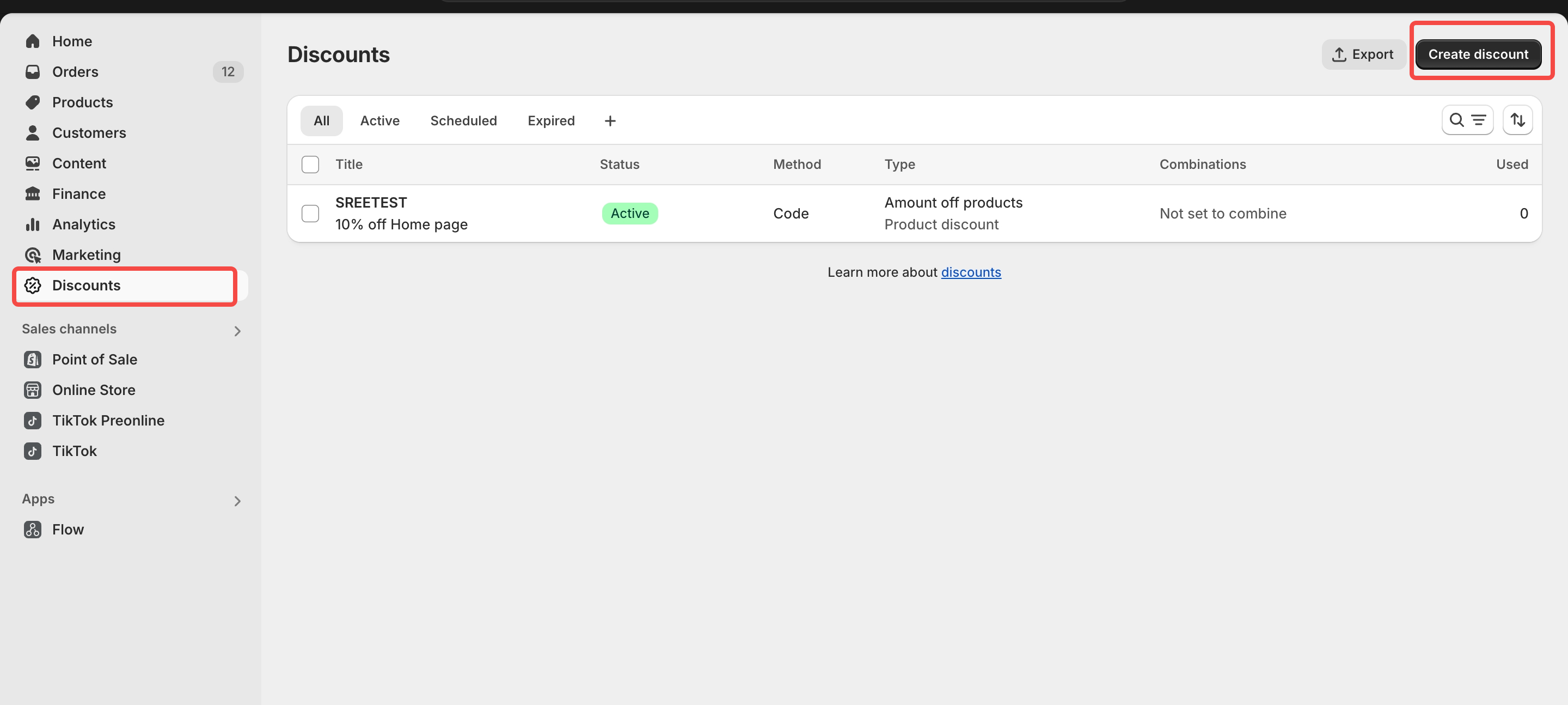
- Choose your discount type.
- In this example, we are using Amount Off Order
- Fill in the discount details as required for your chosen promotion type
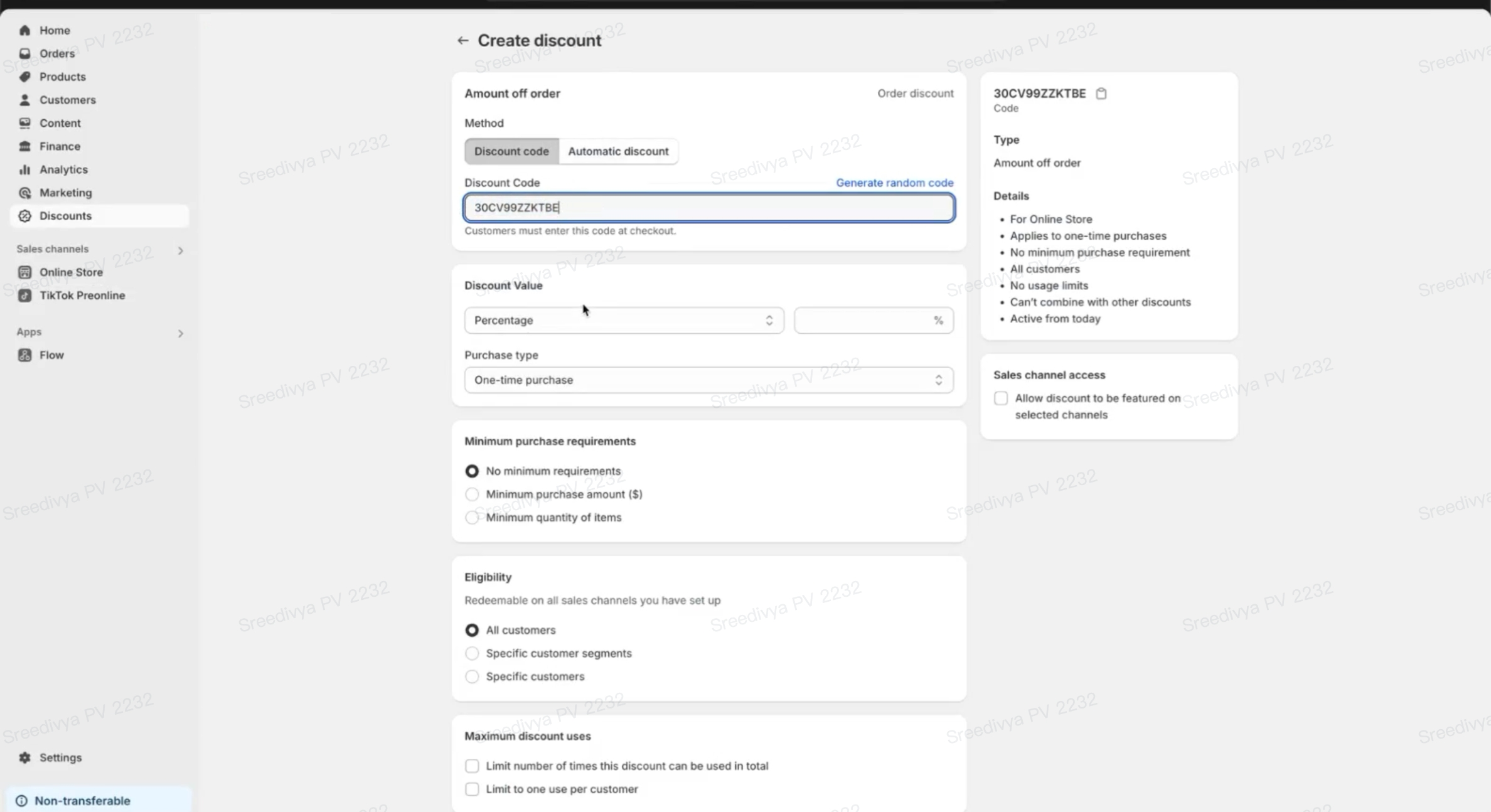
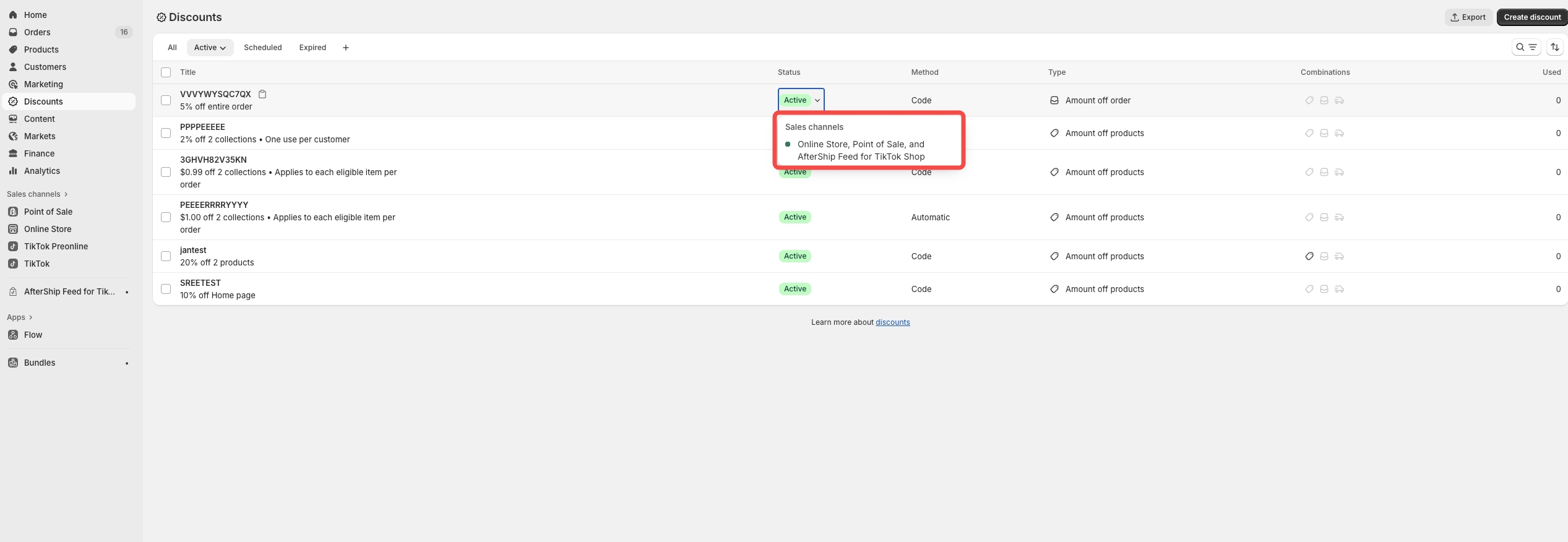
- Choose TikTok as sales channel in Sales channel section
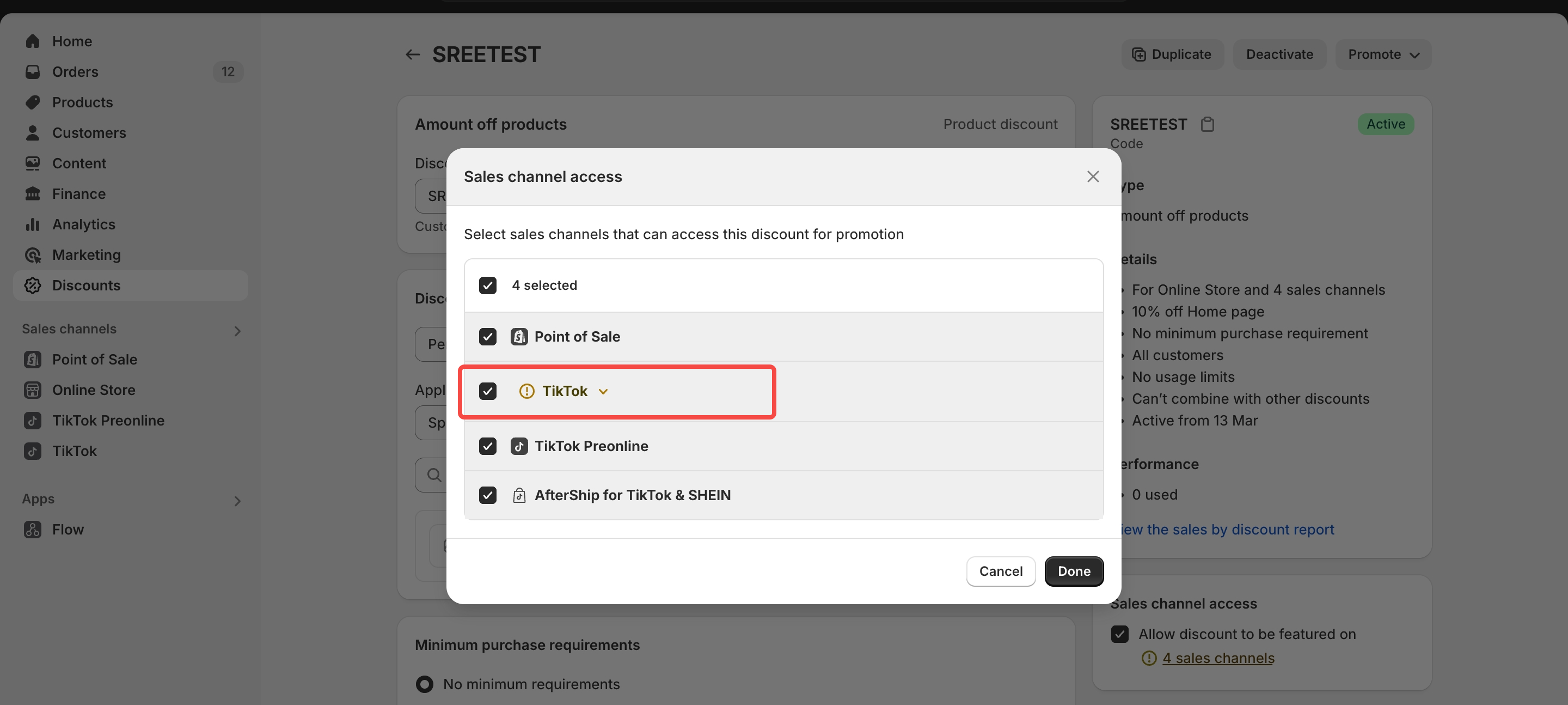
- Once saved, go to TikTok App in Shopify
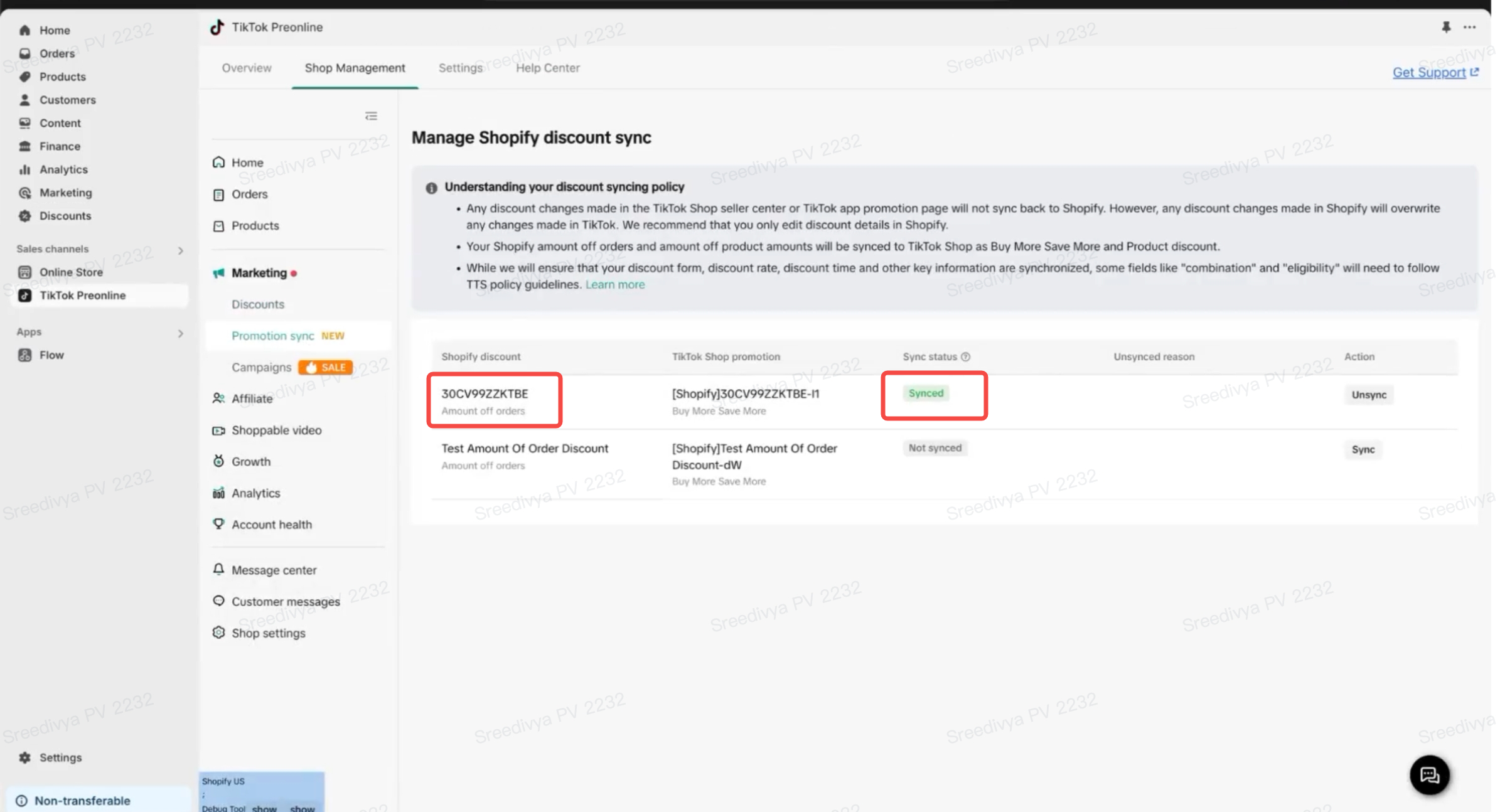
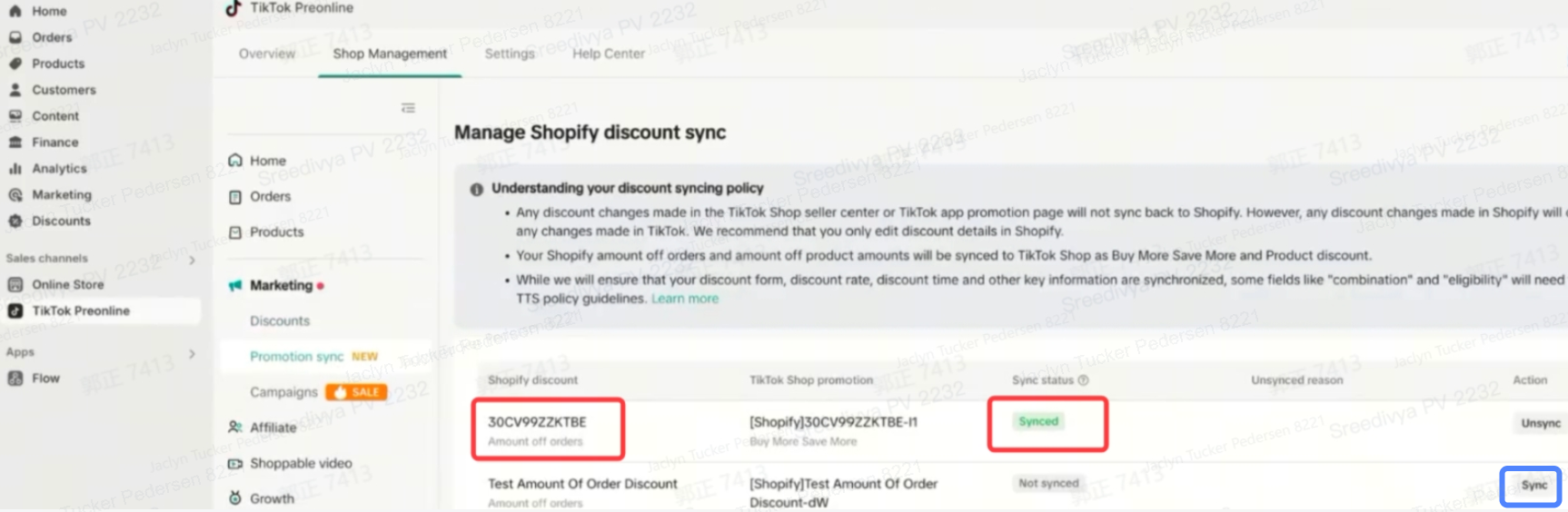
- In Shop management tab > Marketing > Promotion Sync, you can verify the discount and sync status
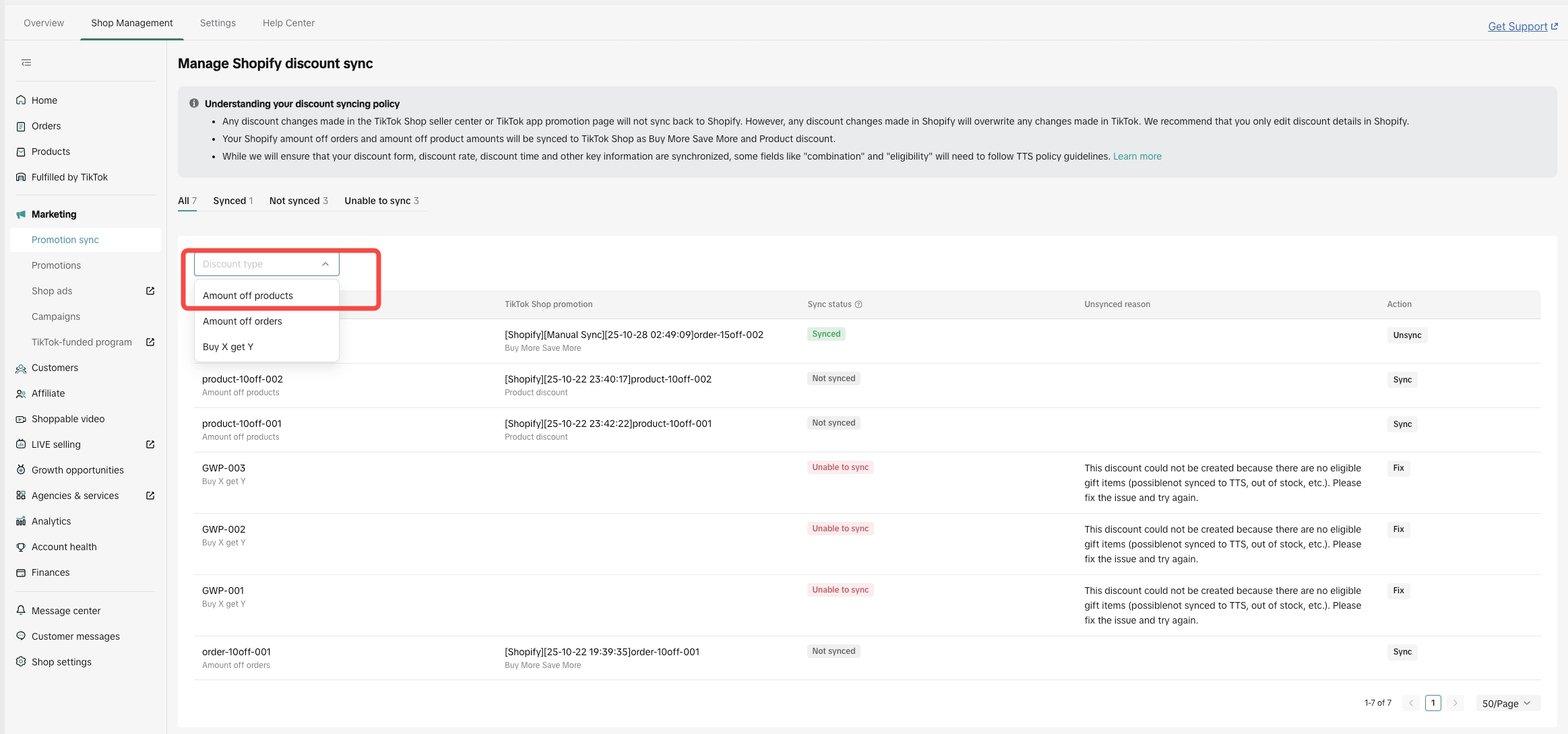
- You can also use the filter to search the promotion based on the discount category
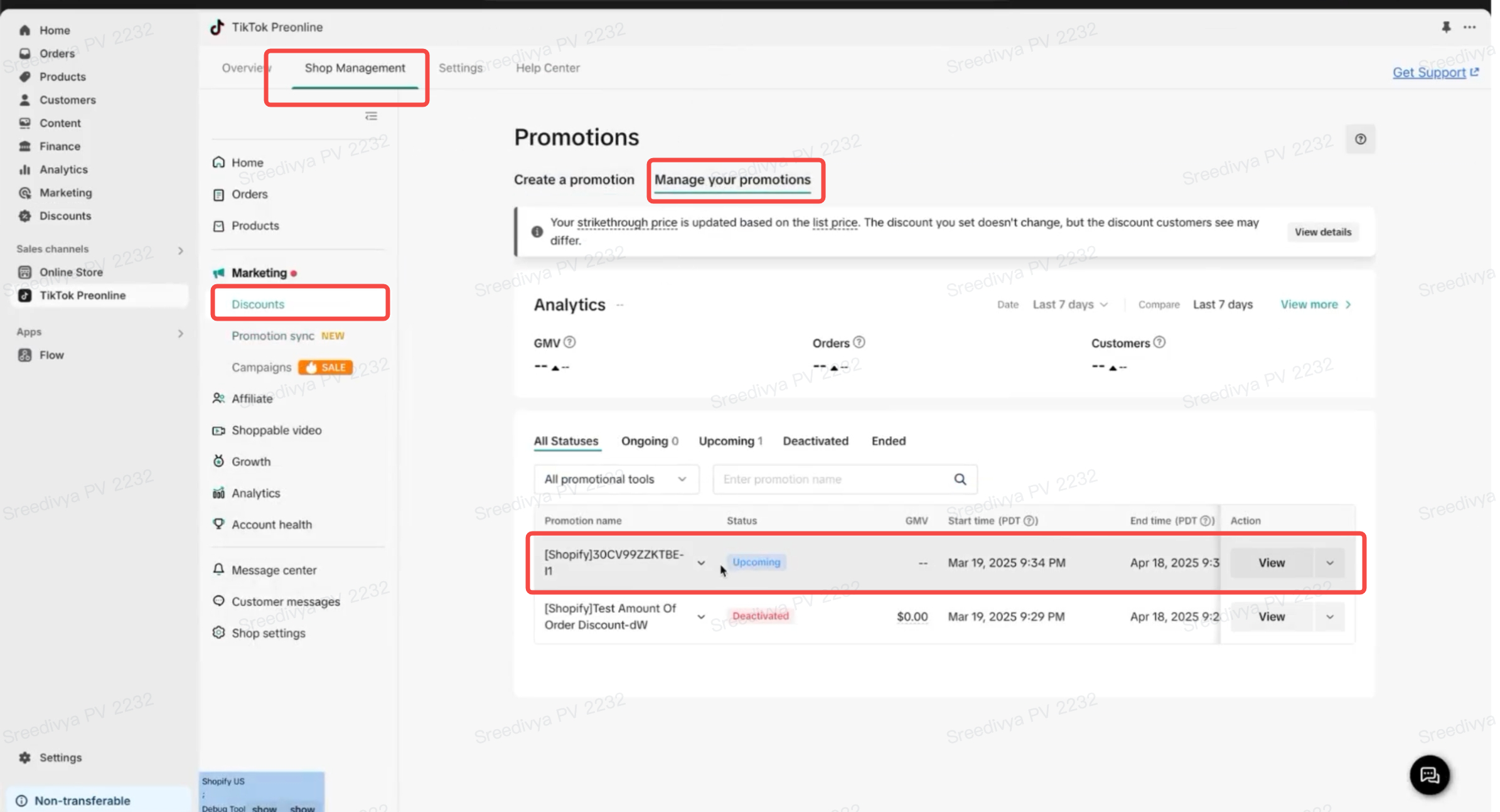
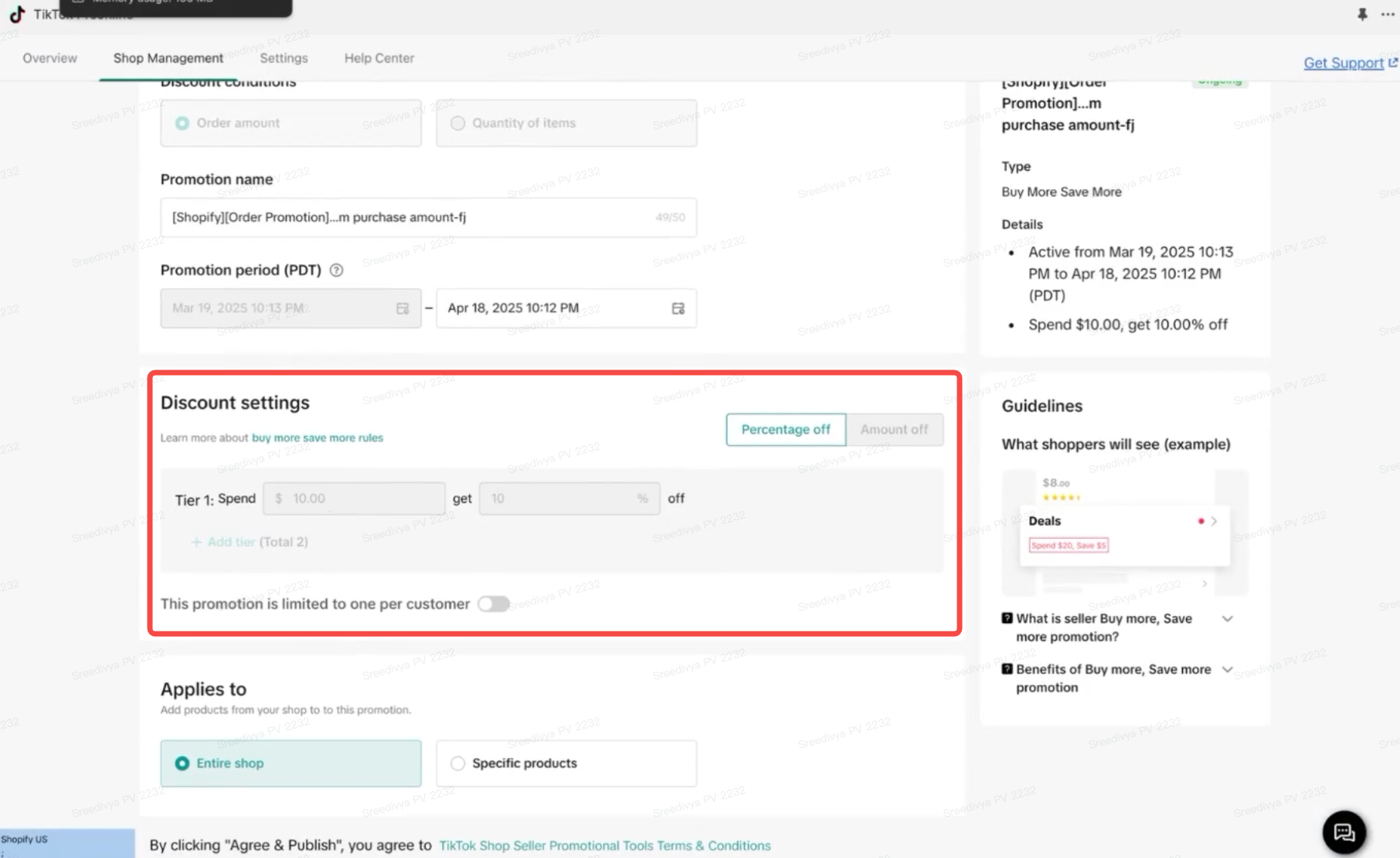
- In Shop management tab > Marketing > Discounts tab, Under Manage Your promotions, you can verify the discount start and end date
How to re-sync a promotion that is no longer synced:
- Login to Shopify
- Go to TikTok App in Shopify
- In Shop management tab > Marketing > Promotion Sync you can see all of your live promotions and always select "Sync" (see blue highlight below)
How to unsync:
Option 1 (from TikTok sales channel):
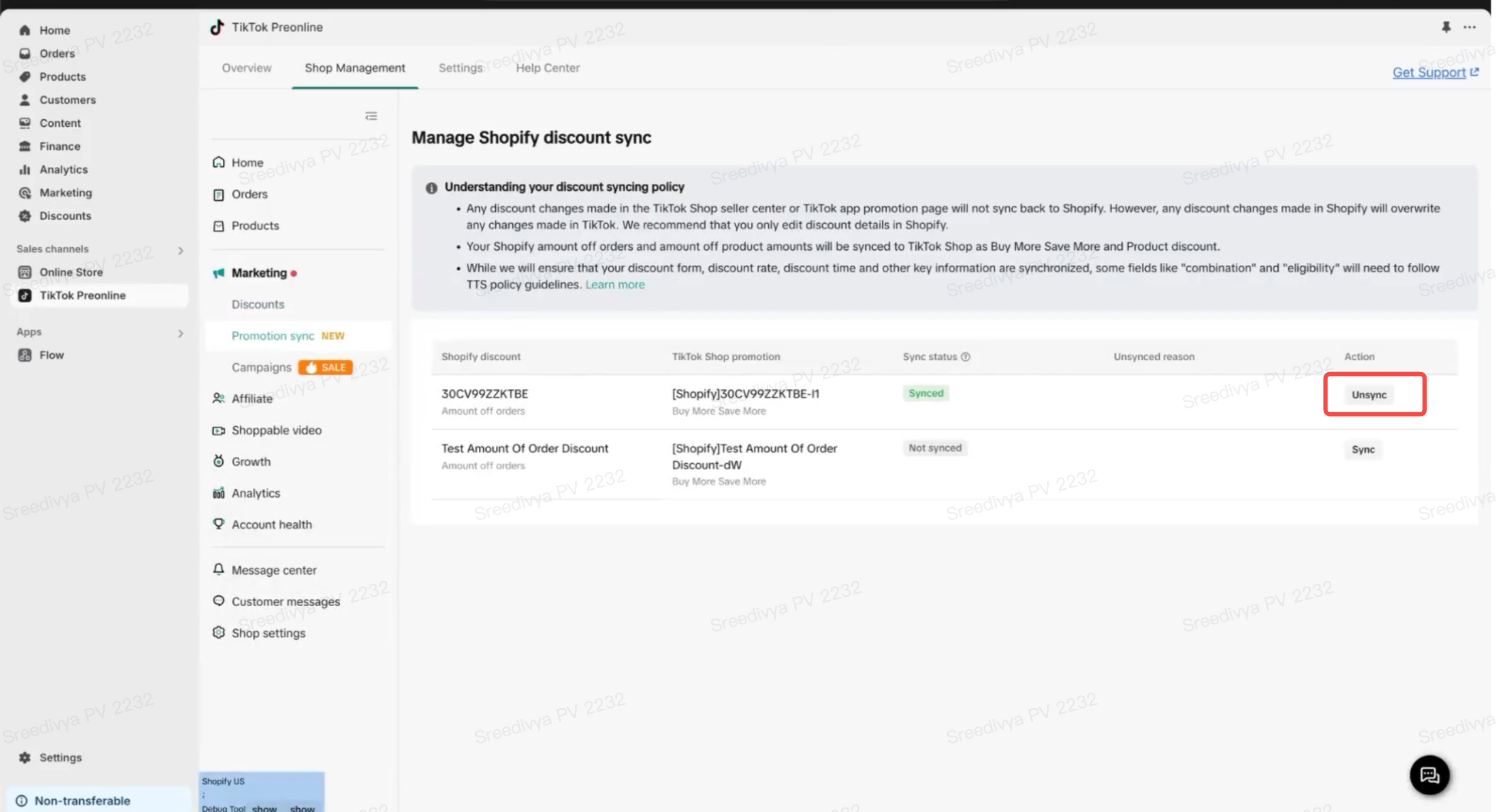
- Go to your Shopify app > Sales channels > TikTok > Shop Management > Marketing > Promotion sync > Select relevant promotion
- You can click on "Unsync" if you do NOT want to sync the discount to TTS.
Option 2 (from Shopify Discounts at discount creation):
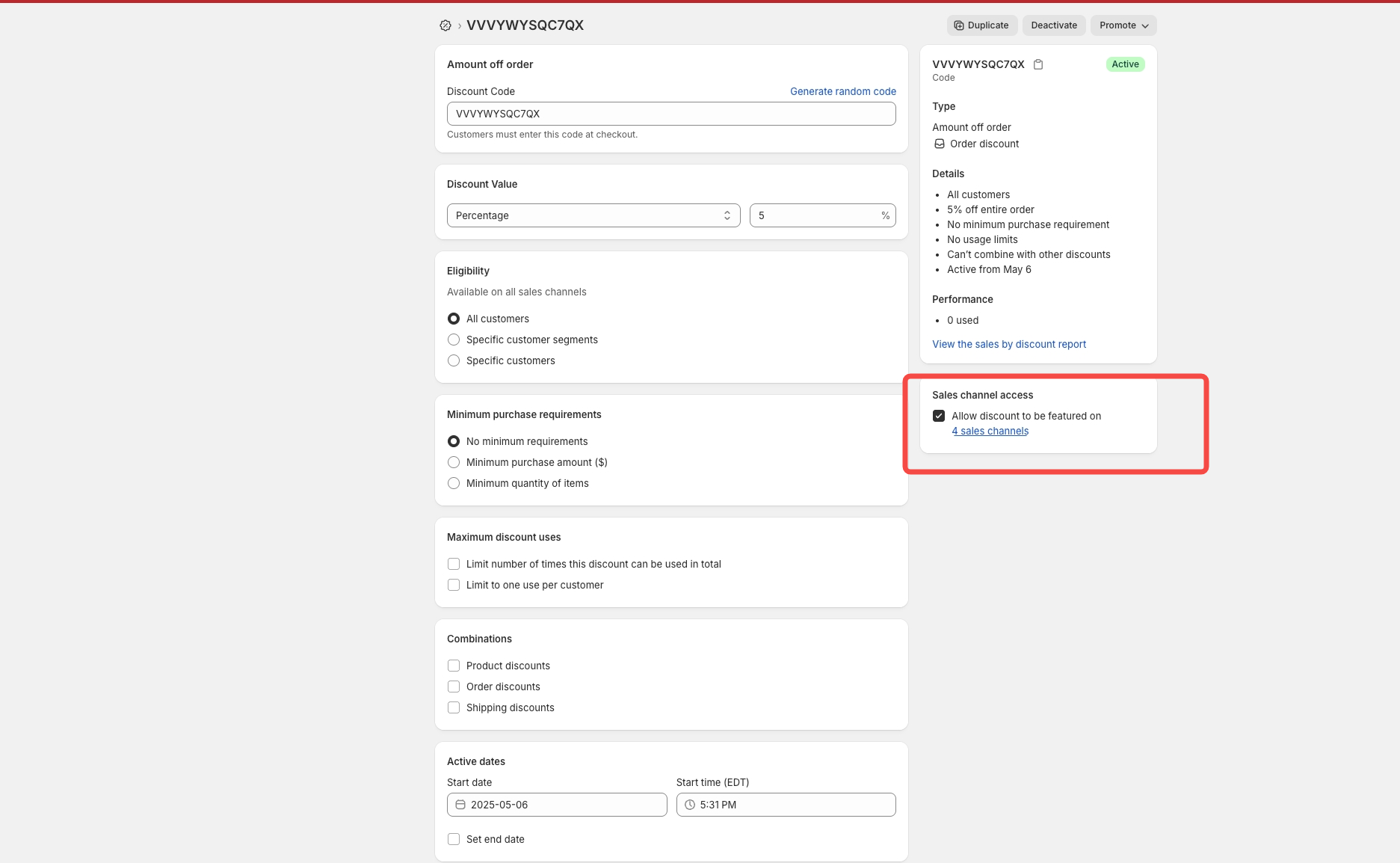
- Go to your Shopify app > Discounts > Create discount
- You can uncheck "TikTok" from sales channel on the discount to unsync the discount to TTS
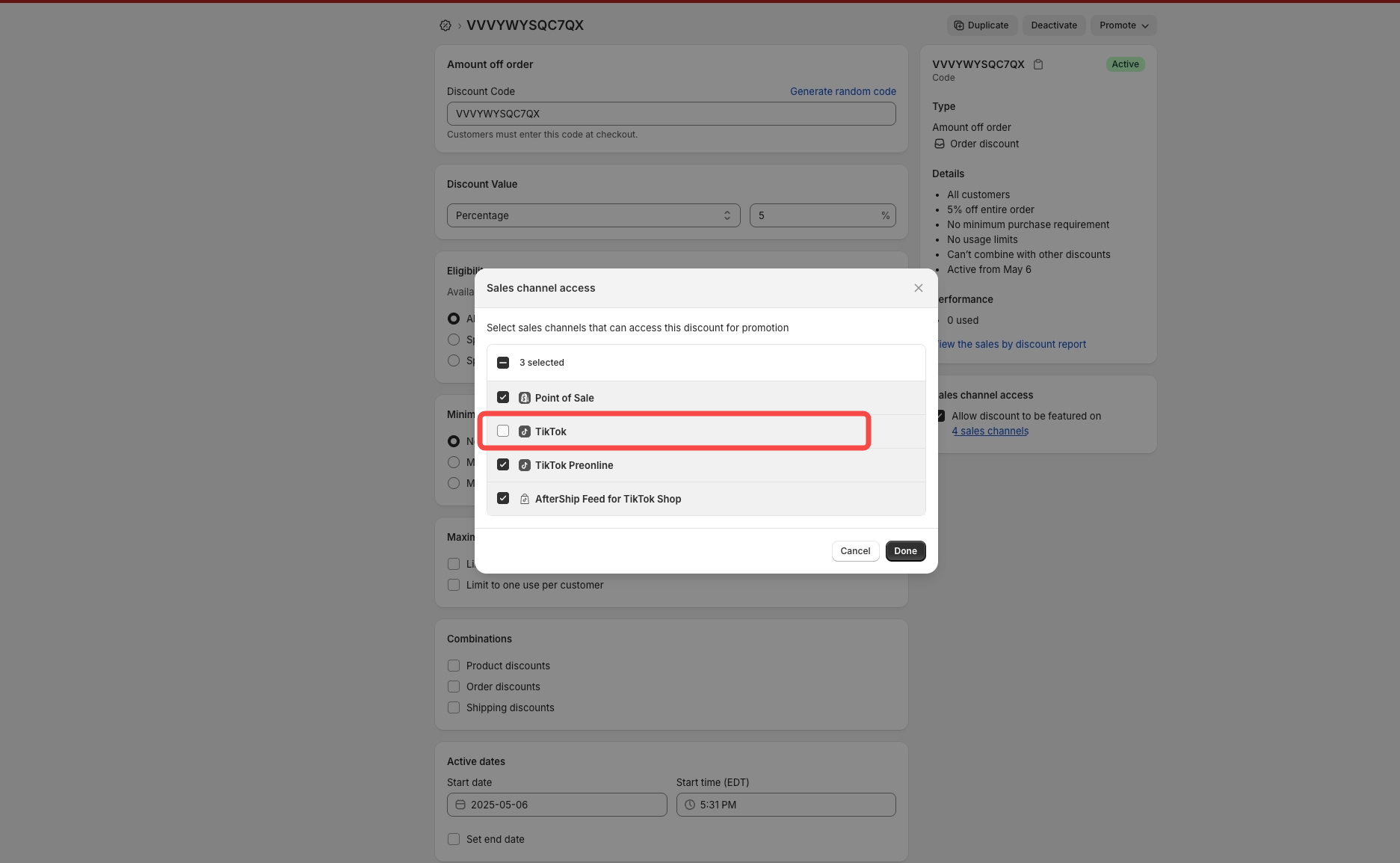
- Once unsynced, the promotion status will be deactivated
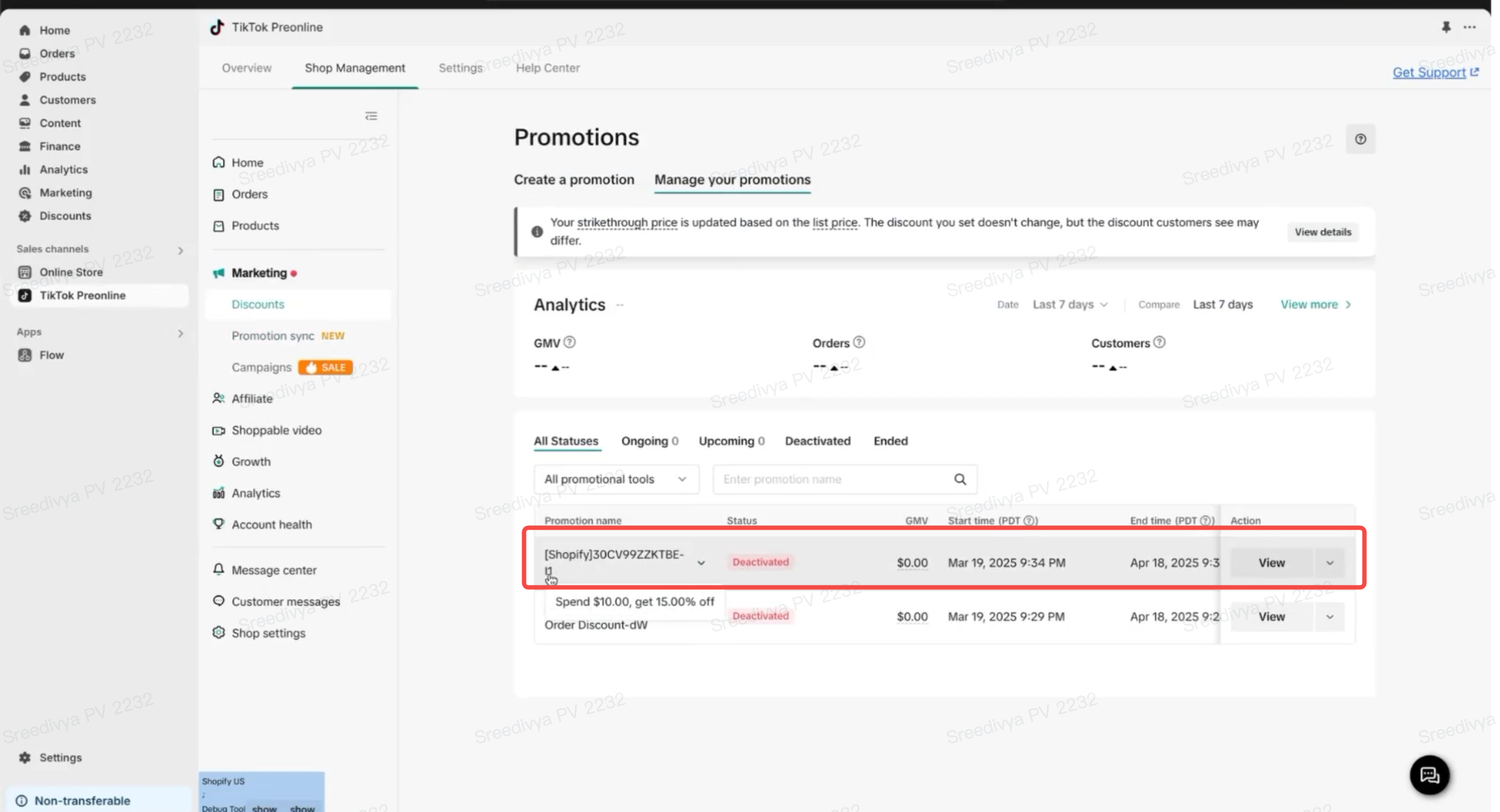
Option 3 (from Shopify Discounts in bulk or after creation):
- You can select all the promotions you do NOT want to sync to TikTok Shop
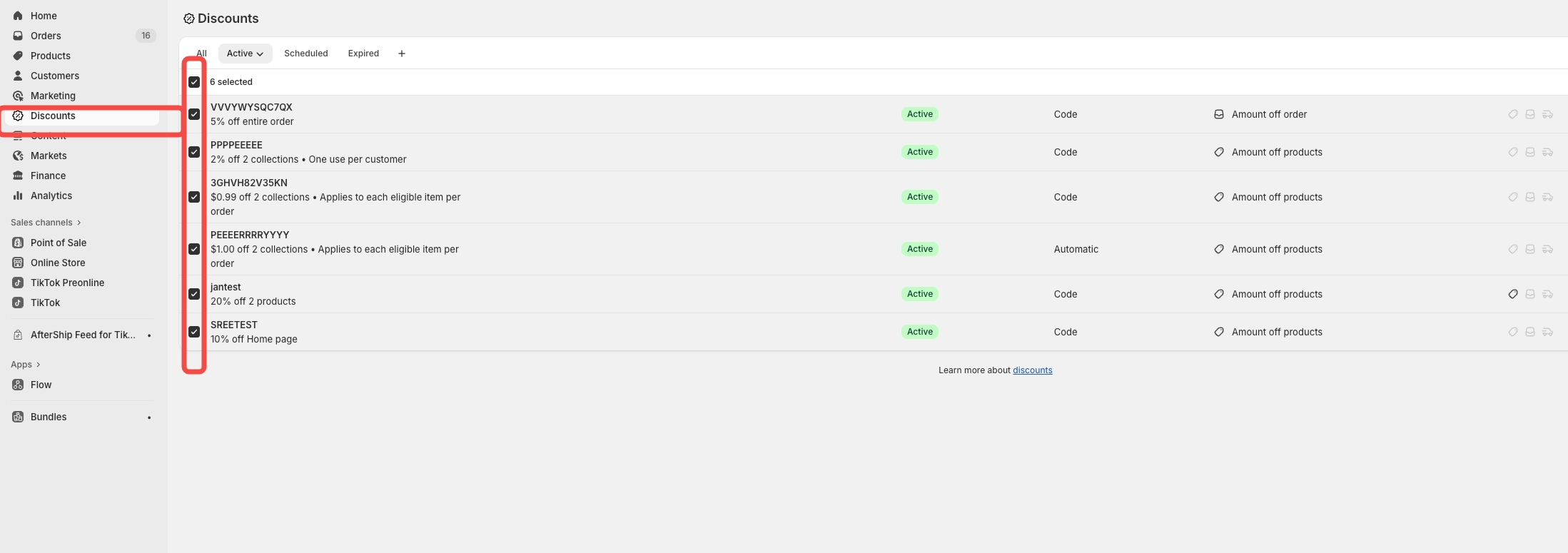
- Click on Deny Sales channel
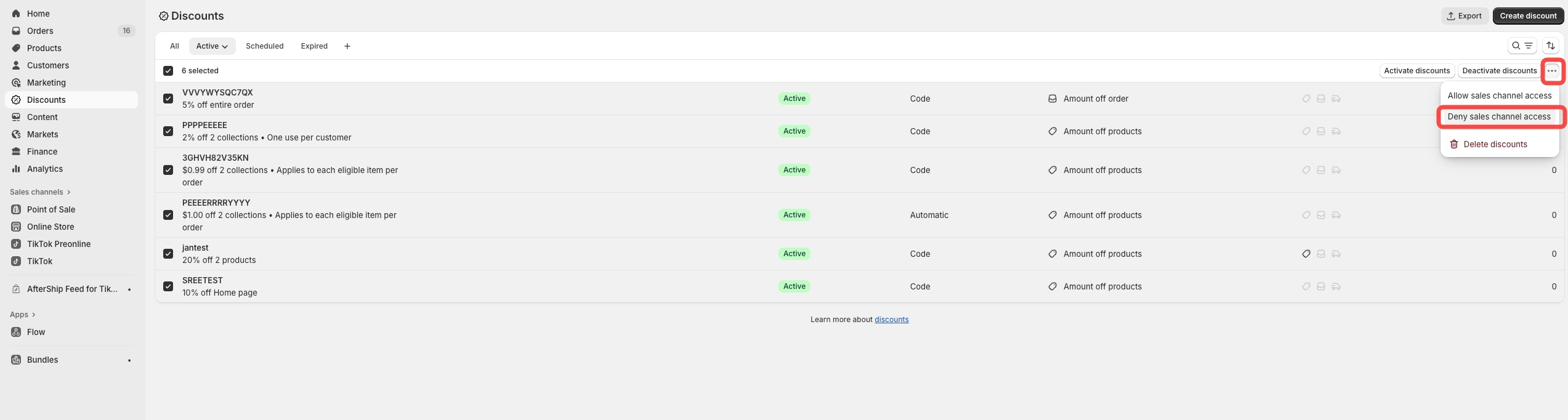
- Choose TikTok and click Unpublish
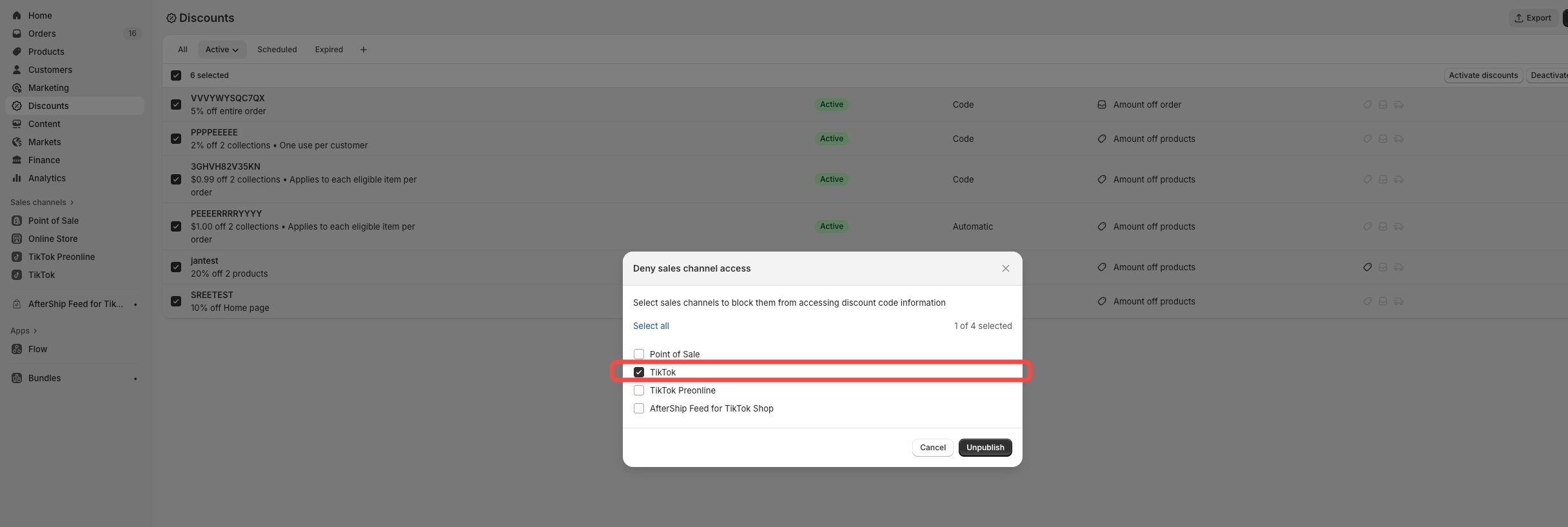
- You can verify by checking sales channel section on the discount
You may also be interested in
Promotion stacking rules
Learn how promotions work together What you'll see and what your customers get: On TikTok Shop, you…
TikTok for Shopify: Strikethrough Pricing Integration
TikTok for Shopify - Strikethrough Pricing Integration for Shopify Overview: Strike-through pricing…
Seller LIVE Flash Deal
What is LIVE Flash Deal ? LIVE Flash Deal is a seller-funded promotion tool that allows sellers to c…
How to Use the 'Buy More Save More' Feature
Product Overview Buy More Save More is a seller-funded promotional tool designed to reward customers…
The smart pricing suite: Pricing insights and campaign price…
Product Overview TikTok Shop Pricing Suite is your complete smart pricing system built directly into…
How to Use Seller Flash Deal
What is Seller Flash Deal Seller Flash Deal is a promotion tool in the Seller Centre to create limit…
How to Use Product Discount
Introduction of product discount, how to create, view, edit, terminate it and how consumers particip…

TikTok Shop LIVE Promotions Tools
Overview Livestreaming is one of the most powerful ways to connect with your audience, deepen engage…
Seller coupons
Overview: What are coupons? Seller coupons are seller-funded discounts customers can claim and apply…

Early Access Deal
What is Early Access Deal? (currently in Beta for selected sellers) Early Access Deal is a seller-fu…